System sounds keep turning back on

SeanHL

New member
Local time
2:05 PM
Messages
46
Hey everyone,

This is more of a software problem than a hardware one, but i thought i'd post it here. Any suggestions for another location are welcome.

I prefer having all of my windows system sounds turned off, which i know how to do, but for some reason they keep turning themselves back on whenever windows has to play an error sound, like when i have to close a window first. There may be more situations where this happens, but that's what i've found so far. It's really quite bizarre, and it has me constantly going back into system settings to turn them back off again. Any idea what's causing this?
 

My Computer

Computer type
PC/Desktop
Computer Manufacturer/Model Number
custom
OS
Windows 7 64 bit
CPU
i5 3570
Motherboard
Asus P8B75-V
Memory
8 GB
Graphics Card(s)
GTX 760 MSI GAMING
Screen Resolution
1920x1080
Hard Drives
Samsung 850 EVO 1TB SSD
PSU
Corsair Vengeance Series - 550W
Case
Cooler Master CM 690 III
Cooling
Hyper 212 Evo
Antivirus
Avast
Browser
Firefox
I've never had that happen. I use my PC for my Recording Studio (with Sonar) and have all system sounds off (disabled).

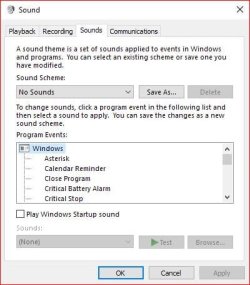
Do you have the "Sound Scheme" set to No Sounds, as mine is
 

Attachments

  • Capture.JPG
    Capture.JPG
    35.1 KB · Views: 17

My Computer

Computer type
PC/Desktop
Computer Manufacturer/Model Number
My Own Build
OS
Windows 10 64 bit
CPU
Intel i7 6700K
Motherboard
ASUS ROG Maximus VIII Hero
Memory
16GB Corsair Dominator
Graphics Card(s)
Intel CPU Graphics
Sound Card
RealTek
Monitor(s) Displays
27" Dell S2719dgf
Screen Resolution
2560X1440
Hard Drives
1 TB Samsung 850 EVO SSD for Win 10 Pro
500GB Samsung 850 EVO SSD for Win 10 Insider
2 TB drive for backup
PSU
EVGA Supernova 750G2
Case
BeQuiet Silent Base 600
Cooling
Deepcool Captain 120EX
Keyboard
Microsoft Wireless 2000
Mouse
Microsoft wireless
Internet Speed
100 MB/sec (Cable)
Antivirus
Microsoft Defender and Malwarebytes
Browser
Edge/Firefox
Other Info
Cakewalk (Sonar) by BandLab and Studio One 4.1 Pro recording studio software. MOTU 896Mk3 Hybrid recording interface, Frontier Tranzport wireless control unit, Behringer X-Touch Control Surface.
Five USB connected optical drives for CD Audio production using Nero BurningROM
I've never had that happen. I use my PC for my Recording Studio (with Sonar) and have all system sounds off (disabled).

Do you have the "Sound Scheme" set to No Sounds, as mine is

Yeah, that's what i do too. I should mention that this is a fresh windows install. It's not a problem that developed over time.
 

My Computer

Computer type
PC/Desktop
Computer Manufacturer/Model Number
custom
OS
Windows 7 64 bit
CPU
i5 3570
Motherboard
Asus P8B75-V
Memory
8 GB
Graphics Card(s)
GTX 760 MSI GAMING
Screen Resolution
1920x1080
Hard Drives
Samsung 850 EVO 1TB SSD
PSU
Corsair Vengeance Series - 550W
Case
Cooler Master CM 690 III
Cooling
Hyper 212 Evo
Antivirus
Avast
Browser
Firefox
A question, do you use the regular PC sound or HDMI sound? If HDMI, I wonder if that is causing the issue?

Also, do you have the PC sound hardware driver or just the generic Windows installed High Definition Audio driver?
 

My Computer

Computer type
PC/Desktop
Computer Manufacturer/Model Number
My Own Build
OS
Windows 10 64 bit
CPU
Intel i7 6700K
Motherboard
ASUS ROG Maximus VIII Hero
Memory
16GB Corsair Dominator
Graphics Card(s)
Intel CPU Graphics
Sound Card
RealTek
Monitor(s) Displays
27" Dell S2719dgf
Screen Resolution
2560X1440
Hard Drives
1 TB Samsung 850 EVO SSD for Win 10 Pro
500GB Samsung 850 EVO SSD for Win 10 Insider
2 TB drive for backup
PSU
EVGA Supernova 750G2
Case
BeQuiet Silent Base 600
Cooling
Deepcool Captain 120EX
Keyboard
Microsoft Wireless 2000
Mouse
Microsoft wireless
Internet Speed
100 MB/sec (Cable)
Antivirus
Microsoft Defender and Malwarebytes
Browser
Edge/Firefox
Other Info
Cakewalk (Sonar) by BandLab and Studio One 4.1 Pro recording studio software. MOTU 896Mk3 Hybrid recording interface, Frontier Tranzport wireless control unit, Behringer X-Touch Control Surface.
Five USB connected optical drives for CD Audio production using Nero BurningROM
A question, do you use the regular PC sound or HDMI sound? If HDMI, I wonder if that is causing the issue?

Also, do you have the PC sound hardware driver or just the generic Windows installed High Definition Audio driver?

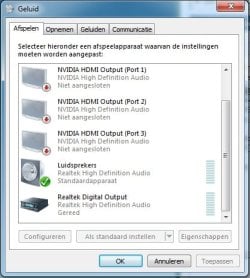
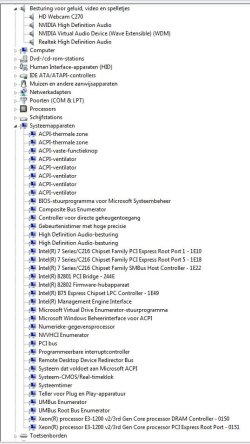
I'm not sure. Can you get that info out of these screenshots, or do you need something else to figure that out? I should note that i don't have any speakers plugged in, just some heaphones in the front jack. There does seem to be a strangely large amount of HDMI ports though. I'm not sure if my system actually has that many, but maybe i'm wrong. I wouldn't know what would qualify as such a port.

I have the realtek HD audio drivers installed. They came with the installation disk for my motherboard. Version 6.0.1.6767.
 

Attachments

  • devices in use.jpg
    devices in use.jpg
    33.3 KB · Views: 18
  • sound devices.jpg
    sound devices.jpg
    76.3 KB · Views: 0

My Computer

Computer type
PC/Desktop
Computer Manufacturer/Model Number
custom
OS
Windows 7 64 bit
CPU
i5 3570
Motherboard
Asus P8B75-V
Memory
8 GB
Graphics Card(s)
GTX 760 MSI GAMING
Screen Resolution
1920x1080
Hard Drives
Samsung 850 EVO 1TB SSD
PSU
Corsair Vengeance Series - 550W
Case
Cooler Master CM 690 III
Cooling
Hyper 212 Evo
Antivirus
Avast
Browser
Firefox
I don't see anything out of the ordinary in your screenshots. If you are not using HDMI, you can ignore that.

Web cams have caused many sound problems. It may not the problem, but temporarily disable the web cam in the Device Manager and see what that does.
 

My Computer

Computer type
PC/Desktop
Computer Manufacturer/Model Number
My Own Build
OS
Windows 10 64 bit
CPU
Intel i7 6700K
Motherboard
ASUS ROG Maximus VIII Hero
Memory
16GB Corsair Dominator
Graphics Card(s)
Intel CPU Graphics
Sound Card
RealTek
Monitor(s) Displays
27" Dell S2719dgf
Screen Resolution
2560X1440
Hard Drives
1 TB Samsung 850 EVO SSD for Win 10 Pro
500GB Samsung 850 EVO SSD for Win 10 Insider
2 TB drive for backup
PSU
EVGA Supernova 750G2
Case
BeQuiet Silent Base 600
Cooling
Deepcool Captain 120EX
Keyboard
Microsoft Wireless 2000
Mouse
Microsoft wireless
Internet Speed
100 MB/sec (Cable)
Antivirus
Microsoft Defender and Malwarebytes
Browser
Edge/Firefox
Other Info
Cakewalk (Sonar) by BandLab and Studio One 4.1 Pro recording studio software. MOTU 896Mk3 Hybrid recording interface, Frontier Tranzport wireless control unit, Behringer X-Touch Control Surface.
Five USB connected optical drives for CD Audio production using Nero BurningROM
I don't see anything out of the ordinary in your screenshots. If you are not using HDMI, you can ignore that.

Web cams have caused many sound problems. It may not the problem, but temporarily disable the web cam in the Device Manager and see what that does.

I do know that the drivers for my webcam don't agree with 64 bit operating systems, even though that problem has no right to exist, considering they're the most recent drivers for a fairly recent webcam. I haven't had this sound problem on my previous windows install though, which was an identical system apart from the storage.

I'll have to do some testing i guess. No idea if i use HDMI or not, and don't know how to find out, but if i discover anything at all, i'll see. Just need a reliable way of triggering the problem.
 

My Computer

Computer type
PC/Desktop
Computer Manufacturer/Model Number
custom
OS
Windows 7 64 bit
CPU
i5 3570
Motherboard
Asus P8B75-V
Memory
8 GB
Graphics Card(s)
GTX 760 MSI GAMING
Screen Resolution
1920x1080
Hard Drives
Samsung 850 EVO 1TB SSD
PSU
Corsair Vengeance Series - 550W
Case
Cooler Master CM 690 III
Cooling
Hyper 212 Evo
Antivirus
Avast
Browser
Firefox
You can disregard the HDMI. That was just a thought but it doesn't appear you are using HDMI.
 

My Computer

Computer type
PC/Desktop
Computer Manufacturer/Model Number
My Own Build
OS
Windows 10 64 bit
CPU
Intel i7 6700K
Motherboard
ASUS ROG Maximus VIII Hero
Memory
16GB Corsair Dominator
Graphics Card(s)
Intel CPU Graphics
Sound Card
RealTek
Monitor(s) Displays
27" Dell S2719dgf
Screen Resolution
2560X1440
Hard Drives
1 TB Samsung 850 EVO SSD for Win 10 Pro
500GB Samsung 850 EVO SSD for Win 10 Insider
2 TB drive for backup
PSU
EVGA Supernova 750G2
Case
BeQuiet Silent Base 600
Cooling
Deepcool Captain 120EX
Keyboard
Microsoft Wireless 2000
Mouse
Microsoft wireless
Internet Speed
100 MB/sec (Cable)
Antivirus
Microsoft Defender and Malwarebytes
Browser
Edge/Firefox
Other Info
Cakewalk (Sonar) by BandLab and Studio One 4.1 Pro recording studio software. MOTU 896Mk3 Hybrid recording interface, Frontier Tranzport wireless control unit, Behringer X-Touch Control Surface.
Five USB connected optical drives for CD Audio production using Nero BurningROM
You can disregard the HDMI. That was just a thought but it doesn't appear you are using HDMI.

I think i found the problem. I'm not completely sure yet, but it might have been because my system was configured to use two different keyboard languages at once. I'm guessing it associates different system sounds with it too, so whenever it had to play a sound that was in one language pack but not the other, it turned the sounds back on. This also solved a rare issue i had with my system thinking i pressed alt + shift at times (like when opening something that i had to put my username and password into), and a sound issue i had with skype. Highly bizarre. Almost like how windows thinks you don't own a legit windows copy when your system time is too far out of whack. Seems completely unrelated, but it's not.
 

My Computer

Computer type
PC/Desktop
Computer Manufacturer/Model Number
custom
OS
Windows 7 64 bit
CPU
i5 3570
Motherboard
Asus P8B75-V
Memory
8 GB
Graphics Card(s)
GTX 760 MSI GAMING
Screen Resolution
1920x1080
Hard Drives
Samsung 850 EVO 1TB SSD
PSU
Corsair Vengeance Series - 550W
Case
Cooler Master CM 690 III
Cooling
Hyper 212 Evo
Antivirus
Avast
Browser
Firefox
i think this happens because of so many errors resulting into a sound or tone, that the algorithms in windows disable it (muting of system sounds will be disabled so you can hear them again) or maybe because of bluetooth headsets and ending a conference on zoom, stuff like that. it's ok if it goes on after a fews days automatically but not after a few hours.

'System Sounds' in the volume mixer keeps unmuting and resetting itself to 100% : Windows10 (reddit.com)
'''System Sounds''' in the volume mixer keeps unmuting and resetting itself to 100% : Windows10
 

My Computer

Computer type
PC/Desktop
OS
Windows 10 64bit
Back
Top