*******************************************************************
Major Edit: So I half-solved the problem myself, but now my question kinda changes.
I don't see a way of editting my post name, so if I'm suppose to abandon this post and make a new one, someone can let me know.
I found out I have a hidden / protected found.000 folder which kept a lot of "lost" / "old" files? I saw it first time but with a simple right click -> properties showed nothing. I do not have access to it either. Using WizTree however reviewed that inside was some of my past Steam Games. In fact not the ones that I thought I have moved in my original post below, because I have forgotten that I didn't move all the games.
So now comes the new question. What are these? Supposed these are corrupted files or something happened to them? They are inside a folder called dir0000.chk under found.000 with a quick google most people get that by running something? I never did anything like that. Now I'm confused to whether if it's possible I can recover them (the best), or simply let them go is fine for me too, but I'm not sure how to do either. I can probably spend longer time googling, but since I've already typed this up and about to head to bed, if anyone feels like dropping some tips on this *new* issue, it would be appreciated greatly!
**************************************************************
Original Post: (tried to delete unrelevant information at this point)
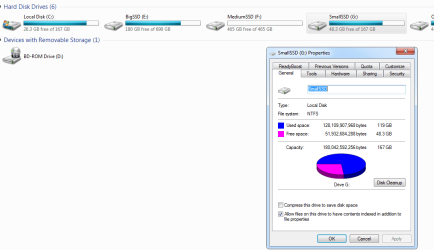
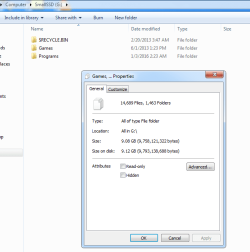
As you can see (if I attached my screenshots correctly), this is not a main drive nor is it used as a backup for anything. It's simply a storage drive for me to put extra programs / games. I used to have quite a bit of Steam games on there, but later bought my "Big SSD" and moved them over. I have no idea when this huge difference between "used" space and actual files accounted for inside the file system started to happen. It always seemed pretty full to me and for some reason I never checked until today - installing yet a new SSD, looking for things to move over but finding none.
I've tried googling but almost all popular responses has something to do with system backups (which I completely don't have as this is not my work computer, and important "personal" files are backed up manually), shadow copies, etc. The resolutions revolved around simple settings and the like which I tried most of, nothing worked. I could be missing something really simple and I'm not claiming to have tried *everything*, but it still confuses me to no end as this is not the OS drive, and my much much more often used "Big SSD" has none of this discrepency at all. Every space of the "used space" on my other SSD are accounted for inside their visible file systems. Obviously I checked "hidden" files, protected system files, etc. Nothing seems to give me reason as to why those space are used. I even defragmented my SSD (I know, I know..) in hopes it might do something... Nope.
I understand this is probably not enough information for people to give me a conclusion(?), but I'm not even sure what other kinds of information I should be providing. So if someone could be so helpful as in giving me a few possibilities and asking for the needed information to tell, I would gladly update / reply those information.
This is very frustrating because I don't want to format the entire drive to test it out if there's any other choice. I have almost 20 different programs installed in it (mostly small, monitoring, benchmarking ones but it'd be annoying to go thru every installation again and moving all the past tracked data / logs).
Help would be greatly appreciated.
Major Edit: So I half-solved the problem myself, but now my question kinda changes.
I don't see a way of editting my post name, so if I'm suppose to abandon this post and make a new one, someone can let me know.
I found out I have a hidden / protected found.000 folder which kept a lot of "lost" / "old" files? I saw it first time but with a simple right click -> properties showed nothing. I do not have access to it either. Using WizTree however reviewed that inside was some of my past Steam Games. In fact not the ones that I thought I have moved in my original post below, because I have forgotten that I didn't move all the games.
So now comes the new question. What are these? Supposed these are corrupted files or something happened to them? They are inside a folder called dir0000.chk under found.000 with a quick google most people get that by running something? I never did anything like that. Now I'm confused to whether if it's possible I can recover them (the best), or simply let them go is fine for me too, but I'm not sure how to do either. I can probably spend longer time googling, but since I've already typed this up and about to head to bed, if anyone feels like dropping some tips on this *new* issue, it would be appreciated greatly!
**************************************************************
Original Post: (tried to delete unrelevant information at this point)
As you can see (if I attached my screenshots correctly), this is not a main drive nor is it used as a backup for anything. It's simply a storage drive for me to put extra programs / games. I used to have quite a bit of Steam games on there, but later bought my "Big SSD" and moved them over. I have no idea when this huge difference between "used" space and actual files accounted for inside the file system started to happen. It always seemed pretty full to me and for some reason I never checked until today - installing yet a new SSD, looking for things to move over but finding none.
I've tried googling but almost all popular responses has something to do with system backups (which I completely don't have as this is not my work computer, and important "personal" files are backed up manually), shadow copies, etc. The resolutions revolved around simple settings and the like which I tried most of, nothing worked. I could be missing something really simple and I'm not claiming to have tried *everything*, but it still confuses me to no end as this is not the OS drive, and my much much more often used "Big SSD" has none of this discrepency at all. Every space of the "used space" on my other SSD are accounted for inside their visible file systems. Obviously I checked "hidden" files, protected system files, etc. Nothing seems to give me reason as to why those space are used. I even defragmented my SSD (I know, I know..) in hopes it might do something... Nope.
I understand this is probably not enough information for people to give me a conclusion(?), but I'm not even sure what other kinds of information I should be providing. So if someone could be so helpful as in giving me a few possibilities and asking for the needed information to tell, I would gladly update / reply those information.
This is very frustrating because I don't want to format the entire drive to test it out if there's any other choice. I have almost 20 different programs installed in it (mostly small, monitoring, benchmarking ones but it'd be annoying to go thru every installation again and moving all the past tracked data / logs).
Help would be greatly appreciated.
Attachments
Last edited:
My Computer
At a glance
Windows 7 Home Premium 64 bit
- Computer type
- PC/Desktop
- OS
- Windows 7 Home Premium 64 bit