Solved ssd I want to boot from can't boot without other hard drive connected

skeptikill

New member
Local time
10:19 AM
Messages
11
Hello all
I had windows 10 on hard drive G. Then, I clean installed windows 7 on hard drive C , an SSD. Before all of this I had other hard drives that H and D ( same hard drive , partitioned) , I don't remember how or why I partitioned the old ones...

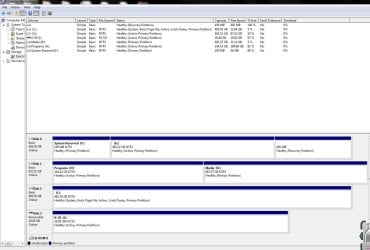
Now, I wanted to delete win 10 from G, but i read sometimes that when you install like I did, the new windows boot process needs files from the old hard drive. So to test this I disconnected the old hard drive (G). I couldn't boot. So I reconnected the old hard drive, and still couldn't boot to windows 7 on the new ssd (C), however it would boot to the old windows 10 (G). I finally put in my windows 7 disc, and let it run a startup repair, this recovered my windows 7 on C.

So here I am, and I want to completely wipe hard drive G, and make my primary, and only booting drive, hard drive C. possibly also un-partition h and d , make it just be one drive.
 

Attachments
  • disk partition.JPG
    disk partition.JPG
    119.1 KB · Views: 4
  • system.JPG
    system.JPG
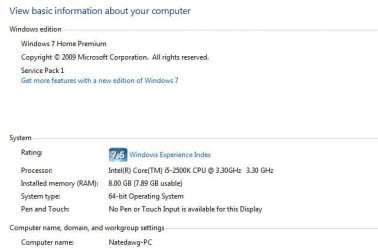
    30.1 KB · Views: 30

My Computer My Computer

At a glance

Windows 7 home premium
Computer type
PC/Desktop
Computer Manufacturer/Model Number
Custom
OS
Windows 7 home premium
Also, just for clarification, I would like "disc 2" to be my primary boot drive.
 

My Computer My Computer

At a glance

Windows 7 home premium
Computer type
PC/Desktop
Computer Manufacturer/Model Number
Custom
OS
Windows 7 home premium
Welcome to our forum skeptikill.

Unhook the sata cable from you disk 1 and 3 then boot to verify that the disk with Windows 7 will boot. (C)

If it boots put the cables you had hooked to disk 1 onto your Window (C) disk.
Now you should only have the Windows disk hooked up. Verify it still boots.

If it does and it should, hook up the other drives.

Go into disk management and remover (active) from partitions G, H, I.

You should end up with "C" with Systems/Active. Hopefully "C" will be disk "0" Zero.

If not you will have to mover your sata data cables on your motherboard as per your motherboard manual.
Disk 0, 1, 2, 3, ect is controlled by what sata port is used on the motherboard.

If all this works out as it should we will get to wiping what ever you would like to wipe out.

This probable was cause by installing Windows 7 and or 10 with the other drives hooked up.

Any questions, just ask.
 

My Computer My Computer

At a glance

Windows 10 Pro. 64/ version 1709 Windows 7 Pr...Intel i7-6800K @ 4.3Corsair Platinum 16 gig @2400EVGA GTX 1070 OC
Computer type
PC/Desktop
Computer Manufacturer/Model Number
Home made Desktop
OS
Windows 10 Pro. 64/ version 1709 Windows 7 Pro/64
CPU
Intel i7-6800K @ 4.3
Motherboard
ASUS X-99 Deluxe II
Memory
Corsair Platinum 16 gig @2400
Graphics Card(s)
EVGA GTX 1070 OC
Monitor(s) Displays
Asus 27" LED LCD/VE278Q
Screen Resolution
1920-1080 or 1280-720 HDMI
Hard Drives
INTEL SSD 730-240 Gb Sata 3.0/
PSU
EVGA Platium 1200W
Case
Phanteks Luxe Tempered Glass 8 fans/ one radiator
Cooling
XSPC/ Water Cooled CPU
Keyboard
Das 4 Professional
Mouse
Logitech M705/MX Anywhere 2-S
Internet Speed
100 mbits
Antivirus
Microsoft Security Essentials/ Malwarebytes Premium 3.0/ SAS
Browser
I.E. 11 default/Firefox/ ISP Time Warner Cable/Spectrum
Other Info
LG BluRay Burner/
Sound system-KLipsch-THX/
Icy Dock ssd Hot Swap bays.
Thank you, However I just realized I linked you the wrong screen capture, and I left a small piece out of the last story, however but maybe this will help. "Now, I wanted to delete win 10 from G, but i read sometimes that when you install like I did, the new windows boot process needs files from the old hard drive. So to test this I disconnected the old hard drive (G). I couldn't boot. So I reconnected the old hard drive, and still couldn't boot to windows 7 on the new ssd (C), however it would boot to the old windows 10 (G). I finally put in my windows 7 disc, and let it run a startup repair, this recovered my windows 7 on C."
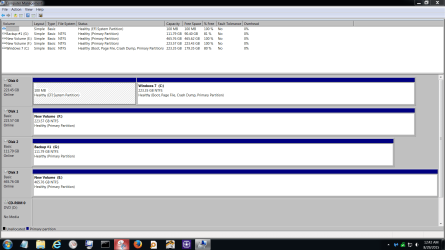
OK, so at this point If I remember correctly I took the screenshot above. Being the genius I am I decided to try a fix following this a you tube, I opened the command program and typed some stuff, then marked my ssd C as active and rebooted, this did not work, I couldnt boot so i put the windows disc in and repaired again. now my partition looks like this.
Unfortunately I'm running to work now and I cant find the you tube guy I followed. I will post later when I get a chance, for now, here is what my partitiopn really looks like .
 

Attachments

  • xsnip.JPG
    xsnip.JPG
    121.8 KB · Views: 6

My Computer My Computer

At a glance

Windows 7 home premium
Computer type
PC/Desktop
Computer Manufacturer/Model Number
Custom
OS
Windows 7 home premium

My Computer My Computer

At a glance

Vista, Windows7, Mint Mate, Zorin, Windows 8from 1.6GHz Duo to i7
Computer Manufacturer/Model Number
HP, Dell, Gateway, Toshiba - 4 laptops and 2 desktops
OS
Vista, Windows7, Mint Mate, Zorin, Windows 8
CPU
from 1.6GHz Duo to i7
Monitor(s) Displays
2x HP w2207
Hard Drives
5x HDD, 7x SSD, 12x Externals
Keyboard
with trackball - no mices
Mouse
Trackball mice
Internet Speed
DSL 6000
Thank you Wolfgang. Great suggestion.

@ skeptikill

If you post the wrong information you could cause a bunch of problems getting proper advice.
We only know what you post.
 

My Computer My Computer

At a glance

Windows 10 Pro. 64/ version 1709 Windows 7 Pr...Intel i7-6800K @ 4.3Corsair Platinum 16 gig @2400EVGA GTX 1070 OC
Computer type
PC/Desktop
Computer Manufacturer/Model Number
Home made Desktop
OS
Windows 10 Pro. 64/ version 1709 Windows 7 Pro/64
CPU
Intel i7-6800K @ 4.3
Motherboard
ASUS X-99 Deluxe II
Memory
Corsair Platinum 16 gig @2400
Graphics Card(s)
EVGA GTX 1070 OC
Monitor(s) Displays
Asus 27" LED LCD/VE278Q
Screen Resolution
1920-1080 or 1280-720 HDMI
Hard Drives
INTEL SSD 730-240 Gb Sata 3.0/
PSU
EVGA Platium 1200W
Case
Phanteks Luxe Tempered Glass 8 fans/ one radiator
Cooling
XSPC/ Water Cooled CPU
Keyboard
Das 4 Professional
Mouse
Logitech M705/MX Anywhere 2-S
Internet Speed
100 mbits
Antivirus
Microsoft Security Essentials/ Malwarebytes Premium 3.0/ SAS
Browser
I.E. 11 default/Firefox/ ISP Time Warner Cable/Spectrum
Other Info
LG BluRay Burner/
Sound system-KLipsch-THX/
Icy Dock ssd Hot Swap bays.
Thank you guys!
Ya I felt really dumb when I went back and reread my post and saw the pic I posted! I will give this a try.
 

My Computer My Computer

At a glance

Windows 7 home premium
Computer type
PC/Desktop
Computer Manufacturer/Model Number
Custom
OS
Windows 7 home premium
OK, I followed the directions, and it told me that C is already the boot drive (something like that) , and it told me to pick a different drive. So I restarted the computer , and it gave me a prompt to start windows 10, or 7. I chose 7 and it is currently disc checking stuff before boot.
 

My Computer My Computer

At a glance

Windows 7 home premium
Computer type
PC/Desktop
Computer Manufacturer/Model Number
Custom
OS
Windows 7 home premium
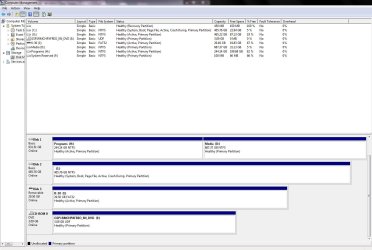
So ya, on reboot the boot manager asks me if I want to load windows 7 or 10.

EasyBCD says that C is already the boot drive.

current partition here
 

Attachments

  • zz.JPG
    zz.JPG
    117.7 KB · Views: 4

My Computer My Computer

At a glance

Windows 7 home premium
Computer type
PC/Desktop
Computer Manufacturer/Model Number
Custom
OS
Windows 7 home premium
Looks like you have a classic double boot installation. Nothing wrong with that.
 

My Computer My Computer

At a glance

Vista, Windows7, Mint Mate, Zorin, Windows 8from 1.6GHz Duo to i7
Computer Manufacturer/Model Number
HP, Dell, Gateway, Toshiba - 4 laptops and 2 desktops
OS
Vista, Windows7, Mint Mate, Zorin, Windows 8
CPU
from 1.6GHz Duo to i7
Monitor(s) Displays
2x HP w2207
Hard Drives
5x HDD, 7x SSD, 12x Externals
Keyboard
with trackball - no mices
Mouse
Trackball mice
Internet Speed
DSL 6000
I'm happy it is working haha, however I now need to completely delete everything on "disc 0" including windows 10, because I need that space for music and photos!
 

My Computer My Computer

At a glance

Windows 7 home premium
Computer type
PC/Desktop
Computer Manufacturer/Model Number
Custom
OS
Windows 7 home premium
Since you have an active partition on each disk, it is not clear which disks bootmgr boots your system. I suggest you first disconnect disk0 and check whether the system boots OK. If that works, then you can proceed.
 

My Computer My Computer

At a glance

Vista, Windows7, Mint Mate, Zorin, Windows 8from 1.6GHz Duo to i7
Computer Manufacturer/Model Number
HP, Dell, Gateway, Toshiba - 4 laptops and 2 desktops
OS
Vista, Windows7, Mint Mate, Zorin, Windows 8
CPU
from 1.6GHz Duo to i7
Monitor(s) Displays
2x HP w2207
Hard Drives
5x HDD, 7x SSD, 12x Externals
Keyboard
with trackball - no mices
Mouse
Trackball mice
Internet Speed
DSL 6000
I disconnected disk 0 and my computer still boots!! I was a little scared haha.... Does this mean I can just format the other one now?
 

My Computer My Computer

At a glance

Windows 7 home premium
Computer type
PC/Desktop
Computer Manufacturer/Model Number
Custom
OS
Windows 7 home premium
You seem to be OK. Your bootmgr is on one of the other disks. It is not clear because each one has an active partition. Therefore one should always check.
 

My Computer My Computer

At a glance

Vista, Windows7, Mint Mate, Zorin, Windows 8from 1.6GHz Duo to i7
Computer Manufacturer/Model Number
HP, Dell, Gateway, Toshiba - 4 laptops and 2 desktops
OS
Vista, Windows7, Mint Mate, Zorin, Windows 8
CPU
from 1.6GHz Duo to i7
Monitor(s) Displays
2x HP w2207
Hard Drives
5x HDD, 7x SSD, 12x Externals
Keyboard
with trackball - no mices
Mouse
Trackball mice
Internet Speed
DSL 6000
I disconnected all except for C, and it still booted, now can u steer me to an easy way to delete all the protected windows files?
 

My Computer My Computer

At a glance

Windows 7 home premium
Computer type
PC/Desktop
Computer Manufacturer/Model Number
Custom
OS
Windows 7 home premium
What protected Windows files are we talking about. I must have missed that one.
 

My Computer My Computer

At a glance

Vista, Windows7, Mint Mate, Zorin, Windows 8from 1.6GHz Duo to i7
Computer Manufacturer/Model Number
HP, Dell, Gateway, Toshiba - 4 laptops and 2 desktops
OS
Vista, Windows7, Mint Mate, Zorin, Windows 8
CPU
from 1.6GHz Duo to i7
Monitor(s) Displays
2x HP w2207
Hard Drives
5x HDD, 7x SSD, 12x Externals
Keyboard
with trackball - no mices
Mouse
Trackball mice
Internet Speed
DSL 6000
Everything that is windows 10 on the old hard drive.
 

My Computer My Computer

At a glance

Windows 7 home premium
Computer type
PC/Desktop
Computer Manufacturer/Model Number
Custom
OS
Windows 7 home premium
Just format the Windows 10 partition.
 

My Computer My Computer

At a glance

Vista, Windows7, Mint Mate, Zorin, Windows 8from 1.6GHz Duo to i7
Computer Manufacturer/Model Number
HP, Dell, Gateway, Toshiba - 4 laptops and 2 desktops
OS
Vista, Windows7, Mint Mate, Zorin, Windows 8
CPU
from 1.6GHz Duo to i7
Monitor(s) Displays
2x HP w2207
Hard Drives
5x HDD, 7x SSD, 12x Externals
Keyboard
with trackball - no mices
Mouse
Trackball mice
Internet Speed
DSL 6000
Welp, that was instantaneous, and not at all as dramatic as I thought.
Thanks very much WHS and Layback Bear. I truly appreciate the help !
 

My Computer My Computer

At a glance

Windows 7 home premium
Computer type
PC/Desktop
Computer Manufacturer/Model Number
Custom
OS
Windows 7 home premium
Here is a little information to remember skeptikill

When a partition like now in your case (C), on disk (2) is marked with Boot and Systems;
that is a bootable drive. Systems is the key word.

Now I suggest is removing all Actives from your other partition on your other drives.
As your Disk Management looks now you should mark G, H, and K partition as inactive.
This tutorial by Brink should help you with that.

http://www.sevenforums.com/tutorials/197157-partition-mark-inactive.html

Then post another picture of Disk Management.
After I look at the picture if you care to, I can guide you to things a little better.
Nice neat and orderly and labeled.


Completing this tutorial it would make thing better for those trying to help you.

http://www.sevenforums.com/tutorials/180324-system-info-see-your-system-specs.html
 

Attachments

  • Disk Management.PNG
    Disk Management.PNG
    50.1 KB · Views: 0
Last edited:

My Computer My Computer

At a glance

Windows 10 Pro. 64/ version 1709 Windows 7 Pr...Intel i7-6800K @ 4.3Corsair Platinum 16 gig @2400EVGA GTX 1070 OC
Computer type
PC/Desktop
Computer Manufacturer/Model Number
Home made Desktop
OS
Windows 10 Pro. 64/ version 1709 Windows 7 Pro/64
CPU
Intel i7-6800K @ 4.3
Motherboard
ASUS X-99 Deluxe II
Memory
Corsair Platinum 16 gig @2400
Graphics Card(s)
EVGA GTX 1070 OC
Monitor(s) Displays
Asus 27" LED LCD/VE278Q
Screen Resolution
1920-1080 or 1280-720 HDMI
Hard Drives
INTEL SSD 730-240 Gb Sata 3.0/
PSU
EVGA Platium 1200W
Case
Phanteks Luxe Tempered Glass 8 fans/ one radiator
Cooling
XSPC/ Water Cooled CPU
Keyboard
Das 4 Professional
Mouse
Logitech M705/MX Anywhere 2-S
Internet Speed
100 mbits
Antivirus
Microsoft Security Essentials/ Malwarebytes Premium 3.0/ SAS
Browser
I.E. 11 default/Firefox/ ISP Time Warner Cable/Spectrum
Other Info
LG BluRay Burner/
Sound system-KLipsch-THX/
Icy Dock ssd Hot Swap bays.
Back
Top