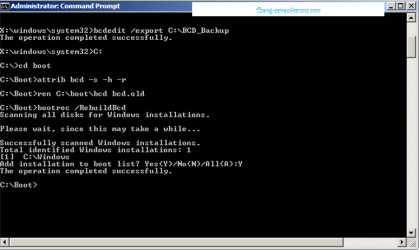
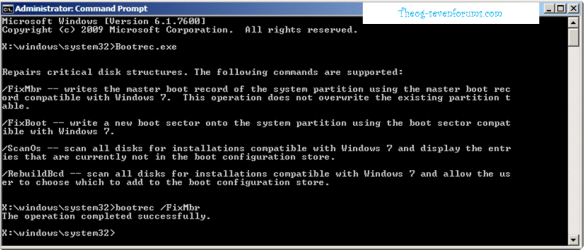
I have an SSD installation question. I am installing a new SSD in an HP Pavilion Dv3-2157cl laptop with Windows 7 Home Premium currently installed on the hard drive. I put the SSD in a HDD Dock (USB), then used EseUS "Partition Clone" and cloned the main partition of drive C to the SSD (I didn't use "Disk Clone" because I didn't want to put the "Restore" partition on the SSD). All worked well, the SSD is designated as drive "F." I removed the hard drive, put in the SSD, but the computer doesn't recognize it. I guess it is due to the SSD being drive "F" - so how do I change the SSD to drive "C" so the computer will recognize it?
I went into the BIOS, but didn't find any way to change the drive letter for the boot disk. The only option I see in this HP BIOS version F.11 (9/4/2009) is just to boot from the hard drive, CD, etc.
Please Help!
Thank You...
I went into the BIOS, but didn't find any way to change the drive letter for the boot disk. The only option I see in this HP BIOS version F.11 (9/4/2009) is just to boot from the hard drive, CD, etc.
Please Help!
Thank You...
My Computer
- Computer type
- PC/Desktop
- Computer Manufacturer/Model Number
- Home Build
- OS
- Windows 7 Home Premium 64bit SP1
- CPU
- Intel Core i7-4770K Haswell 3.5GHz
- Motherboard
- MSI Z87 MPOWER LGA 1150 Intell Z87 HDMI SATA 6Gb/s USB 3.0 A
- Memory
- Crucial Ballistix 8GB 240-Pin DDR3 SDRAM DDR3
- Graphics Card(s)
- Intel HD Graphics
- Monitor(s) Displays
- ASUS 26", ASUS 26," ASUS 24"
- Screen Resolution
- 1920 x 1080
- Hard Drives
- Samsung 830 256GB SATA III SSD
Western Digital Caviar Black WD2001FASS 2TB
Seagate Barracuda 1TB
- PSU
- Corsair TX Series CMPSU-750TX 750W
- Case
- Rosewill THOR V2 Gaming
- Keyboard
- Logitech K350
- Mouse
- Logitech M705
- Internet Speed
- 18 MBps