SSD partition problems? advice neaded

CovertDeath

New member
Member
Local time
4:00 PM
Messages
48
Hello again 7 Forums!

My Corsair Force GT 60Gb SSD is behaving very weird and i'm hoping some SSD intelligent people can help me. let me just make a list of the problems I am seeing below:

also note:
this is NOT my boot drive ANYMORE it used to have win7 on it but not anymore. i plan to use it solely for games now.

1. I can't update the firmware from corsair for some reason because the installer doesn't even detect my drive. any advice? the corsair forums are junk

2. I can't run "HD tune pro" write tests because it thinks the drive is partitioned i guess???

3. read speeds are low and write speeds are just pathetic using CrystalDiskMark

4. I also seem to be missing ~4Gb of space (im thinking its a lost partition or something)

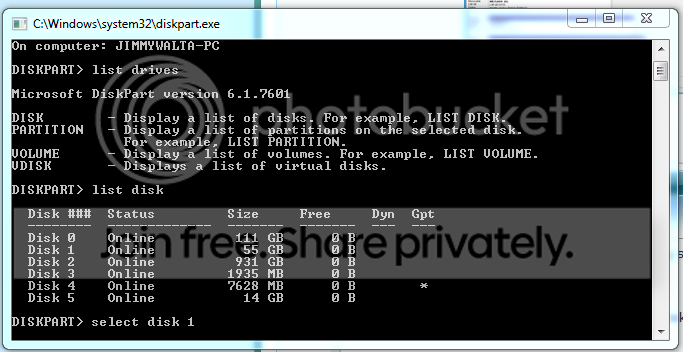
i have attached a screenshot of all the SDD info i have, maybe someone can help me. i dont see any extra partitions so i don't know what is going on, but if anyone can help me get this drive running the way it should i would much appreciate it!

my SSD is Disk 1: Drive G:
HDissues.png
 

My Computer

Computer Manufacturer/Model Number
Custom Built
OS
Windows 7 Ultimate x64
CPU
AMD Phenom II x4 955 ~4.1Ghz
Motherboard
AsRock Extreme 4 990FX
Memory
G.Skill 8Gb 1600 (2x 4Gb)
Graphics Card(s)
2x GTX 460 EVGA in SLI
Sound Card
Creative Sound Blaster X-Fi Surround 5.1 USB Sound Card
Monitor(s) Displays
ASUS 24 in LED
Screen Resolution
1920x1080
Hard Drives
2x WD 500Gb @7200rpm in RAID 0
SATA3 Force GT 60Gb SSD
120Gb WD HDD (minor backup)
1Tb external nightly back-up of RAID 0 Drive
PSU
Corsair TX750W
Case
Azza mid tower
Cooling
Corsair H80 Liquid cooling
Keyboard
Logitech G110
Mouse
mx518
Internet Speed
15mb/3mb
I don't see any signs of missing space or extra partitions.

What about alignment?

Post a picture of the drive in Diskpart so we can check the alignment. That has a major effect on performance.
 

My Computer

Computer type
PC/Desktop
Computer Manufacturer/Model Number
Ignatz Special; 4 speed manual gearbox; factory air conditioning; one of one
OS
Windows 7 Home Premium SP1, 64-bit
CPU
Intel Skylake i5-6600K, not overclocked
Motherboard
AsRock Z170M Extreme 4, micro ATX
Memory
8 GB HyperX DDR4-2666 (2 x 4 GB)
Graphics Card(s)
none; graphics are integrated on CPU
Sound Card
onboard: Realtek ALC1150; external: USB Behringer UF0-202
Monitor(s) Displays
Dell S2340M 23 inch IPS
Screen Resolution
1600 x 900
Hard Drives
System: Crucial MX100 series SSD, 128 GB;
Data: Samsung Spinpoint 103SJ, 1 TB;
Backup: WD Caviar Green WD30EZRX-00D8PB0, 3 TB
PSU
Rosewill SilentNight 500 watt fanless, semi-modular
Case
Antec Solo II
Cooling
Noctua NH-U12S; Noctua F12 intake, Noctua S12A exhaust
Keyboard
Microsoft 200 6JH-00001 USB
Mouse
Dell or Microsoft optical wired; USB
Antivirus
Microsoft Security Essentials and Malwarebytes Premium
Browser
Pale Moon
Other Info
All fans PWM; speeds at idle: CPU circa 500 rpm; intake circa 600 rpm; exhaust circa 600 rpm; CPU temps 27 idle and 47 C load in a warm room (27 C/81 F) when running Intel Extreme Tuning Utility stress test.
that is what has my so confused. the preformance WAS good when win7 was on it, but i wanted to update the firmware to 1.3.3 but to do so i couldn't have an active OS on the drive so i just installed win7 on my RAID drive and was going to update it from that OS. i deleted all partitions on the SSD then formated it to be used. this is when i noticed the slightly smaller space, then i ran the speed tests.... this is where i KNOW something is wrong. its a 550mb/s read/Write SSD, the read spead is fine i guess but the write is pathetic, my 5000rpm drive could write faster. and worse yet, the corsair firmware updater doesn't even recognize my drive :(

diskpart.png
 

My Computer

Computer Manufacturer/Model Number
Custom Built
OS
Windows 7 Ultimate x64
CPU
AMD Phenom II x4 955 ~4.1Ghz
Motherboard
AsRock Extreme 4 990FX
Memory
G.Skill 8Gb 1600 (2x 4Gb)
Graphics Card(s)
2x GTX 460 EVGA in SLI
Sound Card
Creative Sound Blaster X-Fi Surround 5.1 USB Sound Card
Monitor(s) Displays
ASUS 24 in LED
Screen Resolution
1920x1080
Hard Drives
2x WD 500Gb @7200rpm in RAID 0
SATA3 Force GT 60Gb SSD
120Gb WD HDD (minor backup)
1Tb external nightly back-up of RAID 0 Drive
PSU
Corsair TX750W
Case
Azza mid tower
Cooling
Corsair H80 Liquid cooling
Keyboard
Logitech G110
Mouse
mx518
Internet Speed
15mb/3mb
If you are willing to completely wipe the SSD, I'd do that in Diskpart with the Clean command and then attempt to create a new single primary partition on it. Then see what it shows for alignment.

I know nothing about RAID and wonder if it is part of your problem?
 

My Computer

Computer type
PC/Desktop
Computer Manufacturer/Model Number
Ignatz Special; 4 speed manual gearbox; factory air conditioning; one of one
OS
Windows 7 Home Premium SP1, 64-bit
CPU
Intel Skylake i5-6600K, not overclocked
Motherboard
AsRock Z170M Extreme 4, micro ATX
Memory
8 GB HyperX DDR4-2666 (2 x 4 GB)
Graphics Card(s)
none; graphics are integrated on CPU
Sound Card
onboard: Realtek ALC1150; external: USB Behringer UF0-202
Monitor(s) Displays
Dell S2340M 23 inch IPS
Screen Resolution
1600 x 900
Hard Drives
System: Crucial MX100 series SSD, 128 GB;
Data: Samsung Spinpoint 103SJ, 1 TB;
Backup: WD Caviar Green WD30EZRX-00D8PB0, 3 TB
PSU
Rosewill SilentNight 500 watt fanless, semi-modular
Case
Antec Solo II
Cooling
Noctua NH-U12S; Noctua F12 intake, Noctua S12A exhaust
Keyboard
Microsoft 200 6JH-00001 USB
Mouse
Dell or Microsoft optical wired; USB
Antivirus
Microsoft Security Essentials and Malwarebytes Premium
Browser
Pale Moon
Other Info
All fans PWM; speeds at idle: CPU circa 500 rpm; intake circa 600 rpm; exhaust circa 600 rpm; CPU temps 27 idle and 47 C load in a warm room (27 C/81 F) when running Intel Extreme Tuning Utility stress test.
RAID should have all the AHCI commands in it so im a little confused as well... i'll try clean in diskpart and report back in a second

UPDATE:
okay, i ran the clean but it didn't fix anything, it cleared the ONE partition i can see and that's it, still crummy speeds and not able to update firmware
 

My Computer

Computer Manufacturer/Model Number
Custom Built
OS
Windows 7 Ultimate x64
CPU
AMD Phenom II x4 955 ~4.1Ghz
Motherboard
AsRock Extreme 4 990FX
Memory
G.Skill 8Gb 1600 (2x 4Gb)
Graphics Card(s)
2x GTX 460 EVGA in SLI
Sound Card
Creative Sound Blaster X-Fi Surround 5.1 USB Sound Card
Monitor(s) Displays
ASUS 24 in LED
Screen Resolution
1920x1080
Hard Drives
2x WD 500Gb @7200rpm in RAID 0
SATA3 Force GT 60Gb SSD
120Gb WD HDD (minor backup)
1Tb external nightly back-up of RAID 0 Drive
PSU
Corsair TX750W
Case
Azza mid tower
Cooling
Corsair H80 Liquid cooling
Keyboard
Logitech G110
Mouse
mx518
Internet Speed
15mb/3mb
Have you tried a secure erase using Parted Magic? A secure erase is supposed to restore an SSD to factory condition. I use Parted Magic and is fairly simple to do and works on any SSD. It simply issues a command to the firmware controller and the controller does the secure erase. The easiest way is to put it on a USB stick and boot from the stick, or download the ISO and burn it to a CD and boot from the Cd. Either way, download the ISO file from the link above, to put it on an USB stick I use Pendrive Linux Universal USB installer. Scroll down the list until you find Parted magic, show the installer where your ISO is located and it will do the rest. These are the instructions for a secure erase with the program. The only issue you may have is you may have to 'hot plug' the SSD to unfreeze it. I just go ahead and unplug the power cord to the SSD, then boot to the USB or CD, once the program is fully loaded, plug the power cable back in and it will be unfrozen. Use the last option, an internal secure erase. If it asks to do an 'enhanced serure erase' select no. It will take about 10 seconds. The message will tell you it will take longer, but as soon as the message goes away, it is done.
 

My Computers

System One System Two

  • Computer type
    PC/Desktop
    Computer Manufacturer/Model Number
    ALWAYS UNDER CONSTRUCTION
    OS
    Windows 11 Pro
    CPU
    Ryzen 9 5900X
    Motherboard
    Asus X570 Crosshair Viii Hero
    Memory
    32GB G Skill DDR4-3600
    Graphics Card(s)
    EVGA RTX 3080 FTW 3 Ultra
    Sound Card
    On Board/Sennheiser PC37X Headset
    Monitor(s) Displays
    3 X Asus 27"
    Screen Resolution
    2560x1440
    Hard Drives
    2 X 1 TB NVME drives
    PSU
    EVGA 850
    Case
    Phanteks Eclipse P400A
    Cooling
    EVGA 280 AIO
    Keyboard
    Logitech G510s/ Logitech G13
    Mouse
    Logitech G502
    Internet Speed
    24/1
    Antivirus
    ESET/MBAM Pro/SAS Pro
    Browser
    Chrome/ Firefox/ Edge
  • Computer type
    Laptop
    System Manufacturer/Model Number
    Dell 16 Plus
    OS
    Windows 11 Pro
    CPU
    Intel Ultra 9 288V
    Memory
    32 GB LPDDR5X 8533
    Monitor(s) Displays
    16" Mini-LED HDR600 Touch 90 Hz
    Screen Resolution
    2560X1600
    Hard Drives
    1 TB NVME
booted into the CD with no problem once i selected the partition method though it didn't give me any option to pick a drive to complete the task, the windows just simply went away...
 

My Computer

Computer Manufacturer/Model Number
Custom Built
OS
Windows 7 Ultimate x64
CPU
AMD Phenom II x4 955 ~4.1Ghz
Motherboard
AsRock Extreme 4 990FX
Memory
G.Skill 8Gb 1600 (2x 4Gb)
Graphics Card(s)
2x GTX 460 EVGA in SLI
Sound Card
Creative Sound Blaster X-Fi Surround 5.1 USB Sound Card
Monitor(s) Displays
ASUS 24 in LED
Screen Resolution
1920x1080
Hard Drives
2x WD 500Gb @7200rpm in RAID 0
SATA3 Force GT 60Gb SSD
120Gb WD HDD (minor backup)
1Tb external nightly back-up of RAID 0 Drive
PSU
Corsair TX750W
Case
Azza mid tower
Cooling
Corsair H80 Liquid cooling
Keyboard
Logitech G110
Mouse
mx518
Internet Speed
15mb/3mb
Once in you should click the icon on the bottom left where the start button on windows is, you will get a menu, select system tools, go to near the top of the list to Hard drive erase, select your SSD, click on the bottom option 'internal secure erase', click next, it will assign a password of 'null' select OK, if it asks if you want an enhanced secure erase select no, the message should come up asking if you are sure, if you are in fact sure, click yes and it will be through in about 15 seconds. Go back to the bottom and click the bottom left again, select log out and restart and boot back into windows. You will have to create an aligned partition and format it. If your drive comes with a utility that will do a secure erase, you can use that instead. Parted Magic is just the tool I always use and I find it quick and simple.
 

My Computers

System One System Two

  • Computer type
    PC/Desktop
    Computer Manufacturer/Model Number
    ALWAYS UNDER CONSTRUCTION
    OS
    Windows 11 Pro
    CPU
    Ryzen 9 5900X
    Motherboard
    Asus X570 Crosshair Viii Hero
    Memory
    32GB G Skill DDR4-3600
    Graphics Card(s)
    EVGA RTX 3080 FTW 3 Ultra
    Sound Card
    On Board/Sennheiser PC37X Headset
    Monitor(s) Displays
    3 X Asus 27"
    Screen Resolution
    2560x1440
    Hard Drives
    2 X 1 TB NVME drives
    PSU
    EVGA 850
    Case
    Phanteks Eclipse P400A
    Cooling
    EVGA 280 AIO
    Keyboard
    Logitech G510s/ Logitech G13
    Mouse
    Logitech G502
    Internet Speed
    24/1
    Antivirus
    ESET/MBAM Pro/SAS Pro
    Browser
    Chrome/ Firefox/ Edge
  • Computer type
    Laptop
    System Manufacturer/Model Number
    Dell 16 Plus
    OS
    Windows 11 Pro
    CPU
    Intel Ultra 9 288V
    Memory
    32 GB LPDDR5X 8533
    Monitor(s) Displays
    16" Mini-LED HDR600 Touch 90 Hz
    Screen Resolution
    2560X1600
    Hard Drives
    1 TB NVME
okay i finally got the secure erase to work. performance has not increased a bit though, still sluggish as ever and i'm not able to do the firmware update either because it still won't recognize it. I am very confused as to what could be causing my SSD issues... any thoughts???

i haven't really done any SSD optimization yet on this new install of win7 but since it's not my OS drive I don't think that will affect it much...
 

My Computer

Computer Manufacturer/Model Number
Custom Built
OS
Windows 7 Ultimate x64
CPU
AMD Phenom II x4 955 ~4.1Ghz
Motherboard
AsRock Extreme 4 990FX
Memory
G.Skill 8Gb 1600 (2x 4Gb)
Graphics Card(s)
2x GTX 460 EVGA in SLI
Sound Card
Creative Sound Blaster X-Fi Surround 5.1 USB Sound Card
Monitor(s) Displays
ASUS 24 in LED
Screen Resolution
1920x1080
Hard Drives
2x WD 500Gb @7200rpm in RAID 0
SATA3 Force GT 60Gb SSD
120Gb WD HDD (minor backup)
1Tb external nightly back-up of RAID 0 Drive
PSU
Corsair TX750W
Case
Azza mid tower
Cooling
Corsair H80 Liquid cooling
Keyboard
Logitech G110
Mouse
mx518
Internet Speed
15mb/3mb
okay i finally got the secure erase to work. performance has not increased a bit though, still sluggish as ever and i'm not able to do the firmware update either because it still won't recognize it. I am very confused as to what could be causing my SSD issues... any thoughts???

i haven't really done any SSD optimization yet on this new install of win7 but since it's not my OS drive I don't think that will affect it much...

If you have done a secure erase and created an aligned partition and still not getting any performance, I would pursue an RMA.
 

My Computers

System One System Two

  • Computer type
    PC/Desktop
    Computer Manufacturer/Model Number
    ALWAYS UNDER CONSTRUCTION
    OS
    Windows 11 Pro
    CPU
    Ryzen 9 5900X
    Motherboard
    Asus X570 Crosshair Viii Hero
    Memory
    32GB G Skill DDR4-3600
    Graphics Card(s)
    EVGA RTX 3080 FTW 3 Ultra
    Sound Card
    On Board/Sennheiser PC37X Headset
    Monitor(s) Displays
    3 X Asus 27"
    Screen Resolution
    2560x1440
    Hard Drives
    2 X 1 TB NVME drives
    PSU
    EVGA 850
    Case
    Phanteks Eclipse P400A
    Cooling
    EVGA 280 AIO
    Keyboard
    Logitech G510s/ Logitech G13
    Mouse
    Logitech G502
    Internet Speed
    24/1
    Antivirus
    ESET/MBAM Pro/SAS Pro
    Browser
    Chrome/ Firefox/ Edge
  • Computer type
    Laptop
    System Manufacturer/Model Number
    Dell 16 Plus
    OS
    Windows 11 Pro
    CPU
    Intel Ultra 9 288V
    Memory
    32 GB LPDDR5X 8533
    Monitor(s) Displays
    16" Mini-LED HDR600 Touch 90 Hz
    Screen Resolution
    2560X1600
    Hard Drives
    1 TB NVME
is an aligned partition any different then a regular partition? if so then i have done everything i can think of and will probably just RMA it unfortunately.... write speeds of 80mb/s just won't cut it haha not when i paid for 500
 

My Computer

Computer Manufacturer/Model Number
Custom Built
OS
Windows 7 Ultimate x64
CPU
AMD Phenom II x4 955 ~4.1Ghz
Motherboard
AsRock Extreme 4 990FX
Memory
G.Skill 8Gb 1600 (2x 4Gb)
Graphics Card(s)
2x GTX 460 EVGA in SLI
Sound Card
Creative Sound Blaster X-Fi Surround 5.1 USB Sound Card
Monitor(s) Displays
ASUS 24 in LED
Screen Resolution
1920x1080
Hard Drives
2x WD 500Gb @7200rpm in RAID 0
SATA3 Force GT 60Gb SSD
120Gb WD HDD (minor backup)
1Tb external nightly back-up of RAID 0 Drive
PSU
Corsair TX750W
Case
Azza mid tower
Cooling
Corsair H80 Liquid cooling
Keyboard
Logitech G110
Mouse
mx518
Internet Speed
15mb/3mb
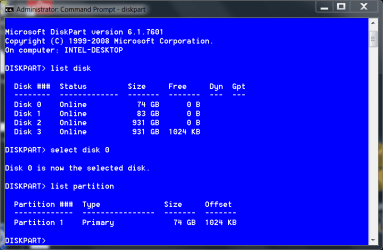
I agree with that. I don't think alignment would make that much difference. If you have AS SSD open it and post a screenshot. You don't need to run the test, just open it and select the SSD in the drop down box up top. To check it the old fashioned way. Click start, type cmd in the search box, right click on the cmd that appears and select run as administrator, in the command window type diskpart and press enter, then type list disk and press enter. look at the sizes and the number it gives each disk. If it is disk #2 type select disk 2 and press enter, when it says disk 2 is the selected disk type list partition. It will show the partition size and the offset. The offset is the alignment. It must be divisible by 4. It should look like this.

check alignment.PNG
 

My Computers

System One System Two

  • Computer type
    PC/Desktop
    Computer Manufacturer/Model Number
    ALWAYS UNDER CONSTRUCTION
    OS
    Windows 11 Pro
    CPU
    Ryzen 9 5900X
    Motherboard
    Asus X570 Crosshair Viii Hero
    Memory
    32GB G Skill DDR4-3600
    Graphics Card(s)
    EVGA RTX 3080 FTW 3 Ultra
    Sound Card
    On Board/Sennheiser PC37X Headset
    Monitor(s) Displays
    3 X Asus 27"
    Screen Resolution
    2560x1440
    Hard Drives
    2 X 1 TB NVME drives
    PSU
    EVGA 850
    Case
    Phanteks Eclipse P400A
    Cooling
    EVGA 280 AIO
    Keyboard
    Logitech G510s/ Logitech G13
    Mouse
    Logitech G502
    Internet Speed
    24/1
    Antivirus
    ESET/MBAM Pro/SAS Pro
    Browser
    Chrome/ Firefox/ Edge
  • Computer type
    Laptop
    System Manufacturer/Model Number
    Dell 16 Plus
    OS
    Windows 11 Pro
    CPU
    Intel Ultra 9 288V
    Memory
    32 GB LPDDR5X 8533
    Monitor(s) Displays
    16" Mini-LED HDR600 Touch 90 Hz
    Screen Resolution
    2560X1600
    Hard Drives
    1 TB NVME
okay, my offset is 1024 so it seems to be all good on that front. i guess i will just be contacting corsair tomorrow :)

thank you very much for all your help, it was very useful!
 

My Computer

Computer Manufacturer/Model Number
Custom Built
OS
Windows 7 Ultimate x64
CPU
AMD Phenom II x4 955 ~4.1Ghz
Motherboard
AsRock Extreme 4 990FX
Memory
G.Skill 8Gb 1600 (2x 4Gb)
Graphics Card(s)
2x GTX 460 EVGA in SLI
Sound Card
Creative Sound Blaster X-Fi Surround 5.1 USB Sound Card
Monitor(s) Displays
ASUS 24 in LED
Screen Resolution
1920x1080
Hard Drives
2x WD 500Gb @7200rpm in RAID 0
SATA3 Force GT 60Gb SSD
120Gb WD HDD (minor backup)
1Tb external nightly back-up of RAID 0 Drive
PSU
Corsair TX750W
Case
Azza mid tower
Cooling
Corsair H80 Liquid cooling
Keyboard
Logitech G110
Mouse
mx518
Internet Speed
15mb/3mb
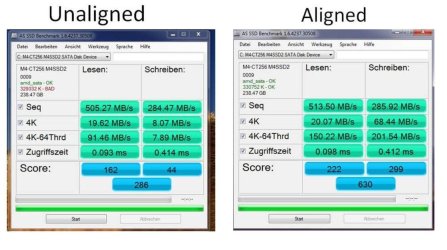
also, as far as performance, this is the difference in an aligned SSD and a not aligned SSD. Not sure where I found this, but it is a good example.

aligned-not aligned.JPG
 

My Computers

System One System Two

  • Computer type
    PC/Desktop
    Computer Manufacturer/Model Number
    ALWAYS UNDER CONSTRUCTION
    OS
    Windows 11 Pro
    CPU
    Ryzen 9 5900X
    Motherboard
    Asus X570 Crosshair Viii Hero
    Memory
    32GB G Skill DDR4-3600
    Graphics Card(s)
    EVGA RTX 3080 FTW 3 Ultra
    Sound Card
    On Board/Sennheiser PC37X Headset
    Monitor(s) Displays
    3 X Asus 27"
    Screen Resolution
    2560x1440
    Hard Drives
    2 X 1 TB NVME drives
    PSU
    EVGA 850
    Case
    Phanteks Eclipse P400A
    Cooling
    EVGA 280 AIO
    Keyboard
    Logitech G510s/ Logitech G13
    Mouse
    Logitech G502
    Internet Speed
    24/1
    Antivirus
    ESET/MBAM Pro/SAS Pro
    Browser
    Chrome/ Firefox/ Edge
  • Computer type
    Laptop
    System Manufacturer/Model Number
    Dell 16 Plus
    OS
    Windows 11 Pro
    CPU
    Intel Ultra 9 288V
    Memory
    32 GB LPDDR5X 8533
    Monitor(s) Displays
    16" Mini-LED HDR600 Touch 90 Hz
    Screen Resolution
    2560X1600
    Hard Drives
    1 TB NVME
I hope you get it worked out. Sorry we couldn't resolve it for you here.
 

My Computers

System One System Two

  • Computer type
    PC/Desktop
    Computer Manufacturer/Model Number
    ALWAYS UNDER CONSTRUCTION
    OS
    Windows 11 Pro
    CPU
    Ryzen 9 5900X
    Motherboard
    Asus X570 Crosshair Viii Hero
    Memory
    32GB G Skill DDR4-3600
    Graphics Card(s)
    EVGA RTX 3080 FTW 3 Ultra
    Sound Card
    On Board/Sennheiser PC37X Headset
    Monitor(s) Displays
    3 X Asus 27"
    Screen Resolution
    2560x1440
    Hard Drives
    2 X 1 TB NVME drives
    PSU
    EVGA 850
    Case
    Phanteks Eclipse P400A
    Cooling
    EVGA 280 AIO
    Keyboard
    Logitech G510s/ Logitech G13
    Mouse
    Logitech G502
    Internet Speed
    24/1
    Antivirus
    ESET/MBAM Pro/SAS Pro
    Browser
    Chrome/ Firefox/ Edge
  • Computer type
    Laptop
    System Manufacturer/Model Number
    Dell 16 Plus
    OS
    Windows 11 Pro
    CPU
    Intel Ultra 9 288V
    Memory
    32 GB LPDDR5X 8533
    Monitor(s) Displays
    16" Mini-LED HDR600 Touch 90 Hz
    Screen Resolution
    2560X1600
    Hard Drives
    1 TB NVME
Back
Top