SSD Partition question

Benteke

Member
Local time
2:57 AM
Messages
121
Location
Way Out West
Ready to reinstall W7 on a brand new (never used) SSD and want to partition it (2 partitions, one for OS, one for data) before I install the OS. I've only ever partitioned AFTER the OS was installed, so just want to know if there's a preferred method (DISKPART vs. disk management vs. 3rd party like minitool etc).

Thanks-
 

My Computer

Computer type
Laptop
Computer Manufacturer/Model Number
Fujitsu LifeBook AH550
OS
Windows 7 Home Premium x64 SP1

My Computer

Computer Manufacturer/Model Number
HP, Dell, Gateway, Toshiba - 4 laptops and 2 desktops
OS
Vista, Windows7, Mint Mate, Zorin, Windows 8
CPU
from 1.6GHz Duo to i7
Monitor(s) Displays
2x HP w2207
Hard Drives
5x HDD, 7x SSD, 12x Externals
Keyboard
with trackball - no mices
Mouse
Trackball mice
Internet Speed
DSL 6000
Ready to reinstall W7 on a brand new (never used) SSD and want to partition it (2 partitions, one for OS, one for data) before I install the OS. I've only ever partitioned AFTER the OS was installed, so just want to know if there's a preferred method (DISKPART vs. disk management vs. 3rd party like minitool etc).

Thanks-


You can set the operating system partition size during the installation. Then use Disk Management after the installation to create the second partition from the remaining unallocated space.

See steps 6,7,8 and 9 in this tutorial.

http://www.sevenforums.com/tutorials/52291-partition-hard-drive-windows-7-install.html
 

My Computer

Computer type
PC/Desktop
Computer Manufacturer/Model Number
Custom Built
OS
Windows 10 Pro x64, Windows 8.1 Pro x64, Windows 7 Ultimate x64 SP1,
CPU
INTEL i9-7920X LGA 2066
Motherboard
Gigabyte X299-WU8 F3
Memory
64 GB (4 X 16 GB) G-Skill V Series DDR4 3200 Quad Channel
Graphics Card(s)
EVGA GTX 1060 SC 3 GB
Sound Card
Realtek Onboard ALC1220
Monitor(s) Displays
2 x Samsung S27E310
Screen Resolution
1920x1080
Hard Drives
Samsung 2 x 970 EVO Plus 500 GB NVMe
1 x 6TB WD 6003FZBX SATA
1 x 6TB WD 60EFRX SATA
12 x 3TB WD 30EFRX SATA
PSU
Seasonic X-1050
Case
Thermaltake Armor+
Cooling
Corsair H80i V2 Liquid AOI Cooler
Keyboard
Logitech G510s
Mouse
Logitech MX Master 2S
Internet Speed
200 Mb/s
Antivirus
ESET NOD32 13.1
Browser
EDGE (Dev, Canary, Beta), Chrome
Other Info
ASUS RT-AC68U router
Malwarebytes 4.0.4
I would use disk management. Just make sure the installer aligns the SSD - which it should.

http://www.sevenforums.com/tutorials/113967-ssd-alignment.html?ltr=S


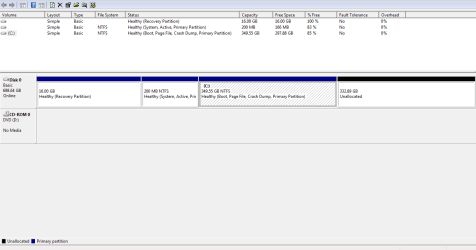
I'll be using restore disks to install the OS and I don't remember seeing an option to partition the drive before installation the last time I ran them. If I wait till after the OS installation, I'll run into the same problem as I did on my current drive, (disk management couldn't shrink the boot partition smaller than 350GB AND couldn't delete the recovery partition - see attachment below), forcing me to have use 3rd party software to do so.... I just want to create two equal sized partitions on the new SSD.
 

Attachments

  • Diskmgmt shrink Capture.PNG
    Diskmgmt shrink Capture.PNG
    12.7 KB · Views: 2

My Computer

Computer type
Laptop
Computer Manufacturer/Model Number
Fujitsu LifeBook AH550
OS
Windows 7 Home Premium x64 SP1
Disk management is limited in it's capabilities. That's why most of us use OEM programs to manipulate the disk layout. Nothing wrong with that.
 

My Computer

Computer Manufacturer/Model Number
HP, Dell, Gateway, Toshiba - 4 laptops and 2 desktops
OS
Vista, Windows7, Mint Mate, Zorin, Windows 8
CPU
from 1.6GHz Duo to i7
Monitor(s) Displays
2x HP w2207
Hard Drives
5x HDD, 7x SSD, 12x Externals
Keyboard
with trackball - no mices
Mouse
Trackball mice
Internet Speed
DSL 6000
Disk management is limited in it's capabilities. That's why most of us use OEM programs to manipulate the disk layout. Nothing wrong with that.

So you're saying that I shouldn't use disk management to partition a brand new drive into two equal size partitions?
 

My Computer

Computer type
Laptop
Computer Manufacturer/Model Number
Fujitsu LifeBook AH550
OS
Windows 7 Home Premium x64 SP1

My Computer

Computer type
PC/Desktop
Computer Manufacturer/Model Number
Own build
OS
Windows 7x64 Home Premium SP1
CPU
Intel i7 2600k
Motherboard
ASUS P8Z68 Deluxe
Memory
G.Skill Ripjaws (DDR3-1600) 2x4GB
Graphics Card(s)
Nvidia GeForce GTS 450; Intel HD Graphics 3000(GT2+)
Monitor(s) Displays
Dell Ultrasharp IPS panel U2311H, Samsung SyncMaster P2350
Screen Resolution
1920x1080
Hard Drives
Samsung 850 Pro SSD 256GB, Samsung SSD 840 120GB, Seagates 1TB Barracuda ST31000528AS x2
PSU
Seasonic M12II 520W
Case
Lian Li Lancool PC-K60
Cooling
Case: 1x120mm, 3x140mm CPU: Hyper 212+
Keyboard
Logitech MK520 (wireless)
Mouse
Logitech MK520
Internet Speed
6-7 Mbps
Antivirus
Norton Security Premium, Malwarebytes on 2 (MSE on 3rd PC)
Browser
FireFox
Other Info
Audio: Logitech Z523 2.1
(Free) Partition Wizard is a more powerful tool. You can partition before or after the install. It also has an option to "align all partitions". I used this align capability on an SSD that had an OS installed but wasn't aligned.
Best Free Partition Manager for Windows | MiniTool Partition Free

Thanks, I have PW free (bootable) on a flash drive but was just wondering if I should use that OR if it could be done using disk management or DISKPART (see OP). I was told it would be better to partition the new SSD before installing the OS.
 

My Computer

Computer type
Laptop
Computer Manufacturer/Model Number
Fujitsu LifeBook AH550
OS
Windows 7 Home Premium x64 SP1
Disk management is limited in it's capabilities. That's why most of us use OEM programs to manipulate the disk layout. Nothing wrong with that.

So you're saying that I cannot use disk management to partition a brand new drive into two equal size partitions?
What I am saying is that not everything you'd like to do (e.g. shrink beyond the MFT) can be done with disk management. But if there are no partitions on the drive yet, that is a different story. Then you just have to make sure that the first partition you define takes only as much space as you want it to have - and not the whole disk.
 

My Computer

Computer Manufacturer/Model Number
HP, Dell, Gateway, Toshiba - 4 laptops and 2 desktops
OS
Vista, Windows7, Mint Mate, Zorin, Windows 8
CPU
from 1.6GHz Duo to i7
Monitor(s) Displays
2x HP w2207
Hard Drives
5x HDD, 7x SSD, 12x Externals
Keyboard
with trackball - no mices
Mouse
Trackball mice
Internet Speed
DSL 6000
What I am saying is that not everything you'd like to do (e.g. shrink beyond the MFT) can be done with disk management.

Yes, I know this first hand.... see post #4. but I was using DM to shrink partitions after the OS install. I'm trying to find out the best tool to partition a new SSD prior to anything being placed on it.

But if there are no partitions on the drive yet, that is a different story. Then you just have to make sure that the first partition you define takes only as much space as you want it to have - and not the whole disk.

Yes, the drive I want to partition is a brand new SSD. It's never been used, still sitting in the box. I was going to swap out my optical drive for the NEW SSD, start Win7 as usual (my main HDD) and then use either DISKPART or disk management to partition the SSD.
 

My Computer

Computer type
Laptop
Computer Manufacturer/Model Number
Fujitsu LifeBook AH550
OS
Windows 7 Home Premium x64 SP1

My Computer

Computer Manufacturer/Model Number
HP, Dell, Gateway, Toshiba - 4 laptops and 2 desktops
OS
Vista, Windows7, Mint Mate, Zorin, Windows 8
CPU
from 1.6GHz Duo to i7
Monitor(s) Displays
2x HP w2207
Hard Drives
5x HDD, 7x SSD, 12x Externals
Keyboard
with trackball - no mices
Mouse
Trackball mice
Internet Speed
DSL 6000
(Free) Partition Wizard is a more powerful tool. You can partition before or after the install. It also has an option to "align all partitions". I used this align capability on an SSD that had an OS installed but wasn't aligned.
Best Free Partition Manager for Windows | MiniTool Partition Free

Thanks, I have PW free (bootable) on a flash drive but was just wondering if I should use that OR if it could be done using disk management or DISKPART (see OP). I was told it would be better to partition the new SSD before installing the OS.
On reflection - I think the reference to the location of the Master File Table is a valid point so it probably would be safer to do your partitioning first. If you have a large SSD (eg 500GB) and want to only allocate 100GB to the OS partition you don't want the MFT located beyond the 100GB boundary. When I look at the location of the MFTs on my partitions I don't appear to see any consistencies in their location.

I don't see why you wouldn't want to use a program with a GUI (Disk Management or Partition Wizard). I almost always use PW because of its flexibility and ease of use but it's up to you.
 

My Computer

Computer type
PC/Desktop
Computer Manufacturer/Model Number
Own build
OS
Windows 7x64 Home Premium SP1
CPU
Intel i7 2600k
Motherboard
ASUS P8Z68 Deluxe
Memory
G.Skill Ripjaws (DDR3-1600) 2x4GB
Graphics Card(s)
Nvidia GeForce GTS 450; Intel HD Graphics 3000(GT2+)
Monitor(s) Displays
Dell Ultrasharp IPS panel U2311H, Samsung SyncMaster P2350
Screen Resolution
1920x1080
Hard Drives
Samsung 850 Pro SSD 256GB, Samsung SSD 840 120GB, Seagates 1TB Barracuda ST31000528AS x2
PSU
Seasonic M12II 520W
Case
Lian Li Lancool PC-K60
Cooling
Case: 1x120mm, 3x140mm CPU: Hyper 212+
Keyboard
Logitech MK520 (wireless)
Mouse
Logitech MK520
Internet Speed
6-7 Mbps
Antivirus
Norton Security Premium, Malwarebytes on 2 (MSE on 3rd PC)
Browser
FireFox
Other Info
Audio: Logitech Z523 2.1

My Computer

Computer type
PC/Desktop
Computer Manufacturer/Model Number
Skylake Special #666
OS
Windows 10 Pro x64
CPU
Intel Core i7 6700K
Motherboard
Asus Sabertooth Z170 Mark 1
Memory
GSkill TridentZ RGB 16GB 3600 16-16-16-36
Graphics Card(s)
EVGA GTX 980 Ti SC x2
Sound Card
Realtek High Definition
Monitor(s) Displays
AOC G2460PG
Screen Resolution
1920 x 1080 144Hz
Hard Drives
Samsung 860 Pro 256GB, Seagate Barracuda 4TB x2
PSU
EVGA 1000 P2, EVGA White Custom Braided Cables
Case
Corsair Vengeance C70 Gunmetal Black
Cooling
Corsair H100i v2, Corsair ML120 x2, Thermal Grizzly Kryonaut
Keyboard
Logitech G910 Orion Spectrum
Mouse
Logitech G700s
Internet Speed
Verizon Fios Quantum Gateway 75/75
Antivirus
Windows Defender, Malwarebytes Free 3.8.3
Browser
Chrome
Other Info
Corsair SP120 x4, LG Blu-ray Drive, Durabrand HT-395 100 Watt Dolby Digital Amp, Corsair H2100 Wireless 7.1 Headset
I don't see why you wouldn't want to use a program with a GUI (Disk Management or Partition Wizard). I almost always use PW because of its flexibility and ease of use but it's up to you.

I'm not against using either. I'm just trying to figure out the least painful of my available options. If PW will do both the alignment & partitioning, then maybe PW is the best option.... I've never partitioned a drive prior to OS installation. I've always done it after.
 

My Computer

Computer type
Laptop
Computer Manufacturer/Model Number
Fujitsu LifeBook AH550
OS
Windows 7 Home Premium x64 SP1
Last edited:

My Computer

Computer Manufacturer/Model Number
HP, Dell, Gateway, Toshiba - 4 laptops and 2 desktops
OS
Vista, Windows7, Mint Mate, Zorin, Windows 8
CPU
from 1.6GHz Duo to i7
Monitor(s) Displays
2x HP w2207
Hard Drives
5x HDD, 7x SSD, 12x Externals
Keyboard
with trackball - no mices
Mouse
Trackball mice
Internet Speed
DSL 6000
Choose whatever method you want.
Whatever method you choose make sure all the SSD partitions are aligned. To check
1) type msinfo32 in the search box then
2) components -> storage -> disks
3) look for your SSD and check each partition starting offset (it will be in bytes) divide by 4096 and make sure each is a whole number (integer).

If not then PW should be able to sort you out


If you are doing a clean install then do all this before you do all the updates.
 

My Computer

Computer type
PC/Desktop
Computer Manufacturer/Model Number
Own build
OS
Windows 7x64 Home Premium SP1
CPU
Intel i7 2600k
Motherboard
ASUS P8Z68 Deluxe
Memory
G.Skill Ripjaws (DDR3-1600) 2x4GB
Graphics Card(s)
Nvidia GeForce GTS 450; Intel HD Graphics 3000(GT2+)
Monitor(s) Displays
Dell Ultrasharp IPS panel U2311H, Samsung SyncMaster P2350
Screen Resolution
1920x1080
Hard Drives
Samsung 850 Pro SSD 256GB, Samsung SSD 840 120GB, Seagates 1TB Barracuda ST31000528AS x2
PSU
Seasonic M12II 520W
Case
Lian Li Lancool PC-K60
Cooling
Case: 1x120mm, 3x140mm CPU: Hyper 212+
Keyboard
Logitech MK520 (wireless)
Mouse
Logitech MK520
Internet Speed
6-7 Mbps
Antivirus
Norton Security Premium, Malwarebytes on 2 (MSE on 3rd PC)
Browser
FireFox
Other Info
Audio: Logitech Z523 2.1
PW will do everything you want, it has a very ease to use GUI interface.

It`s all clicks, and you simply use a slider to size your partitions, you click apply and it does everything for you.

Your drive will be shown in the GUI and all you have to do is right click on your drive, you`ll see a drop down and everything is right there.
 

My Computer

Computer type
PC/Desktop
Computer Manufacturer/Model Number
Skylake Special #666
OS
Windows 10 Pro x64
CPU
Intel Core i7 6700K
Motherboard
Asus Sabertooth Z170 Mark 1
Memory
GSkill TridentZ RGB 16GB 3600 16-16-16-36
Graphics Card(s)
EVGA GTX 980 Ti SC x2
Sound Card
Realtek High Definition
Monitor(s) Displays
AOC G2460PG
Screen Resolution
1920 x 1080 144Hz
Hard Drives
Samsung 860 Pro 256GB, Seagate Barracuda 4TB x2
PSU
EVGA 1000 P2, EVGA White Custom Braided Cables
Case
Corsair Vengeance C70 Gunmetal Black
Cooling
Corsair H100i v2, Corsair ML120 x2, Thermal Grizzly Kryonaut
Keyboard
Logitech G910 Orion Spectrum
Mouse
Logitech G700s
Internet Speed
Verizon Fios Quantum Gateway 75/75
Antivirus
Windows Defender, Malwarebytes Free 3.8.3
Browser
Chrome
Other Info
Corsair SP120 x4, LG Blu-ray Drive, Durabrand HT-395 100 Watt Dolby Digital Amp, Corsair H2100 Wireless 7.1 Headset
PW will do everything you want, it has a very ease to use GUI interface.

It`s all clicks, and you simply use a slider to size your partitions, you click apply and it does everything for you.

Your drive will be shown in the GUI and all you have to do is right click on your drive, you`ll see a drop down and everything is right there.


Ok, I think I'll use PW for this then... Just one more clarification.... The alignment is performed after the partitioning, correct?
 

My Computer

Computer type
Laptop
Computer Manufacturer/Model Number
Fujitsu LifeBook AH550
OS
Windows 7 Home Premium x64 SP1
With PW you can align any time.
 

My Computer

Computer Manufacturer/Model Number
HP, Dell, Gateway, Toshiba - 4 laptops and 2 desktops
OS
Vista, Windows7, Mint Mate, Zorin, Windows 8
CPU
from 1.6GHz Duo to i7
Monitor(s) Displays
2x HP w2207
Hard Drives
5x HDD, 7x SSD, 12x Externals
Keyboard
with trackball - no mices
Mouse
Trackball mice
Internet Speed
DSL 6000
With PW you can align any time.

Ok, thanks. Is there a preference (before / after), or does it not matter?
 

My Computer

Computer type
Laptop
Computer Manufacturer/Model Number
Fujitsu LifeBook AH550
OS
Windows 7 Home Premium x64 SP1
Back
Top