SSD show low performance

livermore

New member
Local time
12:46 AM
Messages
10
I bought a Samsung 840 EVO120Gb which is showing a very disappointing performance.

My system is the following:

Windows 7 Ultimate x64
Asus P7P55 WS
GSkill 12gb
Intel i5 760 2.8Ghz
4x Nvidia Quadro NVS 290

From images I've seen over the net of this SSD, the performance is always above the 400's Mb.
Is this poor performance related to the fact my mobo is SATA 2?

I updated its firmware to the latest one, EXT0CB6Q.
My mobo bios and drivers are also updated to latest ones, which are from 2011.
 

Attachments

  • samsung.png
    samsung.png
    43.9 KB · Views: 35

My Computer

Computer type
PC/Desktop
Computer Manufacturer/Model Number
custom build
OS
Windows 7 Ultimate x64
CPU
Intel i5 760 2.8Ghz
Motherboard
Asus P7P55 WS
Memory
GSkill 12gb
Graphics Card(s)
4x Nvidia Quadro NVS 290
Hard Drives
OCZ Vertex2 3.5 ATA 120gb
Antivirus
ESET Internet Security
Browser
Chrome
To get the maximum speed from an SSD (SATA III), you will need a SATA III controller on the motherboard.

Your speed seems ok for a SATA II system.
 

My Computer

Computer type
PC/Desktop
Computer Manufacturer/Model Number
Custom Built
OS
Windows 10 Pro x64, Windows 8.1 Pro x64, Windows 7 Ultimate x64 SP1,
CPU
INTEL i9-7920X LGA 2066
Motherboard
Gigabyte X299-WU8 F3
Memory
64 GB (4 X 16 GB) G-Skill V Series DDR4 3200 Quad Channel
Graphics Card(s)
EVGA GTX 1060 SC 3 GB
Sound Card
Realtek Onboard ALC1220
Monitor(s) Displays
2 x Samsung S27E310
Screen Resolution
1920x1080
Hard Drives
Samsung 2 x 970 EVO Plus 500 GB NVMe
1 x 6TB WD 6003FZBX SATA
1 x 6TB WD 60EFRX SATA
12 x 3TB WD 30EFRX SATA
PSU
Seasonic X-1050
Case
Thermaltake Armor+
Cooling
Corsair H80i V2 Liquid AOI Cooler
Keyboard
Logitech G510s
Mouse
Logitech MX Master 2S
Internet Speed
200 Mb/s
Antivirus
ESET NOD32 13.1
Browser
EDGE (Dev, Canary, Beta), Chrome
Other Info
ASUS RT-AC68U router
Malwarebytes 4.0.4
To get the maximum speed from an SSD (SATA III), you will need a SATA III controller on the motherboard.

Your speed seems ok for a SATA II system.

Many thanks
 

My Computer

Computer type
PC/Desktop
Computer Manufacturer/Model Number
custom build
OS
Windows 7 Ultimate x64
CPU
Intel i5 760 2.8Ghz
Motherboard
Asus P7P55 WS
Memory
GSkill 12gb
Graphics Card(s)
4x Nvidia Quadro NVS 290
Hard Drives
OCZ Vertex2 3.5 ATA 120gb
Antivirus
ESET Internet Security
Browser
Chrome
SATA 2 is about 3gb/s (that is gigabits not gigabytes, lower case b.) While SATA 3 is around 6gb/s. So when you translate those speeds in MegaBytes they are about 400MB/s to 800MB/s roughly, not counting overhead.


In other words you are at the theoretically limit of SATA 2 right now.
 
Last edited:

My Computer

Computer type
PC/Desktop
Computer Manufacturer/Model Number
Alienware Aurora ALX R4
OS
Windows 10 Pro (x64)
CPU
Intel Core i7-3930K (3.2GHz - 4.5GHz)
Motherboard
Alienware Aurora-R4 x79
Memory
4x Samsung 4GB PC3-12800 DDR3 (16GB 1600MHz)
Graphics Card(s)
Nvidia Geforce GTX 690
Sound Card
SteelSeries Siberia Elite
Monitor(s) Displays
Dell UltraSharp U3011
Screen Resolution
2560x1600
Hard Drives
Samsung 850 Pro 256 GB, Seagate 1TB Desktop Hybrid HDD, 2x Western Digital 4TB Green HDD
PSU
875W Some Dell PSU <.<
Case
Alienware Aurora ALX
Cooling
Custom Liquid Cooling (EK CPU & GPU blocks) dual EK 480RAD
Keyboard
Logitech G710+ Mechanical
Mouse
Logitech G700s
Internet Speed
Verizon Fios (50 mbps average)
Other Info
Server: Intel NUC D54250WYK: i5-4250U, 16GB, 256 GB mSATA, Windows Server 2012 R2
Did you install Samsung Magician? Very very worthwhile to improve performance.

Did you leave the Magician-recommended amount of space unallocated for "over-provisioning? I know that seems wasteful when it's only 120GB, but it's under 10% and it improves performance.

Did you enable the Magician-facilitated "rapid mode", which makes use of available RAM (you have 12GB, so there should be plenty available for Magician) which also improves performance?

Did you install Windows from scratch onto the new SSD, or did you clone your existing spinner onto the SSD using Samsung software or something else?

If you simply transferred your existing installed Windows over to the SSD, did you then let Magician make its recommended performance tweaks to your Windows system (which was originally installed when you had a spinner, but which deserves some tweaks for SSD)?

As has already been discussed, you have a SATA-II motherboard which of course starts off slower than SATA-III, and you also have a "modest" CPU. So your expectations have to be modified accordingly. What was your equivalent benchmark performance before you upgraded to SSD, when you were still using a spinner? That's really what you should compare to, to see if your improvement is satisfactory.
 

My Computer

Computer type
PC/Desktop
Computer Manufacturer/Model Number
Home-built, two systems (1) and (2)
OS
Windows 7 Pro x64 (1), Win7 Pro X64 (2)
CPU
i5-3350p 3.1Ghz/6MB-cache (1); E8400 3.0Ghz/6MB-cache (2)
Motherboard
ASUS P8Z77-V Pro (1); ASUS P5Q3 (2)
Memory
8GB PC3-12800 DDR3 (1); 4GB PC3-10600 DDR3 (2)
Graphics Card(s)
ATI HD7750 (1), (see TV cards); ATI R7 250 (2)
Sound Card
Realtek ALC892 HD Audio (1); Realtek ALC1200 HD Audio (2)
Monitor(s) Displays
Eizo HD2441W LCD, Eizo S2433W (1); Eizo 24" S2433W (2)
Screen Resolution
1920x1200, 1920x1200 (1); 1920x1200 (2)
Hard Drives
(1) 1TB SATA-II (7200RPM), 2x2TB SATA-III (7200RPM), 250GB SATA-III (10000RPM) for OS; 2x2TB external USB 3.0

(2) 320GB SATA-II (7200RPM), 750GB SATA-II (7200RPM), 150GB SATA-II (10000RPM) for OS; 2TB external USB 3.0
PSU
Nesteq ECS-6001 600W (1); Nesteq ECS-5001 500W (2)
Case
Acousti-Case 360 (1) and (2)
Cooling
Noctua NH-U12P SE2 for CPU, 2x120mm case fans (1) and (2)
Keyboard
IBM PS/2 (1) and (2)
Mouse
Logitech MX Revolution wireless (1); Microsoft wired (2)
Internet Speed
100mbps down / 10mbps up
Antivirus
Microsoft Security Essentials; Malwarebyte Anti-Malware Pro
Browser
Firefox
Other Info
Ceton InfiniTV 4-tuner cablecard-enabled TV card as well as Hauppauge HVR-2250 OTA/ATSC 2-tuner TV card in (1), running under Win7 WMC
Did you install Samsung Magician? Very very worthwhile to improve performance.

Did you leave the Magician-recommended amount of space unallocated for "over-provisioning? I know that seems wasteful when it's only 120GB, but it's under 10% and it improves performance.

Did you enable the Magician-facilitated "rapid mode", which makes use of available RAM (you have 12GB, so there should be plenty available for Magician) which also improves performance?

Did you install Windows from scratch onto the new SSD, or did you clone your existing spinner onto the SSD using Samsung software or something else?

If you simply transferred your existing installed Windows over to the SSD, did you then let Magician make its recommended performance tweaks to your Windows system (which was originally installed when you had a spinner, but which deserves some tweaks for SSD)?

As has already been discussed, you have a SATA-II motherboard which of course starts off slower than SATA-III, and you also have a "modest" CPU. So your expectations have to be modified accordingly. What was your equivalent benchmark performance before you upgraded to SSD, when you were still using a spinner? That's really what you should compare to, to see if your improvement is satisfactory.


I didn't install Magician so before answer anything else, i'm going to install it.

Regarding expectations I knew I would not get the 400Mb but I thought that at least the new drive would surpass the OCZ but for what I remember, the OCZ had similar performance.
So in terms of SSD technology one could say that it did not improve that much. The advancement was in fact in the SATA connection that double the bandwidth

I'll report back after install Magician

Thanks
 

My Computer

Computer type
PC/Desktop
Computer Manufacturer/Model Number
custom build
OS
Windows 7 Ultimate x64
CPU
Intel i5 760 2.8Ghz
Motherboard
Asus P7P55 WS
Memory
GSkill 12gb
Graphics Card(s)
4x Nvidia Quadro NVS 290
Hard Drives
OCZ Vertex2 3.5 ATA 120gb
Antivirus
ESET Internet Security
Browser
Chrome
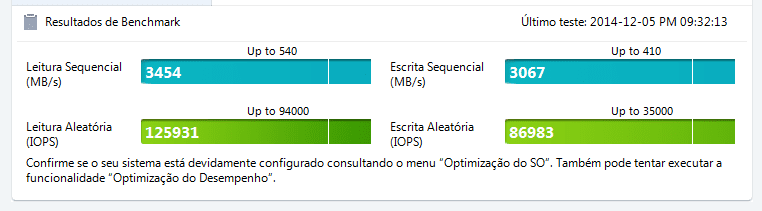
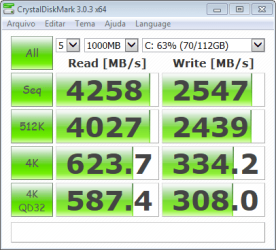
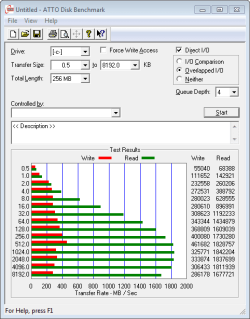
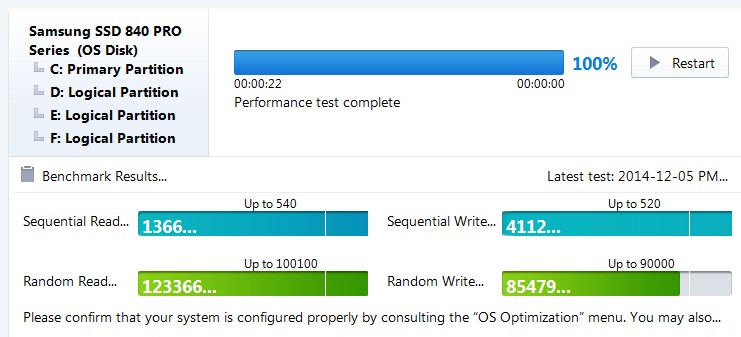
So after installing it and activate the rapid mode the performance got a bit more difficult to read :o

I installed Windows from scrach
 

Attachments

  • opt01.png
    opt01.png
    16.6 KB · Views: 1
  • opt02.png
    opt02.png
    45.2 KB · Views: 25
  • opt03.png
    opt03.png
    18.9 KB · Views: 25

My Computer

Computer type
PC/Desktop
Computer Manufacturer/Model Number
custom build
OS
Windows 7 Ultimate x64
CPU
Intel i5 760 2.8Ghz
Motherboard
Asus P7P55 WS
Memory
GSkill 12gb
Graphics Card(s)
4x Nvidia Quadro NVS 290
Hard Drives
OCZ Vertex2 3.5 ATA 120gb
Antivirus
ESET Internet Security
Browser
Chrome
What's hard to read?

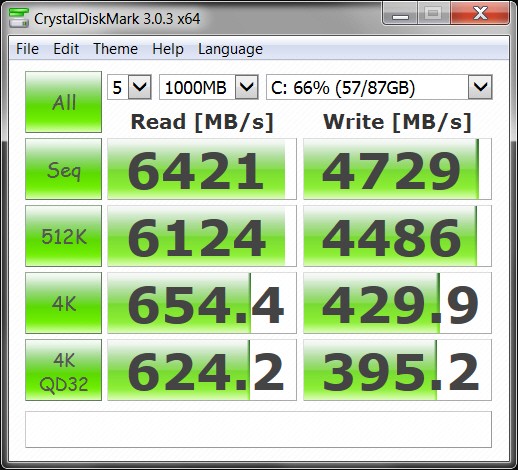
Your CrystalDiskMark test results are HUGELY IMPROVED from what your first screenshot showed. GIGANTIC improvement, I would say.

Here are the test results from my own Lenovo W530 (i7-3740QM, 8GB PC3-12800 800Mhz memory), with 512GB Samsung 840 Pro, on SATA-III controller:

ck0KES.jpg


My results are better than yours, but that's to be expected as my SSD is on a SATA-III controller, and it's for an 840 Pro rather than and 840 EVO. But I'd still say your results are excellent now that you have RapidMode enabled via Samsung Magician. It's using your GSkill RAM memory as intermediate cache buffer for the SSD.

Even more remarkable are your Magician Benchmark performance results for your 840 Evo. I don't quite understand how those numbers could be so high. Here's my own similar test results, which seem to be a fair amount lower than yours:

tkuwAV.jpg


I'd say now that you're running with Samsung Magician and RapidMode enabled, you're doing just fine even only through SATA-II connection. Quite surprising, actually.
 

My Computer

Computer type
PC/Desktop
Computer Manufacturer/Model Number
Home-built, two systems (1) and (2)
OS
Windows 7 Pro x64 (1), Win7 Pro X64 (2)
CPU
i5-3350p 3.1Ghz/6MB-cache (1); E8400 3.0Ghz/6MB-cache (2)
Motherboard
ASUS P8Z77-V Pro (1); ASUS P5Q3 (2)
Memory
8GB PC3-12800 DDR3 (1); 4GB PC3-10600 DDR3 (2)
Graphics Card(s)
ATI HD7750 (1), (see TV cards); ATI R7 250 (2)
Sound Card
Realtek ALC892 HD Audio (1); Realtek ALC1200 HD Audio (2)
Monitor(s) Displays
Eizo HD2441W LCD, Eizo S2433W (1); Eizo 24" S2433W (2)
Screen Resolution
1920x1200, 1920x1200 (1); 1920x1200 (2)
Hard Drives
(1) 1TB SATA-II (7200RPM), 2x2TB SATA-III (7200RPM), 250GB SATA-III (10000RPM) for OS; 2x2TB external USB 3.0

(2) 320GB SATA-II (7200RPM), 750GB SATA-II (7200RPM), 150GB SATA-II (10000RPM) for OS; 2TB external USB 3.0
PSU
Nesteq ECS-6001 600W (1); Nesteq ECS-5001 500W (2)
Case
Acousti-Case 360 (1) and (2)
Cooling
Noctua NH-U12P SE2 for CPU, 2x120mm case fans (1) and (2)
Keyboard
IBM PS/2 (1) and (2)
Mouse
Logitech MX Revolution wireless (1); Microsoft wired (2)
Internet Speed
100mbps down / 10mbps up
Antivirus
Microsoft Security Essentials; Malwarebyte Anti-Malware Pro
Browser
Firefox
Other Info
Ceton InfiniTV 4-tuner cablecard-enabled TV card as well as Hauppauge HVR-2250 OTA/ATSC 2-tuner TV card in (1), running under Win7 WMC
My initial dificulty was really believing what I was seeing.
Starting from a reading of 271mb to 425mb just by activating rapid mode was something amazing.

Many thanks for you advise in installing Magician.
 

My Computer

Computer type
PC/Desktop
Computer Manufacturer/Model Number
custom build
OS
Windows 7 Ultimate x64
CPU
Intel i5 760 2.8Ghz
Motherboard
Asus P7P55 WS
Memory
GSkill 12gb
Graphics Card(s)
4x Nvidia Quadro NVS 290
Hard Drives
OCZ Vertex2 3.5 ATA 120gb
Antivirus
ESET Internet Security
Browser
Chrome
Back
Top