Solved SSD, System restore and Backup questions

arleetel

New member
Local time
10:51 AM
Messages
20
Hello,
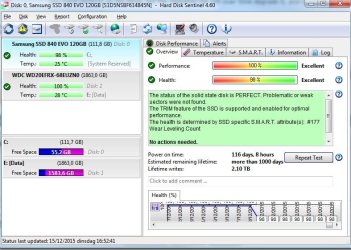
I did a system restore and the health of my SSD drive dropped to 98 %, performance is still 100 %.
According to HD sentinel there is no action needed.
Did have a search about that and it seems that system restore is the reason.

I have Easeus to do home installed, if I make an image of my system would it be enough to reset the whole thing on a new SSD if it happens to die, although all my software is installed on an internal HD, except for the Antivirus.

Now I suppose system restore in the case of an SSD is a bad thing to do, but if I have to restore through Easeus, will it degrade further ?

If it is, making all sorts of system backups does not make sense, not even a system repair disc.

Did a search and some people say that it’s OK to do system restore on an SSD, others advise against it, this is all very confusing.

Maybe next time a normal HD !

I would appreciate any comment about that subject and I thank you in advance.
 

My Computer My Computer

Computer type
PC/Desktop
Computer Manufacturer/Model Number
unknown
OS
Microsoft Windows 7 Home Premium 64-bit 7601 Multiprocessor Free Service Pack 1
CPU
Intel(R) Core(TM) i7-4770 CPU @ 3.40GHz
Motherboard
Gigabyte Technology Co., Ltd. Z87X-UD3H-CF
Memory
16,0 GB RAM 15,89 GB usable
Graphics Card(s)
Intel(R) HD Graphics 4600
Sound Card
Realtek High Definition Audio
Screen Resolution
1920x1080
Hard Drives
(1) Samsung SSD 840 EVO 120G SCSI Disk Device (2) WDC WD20EFRX-68EUZN0 SCSI Disk Device
Keyboard
Logitech
Mouse
Logitech
Antivirus
Kaspersky Internet Security 2016
Browser
Google Chrome
That makes no sense at all. System restore could not possibly do any kind of damage to the physical device, all it does is overwriting some configurations, the registry and some files with a backup copy, operations that are harmless to any HD. Do you have any reason to believe that's the root cause?

What you're seeing is a direct consequence of normal usage of pretty much any thing in life: things wear out after normal use for a period of time. It's very difficult to attribute those degradations to any concrete action you could perform on the thing, but the repeated use will over time degrade it, and is expectable to be so.

I would also question how reliable is that "98%" (or the 100% before it). Do you know exactly how the program reached to those numbers? How accurate are they really?
Ultimately, until the disk begins experiencing troubles (like bad sectors or some noticeable speed degradation), there is no reason to worry about. A backup is always a good thing to have handy, just in case, but I don't see any reason to be paranoid about it.
 

My Computer My Computer

Computer type
Laptop
Computer Manufacturer/Model Number
Toshiba Sattelite A665-S6092
OS
Windows 7 Ultimate x64
CPU
Intel Core i7-740QM
Memory
8 GB DDR3
Graphics Card(s)
NVIDIA GeForce 330GT
Screen Resolution
1366x768
Hard Drives
Samsung 840 SSD 500GB
1TB USB3 external HD
Cooling
Coolermaster Notepal U3 notebook cooling pad
Internet Speed
3mbps ASDL
Antivirus
ClamWin 0.98.7
Browser
Opera 12.17 x86 (main), Firefox 38 (sec), IE11 (last resort)
Hello,
Thanks for your reaction.
The reason I think/thought the SSD health degraded because of system restore is that after restarting it showed that way on HD sentinel.
After a google search I found out (maybe wrongly) that a system restore does that and should not be done
on an SSD.

This happened after a year and a half, a bit quick if you ask me.

I made an image of my system if the disk continues to degrade I will have to buy a new SSD and hope everything can be reset with not too much trouble.

Somebody told me this morning to update the firmware but that's a bit risky and God knows what will happen after that.

Yes, you're right I'm paranoid when there are computer problems.
 

Attachments

  • HD sentinel.JPG
    HD sentinel.JPG
    83.5 KB · Views: 0

My Computer My Computer

Computer type
PC/Desktop
Computer Manufacturer/Model Number
unknown
OS
Microsoft Windows 7 Home Premium 64-bit 7601 Multiprocessor Free Service Pack 1
CPU
Intel(R) Core(TM) i7-4770 CPU @ 3.40GHz
Motherboard
Gigabyte Technology Co., Ltd. Z87X-UD3H-CF
Memory
16,0 GB RAM 15,89 GB usable
Graphics Card(s)
Intel(R) HD Graphics 4600
Sound Card
Realtek High Definition Audio
Screen Resolution
1920x1080
Hard Drives
(1) Samsung SSD 840 EVO 120G SCSI Disk Device (2) WDC WD20EFRX-68EUZN0 SCSI Disk Device
Keyboard
Logitech
Mouse
Logitech
Antivirus
Kaspersky Internet Security 2016
Browser
Google Chrome
Dunno Hard Disk Sentinel but arleetel it also says your SSD is PERFECT so why fight that? IMO there is no need (whatsoever) to be concerned. HDS must have decided that the additional writes to the SSD from Restore aged it by 2%. I would only say that while yes a System Restore writes "everything" from the backup image to your SSD, you (hopefully) did it because you had to and you will do this very seldom in the future.

If Samsung says you need a firmware update then you should seriously consider doing it.
 

My Computer My Computer

Computer type
Laptop
Computer Manufacturer/Model Number
Dell Latitude E6540 Laptop
OS
Windows 7 Professional 64bit
CPU
Intel Core i7 4600M @ 2.90GHz
Motherboard
Dell Inc. 0CYT5F (SOCKET 0)
Memory
16.0GB Dual-Channel DDR3 @ 797MHz (11-11-11-28)
Graphics Card(s)
Intel HD Graphics 4600 (Dell) 2048MB ATI AMD Radeon HD 8790M
Sound Card
Realtek High Definition Audio
Monitor(s) Displays
HP ZR30w (2560x1600@60Hz)
Hard Drives
256GB LITEONIT LMT-256M6M-41 mm SATA (SSD)
1TB Samsung SSD 860 EVO mSATA SATA (SSD)
2TB USB 3.0 USB Device
115GB SanDisk Ultra Fit USB
Other Info
Multiple Dell E-Port Plus II Port Replicator/Docking Stations 0Y72NH USB 3.0 + 130W AC Adapters
@maxseven : Yep I had to do a system restore and I certainly will not do it again, I did not know this was affecting my SSD, next computer will be a normal HD that's for sure.

It was not Samsung that suggested to do a firmware update, just a friend.
I had a look and this seems quite complicated, not just an update click and install.

I'll try not to worry.

Thanks for your reaction.
 

My Computer My Computer

Computer type
PC/Desktop
Computer Manufacturer/Model Number
unknown
OS
Microsoft Windows 7 Home Premium 64-bit 7601 Multiprocessor Free Service Pack 1
CPU
Intel(R) Core(TM) i7-4770 CPU @ 3.40GHz
Motherboard
Gigabyte Technology Co., Ltd. Z87X-UD3H-CF
Memory
16,0 GB RAM 15,89 GB usable
Graphics Card(s)
Intel(R) HD Graphics 4600
Sound Card
Realtek High Definition Audio
Screen Resolution
1920x1080
Hard Drives
(1) Samsung SSD 840 EVO 120G SCSI Disk Device (2) WDC WD20EFRX-68EUZN0 SCSI Disk Device
Keyboard
Logitech
Mouse
Logitech
Antivirus
Kaspersky Internet Security 2016
Browser
Google Chrome
Don't worry! My first SSD was an Intel and I worried and made system tweaks to minimize writes to it and five years of every day use later it's still as good as new. A recent study showed You (meaning a normal person in a normal usage environment) can't "wear-out" an SSD.

Don't go back to Hard Disk Drives! Not unless you need Terabytes of storage!
 

My Computer My Computer

Computer type
Laptop
Computer Manufacturer/Model Number
Dell Latitude E6540 Laptop
OS
Windows 7 Professional 64bit
CPU
Intel Core i7 4600M @ 2.90GHz
Motherboard
Dell Inc. 0CYT5F (SOCKET 0)
Memory
16.0GB Dual-Channel DDR3 @ 797MHz (11-11-11-28)
Graphics Card(s)
Intel HD Graphics 4600 (Dell) 2048MB ATI AMD Radeon HD 8790M
Sound Card
Realtek High Definition Audio
Monitor(s) Displays
HP ZR30w (2560x1600@60Hz)
Hard Drives
256GB LITEONIT LMT-256M6M-41 mm SATA (SSD)
1TB Samsung SSD 860 EVO mSATA SATA (SSD)
2TB USB 3.0 USB Device
115GB SanDisk Ultra Fit USB
Other Info
Multiple Dell E-Port Plus II Port Replicator/Docking Stations 0Y72NH USB 3.0 + 130W AC Adapters
There was one study that claimed that SSDs last longer than HDDs. Unfortunately I lost the link.
 

My Computer My Computer

Computer Manufacturer/Model Number
HP, Dell, Gateway, Toshiba - 4 laptops and 2 desktops
OS
Vista, Windows7, Mint Mate, Zorin, Windows 8
CPU
from 1.6GHz Duo to i7
Monitor(s) Displays
2x HP w2207
Hard Drives
5x HDD, 7x SSD, 12x Externals
Keyboard
with trackball - no mices
Mouse
Trackball mice
Internet Speed
DSL 6000
@maxseven : I use the computer normally but for 6 to 8 hours/day
and for the storage there is the internal HD where all my programs are installed.

@whs : I hope you're right.
This is the first time I use an SSD though.
 

My Computer My Computer

Computer type
PC/Desktop
Computer Manufacturer/Model Number
unknown
OS
Microsoft Windows 7 Home Premium 64-bit 7601 Multiprocessor Free Service Pack 1
CPU
Intel(R) Core(TM) i7-4770 CPU @ 3.40GHz
Motherboard
Gigabyte Technology Co., Ltd. Z87X-UD3H-CF
Memory
16,0 GB RAM 15,89 GB usable
Graphics Card(s)
Intel(R) HD Graphics 4600
Sound Card
Realtek High Definition Audio
Screen Resolution
1920x1080
Hard Drives
(1) Samsung SSD 840 EVO 120G SCSI Disk Device (2) WDC WD20EFRX-68EUZN0 SCSI Disk Device
Keyboard
Logitech
Mouse
Logitech
Antivirus
Kaspersky Internet Security 2016
Browser
Google Chrome
Don't worry. I have nearly a dozen SSDs - some are very old. None has failed yet.
 

My Computer My Computer

Computer Manufacturer/Model Number
HP, Dell, Gateway, Toshiba - 4 laptops and 2 desktops
OS
Vista, Windows7, Mint Mate, Zorin, Windows 8
CPU
from 1.6GHz Duo to i7
Monitor(s) Displays
2x HP w2207
Hard Drives
5x HDD, 7x SSD, 12x Externals
Keyboard
with trackball - no mices
Mouse
Trackball mice
Internet Speed
DSL 6000
@maxseven : I use the computer normally but for 6 to 8 hours/day
and for the storage there is the internal HD where all my programs are installed.

@whs : I hope you're right.
This is the first time I use an SSD though.
You've confused me with this, and I can't tell from Post 1: your Programs are on an HDD? If yes, what is the SSD for? IMO your C: (startup) drive should be the SSD and it should have Windows and all the executable programs running off'n it. Your "spinner(s)" should be used for data and for keeping copies of your Image backup files, because yes if the SSD *were* to fail my experience has been anyway that it disappears in a flash unlike spinners which tend to degrade over time (and you can nurse them along).

In any case you are doing well to make image backups of your SSD, and while you Should be concerned if you have some sorts of problems that require you to Restore more than a couple times a year, you should Not be concerned about wear/tear on your SSD from the restore operations.
 

My Computer My Computer

Computer type
Laptop
Computer Manufacturer/Model Number
Dell Latitude E6540 Laptop
OS
Windows 7 Professional 64bit
CPU
Intel Core i7 4600M @ 2.90GHz
Motherboard
Dell Inc. 0CYT5F (SOCKET 0)
Memory
16.0GB Dual-Channel DDR3 @ 797MHz (11-11-11-28)
Graphics Card(s)
Intel HD Graphics 4600 (Dell) 2048MB ATI AMD Radeon HD 8790M
Sound Card
Realtek High Definition Audio
Monitor(s) Displays
HP ZR30w (2560x1600@60Hz)
Hard Drives
256GB LITEONIT LMT-256M6M-41 mm SATA (SSD)
1TB Samsung SSD 860 EVO mSATA SATA (SSD)
2TB USB 3.0 USB Device
115GB SanDisk Ultra Fit USB
Other Info
Multiple Dell E-Port Plus II Port Replicator/Docking Stations 0Y72NH USB 3.0 + 130W AC Adapters
@maxseven : yes the OS (startup) is on the SSD + the AV software.

All the executive programs like Auslogics, HDS, Bryce, PaintShop pro and many more are on the internal 2TB drive.
The SSD is only 126 GB.

The backup files are on an external HDD, so is the image.

I suppose this is the normal thing to do.
 

My Computer My Computer

Computer type
PC/Desktop
Computer Manufacturer/Model Number
unknown
OS
Microsoft Windows 7 Home Premium 64-bit 7601 Multiprocessor Free Service Pack 1
CPU
Intel(R) Core(TM) i7-4770 CPU @ 3.40GHz
Motherboard
Gigabyte Technology Co., Ltd. Z87X-UD3H-CF
Memory
16,0 GB RAM 15,89 GB usable
Graphics Card(s)
Intel(R) HD Graphics 4600
Sound Card
Realtek High Definition Audio
Screen Resolution
1920x1080
Hard Drives
(1) Samsung SSD 840 EVO 120G SCSI Disk Device (2) WDC WD20EFRX-68EUZN0 SCSI Disk Device
Keyboard
Logitech
Mouse
Logitech
Antivirus
Kaspersky Internet Security 2016
Browser
Google Chrome
@maxseven : yes the OS (startup) is on the SSD + the AV software.

All the executive programs like Auslogics, HDS, Bryce, PaintShop pro and many more are on the internal 2TB drive.
The SSD is only 126 GB.

The backup files are on an external HDD, so is the image.

I suppose this is the normal thing to do.
Yes backups are best on the external drive, so electrical or other problems with the PC hardware do not affect it.

But normally programs should be on the SSD with the OS, to take advantage of the improved access times (speed!).
 

My Computer My Computer

Computer type
Laptop
Computer Manufacturer/Model Number
Dell Latitude E6540 Laptop
OS
Windows 7 Professional 64bit
CPU
Intel Core i7 4600M @ 2.90GHz
Motherboard
Dell Inc. 0CYT5F (SOCKET 0)
Memory
16.0GB Dual-Channel DDR3 @ 797MHz (11-11-11-28)
Graphics Card(s)
Intel HD Graphics 4600 (Dell) 2048MB ATI AMD Radeon HD 8790M
Sound Card
Realtek High Definition Audio
Monitor(s) Displays
HP ZR30w (2560x1600@60Hz)
Hard Drives
256GB LITEONIT LMT-256M6M-41 mm SATA (SSD)
1TB Samsung SSD 860 EVO mSATA SATA (SSD)
2TB USB 3.0 USB Device
115GB SanDisk Ultra Fit USB
Other Info
Multiple Dell E-Port Plus II Port Replicator/Docking Stations 0Y72NH USB 3.0 + 130W AC Adapters
@maxseven : thanks for all you reactions.

You're probably right about all programs installed on the SSD, but in my case it's impossible (too small), maybe next time a bigger one or just a normal Ultra Durable HDD like on my computer with windows 10, which is starting quicker than windows 7 on a normal HDD. Yep I have a few computers to play with, just in case.....

I think we can say questions have been answered.

I'll consider it solved.
 

My Computer My Computer

Computer type
PC/Desktop
Computer Manufacturer/Model Number
unknown
OS
Microsoft Windows 7 Home Premium 64-bit 7601 Multiprocessor Free Service Pack 1
CPU
Intel(R) Core(TM) i7-4770 CPU @ 3.40GHz
Motherboard
Gigabyte Technology Co., Ltd. Z87X-UD3H-CF
Memory
16,0 GB RAM 15,89 GB usable
Graphics Card(s)
Intel(R) HD Graphics 4600
Sound Card
Realtek High Definition Audio
Screen Resolution
1920x1080
Hard Drives
(1) Samsung SSD 840 EVO 120G SCSI Disk Device (2) WDC WD20EFRX-68EUZN0 SCSI Disk Device
Keyboard
Logitech
Mouse
Logitech
Antivirus
Kaspersky Internet Security 2016
Browser
Google Chrome
Back
Top