SSD wont boot into Windows 7?

allday165

New member
Local time
11:13 AM
Messages
16
Had this SSD for 6 months (OCZ Vertex 4). I used it as my boot drive, with a secondary hard drive unharmed. Woke up one morning to use it and it wont boot. I get the common message "Reboot and select proper boot device", unable to load Windows 7 after the BIOS. The SSD shows up in the BIOS and Device Manager, doesn't not show up in Windows. I tried a bunch of things, installing Windows 7 on my extra hard drive, but it won't show up as a secondary/data drive.

Now, I understand there are a lot of threads with this problem. I just want to know if there's a way I can save two things...my programs and my bookmarks on Firefox. All I would need is a screenshot of my start menu and bookmarks, which I feel guilt for not backing up, but I can't access the drive. Everything else is backed up.

If there is a way I can install Windows on the SSD without losing my bookmarks and programs, or extract the data somehow, I would appreciate it. Thank you.
 

My Computer My Computer

OS
Windows 7 Home Premium 64bit
CPU
AMD Phenom x4 965 BE @ 3.5
Motherboard
Asus M4A77TD
Memory
4 GB G.Skill Ripjaws DDR3-1600
Graphics Card(s)
Asus ATI Radeon HD4870
Hard Drives
128 GB OCZ Vertex 4 (Boot)
128 GB OCZ Agility 4 (Data #1)
1 TB Samsung Spinpoint 7200 RPM (Data #2, not attached)
320 GB Seagate Barracuda 5400RPM (Back up, not attached)
PSU
OCZ 550Fifty
Case
Antec Three Hundred
Cooling
4x90mm, Cooler Master Hyper 212
My guess is that possibly you installed or windows update installed and AHCI driver that maybe wasnt enabled before or something in your bios just got changed up,, have you reset your bios to defaults?
IF that doesnt work try this tutorial by BFK
http://www.sevenforums.com/tutorials/61869-ahci-enable-windows-7-vista-32.html

EDIT: Ooops i may not have read your post correctly,,, have you tried to use F12 or whatever F key your board requires to select your boot drive? if you tell it to boot directly from your SSD drive maybe that will get you in
 

My Computer My Computer

Computer type
PC/Desktop
Computer Manufacturer/Model Number
JRockZ
OS
Win 7 64 Ultimate
CPU
AMD 8350 Bulldozer 4ghz
Motherboard
Asus M5a97 R2
Memory
6gb
Graphics Card(s)
ATI Radeon HD 5770 X 2
Sound Card
Board
Monitor(s) Displays
Dual Gateway 19" and 32" TV 3 displays at once :D
Screen Resolution
1440X900
Hard Drives
OCZ Agility SSD Patriot Blaze 120
PSU
750 Watt Thermaltake Tough Power
Case
Diablotek EVO Mid Tower Case CPA-6170 - 8X 120mm case fans
Cooling
Corsair Liquid Cooled
Antivirus
NAV
Browser
Always IE
F8 shows the boot menu, TAB is for POST. It shows the error message right after I select the SSD. Same thing with POST.
 

My Computer My Computer

OS
Windows 7 Home Premium 64bit
CPU
AMD Phenom x4 965 BE @ 3.5
Motherboard
Asus M4A77TD
Memory
4 GB G.Skill Ripjaws DDR3-1600
Graphics Card(s)
Asus ATI Radeon HD4870
Hard Drives
128 GB OCZ Vertex 4 (Boot)
128 GB OCZ Agility 4 (Data #1)
1 TB Samsung Spinpoint 7200 RPM (Data #2, not attached)
320 GB Seagate Barracuda 5400RPM (Back up, not attached)
PSU
OCZ 550Fifty
Case
Antec Three Hundred
Cooling
4x90mm, Cooler Master Hyper 212
Get a Boot CD with something like Ubuntu on it and post a screen shot of a drive and partition map of your drives.

I suspect you installed Windows on the SSD and left the original drive in the system when doing that. That may cause the System Reserve partition to be placed on the second drive and it that drive goes bad the system won't boot.

You could also try disconnecting the second drive and then doing a Repair install, or a new install over the top of the current install on the SSD. That may place the System Reserve partition on the SSD.

Then again the SSD may have failed.

When you go to install windows on any drive Disconnect ALL Other drives.
 

My Computer My Computer

OS
7 x64
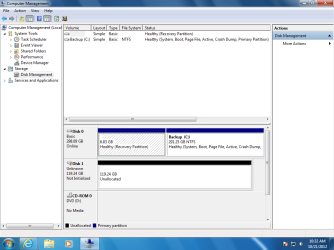
Is this what you mean as partition map? Disk 0 is my 320 GB Barracuda that I have as my back up drive not attached to my computer. I installed Win7 on it because I could just put the data from my 1TB Spinpoint should I lose any data, but I didn't lose any. Disk 1 is my Vertex 4 SSD.
 

Attachments

  • partition.png
    partition.png
    39.6 KB · Views: 28

My Computer My Computer

OS
Windows 7 Home Premium 64bit
CPU
AMD Phenom x4 965 BE @ 3.5
Motherboard
Asus M4A77TD
Memory
4 GB G.Skill Ripjaws DDR3-1600
Graphics Card(s)
Asus ATI Radeon HD4870
Hard Drives
128 GB OCZ Vertex 4 (Boot)
128 GB OCZ Agility 4 (Data #1)
1 TB Samsung Spinpoint 7200 RPM (Data #2, not attached)
320 GB Seagate Barracuda 5400RPM (Back up, not attached)
PSU
OCZ 550Fifty
Case
Antec Three Hundred
Cooling
4x90mm, Cooler Master Hyper 212
Is this what you mean as partition map? Disk 0 is my 320 GB Barracuda that I have as my back up drive not attached to my computer. I installed Win7 on it because I could just put the data from my 1TB Spinpoint should I lose any data, but I didn't lose any. Disk 1 is my Vertex 4 SSD.


It looks from your Disk Management that there are no files on your SSD. It appears the boot drive is Disk 0. Have you tried booting with the SSD unplugged from the motherboard and only Disk 0 plugged in. From what I see it should boot doing it that way. You will need to go into your Bios and make sure that the 298 GB is the disk that boots first. If it does I can lead you to transferring things to the SSD.
 
Last edited:

My Computer My Computer

Computer type
PC/Desktop
Computer Manufacturer/Model Number
Custom Build
OS
Windows 7 Home Premium 32-Bit - Build 7600 SP1
CPU
Intel Core i3-2120 3.30Ghz
Motherboard
Asus P8Z68-V LX Intel Z68 Socket H2 ATX
Memory
Kingston 4 GB DDR3 1333 mhz
Graphics Card(s)
AMD Radeon HD6670
Sound Card
Sound Blaster Audigy SE 24-Bit
Monitor(s) Displays
Asus VE228
Screen Resolution
1440 X 900
Hard Drives
OCZ Vertex 3 120 GB Sata 3 SSD ==
Kingston SH103/S3 120 G Hyper X 120 GB SSD ==
Western Digital 500 GB Caviar Green 7200 RPM ==
PSU
Corsair CX600M == 600 Watt
Case
NZXT Apollo - Silver with Clear Side Panel
Cooling
Three 120 mm Fans
Keyboard
Microsoft Natural 4000
Mouse
Microsoft Custom Optical 3000
Internet Speed
AT&T Fiber Optic Wireless Network
Antivirus
Microsoft Security Essentials
Browser
Chrome
Other Info
120 mm Blue LED Fan -- Three Blue LED Lazer Light Sticks
Yes that is what I meant. I didn't think you could boot into Windows, at least that is what I got from an earlier post of yours.

In any event if the SSD was working before it certainly isn't now as it is 119GBs of Unallocated space. Might be that drive has failed or you somehow inadvertently wiped that drive.

If you try to install Windows on it be sure to disconnect the other drive. Otherwise you will have a slight mess on your hands.
 

My Computer My Computer

OS
7 x64
Disk 0 is my 320 GB Barracuda. I installed Win7 on it because I needed a boot drive (my ssd won't boot), so I could come on the forum and post. My 1TB is a moot point. It has all my data on it and no OS, except for programs and bookmarks. The only reason I mentioned it was because I can always take the data on the 1TB and transfer it to the 320 GB, considering I need to wipe the 320 GB clean.
 

My Computer My Computer

OS
Windows 7 Home Premium 64bit
CPU
AMD Phenom x4 965 BE @ 3.5
Motherboard
Asus M4A77TD
Memory
4 GB G.Skill Ripjaws DDR3-1600
Graphics Card(s)
Asus ATI Radeon HD4870
Hard Drives
128 GB OCZ Vertex 4 (Boot)
128 GB OCZ Agility 4 (Data #1)
1 TB Samsung Spinpoint 7200 RPM (Data #2, not attached)
320 GB Seagate Barracuda 5400RPM (Back up, not attached)
PSU
OCZ 550Fifty
Case
Antec Three Hundred
Cooling
4x90mm, Cooler Master Hyper 212
Ok, so I guess all the data is gone already? Is there anyway to recover it? I don't trust this drive anymore, so I really don't want to continue using it in the future. I guess I'll call OCZ or something, because I think there is a 1 year warranty on it.
 

My Computer My Computer

OS
Windows 7 Home Premium 64bit
CPU
AMD Phenom x4 965 BE @ 3.5
Motherboard
Asus M4A77TD
Memory
4 GB G.Skill Ripjaws DDR3-1600
Graphics Card(s)
Asus ATI Radeon HD4870
Hard Drives
128 GB OCZ Vertex 4 (Boot)
128 GB OCZ Agility 4 (Data #1)
1 TB Samsung Spinpoint 7200 RPM (Data #2, not attached)
320 GB Seagate Barracuda 5400RPM (Back up, not attached)
PSU
OCZ 550Fifty
Case
Antec Three Hundred
Cooling
4x90mm, Cooler Master Hyper 212
Ok, so I guess all the data is gone already? Is there anyway to recover it? I don't trust this drive anymore, so I really don't want to continue using it in the future. I guess I'll call OCZ or something, because I think there is a 1 year warranty on it.

The SSD is all unallocated space, ie blank. If you have a Windows 7 disk, you give it a try installing again on the SSD. You can find out that way if the SSD is good.
 

My Computer My Computer

Computer type
PC/Desktop
Computer Manufacturer/Model Number
Custom Build
OS
Windows 7 Home Premium 32-Bit - Build 7600 SP1
CPU
Intel Core i3-2120 3.30Ghz
Motherboard
Asus P8Z68-V LX Intel Z68 Socket H2 ATX
Memory
Kingston 4 GB DDR3 1333 mhz
Graphics Card(s)
AMD Radeon HD6670
Sound Card
Sound Blaster Audigy SE 24-Bit
Monitor(s) Displays
Asus VE228
Screen Resolution
1440 X 900
Hard Drives
OCZ Vertex 3 120 GB Sata 3 SSD ==
Kingston SH103/S3 120 G Hyper X 120 GB SSD ==
Western Digital 500 GB Caviar Green 7200 RPM ==
PSU
Corsair CX600M == 600 Watt
Case
NZXT Apollo - Silver with Clear Side Panel
Cooling
Three 120 mm Fans
Keyboard
Microsoft Natural 4000
Mouse
Microsoft Custom Optical 3000
Internet Speed
AT&T Fiber Optic Wireless Network
Antivirus
Microsoft Security Essentials
Browser
Chrome
Other Info
120 mm Blue LED Fan -- Three Blue LED Lazer Light Sticks

My Computer My Computer

Computer Manufacturer/Model Number
HP, Dell, Gateway, Toshiba - 4 laptops and 2 desktops
OS
Vista, Windows7, Mint Mate, Zorin, Windows 8
CPU
from 1.6GHz Duo to i7
Monitor(s) Displays
2x HP w2207
Hard Drives
5x HDD, 7x SSD, 12x Externals
Keyboard
with trackball - no mices
Mouse
Trackball mice
Internet Speed
DSL 6000
Back
Top