Stand by and hibernate at the same time?

Burgurne

Danish Viking
Member
VIP
Local time
3:53 AM
Messages
134
Location
Denmark
I can't see how I can get Hibernate AND Stand By as a chiose in the "shut down" menu. If Hibernate is active, I can select Hibernate, but not Stand By, and if Hibernate is not active (powercfg /-h), then I can select Stand By.

How do I change the powerscheme, so both are selectable at the same time? :o
 

My Computer My Computer

Computer type
PC/Desktop
Computer Manufacturer/Model Number
homebrewed
OS
Windows 7 Ultimate x64 retail
CPU
Core i5 3570K @ 4,4Ghz
Motherboard
MSI Z77A GD65
Memory
16Gbyte Corsair C9 1866mhz
Graphics Card(s)
MSI Lightning GTX 770
Sound Card
Auzentech
Monitor(s) Displays
BenQ 24"
Screen Resolution
1920x1200
Hard Drives
Samsung 840 EVO SSD, Samsung SSD 830 256Gbyte, Seagate 3Tbyte HDD, WD 4 Tbyte HDD.
PSU
Zahlmann 850HP
Case
Corsair Carbide 500R
Keyboard
G15 logitech
Mouse
Logitech Laser MX1000
Internet Speed
60/60
Antivirus
Bitdefender
Browser
Chrome
There is not any way... Hibernate is for laptops, stand-by is more like sleep. Both are available on a laptop, but hibernate is not available for desktops.

~Lordbob
 

My Computer My Computer

Computer Manufacturer/Model Number
Hera
OS
Windows 7 Ultimate x64, Mint 9
CPU
Intel i5-2500k
Motherboard
ASUS P8P67 Pro
Memory
2x 4Gb Corsair VENGEANCE DDR3-1600
Graphics Card(s)
NVidia GeForce N260GTX Twin Frozr
Sound Card
Realtek HD OnBoard Audio
Monitor(s) Displays
ASUS 24" Monitor
Screen Resolution
1920x1080
Hard Drives
G.SKILL Phoenix Series 60GB SATA II MLC Internal Solid State Drive (SSD)
SAMSUNG Spinpoint F3R 1TB 7200 RPM 32MB Cache SATA II
PSU
Cooler Master Real Power Pro 750W
Case
Cooler Master Haf 932
Cooling
Fans
Keyboard
Razer Tarantula
Mouse
Razer Lachesis
Internet Speed
not fast enough
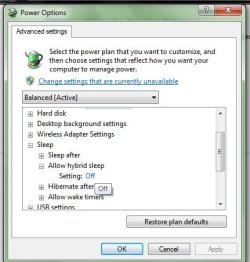
Yes you can, this is mine and it has both Sleep and Hibernate in the Shutdown Menu.

Go to the Power Options by typing "Power" in the Start Menu and Select Power Options from the Search Results and Go to the "Edit Power Plan Window"then Select "Change Advanced Power..." .
Then in the New Window,
"Sleep" > "Allow Hybrid Sleep" > Seeting and select "OFF"

Now you can sleep and Hibernate. Even in your Desktop :D
 

Attachments

  • ss.jpg
    ss.jpg
    31.1 KB · Views: 19
  • s.jpg
    s.jpg
    7.7 KB · Views: 3,147

My Computer My Computer

Computer Manufacturer/Model Number
Intel
OS
Windows 7 Professional, Windows XP
CPU
Intel Dual Core
Motherboard
Intel D945GCNL
Memory
2GB
Graphics Card(s)
Intel 82945G Express
Monitor(s) Displays
HP Pavilion 1859m
Screen Resolution
1366x768
Hard Drives
Samsung 250GB SATA
Maxtor 80GB SATA
Case
High Tower
Cooling
Air
Keyboard
Delux
Mouse
A4Tech
Internet Speed
512kbps downlink and 128kbps uplink :(
I really like Hybrid Sleep, it saved me more then once. When my PC was sleeping I lost power. Normally that means the computer will boot as if you cut the power to the PC before shutting down. I was saved by Hybrid Sleep because the PC will save a hibernation file before going to sleep and just in case you lose power (as I did), the PC will boot from the hibernation because you lost power during sleep.

:D
 

My Computer My Computer

OS
Win7 RTM
Back
Top