
Standard VGA Adapter, Sigh

jvp1

New member
Local time
9:16 PM
Messages
4
Location
Surrey, BC
Hi everyone,

I cruised around the forum trying to find a solution that worked for me but I couldn't. Here's the situation:

I formatted this computer (was running Vista) and installed 7 (x64). But now 7 isn't detecting my video card properly.

I've tried running EVEREST and so on, but haven't gained any hints that way. It's an onboard videocard and I can't make out any identifying characteristics that have been helpful so far. I've tried updating the motherboard but obviously that wasn't any help.

Now, I originally updated this beast from XP to Vista and recall having a similar problem. Somehow I figured out the card required a driver from Chrome (Welcome to S3 Graphics - Create world-class graphics and video cores).

I tried installing the 500 series driver for 7x64 but it doesn't seem to have taken. I fiddled with device manager but it is refusing to change from Standard VGA Adapter. I tried installing the 400 series but it gave me a hardware error which suggests I was on the money for it being 500.

Is there a way to force device manager to accept the 500 series driver? It didn't give me an error or anything and I'm pretty sure it's what I want -- positive, even.

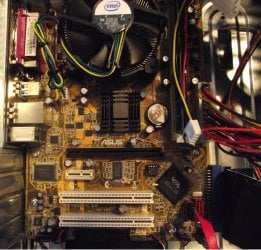
I've included a pic of the inside of the computer (kind of useless?) and can attach an EVEREST diagnosis if anyone likes.

thanks,
James
 

Attachments
  • DSCF1257.jpg
    DSCF1257.jpg
    351.3 KB · Views: 12
Last edited:

My Computer My Computer

OS
Windows 7

My Computer My Computer

Computer type
PC/Desktop
Computer Manufacturer/Model Number
Self Built
OS
Windows 7 Ultimate 64bit
CPU
AMD Phenom Quad core 9950 black edition
Motherboard
Gigabyte
Memory
16Gb
Graphics Card(s)
2x XFX Radeon 5850
Sound Card
PCI Express X-Fi Titanium / Logitech G35
Monitor(s) Displays
2x HP 2410i
Screen Resolution
1920x1080
Hard Drives
2x 500Gb Seagate
1x 300Gb Seagate
1x 1Tb Seagate
2x 1Tb Hitatchi
PSU
Jean Tech Storm 700W
Case
Cooler Master COSMOS S
Cooling
Akasa Evo Blue Pro
Keyboard
Logitech G15
Mouse
Mad Catz M.M.O. 7
Internet Speed
12mb
Hi everyone,

I cruised around the forum trying to find a solution that worked for me but I couldn't. Here's the situation:

I formatted this computer (was running Vista) and installed 7 (x64). But now 7 isn't detecting my video card properly.

I've tried running EVEREST and so on, but haven't gained any hints that way. It's an onboard videocard and I can't make out any identifying characteristics that have been helpful so far. I've tried updating the motherboard but obviously that wasn't any help.

Now, I originally updated this beast from XP to Vista and recall having a similar problem. Somehow I figured out the card required a driver from Chrome (Welcome to S3 Graphics - Create world-class graphics and video cores).

I tried installing the 500 series driver for 7x64 but it doesn't seem to have taken. I fiddled with device manager but it is refusing to change from Standard VGA Adapter. I tried installing the 400 series but it gave me a hardware error which suggests I was on the money for it being 500.

Is there a way to force device manager to accept the 500 series driver? It didn't give me an error or anything and I'm pretty sure it's what I want -- positive, even.

I've included a pic of the inside of the computer (kind of useless?) and can attach an EVEREST diagnosis if anyone likes.

thanks,
James

In your forum user interface, there is a section for entering your system specifications;


This makes it much easier for anybody giving you advice to find out what you are using.

If you fill those specs in, then somebody might be able to help you.

You can use Everest, or Speccy ;

Speccy - System Information - Free Download

to find your system specs.

Regards....Mike Connor
 

My Computer My Computer

OS
Several, including Windows 7 x64 Ultimate
PooMan: THANK YOU. I've been to the site before, but every time I selected my OS as "Other" instead of Windows 7. I downloaded the Vista x64 drivers, ran in compatability mode, and now everything's perfect. I don't know what I was thinking or doing beforehand because the second I tried Windows Vista the whole plan kind of formed in my head. Thanks again:)

Mike: The computer I'm troubleshooting isn't my main computer so I didn't see much need for that. Thanks for the advice though, I'll be sure to update my profile with my main computer's specs soon (or before the next problem I need help with) -- thanks.
 

My Computer My Computer

OS
Windows 7
PooMan: THANK YOU. I've been to the site before, but every time I selected my OS as "Other" instead of Windows 7. I downloaded the Vista x64 drivers, ran in compatability mode, and now everything's perfect. I don't know what I was thinking or doing beforehand because the second I tried Windows Vista the whole plan kind of formed in my head. Thanks again:)

Mike: The computer I'm troubleshooting isn't my main computer so I didn't see much need for that. Thanks for the advice though, I'll be sure to update my profile with my main computer's specs soon (or before the next problem I need help with) -- thanks.

We only need to see the specs for the one you are troubleshooting! :)

Nice to hear you got it sorted out.

Regards....Mike Connor
 

My Computer My Computer

OS
Several, including Windows 7 x64 Ultimate
i have that same problem to, i was running windows vista and formatted to win 7 ultimate 64bit,

PCI\VEN_10DE&DEV_0427&SUBSYS_02091028&REV_A1
PCI\VEN_10DE&DEV_0427&SUBSYS_02091028
PCI\VEN_10DE&DEV_0427&CC_030000
PCI\VEN_10DE&DEV_0427&CC_0300
 

My Computer My Computer

Computer Manufacturer/Model Number
DELL
OS
windows 7 ultimate x64
Back
Top