Start Button has an awkward look and I cannot change it.

Nyello

New member
Local time
7:42 AM
Messages
4
So I've googled this problem about 1,200 times, but to no avail. I haven't found someone with this problem at all.

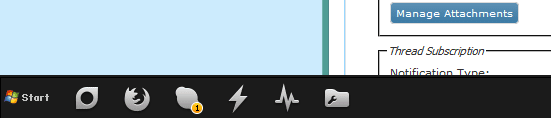
My Start Button looks weird. Here is an image:


b20e8b58e8.png

This is obviously not the default, nor is it a custom one.

This happened after I had downloaded a custom Windows 7 theme. For reference of the theme I'm using

I've tried changing it again with multiple programs (Customizer God, Windows 7 Start Orb changer) and I've even attemped to do it manually, using this.
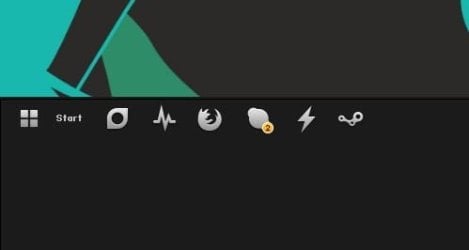
Awkwardly enough, inside of those programs (and even explorer.exe) it shows the custom orbs. However, it does not project onto the actual orb on my taskbar.

Here is an image of that:
223f43ff5e.png

The text is hard to see, but the point is visible.

I've had this problem for months, but I am just now looking to get help. It's a tiny nuisance that I would love to get fixed.


Additional Information:
Windows 7 Home Premium x64
I'm not using Aero

Hoping I put this thread into the correct section, thanks in advance!
 

My Computer My Computer

At a glance

Windows 7 Home Premium x64Intel i5-2320 CPU @ 3.00GHz14GB RAMAMD HD 7700 Series GPU
Computer type
PC/Desktop
Computer Manufacturer/Model Number
Custom
OS
Windows 7 Home Premium x64
CPU
Intel i5-2320 CPU @ 3.00GHz
Motherboard
ASRock Pro z75
Memory
14GB RAM
Graphics Card(s)
AMD HD 7700 Series GPU
Sound Card
ASUS Xonar DG
Hard Drives
Samsung EVO 840 240GB
1TB HDD
Case
Corsair Carbide Series 200R Black Steel
Antivirus
Microsoft Security Essentiasl
Browser
Firefox
for some reason i cannot see the images, can you please upload it as attachments
 

My Computer My Computer

At a glance

Windows 7 Enterprise x64Intel i5 Dual Core
Computer type
Laptop
Computer Manufacturer/Model Number
Dell
OS
Windows 7 Enterprise x64
CPU
Intel i5 Dual Core
Screen Resolution
1366x768
Keyboard
built in Keyboard
Antivirus
System Centre Endpoint Protection
Browser
Google Chrome, Firefox and Internet Explorer
Here:
 

Attachments

  • b20e8b58e8.png
    b20e8b58e8.png
    3.7 KB · Views: 35
  • 223f43ff5e.png
    223f43ff5e.png
    15.6 KB · Views: 2

My Computer My Computer

At a glance

Windows 7 Home Premium x64Intel i5-2320 CPU @ 3.00GHz14GB RAMAMD HD 7700 Series GPU
Computer type
PC/Desktop
Computer Manufacturer/Model Number
Custom
OS
Windows 7 Home Premium x64
CPU
Intel i5-2320 CPU @ 3.00GHz
Motherboard
ASRock Pro z75
Memory
14GB RAM
Graphics Card(s)
AMD HD 7700 Series GPU
Sound Card
ASUS Xonar DG
Hard Drives
Samsung EVO 840 240GB
1TB HDD
Case
Corsair Carbide Series 200R Black Steel
Antivirus
Microsoft Security Essentiasl
Browser
Firefox
I have a similar situation, but I like the Start button and want to recreate it.

At work, some of our computers have a start button that's different than the standard. I think it looks nice and want to re-create it...the problem is that this new look is NOT coming from explorer.exe, it still has the standard looking orb, and I can't figure out how this is being customized without explorer.exe

And windows IS using explorer.exe as the shell
 

My Computer My Computer

At a glance

Windows 7 Enterprise x64 & x32
Computer type
PC/Desktop
OS
Windows 7 Enterprise x64 & x32
looks like the classic start button, possibly a broken theme? try annother theme and see if it continues
 

My Computer My Computer

At a glance

Windows 7 Enterprise x64Intel i5 Dual Core
Computer type
Laptop
Computer Manufacturer/Model Number
Dell
OS
Windows 7 Enterprise x64
CPU
Intel i5 Dual Core
Screen Resolution
1366x768
Keyboard
built in Keyboard
Antivirus
System Centre Endpoint Protection
Browser
Google Chrome, Firefox and Internet Explorer
Okay, weird.
It works on ALL of the Aero themes, and the "Windows 7 Basic" theme.
However, all of the other Basic & High Contrast themes, and my 3 other custom themes are broken.

I've reinstalled this theme a few times, and nobody on the page where I've gotten the theme from has had this problem.
 

My Computer My Computer

At a glance

Windows 7 Home Premium x64Intel i5-2320 CPU @ 3.00GHz14GB RAMAMD HD 7700 Series GPU
Computer type
PC/Desktop
Computer Manufacturer/Model Number
Custom
OS
Windows 7 Home Premium x64
CPU
Intel i5-2320 CPU @ 3.00GHz
Motherboard
ASRock Pro z75
Memory
14GB RAM
Graphics Card(s)
AMD HD 7700 Series GPU
Sound Card
ASUS Xonar DG
Hard Drives
Samsung EVO 840 240GB
1TB HDD
Case
Corsair Carbide Series 200R Black Steel
Antivirus
Microsoft Security Essentiasl
Browser
Firefox
Okay! Development!

I've figured out where the Windows Icon is coming from.
C:\Windows\Branding\ShellBrd\ShellBrd.dll

I changed the Image in it with the .bmp you would usually use to change a start orb, and it DID work. Kind of. You can see it in the attachment.

So, it stretched my taskbar down a large amount, and kept the area where "start" is written. Not cool.
I was smart enough to make a backup and fix it quickly. How do I solve this issue? Would I have to force this theme to use explorer.exe for its orb somehow? I wouldn't mind finding a program to open up the theme itself if that can fix it.

(Also, the icon wasn't animated when I hovered or clicked on it. Presumably because ShellBrd.dll isn't meant for animated orbs.)

P.S: I wouldn't mind enabling Aero for the theme. I kind of dislike a few aspects of Aero, but as long as it doesn't affect the theme itself, (other than the orb, obviously.) I'll change it. However, I do not know if the google results I got for enabling aero force it onto the current theme or just allow you to use it. Would like some insight.
 

Attachments

  • 9d4b9f340f.jpg
    9d4b9f340f.jpg
    5.2 KB · Views: 41
Last edited:

My Computer My Computer

At a glance

Windows 7 Home Premium x64Intel i5-2320 CPU @ 3.00GHz14GB RAMAMD HD 7700 Series GPU
Computer type
PC/Desktop
Computer Manufacturer/Model Number
Custom
OS
Windows 7 Home Premium x64
CPU
Intel i5-2320 CPU @ 3.00GHz
Motherboard
ASRock Pro z75
Memory
14GB RAM
Graphics Card(s)
AMD HD 7700 Series GPU
Sound Card
ASUS Xonar DG
Hard Drives
Samsung EVO 840 240GB
1TB HDD
Case
Corsair Carbide Series 200R Black Steel
Antivirus
Microsoft Security Essentiasl
Browser
Firefox
Back
Top