Solved .7Z Associated with Windows Explorer and I cannot change it.

Disciple Dark

New member
Local time
9:40 PM
Messages
5
Hello and thank you for taking a look at my post. :confused:

I am using Windows 7 Prof 64 bit
I unintentionally set .7Z files to open with windows explorer.

I have tried everything on the forums I could find including running 7 zip as admin and setting its associations which is already set to open .7Z files.

However the Icon over the .7Z is still explorer and when I attempt to set default device it is grayed out, I can not change it. I have tried default programs associations and I am at my wits end :cry:

When I open the file with a double click it just opens like 50 explorers, I can right click and open with 7zip but would like to set the default to be 7zip .

Any info is most welcome since the info I found was of no help.

Thank you again ;)
 

My Computer My Computer

At a glance

Windows 7 Proffesional 64 bit
Computer type
PC/Desktop
Computer Manufacturer/Model Number
custom build
OS
Windows 7 Proffesional 64 bit
Disciple Dark, Welcome to the forums. How long has this been happening? Have you tried a system restore or repair install?
 

My Computer My Computer

At a glance

Windows 10 Pro X64Intel(R) Core(TM) i5-3570K CPU OC@ 4.5GHZ Turbo8.00 GB DDR3 1600MhzMSI Gaming X GTX 1070
Computer type
PC/Desktop
Computer Manufacturer/Model Number
Dude Build
OS
Windows 10 Pro X64
CPU
Intel(R) Core(TM) i5-3570K CPU OC@ 4.5GHZ Turbo
Motherboard
MSI Z77A-G45 Gaming
Memory
8.00 GB DDR3 1600Mhz
Graphics Card(s)
MSI Gaming X GTX 1070
Sound Card
Realtek High Definition
Monitor(s) Displays
Dell S23O9W, HP L1710
Screen Resolution
DELL-1920 x 1080 HP-1280 x1024
Hard Drives
Crucial m4 256 SSD, WD 7200RPM 500GB WD 1TB
PSU
Seasonic X650 GOLD
Case
Zalman Z12
Cooling
Antec Kuhler 920
Keyboard
Logitech
Mouse
MSI DS100 Interceptor
Internet Speed
50 down and 5 up
Antivirus
MSE
Browser
Chrome, IE 11
Other Info
Logitech X-620 Speakers
Uninstall 7Zip.

This should return the default to Explorer's own Extraction tool.

If not then how exactly did you set 7Zip as any kind of default for Explorer? When and where?

Dude's suggestion to System Restore may be your only resort besides a Clean Reinstall but if you've ruined the OS in other ways it may be best if you get one perfect install now you can save as an image for recovery purposes. Stick with the tools and methods in the blue link to get and keep it perfect.
 
Hello,
Thank you for the welcome :)

I will try the system restore if needed, what happened is I was setting the .7z file to be opened default with 7 Zip, as I navigated to the exe I twitched while sneezing and selected explorer lol no joke of all the dumb luck, in any case the only problem is that windows tries to open .7z files with Explorer which just causes around 50 explorers to open :doh:

If I could just find a way to set the 7z file to open default with 7 Zip all would be well but for whatever funked up reason the option to always use selected program is greyed out.

I do not think anything is wrong with the OS other than this simple yet annoying problem, I can open the 7z file with 7 zip but have to do so through the context menu.

I would like to avoid the system restore, I have tried uninstalling 7 Zip btw also restarted and even went so far as to delete the reg entries for the program and all 7z related content.
This is a most confusing issue for me I do not understand why the always use program is greyed out.
 

My Computer My Computer

At a glance

Windows 7 Proffesional 64 bit
Computer type
PC/Desktop
Computer Manufacturer/Model Number
custom build
OS
Windows 7 Proffesional 64 bit
See if it's in your Control Panel>Default Programs list, click on it and specific its defaults for only .zip files.

Or in the file associations there reset to defaults.
 
See if it's in your Control Panel>Default Programs list, click on it and specific its defaults for only .zip files.

Or in the file associations there reset to defaults.

7 Zip is not in my default programs list :confused:

I just need to figure out how to dissociate the 7z files from explorer.exe and it is proving quite challenging nobody seems to know how to do this :cry:
 

My Computer My Computer

At a glance

Windows 7 Proffesional 64 bit
Computer type
PC/Desktop
Computer Manufacturer/Model Number
custom build
OS
Windows 7 Proffesional 64 bit
Hello Disciple Dark, and welcome to Seven Forums.

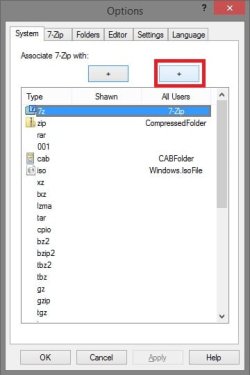
What version of 7-Zip do you have installed. I like the 9.30 alpha version myself, and never had any issues with it. If you have not already, you might install it and try this below to see if it may help.
  • Open 7-Zip (7zFM.exe) with Run as administrator.
  • In 7-Zip, click on Tools (menu bar) and Options.
  • Select 7z under the "Type" column, click on the + button above "All Users", and click on OK.
7-Zip_Options.jpg

Hope this helps, :)
Shawn
 

My Computer My Computer

At a glance

64-bit Windows 11 Pro for WorkstationsIntel i7-8700K OC'd to 5 GHz64 GB (4x16GB) G.SKILL TridentZ RGB DDR4 3600...ASUS ROG-STRIX-GTX1080TI-O11G-GAMING
Computer type
PC/Desktop
Computer Manufacturer/Model Number
Self built custom
OS
64-bit Windows 11 Pro for Workstations
CPU
Intel i7-8700K OC'd to 5 GHz
Motherboard
ASUS ROG Maximus XI Formula Z390
Memory
64 GB (4x16GB) G.SKILL TridentZ RGB DDR4 3600 MHz
Graphics Card(s)
ASUS ROG-STRIX-GTX1080TI-O11G-GAMING
Sound Card
Integrated
Monitor(s) Displays
2 x Samsung Odyssey G7 27"
Screen Resolution
2560x1440
Hard Drives
1TB Samsung 990 PRO M.2,
4TB Samsung 990 PRO PRO M.2,
TerraMaster F8 SSD Plus NAS
PSU
Seasonic Prime Titanium 850W
Case
Thermaltake Core P3
Cooling
Corsair Hydro H115i
Keyboard
Logitech wireless K800
Mouse
Logitech MX Master 4
Internet Speed
2 Gb/s Download and 100 Mb/s Upload
Antivirus
Malwarebyte Anti-Malware Premium
Browser
Google Chrome
Other Info
Logitech Z625 speaker system,
Logitech BRIO 4K Pro webcam,
HP Color LaserJet Pro MFP M477fdn,
APC SMART-UPS RT 1000 XL - SURT1000XLI,
Galaxy S23 Plus phone
You're welcome Greg. :)
 

My Computer My Computer

At a glance

64-bit Windows 11 Pro for WorkstationsIntel i7-8700K OC'd to 5 GHz64 GB (4x16GB) G.SKILL TridentZ RGB DDR4 3600...ASUS ROG-STRIX-GTX1080TI-O11G-GAMING
Computer type
PC/Desktop
Computer Manufacturer/Model Number
Self built custom
OS
64-bit Windows 11 Pro for Workstations
CPU
Intel i7-8700K OC'd to 5 GHz
Motherboard
ASUS ROG Maximus XI Formula Z390
Memory
64 GB (4x16GB) G.SKILL TridentZ RGB DDR4 3600 MHz
Graphics Card(s)
ASUS ROG-STRIX-GTX1080TI-O11G-GAMING
Sound Card
Integrated
Monitor(s) Displays
2 x Samsung Odyssey G7 27"
Screen Resolution
2560x1440
Hard Drives
1TB Samsung 990 PRO M.2,
4TB Samsung 990 PRO PRO M.2,
TerraMaster F8 SSD Plus NAS
PSU
Seasonic Prime Titanium 850W
Case
Thermaltake Core P3
Cooling
Corsair Hydro H115i
Keyboard
Logitech wireless K800
Mouse
Logitech MX Master 4
Internet Speed
2 Gb/s Download and 100 Mb/s Upload
Antivirus
Malwarebyte Anti-Malware Premium
Browser
Google Chrome
Other Info
Logitech Z625 speaker system,
Logitech BRIO 4K Pro webcam,
HP Color LaserJet Pro MFP M477fdn,
APC SMART-UPS RT 1000 XL - SURT1000XLI,
Galaxy S23 Plus phone
Hello Disciple Dark, and welcome to Seven Forums.

What version of 7-Zip do you have installed. I like the 9.30 alpha version myself, and never had any issues with it. If you have not already, you might install it and try this below to see if it may help.
  • Open 7-Zip (7zFM.exe) with Run as administrator.
  • In 7-Zip, click on Tools (menu bar) and Options.
  • Select 7z under the "Type" column, click on the + button above "All Users", and click on OK.
View attachment 277214

Hope this helps, :)
Shawn

I will need to get the alpha for those options I suppose because I do not get those arrows on the gui maybe a newer option. In any case even while running 7zip file manager as admin and applying the change it has no affect. I will have to do a system restore it would seem :( thank you all for your help btw I am grateful :D
 

My Computer My Computer

At a glance

Windows 7 Proffesional 64 bit
Computer type
PC/Desktop
Computer Manufacturer/Model Number
custom build
OS
Windows 7 Proffesional 64 bit
Disciple Dark,

Yeah, you might uninstall your current version of 7-Zip, then install the 9.30 alpha version (top right corner at site) to see how it works for you. It should work better for you. :)
 

My Computer My Computer

At a glance

64-bit Windows 11 Pro for WorkstationsIntel i7-8700K OC'd to 5 GHz64 GB (4x16GB) G.SKILL TridentZ RGB DDR4 3600...ASUS ROG-STRIX-GTX1080TI-O11G-GAMING
Computer type
PC/Desktop
Computer Manufacturer/Model Number
Self built custom
OS
64-bit Windows 11 Pro for Workstations
CPU
Intel i7-8700K OC'd to 5 GHz
Motherboard
ASUS ROG Maximus XI Formula Z390
Memory
64 GB (4x16GB) G.SKILL TridentZ RGB DDR4 3600 MHz
Graphics Card(s)
ASUS ROG-STRIX-GTX1080TI-O11G-GAMING
Sound Card
Integrated
Monitor(s) Displays
2 x Samsung Odyssey G7 27"
Screen Resolution
2560x1440
Hard Drives
1TB Samsung 990 PRO M.2,
4TB Samsung 990 PRO PRO M.2,
TerraMaster F8 SSD Plus NAS
PSU
Seasonic Prime Titanium 850W
Case
Thermaltake Core P3
Cooling
Corsair Hydro H115i
Keyboard
Logitech wireless K800
Mouse
Logitech MX Master 4
Internet Speed
2 Gb/s Download and 100 Mb/s Upload
Antivirus
Malwarebyte Anti-Malware Premium
Browser
Google Chrome
Other Info
Logitech Z625 speaker system,
Logitech BRIO 4K Pro webcam,
HP Color LaserJet Pro MFP M477fdn,
APC SMART-UPS RT 1000 XL - SURT1000XLI,
Galaxy S23 Plus phone
Hello Again People,

I wanted to report back and let you all know that my problem has been resolved, I had to restore my system to a point a few days back but no harm done only a minor inconvenience.

Thank you for the aid :)
And have a great day
~D
 

My Computer My Computer

At a glance

Windows 7 Proffesional 64 bit
Computer type
PC/Desktop
Computer Manufacturer/Model Number
custom build
OS
Windows 7 Proffesional 64 bit
I'm happy to hear that you got it sorted D. Have a great day as well. :)
 

My Computer My Computer

At a glance

64-bit Windows 11 Pro for WorkstationsIntel i7-8700K OC'd to 5 GHz64 GB (4x16GB) G.SKILL TridentZ RGB DDR4 3600...ASUS ROG-STRIX-GTX1080TI-O11G-GAMING
Computer type
PC/Desktop
Computer Manufacturer/Model Number
Self built custom
OS
64-bit Windows 11 Pro for Workstations
CPU
Intel i7-8700K OC'd to 5 GHz
Motherboard
ASUS ROG Maximus XI Formula Z390
Memory
64 GB (4x16GB) G.SKILL TridentZ RGB DDR4 3600 MHz
Graphics Card(s)
ASUS ROG-STRIX-GTX1080TI-O11G-GAMING
Sound Card
Integrated
Monitor(s) Displays
2 x Samsung Odyssey G7 27"
Screen Resolution
2560x1440
Hard Drives
1TB Samsung 990 PRO M.2,
4TB Samsung 990 PRO PRO M.2,
TerraMaster F8 SSD Plus NAS
PSU
Seasonic Prime Titanium 850W
Case
Thermaltake Core P3
Cooling
Corsair Hydro H115i
Keyboard
Logitech wireless K800
Mouse
Logitech MX Master 4
Internet Speed
2 Gb/s Download and 100 Mb/s Upload
Antivirus
Malwarebyte Anti-Malware Premium
Browser
Google Chrome
Other Info
Logitech Z625 speaker system,
Logitech BRIO 4K Pro webcam,
HP Color LaserJet Pro MFP M477fdn,
APC SMART-UPS RT 1000 XL - SURT1000XLI,
Galaxy S23 Plus phone
Back
Top