
Start Button Icon is Missing?

baumgrenze

New member
Member
VIP
Local time
6:02 AM
Messages
300
Location
Charlottesville, VA
Earlier this afternoon I was working in PhotoShopElements 6 and I noticed that the top menu bar was almost invisible and off the top of the screen. Then I noticed that my entire taskbar was gone. I did some elementary forum searching and I can open the Start menu with the Windows Key on my keyboard.

I checked my display settings. I had a 145% custom setting. I took everything back to 'default settings' I believe. I have a DellP990 Trinitron. I like the color. It is set at 1600 x 1200 (recommended.) I did set the display to 'medium' because my 75-year-old eyes cannot resolve ultra-fine print on a screen anymore.

I believe the paragraph below best describes my problem.

Before I started this post I did a set of screen-dumps and pasted them into Word. I went to check a fact on one of them. Damn if the missing bars aren't right there in the screen dumps! By this I mean the top-of-the-screen Blue Bar with the shutoff at the right and the TaskBar with the Windows Start button at the left can bee seen in the screen dumps in Word but they are not visible on my monitor.

How do I restore my system so they show on the monitor?

thanks

baumgrenze
 

My Computer

Computer type
PC/Desktop
Computer Manufacturer/Model Number
Custom built by GamePC/Solid Electric - Palo Alto - on 03/10/08
OS
Win 7 Pro 64
CPU
Intel Core 2 Quad Q6600 (2.4 GHz) Quad Core
Motherboard
Gigabyte GA-P35-DS3P Intel P35 ATX (rev. 2.1)
Memory
2 x Crucial 4GB Kit (2GBx2) DDR2 CT2KIT25664AA800
Graphics Card(s)
Sapphire Radeon HD 3870 PCIe 512 Mb
Sound Card
RealTek audio on MOBO + EDIROL UA-1EX
Monitor(s) Displays
Samsung S24A450BW 24" LED monitor
Screen Resolution
1600 x 1200 at 75 Hz
Hard Drives
2 Crucial 128 Gb SSD (CT128M550SSD1)
one mounted and running Win7/Pro x64
one disconnected containing only Win10/Pro upgrade - in process
1 1TB WD Caviar Black (WD1003FZEX-00MK2A0) (Data drive)
1 2TB Seagate 2TB (PN/ 9JB1N3-576 - ST2000DM001-1ER
PSU
Seasonic S12-HT 650W 80% Efficiency Power Supply
Case
Lian Li PC-B25B
Cooling
Gigabyte Silent-Pipe
Keyboard
Dell MS Comfort
Mouse
HP x4000 wireless
Internet Speed
Sonic FTTN @ 23 Mbps
Antivirus
Avast
Browser
SeaMonkey
Other Info
BIOS: Award Software International, Inc. F6 06/18/2009

System Specs - Updated on 09//16/19
Last edited:

My Computer

Computer type
PC/Desktop
Computer Manufacturer/Model Number
Custom Build
OS
Windows 7 Ultimate x64 SP1
CPU
AMD Phenom 2 1090T
Motherboard
Gigabyte GA-890FXA-UD5
Memory
2x8GB Kingston HyperX Fury Black 1600Mhz Unganged
Graphics Card(s)
MSI GTX 970 Gaming 4G
Sound Card
Realtek On-Board HD 7.1 Audio / Logitech G35
Monitor(s) Displays
3xAcer GD245HQ
Screen Resolution
1920x1080
Hard Drives
Samsung 850 Pro 512GB SSD - OS /
WD Caviar Black SATA 3 - 1 TBx2 - Dynamic RAID 0 /
WD Caviar Green SATA 2 - 640GBx2 - Dynamic RAID 0 /
WD Caviar Green SATA 2 - 640GB - Internal Backup /
Seagate Barracude SATA 3 - 3TB - External Backup/ Sync
PSU
HighPower 1000W
Case
Cooler Master HAF 932
Cooling
Noctua NH-D14
Keyboard
Logitech G19
Mouse
Logitech G500
Internet Speed
100/4 Mbit Cable (100GB quota)
Antivirus
ZoneAlarm Extreme Security / MBAM Pro / MBAE Free / SAS Free
Browser
IE 11 - Firefox - Chrome
Other Info
Logitech F710/ G27/ G940/ Z5500 // TrackIR 5 // Nvidia 3D Surround Vision
I went back and looked at my Word document. It was set to 1600 x 1200. This setting was marked (Recommended) Based on a suggestion I found a few minutes ago I adjusted it to 1440 x 900 and now everything is on the screen again.

Does this make sense to one of you with far more digital skill than me? I'd like to understand why the 'recommended' setting was wrong and this one works. An explanation will allow me to click on 'Mark Solved.'

Before closing this reply, I opened PSE 6 and much to my pleasure I found that the toolbars seem easier to read. The pop-out items on the left side menu are still 'eye breakers.'

Does this setting compromise my what I see when I want to edit photographs? Do I lose access to detail on the screen?

The experience that allowed me to drill down on this problem was my seeing that a 'screen dump to Word' saw more than what I could see on the screen. It might be a good suggestion to offer users with 'display' problems.

thanks,

baumgrenze
 

My Computer

Computer type
PC/Desktop
Computer Manufacturer/Model Number
Custom built by GamePC/Solid Electric - Palo Alto - on 03/10/08
OS
Win 7 Pro 64
CPU
Intel Core 2 Quad Q6600 (2.4 GHz) Quad Core
Motherboard
Gigabyte GA-P35-DS3P Intel P35 ATX (rev. 2.1)
Memory
2 x Crucial 4GB Kit (2GBx2) DDR2 CT2KIT25664AA800
Graphics Card(s)
Sapphire Radeon HD 3870 PCIe 512 Mb
Sound Card
RealTek audio on MOBO + EDIROL UA-1EX
Monitor(s) Displays
Samsung S24A450BW 24" LED monitor
Screen Resolution
1600 x 1200 at 75 Hz
Hard Drives
2 Crucial 128 Gb SSD (CT128M550SSD1)
one mounted and running Win7/Pro x64
one disconnected containing only Win10/Pro upgrade - in process
1 1TB WD Caviar Black (WD1003FZEX-00MK2A0) (Data drive)
1 2TB Seagate 2TB (PN/ 9JB1N3-576 - ST2000DM001-1ER
PSU
Seasonic S12-HT 650W 80% Efficiency Power Supply
Case
Lian Li PC-B25B
Cooling
Gigabyte Silent-Pipe
Keyboard
Dell MS Comfort
Mouse
HP x4000 wireless
Internet Speed
Sonic FTTN @ 23 Mbps
Antivirus
Avast
Browser
SeaMonkey
Other Info
BIOS: Award Software International, Inc. F6 06/18/2009

System Specs - Updated on 09//16/19

My Computer

Computer type
PC/Desktop
Computer Manufacturer/Model Number
Custom Build
OS
Windows 7 Ultimate x64 SP1
CPU
AMD Phenom 2 1090T
Motherboard
Gigabyte GA-890FXA-UD5
Memory
2x8GB Kingston HyperX Fury Black 1600Mhz Unganged
Graphics Card(s)
MSI GTX 970 Gaming 4G
Sound Card
Realtek On-Board HD 7.1 Audio / Logitech G35
Monitor(s) Displays
3xAcer GD245HQ
Screen Resolution
1920x1080
Hard Drives
Samsung 850 Pro 512GB SSD - OS /
WD Caviar Black SATA 3 - 1 TBx2 - Dynamic RAID 0 /
WD Caviar Green SATA 2 - 640GBx2 - Dynamic RAID 0 /
WD Caviar Green SATA 2 - 640GB - Internal Backup /
Seagate Barracude SATA 3 - 3TB - External Backup/ Sync
PSU
HighPower 1000W
Case
Cooler Master HAF 932
Cooling
Noctua NH-D14
Keyboard
Logitech G19
Mouse
Logitech G500
Internet Speed
100/4 Mbit Cable (100GB quota)
Antivirus
ZoneAlarm Extreme Security / MBAM Pro / MBAE Free / SAS Free
Browser
IE 11 - Firefox - Chrome
Other Info
Logitech F710/ G27/ G940/ Z5500 // TrackIR 5 // Nvidia 3D Surround Vision
GokAy

Thank you for persisting with me. I apologize for taking so long to reply; I've been gathering my questions.

At 1600 x 1200 the task bar and title bars are both gone.

When I adjusted the resolution to other options near the top of the list, I noticed that monitor images I thought should be circular seemed vertically distorted. I opened Autosketch and drew a circle and measured it with a rule. The circle is a vertical ellipse with a horizontal/vertical ratio of 0.8 with the settings 1440 x 900 and 120%.

I went back to the Display>Screen Resolution page and checked each available setting. I found these:

Width Height Height/Width Ratio
1600 1200 0.75
1440 900 0.625
1360 768 0.565
1280 1024 0.8
1280 960 0.75

Pardon the clumsy table. I looked for a 'table' option and did not find one. I've not had a URL at which to park images since Imageshack went subscription.

When I use 1280 x 1024 the circle is no longer an ellipse but a circle! There is a significant black border on the monitor. It is wider in the horizontal dimension than the vertical.

The screen dimensions in the Specifications are 365 mm x 274 mm. The ratio of these numbers is ~0.75. This suggests that 1600 x 1200 Screen Resolution should be best, as recommended. The only other 0.75 ratio setting 'near the top' is 1280 x 960. Am I correct in understanding that I give up 320 pixels horizontal and 240 pixels vertical in order to gain tool bars and menus that are larger and easier to read? Is it true that once I give up the use of these pixels, I cannot view graphics as clearly, even though I increase the magnification in something like PSE6? Also, what is the impact on graphic resolution of setting the 'text size' to 120%?

I remembered the Acrobat version of the P990 Owner's Manual. I rediscovered that it is a remarkably flexible device. If I use the Auto Sizing and Centering button on the bezel at 1600 x 1200, I do not see the task bar and title bar. However, I can access on screen menus that allow me to adjust the height and width of the display. Visually the outer edges of items on the edges of the display, e.g., the "W" icon in the upper left of a Word document, the 'shut down' X in the upper right and the edges of icons in the task bar and system tray just touch the black edges. The way it is set up now, a circle is a real circle and I have about 4 mm of black on each edge of the screen. Should I lock the display settings? I hope so, I did. It is an on screen option. Could the software in a program have reset my display settings, esp. to the default?

I could be using a Samsung S24A450SW LCD monitor. The specs tell me that its optimum resolution is 1920 x 1200. Do I understand correctly that it just has a different aspect ratio, 0.625 vs 0.75. Photo enthusiasts suggest that the Sony Trinitron technology used in the P990 delivers much more desirable color than any LCD, so I guess I will stick with it as long as it produces a useful image on the screen. If I'm wrong, help me understand why.

thanks

baumgrenze
 

My Computer

Computer type
PC/Desktop
Computer Manufacturer/Model Number
Custom built by GamePC/Solid Electric - Palo Alto - on 03/10/08
OS
Win 7 Pro 64
CPU
Intel Core 2 Quad Q6600 (2.4 GHz) Quad Core
Motherboard
Gigabyte GA-P35-DS3P Intel P35 ATX (rev. 2.1)
Memory
2 x Crucial 4GB Kit (2GBx2) DDR2 CT2KIT25664AA800
Graphics Card(s)
Sapphire Radeon HD 3870 PCIe 512 Mb
Sound Card
RealTek audio on MOBO + EDIROL UA-1EX
Monitor(s) Displays
Samsung S24A450BW 24" LED monitor
Screen Resolution
1600 x 1200 at 75 Hz
Hard Drives
2 Crucial 128 Gb SSD (CT128M550SSD1)
one mounted and running Win7/Pro x64
one disconnected containing only Win10/Pro upgrade - in process
1 1TB WD Caviar Black (WD1003FZEX-00MK2A0) (Data drive)
1 2TB Seagate 2TB (PN/ 9JB1N3-576 - ST2000DM001-1ER
PSU
Seasonic S12-HT 650W 80% Efficiency Power Supply
Case
Lian Li PC-B25B
Cooling
Gigabyte Silent-Pipe
Keyboard
Dell MS Comfort
Mouse
HP x4000 wireless
Internet Speed
Sonic FTTN @ 23 Mbps
Antivirus
Avast
Browser
SeaMonkey
Other Info
BIOS: Award Software International, Inc. F6 06/18/2009

System Specs - Updated on 09//16/19
You can attach screenshots and files to SevenForums, it is better that way also since they are not deleted. Use the paperclip icon to upload and attach them.

Check the OSD menu of the monitor and see if there is a factory reset of some sort. You should be getting a full display with the native resolution (1600x1200) and it should be undistorted also. Also check your GPU's software (AMD CCC?) for any image properties (resize, aspect ratio etc.)
 

My Computer

Computer type
PC/Desktop
Computer Manufacturer/Model Number
Custom Build
OS
Windows 7 Ultimate x64 SP1
CPU
AMD Phenom 2 1090T
Motherboard
Gigabyte GA-890FXA-UD5
Memory
2x8GB Kingston HyperX Fury Black 1600Mhz Unganged
Graphics Card(s)
MSI GTX 970 Gaming 4G
Sound Card
Realtek On-Board HD 7.1 Audio / Logitech G35
Monitor(s) Displays
3xAcer GD245HQ
Screen Resolution
1920x1080
Hard Drives
Samsung 850 Pro 512GB SSD - OS /
WD Caviar Black SATA 3 - 1 TBx2 - Dynamic RAID 0 /
WD Caviar Green SATA 2 - 640GBx2 - Dynamic RAID 0 /
WD Caviar Green SATA 2 - 640GB - Internal Backup /
Seagate Barracude SATA 3 - 3TB - External Backup/ Sync
PSU
HighPower 1000W
Case
Cooler Master HAF 932
Cooling
Noctua NH-D14
Keyboard
Logitech G19
Mouse
Logitech G500
Internet Speed
100/4 Mbit Cable (100GB quota)
Antivirus
ZoneAlarm Extreme Security / MBAM Pro / MBAE Free / SAS Free
Browser
IE 11 - Firefox - Chrome
Other Info
Logitech F710/ G27/ G940/ Z5500 // TrackIR 5 // Nvidia 3D Surround Vision
Thanks again, GokAy1

The 'factory reset' for the P990 is a button on the bezel. Perhaps the CRT monitor yoke circuitry is getting tired, or perhaps some 3rd party software messed it up, but when I tried that button it reset the display screen adjustments I made and the top and bottom of the image captured by a screen dump would no longer show on the monitor. I now believe I have them locked, but I've not 'tested' the reliability of the lock.

I just checked and the way it is adjusted now, both a screen dump of a circle pasted into Word and viewed on screen and the view of the circle in a web page have equal diameters top-to-bottom and side-to-side.

Please explain in greater detail how you believe I should check my "GPU's software (AMD CCC?) for any image properties (resize, aspect ratio etc.") This is not something I can recall having done before.

Perhaps it is relevant that on 7/23/15 I downloaded the most recent driver for my video card from AMD:

13-9-legacy_vista_win7_64_dd_ccc_whql

It did seem to work until the day I posted. That seems a long time for a problem to take to show up and cause me trouble. Do you agree?

I see our clocks are different by 10 hours. That does not allow for many hours/day when we might both be online at the same time.


Thanks for your patience.

baumgrenze
 

My Computer

Computer type
PC/Desktop
Computer Manufacturer/Model Number
Custom built by GamePC/Solid Electric - Palo Alto - on 03/10/08
OS
Win 7 Pro 64
CPU
Intel Core 2 Quad Q6600 (2.4 GHz) Quad Core
Motherboard
Gigabyte GA-P35-DS3P Intel P35 ATX (rev. 2.1)
Memory
2 x Crucial 4GB Kit (2GBx2) DDR2 CT2KIT25664AA800
Graphics Card(s)
Sapphire Radeon HD 3870 PCIe 512 Mb
Sound Card
RealTek audio on MOBO + EDIROL UA-1EX
Monitor(s) Displays
Samsung S24A450BW 24" LED monitor
Screen Resolution
1600 x 1200 at 75 Hz
Hard Drives
2 Crucial 128 Gb SSD (CT128M550SSD1)
one mounted and running Win7/Pro x64
one disconnected containing only Win10/Pro upgrade - in process
1 1TB WD Caviar Black (WD1003FZEX-00MK2A0) (Data drive)
1 2TB Seagate 2TB (PN/ 9JB1N3-576 - ST2000DM001-1ER
PSU
Seasonic S12-HT 650W 80% Efficiency Power Supply
Case
Lian Li PC-B25B
Cooling
Gigabyte Silent-Pipe
Keyboard
Dell MS Comfort
Mouse
HP x4000 wireless
Internet Speed
Sonic FTTN @ 23 Mbps
Antivirus
Avast
Browser
SeaMonkey
Other Info
BIOS: Award Software International, Inc. F6 06/18/2009

System Specs - Updated on 09//16/19
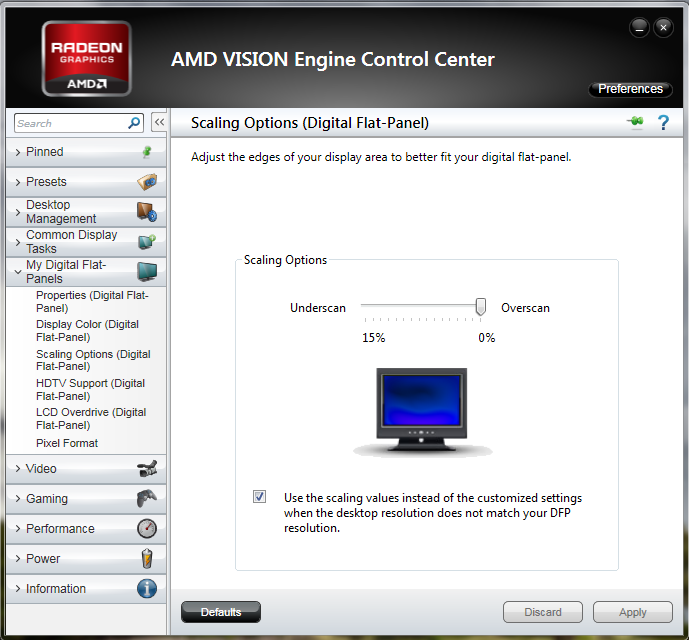
Have you tried the vertical and horizontal adjustments for the crt? This sounds like it is not auto adjusting properly and your screen is off the "screen" as it were. It does sound like you already tried this though. in CCC look for the monitor then look for the overscan setting in scaling.
ZKd0B.png
 

My Computer

Computer type
PC/Desktop
Computer Manufacturer/Model Number
Custom
OS
10 Pro x64
CPU
Ryzen 9 3900X
Motherboard
Asrock x370 Tachi
Memory
64GB(4x16GB) DDR4
Graphics Card(s)
EVGA 1080ti FTW3
Sound Card
ASUS Xonar Essence STX (V4 Bursons), ODAC rev B, NFB-11, O2
Monitor(s) Displays
3xASUS PB278Q/R, Optoma HD142X
Screen Resolution
3x1440p, 1080p
Hard Drives
512GB 850 EVO(OS, Programs)
4TB (Movies)
3TB (Downloads)
3TB (Programs)
1TB HDD (Games)
2x6TB R1 (videos)
PSU
AX760
Case
Fractal Define R5
Cooling
NH-D15S
Keyboard
Massdrop Ctrl with Box Navy's
Mouse
G903, Alioth XXL Mat
Internet Speed
280/40
Antivirus
MBAM, ESET
Browser
Canary 64 Bit
Other Info
I also own a Thinkpad P50 Xeon 4K, X220T, X1C5
Software can't interfere with the monitor settings and having reverted to factory settings, only thing remaining is a misconfiguration in AMD software. rvcjew has provided you one possibility, (I am not very fluent with AMD cards), check the different options in the Control Center.
 

My Computer

Computer type
PC/Desktop
Computer Manufacturer/Model Number
Custom Build
OS
Windows 7 Ultimate x64 SP1
CPU
AMD Phenom 2 1090T
Motherboard
Gigabyte GA-890FXA-UD5
Memory
2x8GB Kingston HyperX Fury Black 1600Mhz Unganged
Graphics Card(s)
MSI GTX 970 Gaming 4G
Sound Card
Realtek On-Board HD 7.1 Audio / Logitech G35
Monitor(s) Displays
3xAcer GD245HQ
Screen Resolution
1920x1080
Hard Drives
Samsung 850 Pro 512GB SSD - OS /
WD Caviar Black SATA 3 - 1 TBx2 - Dynamic RAID 0 /
WD Caviar Green SATA 2 - 640GBx2 - Dynamic RAID 0 /
WD Caviar Green SATA 2 - 640GB - Internal Backup /
Seagate Barracude SATA 3 - 3TB - External Backup/ Sync
PSU
HighPower 1000W
Case
Cooler Master HAF 932
Cooling
Noctua NH-D14
Keyboard
Logitech G19
Mouse
Logitech G500
Internet Speed
100/4 Mbit Cable (100GB quota)
Antivirus
ZoneAlarm Extreme Security / MBAM Pro / MBAE Free / SAS Free
Browser
IE 11 - Firefox - Chrome
Other Info
Logitech F710/ G27/ G940/ Z5500 // TrackIR 5 // Nvidia 3D Surround Vision
Back
Top