Solved start button icon

Status
Not open for further replies.

koenh

New member
Member
Local time
2:25 AM
Messages
37
Hello,

I just got a new computer in the office, and it uses windows7 (professional edition, placed in domain...)

The start button icon is the old windows logo with 'start' next to it.
I found the tutorial (http://www.sevenforums.com/tutorials/23024-start-menu-button-change.html?filter) but i cannot install all that software on that computer...

My question is how to change the icon back to the default one...

allready thanks
grz
 

My Computer

OS
Windows 7 professional
Hello,

I just got a new computer in the office, and it uses windows7 (professional edition, placed in domain...)

The start button icon is the old windows logo with 'start' next to it.
I found the tutorial (http://www.sevenforums.com/tutorials/23024-start-menu-button-change.html?filter) but i cannot install all that software on that computer...

My question is how to change the icon back to the default one...

allready thanks
grz

You're going to need someones permission to do that, This is the easiest and best way to change them,

Windows 7 Start Button Changer: Change Your Windows 7 Start Button With One Click | door2windows
 

My Computer

Computer type
PC/Desktop
Computer Manufacturer/Model Number
Self Built
OS
Win 10 Pro x64
CPU
Intel I5-2500K @3.3GHz
Motherboard
Asrock P67 Extreme4
Memory
16GB G.Skill Ripjaws X (4x4GB)
Graphics Card(s)
EVGA GeForce 750 Ti SC 2GB
Sound Card
ASUS Xonar DG 5.1 Channels 24-bit 96KHz PCI Interface Sound
Monitor(s) Displays
auria eq2367
Screen Resolution
1920 x 1080
Hard Drives
250GB Samsung 850 EVO SSD
1TB WD Blue
1TB Hitachi
PSU
SeaSonic X 650W 80 Plus Gold
Case
Corsair Obsidian 750D
Cooling
Corsair H60, Three 140mm case fans
Keyboard
Logitech Wireless Keyboard K520
Mouse
Logitech Wireless Mouse M310
Internet Speed
Wave Broadband ~ 100 dn 5 up
Antivirus
Windows Defender, Malwarebytes Premium
Browser
Edge, IE11, Chrome
Other Info
Laptop specs: HP g7-1365dx /
CPU: AMD A6-3420M APU with Radeon(tm) HD Graphics /
RAM: Crucial 8Gb (2x4Gb) /
SSD: Crucial M4-CT128M4SSD2 ATA Device/ FW 000F /
GFX: AMD Radeon HD 6520G /
OS: Windows 10 Pro x64
be sure to run it as administrator
and welcome to sevenforums
 

My Computer

Computer Manufacturer/Model Number
Hewlett packard/p6512uk
OS
Microsoft Windows 7 Home Premium 64-bit 7600
CPU
IIx4 amd athelon 635 processor
Motherboard
FOXCONN 2AA9
Memory
2x2gb
Graphics Card(s)
ati radeon HD 5450
Sound Card
(1) Realtek High Definition Audio (2) AMD High Definition
Monitor(s) Displays
samsung lcd tv 32"
Screen Resolution
1360x 768
Hard Drives
(1) WDC WD10 01FAES-60Z2A0 SATA Disk Device (2) Maxtor OneTouch USB Device (3) ST310003 33AS USB Device (4) WD My Book 1111 USB Device
PSU
?
Cooling
air!
Keyboard
wireless hp
Mouse
wireless Hp,optical
Internet Speed
1.10mb/s
Antivirus
MSE
Browser
Firefox
Tx for the replys...

Does anyone know why the icon has changed?
Is it an administrator setting or is it because the computer (laptop) is part of a domain or ...?

allready thanks.
 

My Computer

OS
Windows 7 professional
Please Post a screentshot. of the taskbar area including the start button.
 

My Computer

Computer Manufacturer/Model Number
COMPAQ Presario Laptop
OS
Windows 7 Ultimate 64 bit, Mac OS X 10.6
CPU
Intel Pentium Dual Core @2.0GHz
Motherboard
Compaq Generic
Memory
12GB
Graphics Card(s)
NVIDIA Graphics For Mobile 512MB VRAM
Sound Card
IDT High definition Audio
Monitor(s) Displays
Laptop LCD Display
Screen Resolution
1280*800 Bright View Widescreen
Hard Drives
500 GB Primary Master@7200rpm + 1 TB External HDD
Cooling
Direct ; generic fan
Keyboard
Generic Laptop Keyboard
Mouse
Touch Pad
Internet Speed
3.1 Mbps wireless Broadband
Other Info
Generic Dock
At my job I use: TClock Light. It allows you to change the start button. It's an executable so you can run it yourself (or drop in start up folder) without having to get permission from I.T. or admin. We use WinXp server professional so you'll have to check if it works with 7.
 

My Computer

Computer Manufacturer/Model Number
Toshiba p205-s7469
OS
Windows 7 Ultimate
CPU
intel Core 2 Duo t5250
Motherboard
Mobile Intel® GM965 Express Chipset
Memory
4gb PC2-5300 DDR2 SDRAM
Graphics Card(s)
Mobile Intel® Graphics Media Accelerator X3100 with 64MB-251
Sound Card
Toshiba w/Realtek Audio & Harmon Kardon Speakers(2)+ subwoof
Monitor(s) Displays
17.0” widescreen TruBrite TFT LCD 1440x900
Hard Drives
toshiba 500gb sata (primary) Toshiba 200gb (secondary)
We use WinXp server professional so you'll have to check if it works with 7.

In Win 7 the start button is associated with 3 image files in explorer.exe ; to change the start button by any method (manually by using resource hacker or using some free apps; basically the mechanism is same though) one need Admin previlage, and in case of manual changing, need to take ownership of the folder too.

That app for XP will not work.

I wounder who changed his start button if its new computer! :confused:
 

My Computer

Computer Manufacturer/Model Number
COMPAQ Presario Laptop
OS
Windows 7 Ultimate 64 bit, Mac OS X 10.6
CPU
Intel Pentium Dual Core @2.0GHz
Motherboard
Compaq Generic
Memory
12GB
Graphics Card(s)
NVIDIA Graphics For Mobile 512MB VRAM
Sound Card
IDT High definition Audio
Monitor(s) Displays
Laptop LCD Display
Screen Resolution
1280*800 Bright View Widescreen
Hard Drives
500 GB Primary Master@7200rpm + 1 TB External HDD
Cooling
Direct ; generic fan
Keyboard
Generic Laptop Keyboard
Mouse
Touch Pad
Internet Speed
3.1 Mbps wireless Broadband
Other Info
Generic Dock
Finally, i got a printscreen of the start icon. You'll find it as attachment...
Isn't it possible to change is by register, something with 'classic'?

I also read that it is in 'explorer.exe'
When i take the file from a pc at home, and i copy it to my work pc, should that work? Could i have other problems?

Allready thanks.

Edit: i cannot find the attachment... What did i do wrong?
 

My Computer

OS
Windows 7 professional
Finally, i got a printscreen of the start icon. You'll find it as attachment...
Isn't it possible to change is by register, something with 'classic'?

I also read that it is in 'explorer.exe'
When i take the file from a pc at home, and i copy it to my work pc, should that work? Could i have other problems?

Allready thanks.

Edit: i cannot find the attachment... What did i do wrong?

How did you upload? Have a look at this,

http://www.sevenforums.com/tutorials/9733-screenshots-files-upload-post-seven-forums.html
 

My Computer

Computer type
PC/Desktop
Computer Manufacturer/Model Number
Self Built
OS
Win 10 Pro x64
CPU
Intel I5-2500K @3.3GHz
Motherboard
Asrock P67 Extreme4
Memory
16GB G.Skill Ripjaws X (4x4GB)
Graphics Card(s)
EVGA GeForce 750 Ti SC 2GB
Sound Card
ASUS Xonar DG 5.1 Channels 24-bit 96KHz PCI Interface Sound
Monitor(s) Displays
auria eq2367
Screen Resolution
1920 x 1080
Hard Drives
250GB Samsung 850 EVO SSD
1TB WD Blue
1TB Hitachi
PSU
SeaSonic X 650W 80 Plus Gold
Case
Corsair Obsidian 750D
Cooling
Corsair H60, Three 140mm case fans
Keyboard
Logitech Wireless Keyboard K520
Mouse
Logitech Wireless Mouse M310
Internet Speed
Wave Broadband ~ 100 dn 5 up
Antivirus
Windows Defender, Malwarebytes Premium
Browser
Edge, IE11, Chrome
Other Info
Laptop specs: HP g7-1365dx /
CPU: AMD A6-3420M APU with Radeon(tm) HD Graphics /
RAM: Crucial 8Gb (2x4Gb) /
SSD: Crucial M4-CT128M4SSD2 ATA Device/ FW 000F /
GFX: AMD Radeon HD 6520G /
OS: Windows 10 Pro x64
Hope this works:

I changed the filetype from JPG to jpg...

grz
 

Attachments

  • Start icon.jpg
    Start icon.jpg
    7.8 KB · Views: 645

My Computer

OS
Windows 7 professional
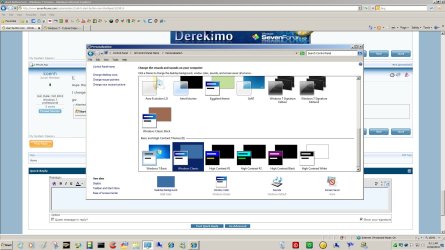
You can get that start button just by changing to windows classic theme,
 

Attachments

  • classic.jpg
    classic.jpg
    183.4 KB · Views: 14

My Computer

Computer type
PC/Desktop
Computer Manufacturer/Model Number
Self Built
OS
Win 10 Pro x64
CPU
Intel I5-2500K @3.3GHz
Motherboard
Asrock P67 Extreme4
Memory
16GB G.Skill Ripjaws X (4x4GB)
Graphics Card(s)
EVGA GeForce 750 Ti SC 2GB
Sound Card
ASUS Xonar DG 5.1 Channels 24-bit 96KHz PCI Interface Sound
Monitor(s) Displays
auria eq2367
Screen Resolution
1920 x 1080
Hard Drives
250GB Samsung 850 EVO SSD
1TB WD Blue
1TB Hitachi
PSU
SeaSonic X 650W 80 Plus Gold
Case
Corsair Obsidian 750D
Cooling
Corsair H60, Three 140mm case fans
Keyboard
Logitech Wireless Keyboard K520
Mouse
Logitech Wireless Mouse M310
Internet Speed
Wave Broadband ~ 100 dn 5 up
Antivirus
Windows Defender, Malwarebytes Premium
Browser
Edge, IE11, Chrome
Other Info
Laptop specs: HP g7-1365dx /
CPU: AMD A6-3420M APU with Radeon(tm) HD Graphics /
RAM: Crucial 8Gb (2x4Gb) /
SSD: Crucial M4-CT128M4SSD2 ATA Device/ FW 000F /
GFX: AMD Radeon HD 6520G /
OS: Windows 10 Pro x64
ok, thanks!

And does anyone knows how to switch back to the normal themes?
I have the classic themes all the time.
I can switch the themes without problems, but the classic remains.

Allready thanks.
 

My Computer

OS
Windows 7 professional
ok, thanks!

And does anyone knows how to switch back to the normal themes?
I have the classic themes all the time.
I can switch the themes without problems, but the classic remains.

Allready thanks.

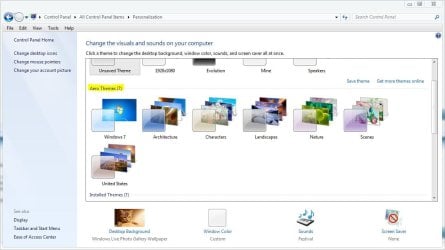
Are you switching to an aero theme?
 

Attachments

  • aero.JPG
    aero.JPG
    76.4 KB · Views: 1

My Computer

Computer type
PC/Desktop
Computer Manufacturer/Model Number
Self Built
OS
Win 10 Pro x64
CPU
Intel I5-2500K @3.3GHz
Motherboard
Asrock P67 Extreme4
Memory
16GB G.Skill Ripjaws X (4x4GB)
Graphics Card(s)
EVGA GeForce 750 Ti SC 2GB
Sound Card
ASUS Xonar DG 5.1 Channels 24-bit 96KHz PCI Interface Sound
Monitor(s) Displays
auria eq2367
Screen Resolution
1920 x 1080
Hard Drives
250GB Samsung 850 EVO SSD
1TB WD Blue
1TB Hitachi
PSU
SeaSonic X 650W 80 Plus Gold
Case
Corsair Obsidian 750D
Cooling
Corsair H60, Three 140mm case fans
Keyboard
Logitech Wireless Keyboard K520
Mouse
Logitech Wireless Mouse M310
Internet Speed
Wave Broadband ~ 100 dn 5 up
Antivirus
Windows Defender, Malwarebytes Premium
Browser
Edge, IE11, Chrome
Other Info
Laptop specs: HP g7-1365dx /
CPU: AMD A6-3420M APU with Radeon(tm) HD Graphics /
RAM: Crucial 8Gb (2x4Gb) /
SSD: Crucial M4-CT128M4SSD2 ATA Device/ FW 000F /
GFX: AMD Radeon HD 6520G /
OS: Windows 10 Pro x64
I now have the icon i posted...
I want the normal icon back. If i need to switch to aero, so be it...

grz
 

My Computer

OS
Windows 7 professional
It seems your theme switched to Windows Classic. You will need to change it to Windows Aero to get the Windows 7 appearance back. :)
 

My Computer

Computer Manufacturer/Model Number
HP Pavilion dv4i-2100
OS
Windows 7 Ultimate x86
CPU
Intel Core i3 M350 @ 2.27 GHz
Motherboard
Stock
Memory
3.00 GB
Graphics Card(s)
Intel 1GB HDMI Graphics Card
Sound Card
Stock
Monitor(s) Displays
14.6" HD
Screen Resolution
1200x800 current setting.
Hard Drives
320GB samsung internal
500GB ADATA portable
PSU
Stock
Case
Stock
Cooling
Targus twin-fan chill mat.
Internet Speed
At home, 300kb/sec downloads. At work, 1028kb/sec downloads.
Other Info
Purchased through HP direct, custom build. I highly recommend HP to anyone.
Ok, i tried that, but no succes.
My windows experience index is 4.1.
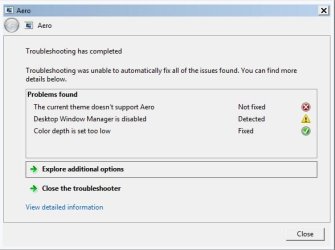
When i try to activate the aero, i get the message in attachment.
I have selected an aero theme, but it runs in classic mode...

Someone an idea what i can do?
Allready thanks.
 

Attachments

  • aero1.jpg
    aero1.jpg
    30.2 KB · Views: 10

My Computer

OS
Windows 7 professional
This is because you are on a domain and the Domain Administrator has set forth some protocols that will not let you do this.
 

My Computer

Computer Manufacturer/Model Number
Toshiba A505
OS
Windows 7 Home Premium 64bit
CPU
Intel Centrino
Memory
4gb
If you boot up your computer using hirens boot disk you can log in as the administrator and then you will have the privileges to change this.
 

My Computer

Computer Manufacturer/Model Number
Toshiba A505
OS
Windows 7 Home Premium 64bit
CPU
Intel Centrino
Memory
4gb

My Computer

Computer type
PC/Desktop
Computer Manufacturer/Model Number
Self Assembled
OS
Microsoft Windows 10 Pro Insider Preview 64-bit
CPU
Intel(R) Core(TM) i3-4130 CPU @ 3.40GHz
Motherboard
Gigabyte Technology Co., Ltd. B85M-D3H
Memory
Corsair Vengence 4GB x2 (8.00GB Dual-Channel DDR3 @ 798MHz)
Graphics Card(s)
2047MB GeForce GTS 450 (ZOTAC International)
Sound Card
Onboard (Realtek High Definition Audio)
Monitor(s) Displays
LG Flatron E2040T
Screen Resolution
1600x900
Hard Drives
Western Digital 1 TB
Seagate 500 GB
PSU
Corsair VS550
Case
Cooler Master K380
Cooling
Cooler Master Seidon 120V Plus
Keyboard
Logitech MK260r
Mouse
Logitech MK260r
Internet Speed
PMPL Broadband
Antivirus
Windows Defender + MBAM
Browser
Firefox
Other Info
Dell Studio 15" Laptop
tx for the replies.

This is because you are on a domain and the Domain Administrator has set forth some protocols that will not let you do this.
Which settings could be made by the administrator. I'm sure when i ask him, he will allow me to do so... The only thing is that i have to say what to change.

If you boot up your computer using hirens boot disk you can log in as the administrator and then you will have the privileges to change this.
what program of the boot cd should i use? there are many programs...

this is what i allready tried and where the last attachment is of...
 

My Computer

OS
Windows 7 professional
Status
Not open for further replies.
Back
Top