Start Menu Background

ebarn

New member
Local time
12:00 PM
Messages
48
Location
Miami
Hello,

I have searched through the 'Taskbar and Start Menu' and 'Appearance and Personalization' Tutorials and did not find this.

How do you change the background for the start menu? And how would you rate this task: expert, advanced, intermediate, etc?

If there is a tutorial and I simply missed it please point me in that direction.

Thanks.
 

My Computer

Computer Manufacturer/Model Number
Dell XPS M1530
OS
Windows 7 Ultimate x64
CPU
Intel Core Duo T7500 @ 2.20 GHz
Memory
4 GB
Graphics Card(s)
GeForce 8400m GS
Only way you can change the background of the start menu is by changing it's color. From Personalization-Window color. Or changing the theme to a basic one.

No other way of changing the background of it natively in Windows 7 that I can think of.

Or maybe you're asking something else? Not sure on what exactly. Change the color of it, change it to have a picture in the background...?
 

My Computer

Computer type
PC/Desktop
Computer Manufacturer/Model Number
Airbot 2.0
OS
Windows 7 Ultimate x64 SP1
CPU
Core i7 920 (D0) @ 4Ghz, *26c idle *65c full load on air
Motherboard
Asus P6X58D Premium - Sata 6Gb/s - USB 3.0
Memory
12GB DDR3 Corsair Dominator -CMD12GX3M6A1600C8 at 1600MHz
Graphics Card(s)
Zotac Geforce GTX 770
Sound Card
ASUS Xonar D2X
Monitor(s) Displays
1 LG 24" Flatron W2453V-PF 1 Samsung 24" P2450H both 2ms RT
Screen Resolution
1920x1080@60hz
Hard Drives
1 Samsung 250GB 840 Evo SSD
1 OCZ Vertex2 180GB SSD
1 TB Samsung Spinpoint F1 7200RPM 32MB cache
2 500GB WD Caviar Blacks 7200RPM 32MB cache (WD5001AALS)

Pioneer DVD Burner DVR-S18M
PSU
Corsair HX1000W
Case
Cooler Master HAF 932
Cooling
Case Fans *3 230mm, *1 140mm/CPU - *Tuniq Tower 120 Extreme
Keyboard
Logitech Wireless MK700
Mouse
Logitech Wireless MK700
Internet Speed
DL 15 Mbps UL 0.98 Mbps
Antivirus
None
Browser
Firefox Nightly
Other Info
Processor-7.7 *RAM- 7.9 *Graphics-7.9 *Gaming Graphics- 7.9 *SSD- 7.8 W.E.I final score= 7.7
*Phone- LG Nexus 5
Only way you can change the background of the start menu is by changing it's color. From Personalization-Window color. Or changing the theme to a basic one.

No other way of changing the background of it natively in Windows 7 that I can think of.

Or maybe you're asking something else? Not sure on what exactly. Change the color of it, change it to have a picture in the background...?

yes... I guess I should've specified. I meant to change it to have a picture in the background.
 

My Computer

Computer Manufacturer/Model Number
Dell XPS M1530
OS
Windows 7 Ultimate x64
CPU
Intel Core Duo T7500 @ 2.20 GHz
Memory
4 GB
Graphics Card(s)
GeForce 8400m GS
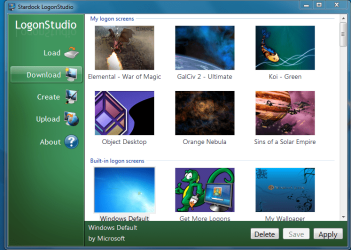
I use objectdock.com for changing start menu or wallpaper
startup.PNG
When you establish an account the door is open for more neat stuff.
 

My Computer

Computer Manufacturer/Model Number
HP M9077c
OS
Windows 7 Home Premium 64bit
CPU
Intel(R)Core(TM)2 quad [email protected] 2.39GHz
Motherboard
ASUSeK
Memory
6GB DDR2 6400
Graphics Card(s)
GeForce 8500/512MB
Sound Card
Realtek High Def Audio
Monitor(s) Displays
HP w2408 LCD 24" widescreen
Screen Resolution
1920x1200
Cooling
6 pack of Bud
Keyboard
MS wireless Inteli
Mouse
MS wireless Inteli
yes... I guess I should've specified. I meant to change it to have a picture in the background.


You'd have to use a third party app, or a customized third party theme to do that.
 

My Computer

Computer type
PC/Desktop
Computer Manufacturer/Model Number
Airbot 2.0
OS
Windows 7 Ultimate x64 SP1
CPU
Core i7 920 (D0) @ 4Ghz, *26c idle *65c full load on air
Motherboard
Asus P6X58D Premium - Sata 6Gb/s - USB 3.0
Memory
12GB DDR3 Corsair Dominator -CMD12GX3M6A1600C8 at 1600MHz
Graphics Card(s)
Zotac Geforce GTX 770
Sound Card
ASUS Xonar D2X
Monitor(s) Displays
1 LG 24" Flatron W2453V-PF 1 Samsung 24" P2450H both 2ms RT
Screen Resolution
1920x1080@60hz
Hard Drives
1 Samsung 250GB 840 Evo SSD
1 OCZ Vertex2 180GB SSD
1 TB Samsung Spinpoint F1 7200RPM 32MB cache
2 500GB WD Caviar Blacks 7200RPM 32MB cache (WD5001AALS)

Pioneer DVD Burner DVR-S18M
PSU
Corsair HX1000W
Case
Cooler Master HAF 932
Cooling
Case Fans *3 230mm, *1 140mm/CPU - *Tuniq Tower 120 Extreme
Keyboard
Logitech Wireless MK700
Mouse
Logitech Wireless MK700
Internet Speed
DL 15 Mbps UL 0.98 Mbps
Antivirus
None
Browser
Firefox Nightly
Other Info
Processor-7.7 *RAM- 7.9 *Graphics-7.9 *Gaming Graphics- 7.9 *SSD- 7.8 W.E.I final score= 7.7
*Phone- LG Nexus 5

My Computer

Computer Manufacturer/Model Number
Dell XPS M1530
OS
Windows 7 Ultimate x64
CPU
Intel Core Duo T7500 @ 2.20 GHz
Memory
4 GB
Graphics Card(s)
GeForce 8400m GS
You are more than welcome.
Hope you enjoy your stay here as we have the Best of the Best in this forum.
 

My Computer

Computer Manufacturer/Model Number
HP M9077c
OS
Windows 7 Home Premium 64bit
CPU
Intel(R)Core(TM)2 quad [email protected] 2.39GHz
Motherboard
ASUSeK
Memory
6GB DDR2 6400
Graphics Card(s)
GeForce 8500/512MB
Sound Card
Realtek High Def Audio
Monitor(s) Displays
HP w2408 LCD 24" widescreen
Screen Resolution
1920x1200
Cooling
6 pack of Bud
Keyboard
MS wireless Inteli
Mouse
MS wireless Inteli
Only way you can change the background of the start menu is by changing it's color. From Personalization-Window color. Or changing the theme to a basic one.

No other way of changing the background of it natively in Windows 7 that I can think of.

Or maybe you're asking something else? Not sure on what exactly. Change the color of it, change it to have a picture in the background...?
There is another way - using custom themes ;)
This will allow you to have a start menu layout and/or background changed to something else than default. Most themes also changes many other parts of the UI though.

See this for more info:
Browsing Visual Styles 7 on deviantART
http://www.sevenforums.com/tutorials/28377-theme-how-apply-custom-themes.html
 
I already stated that. I said not natively. I don't consider customized altered themes as native. In my second post, I mentioned use a customized theme as well.
 

My Computer

Computer type
PC/Desktop
Computer Manufacturer/Model Number
Airbot 2.0
OS
Windows 7 Ultimate x64 SP1
CPU
Core i7 920 (D0) @ 4Ghz, *26c idle *65c full load on air
Motherboard
Asus P6X58D Premium - Sata 6Gb/s - USB 3.0
Memory
12GB DDR3 Corsair Dominator -CMD12GX3M6A1600C8 at 1600MHz
Graphics Card(s)
Zotac Geforce GTX 770
Sound Card
ASUS Xonar D2X
Monitor(s) Displays
1 LG 24" Flatron W2453V-PF 1 Samsung 24" P2450H both 2ms RT
Screen Resolution
1920x1080@60hz
Hard Drives
1 Samsung 250GB 840 Evo SSD
1 OCZ Vertex2 180GB SSD
1 TB Samsung Spinpoint F1 7200RPM 32MB cache
2 500GB WD Caviar Blacks 7200RPM 32MB cache (WD5001AALS)

Pioneer DVD Burner DVR-S18M
PSU
Corsair HX1000W
Case
Cooler Master HAF 932
Cooling
Case Fans *3 230mm, *1 140mm/CPU - *Tuniq Tower 120 Extreme
Keyboard
Logitech Wireless MK700
Mouse
Logitech Wireless MK700
Internet Speed
DL 15 Mbps UL 0.98 Mbps
Antivirus
None
Browser
Firefox Nightly
Other Info
Processor-7.7 *RAM- 7.9 *Graphics-7.9 *Gaming Graphics- 7.9 *SSD- 7.8 W.E.I final score= 7.7
*Phone- LG Nexus 5
I already stated that. I said not natively. I don't consider customized altered themes as native. In my second post, I mentioned use a customized theme as well.
Oh okay, my bad, i didn't read your second post before just now :o
 
You are more than welcome.
Hope you enjoy your stay here as we have the Best of the Best in this forum.

So far pretty good. I have learned a lot of new and useful things on here.
 

My Computer

Computer Manufacturer/Model Number
Dell XPS M1530
OS
Windows 7 Ultimate x64
CPU
Intel Core Duo T7500 @ 2.20 GHz
Memory
4 GB
Graphics Card(s)
GeForce 8400m GS
You are just at the beginning of learning new things here.
Been here almost 2 months and the learning never stops.
Glad you are enjoying it and thanks for the "rep":D
 

My Computer

Computer Manufacturer/Model Number
HP M9077c
OS
Windows 7 Home Premium 64bit
CPU
Intel(R)Core(TM)2 quad [email protected] 2.39GHz
Motherboard
ASUSeK
Memory
6GB DDR2 6400
Graphics Card(s)
GeForce 8500/512MB
Sound Card
Realtek High Def Audio
Monitor(s) Displays
HP w2408 LCD 24" widescreen
Screen Resolution
1920x1200
Cooling
6 pack of Bud
Keyboard
MS wireless Inteli
Mouse
MS wireless Inteli
You are just at the beginning of learning new things here.
Been here almost 2 months and the learning never stops.
Glad you are enjoying it and thanks for the "rep":D

Heh. I imagine. So much stuff on here it's like I don't even know where to start. Feel like a kid in a candy store. Or an adult in a liquor store. lol.
 

My Computer

Computer Manufacturer/Model Number
Dell XPS M1530
OS
Windows 7 Ultimate x64
CPU
Intel Core Duo T7500 @ 2.20 GHz
Memory
4 GB
Graphics Card(s)
GeForce 8400m GS
Well, ebarn, don't eat or drink too much in one day. Not good for you.
What you learn along the way make sure you share with those that are seeking help!
 

My Computer

Computer Manufacturer/Model Number
HP M9077c
OS
Windows 7 Home Premium 64bit
CPU
Intel(R)Core(TM)2 quad [email protected] 2.39GHz
Motherboard
ASUSeK
Memory
6GB DDR2 6400
Graphics Card(s)
GeForce 8500/512MB
Sound Card
Realtek High Def Audio
Monitor(s) Displays
HP w2408 LCD 24" widescreen
Screen Resolution
1920x1200
Cooling
6 pack of Bud
Keyboard
MS wireless Inteli
Mouse
MS wireless Inteli
Back
Top