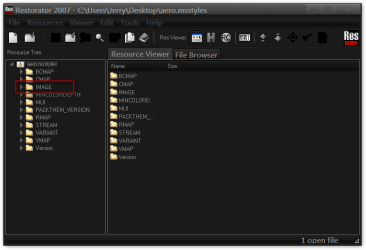
really want to change the windows 7 start menu background. i have been trying to understand the few tutorials i found here but none of them seem to be blatant enough for my understanding.. i have installed "restorator 2009" "uxstylecore x64" and "resheack" i attempted to follow a tutorial for restorator. but it does not seem to work as they describe. i copied the aero.msstyles file to desktop and opened it with restorator. then it says to go to images but i do not get an images folder only these. mui/string/version. also upon instructions i installed dark 7 theme but that just makes my explorer turn to basic. i am so lost i have been tweaking windows 7 for quite a while and never had a problem understanding instructions but a must be missing something crucial. caan anyone provide a good tutorial for changing the windows 7 start menu background? without paying a dime. thanks for any help.
UxStyle Core does not modify themes, it just circumvents the Microsoft Protection so you can be able to use Custom themes.
Resource Hacker/resheack, only allows you to modify 32bit files. as far as I know
Dont know much about creating themes but the only other software I know of is Win7 Style Builder $22 bucks, or Skinstudio $20. I know your looking for something for free, but I dont think a free one exists ???
I know you can edit the shellstyle.dll's and .msstyles with restorator but have not played around with it for so long i forgot all the details?
I would Start at a few Forums that focus on Windows 7 style building
ok thankyou. yeah there is a tutorial here using only restorator to change the white background to an image. but they are skipping steps because i followed the first 3 steps and hit a brick wall when i opened the aero.msstyles file in restorator. they say to open "image" but there is no image folder or file. oh well cant win all battles. buit it just seems to me someone knows how to do this and never posts a decent tutorial since i see themes all over deviantart with pictures in the start menu. and they are not using windowblinds to do it. sorry but there is no way i would shell out 20 bucks to change an image on my desktop. those should be freeware. its bs that these hacks charge money to change images. imho.
If you are trying to put a picture in the start menu background it is very hard because start menu stretches depending on how much you have in it.
I can give you the default aero image numbers for the start menu if that would help. If the theme has been built with Windows Style Builder the image numbers have changed and I would need a link to the theme so I could find the new numbers.
If you want to just change the color I can change that for you. If you are using the default aero theme.
If you are using a custom theme you will need to ask the theme maker. It's not cool to change someone else work.
Let me know if I can help.
Jerry
My Computer
Computer type
Laptop
Computer Manufacturer/Model Number
Sager NP9170
OS
Win 7 Pro x64 / Win 10 Pro
CPU
Intel(R) Core(TM) i7-3630QM CPU @ 2.40GHz
Motherboard
CLEVO P170EM
Memory
12 GB
Graphics Card(s)
(1) Intel(R) HD Graphics 4000 (2) NVIDIA GeForce GTX 675M
Sound Card
(1) Realtek High Definition Audio (2) Intel(R) Display Aud
Monitor(s) Displays
17.3
Screen Resolution
1920x1080
Hard Drives
(1) Samsung 860 EVO 500GB(OS) (1) Samsung 860 EVO 500GB(Data)
Keyboard
Backlite
Antivirus
MSE, Malwarebytes Pro
Browser
Firefox
Other Info
DESKTOP: Custom-built.
OS: Win 10 Pro x64.
CASE: Rosewill R5.
CPU: Intel I5 4670K CPU @ 3.40GHz.
CPU COOLER: Cool Master Hyper 212 EVO.
MOTHERBOARD: Asus Z87-A.
MEMORY: Kingston HyperX 2x4 GB.
GPU: Nvidia Geforce 650 TI.
PSU: Corsair TX750.
DRIVES: (1) Samsung 840 120 GB SSD (2) Western Digital blue 500 GB 7200 RPM.