Start Menu Button - Change

How to Change the Start Menu Button in Windows 7

   Information
This will show you how to change the Start Menu button orb in Windows 7 32-bit and 64-bit.
   Warning
REMEMBER TO BACK UP EXPLORER.EXE!


Here's How:

For custom made start buttons, and further information, please visit this thread: http://www.sevenforums.com/customization/2002-custom-themes-icons-start-buttons-92.html

   Information
The explorer.exe you want to edit is:

C:\Windows\explorer.exe

and not C:\Windows\SysWOW64\explorer.exe (for those running x64)

And for those who use the larger DPI's i.e 125% , 150% you need to change:

6806 - 66 x 198
6807 - 81 x 243
6808 - 106 x 318


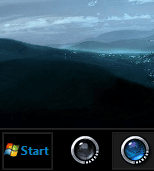
NOTE: The start orb replacement always HAS to look like this:
1 orb: Orb when not in use (when not clicked or mouseover'ed)
2 orb: mouseover
3 orb: When start orb is clicked
2u9ka5w.jpg

1. Download Restorator (Shareware) (Restorator 2007 Resource Editor - Restorator - Bome Software)

2. Take ownership of the whole Windows folder (see these links for more info: Take Ownership of file - Vista Forums and http://www.sevenforums.com/tutorials/1911-take-ownership-shortcut.html)

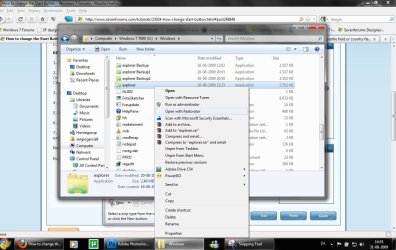
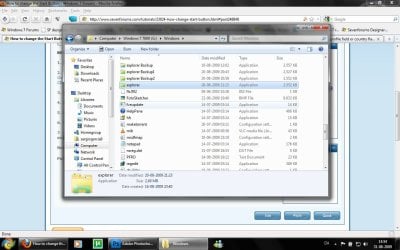
3. Open explorer.exe with restorator
1.jpg

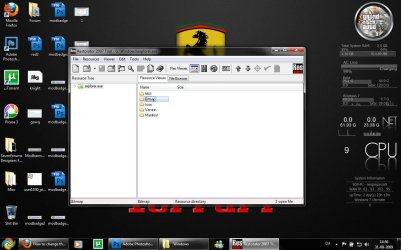
2.jpg
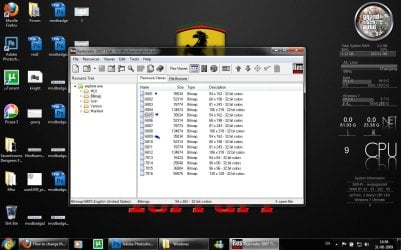
4. Go to the folder called "Bitmap"
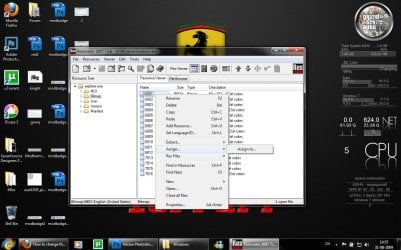
3.jpg
5. Replace 6801.bmp, 6805.bmp, and 6809.bmp (as seen on the picture, you will need to right click and click assign, and then click assign to, then select your file.)
4.jpg

5.jpg
6. Go to "file" and Save as explorer.exe on your desktop

7. Go to the windows folder and rename explorer.exe to explorer.exe.bak and then copy-paste the new explorer, Kill the process in task manager and start it again.
Now you have a new start button! :D

Please comment, if you have something to say :)


Last edited by a moderator:
I don't know about the dreamscape. Are you using the start button changer as admin?
Maybe not, I'll try again.
:doh:

EDIT, nah, I think I'll pass this. The download site seems to be tainted and I'm getting the error page again no matter how I try to do it.
 

My Computer

Computer type
PC/Desktop
Computer Manufacturer/Model Number
Home Built Desktop By DataTech
OS
Windows 7 Ultimate X64 SP1
CPU
Intel i5-2550K, Differing ~4.4-4.8GHz No built in GPU
Motherboard
ASUS P8Z68-V PRO/GEN3
Memory
16GB G.Skill Sniper 1866MHz @ 2133MHz 2x8GB
Graphics Card(s)
ASUS GTX650TIB-DC2OC-2GD5, (650TI Boost)
Sound Card
Onboard Realtek 5-1
Monitor(s) Displays
Samsung P2570HD
Screen Resolution
1920x1080
Hard Drives
Samsung 840 Pro 256GB SSD for OS, 500GB Seagate Constellation (Enterprise drive) for Data
PSU
Corsair HX650W
Case
Inwin Dragon Rider
Cooling
Hyper 212 EVO w/two Noctua fans, push-pull, @1300 RPM
Keyboard
E-Z Eyes, bright yellow keys with large characters
Mouse
steelseries SENSEI Laser Pro Gaming
Internet Speed
48-51Mbs Mbs down, 11 Mbs up Xfinity Cable
Antivirus
Norton Internet Security 2013
Browser
IE 10, Opera, Pale Moon if needed
Other Info
4 case fans, LG BluRay-RE, ASUS DVD-RW, Mr. Fusion power supply, 1.21 gigawatts.
Hello everyone. I took advantage of this utility. The program has written that the changes made​​, I rebooted the computer, and the button has not changed. Why is it so?
 

My Computer

OS
windows 7 ultimate x64
Start Orbs Button

Does anybody here make "Start Orbs Button?" I made a customize start orb button recently. I'm not quite good at it and would like to get a couple pointers on how to make it look better/perfect like the ones already here...

The "3rd One" I'm having issue with. It's higher then the first two, I can't seem to get it right.
 

Attachments

  • 1st The start orb itself.jpg
    1st The start orb itself.jpg
    290.3 KB · Views: 489
  • 2nd start while mouseover.jpg
    2nd start while mouseover.jpg
    290.3 KB · Views: 448
  • 3rd Start orb when clicked.jpg
    3rd Start orb when clicked.jpg
    321.9 KB · Views: 525

My Computer

OS
Windows 7 Home Premium 64bit
Hey

I know this isn't thread related, but which gadget is that u use on the right side of the screen?
 

My Computer

Computer Manufacturer/Model Number
Sony Vaio F
OS
windows 7 home premium 64Bit
CPU
Intel i7-2670QM
Motherboard
NA
Memory
6GB @ 1333Mhz
Graphics Card(s)
Gt540M
Sound Card
Realtek HD
Hard Drives
Toshiba
500GB @ 7200RPM

My Computer

Computer type
PC/Desktop
OS
Win 10 x64 Pro x64 / Ubuntu 15.10 x64
CPU
Intel i7-4960X
Motherboard
Asus Rampage IV Black Edition
Memory
4x8GB Corsair Dominator Platinum @2400MHz 10-12-12-31
Graphics Card(s)
2x MSI GTX780Ti 3GB (SLI)
Sound Card
Onboard SupremeFX (Cirrus Logic CS4398)
Monitor(s) Displays
3x LG Cinema 27" IPS LED (27MP65)
Screen Resolution
[1920x1080]x3
Hard Drives
Crucial M500 120GB, Crucial M500 480GB, Toshiba DT01ACA200 2TB
PSU
CoolerMaster V1000
Case
Corsair Obsidian 750D
Cooling
ThermalTake Water 3.0 Extreme, 4xSP120, 3xAF120
Keyboard
Moshi Luna
Mouse
Logitech G700s / Roccat Tyon
Internet Speed
4Mb uncapped ADSL (Afrihost)
Antivirus
MS Security Essentials
Browser
Chrome... Duh. (:
didnt work

please help ive tried this several times to no avail
 

Attachments

  • Capture.PNG
    Capture.PNG
    38.8 KB · Views: 611

My Computer

Computer type
PC/Desktop
Computer Manufacturer/Model Number
emachine
OS
64
Antivirus
norton
Browser
chrome

My Computer

Computer type
PC/Desktop
OS
Win 10 x64 Pro x64 / Ubuntu 15.10 x64
CPU
Intel i7-4960X
Motherboard
Asus Rampage IV Black Edition
Memory
4x8GB Corsair Dominator Platinum @2400MHz 10-12-12-31
Graphics Card(s)
2x MSI GTX780Ti 3GB (SLI)
Sound Card
Onboard SupremeFX (Cirrus Logic CS4398)
Monitor(s) Displays
3x LG Cinema 27" IPS LED (27MP65)
Screen Resolution
[1920x1080]x3
Hard Drives
Crucial M500 120GB, Crucial M500 480GB, Toshiba DT01ACA200 2TB
PSU
CoolerMaster V1000
Case
Corsair Obsidian 750D
Cooling
ThermalTake Water 3.0 Extreme, 4xSP120, 3xAF120
Keyboard
Moshi Luna
Mouse
Logitech G700s / Roccat Tyon
Internet Speed
4Mb uncapped ADSL (Afrihost)
Antivirus
MS Security Essentials
Browser
Chrome... Duh. (:
it still failed,

It is working just not in this theme for some reason.when i pick another theme like stock it works? But on your theme it does not
 

My Computer

Computer type
PC/Desktop
Computer Manufacturer/Model Number
emachine
OS
64
Antivirus
norton
Browser
chrome
Great thanks,new start menu button looks nice !
 

My Computer

Computer type
PC/Desktop
OS
Win7 Ultimate/X84
CPU
Intel Celeron 336/2.8Ghz
Motherboard
MS-7592
Memory
DDR3/2GB
Hard Drives
ATA-100/160GB
Browser
FirefoX
Thank you so much. I did every step exactly as you instructed and it worked beautifully (the 1st time too!):geek::D:thumbsup::grouphug:
 

My Computer

Computer type
Laptop
Computer Manufacturer/Model Number
Gateway also have an HP
OS
Windows 7 Ultimate x64
CPU
Intel Pentium B960 Cores 2 Threads 2 Name Intel Pentium B
Motherboard
Manufacturer Gateway Model EG50_HC_HR (U3E1) Version V2.21 C
Memory
Memory slots Memory Type DDR3 Size 4096 MBytes Channels #
Graphics Card(s)
Monitor 1 Name Generic PnP Monitor on Intel HD Graphics Cu
Hard Drives
Hard drives
ST500LT012-9WS142
Manufacturer Seagate
Heads 16
Cylinders 60,801
Tracks 15,504,255
Sectors 976,768,065
SATA type SATA-II 3.0Gb/s
Device type Fixed
ATA Standard ATA8-ACS
Serial Number W0VJJ4YP
Fir
Antivirus
zero
Browser
Chrome & Firefox latest updates
Back
Top