Start Menu Button - Change

How to Change the Start Menu Button in Windows 7

   Information
This will show you how to change the Start Menu button orb in Windows 7 32-bit and 64-bit.
   Warning
REMEMBER TO BACK UP EXPLORER.EXE!


Here's How:

For custom made start buttons, and further information, please visit this thread: http://www.sevenforums.com/customization/2002-custom-themes-icons-start-buttons-92.html

   Information
The explorer.exe you want to edit is:

C:\Windows\explorer.exe

and not C:\Windows\SysWOW64\explorer.exe (for those running x64)

And for those who use the larger DPI's i.e 125% , 150% you need to change:

6806 - 66 x 198
6807 - 81 x 243
6808 - 106 x 318


NOTE: The start orb replacement always HAS to look like this:
1 orb: Orb when not in use (when not clicked or mouseover'ed)
2 orb: mouseover
3 orb: When start orb is clicked
2u9ka5w.jpg

1. Download Restorator (Shareware) (Restorator 2007 Resource Editor - Restorator - Bome Software)

2. Take ownership of the whole Windows folder (see these links for more info: Take Ownership of file - Vista Forums and http://www.sevenforums.com/tutorials/1911-take-ownership-shortcut.html)

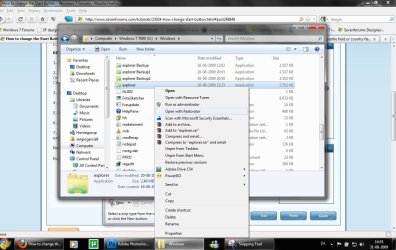
3. Open explorer.exe with restorator
1.jpg

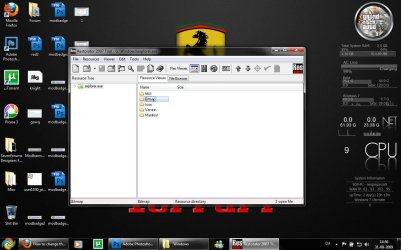
2.jpg
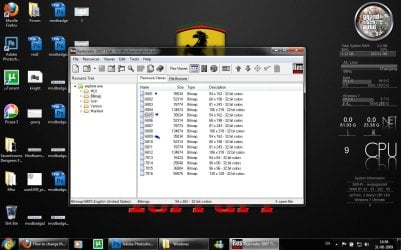
4. Go to the folder called "Bitmap"
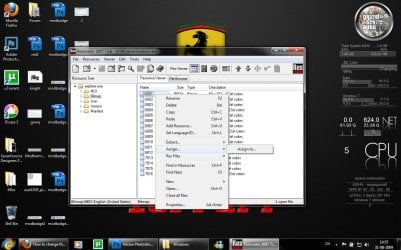
3.jpg
5. Replace 6801.bmp, 6805.bmp, and 6809.bmp (as seen on the picture, you will need to right click and click assign, and then click assign to, then select your file.)
4.jpg

5.jpg
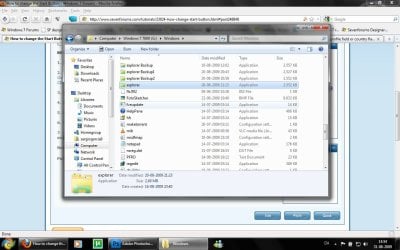
6. Go to "file" and Save as explorer.exe on your desktop

7. Go to the windows folder and rename explorer.exe to explorer.exe.bak and then copy-paste the new explorer, Kill the process in task manager and start it again.
Now you have a new start button! :D

Please comment, if you have something to say :)


Last edited by a moderator:
Can i make the START button a bit smaller ? Not only to change it,just smaller...
Is that possible ?
 

My Computer

Computer type
PC/Desktop
OS
Windows 7 Ultimate x64
CPU
Intel7 4790K
Motherboard
Gigabyte GA-Z97X UD5H
Memory
8 GB DDR3
Graphics Card(s)
GTX 980Ti G1
Sound Card
SoundBlaster X-FI XtremeGamer
Monitor(s) Displays
Samsung UE40JU6550 UHD
Screen Resolution
3840 X 2160
Hard Drives
1 SSD Intel 330
2 x Western Digital 6400 AAKS
1 x Western Digital 3200 AAKS
PSU
Corsair 750W
Case
Cooler Master HAF 922
Can i make the START button a bit smaller ? Not only to change it,just smaller...
Is that possible ?

Make it as tiny as you like. I made my start button tutorial because the button stuck out over the top of the task bar and annoyed me when use small icons was turned on.

http://www.sevenforums.com/tutorials/95974-start-button-create-rectangular-start-button.html you can make your own rectangular (or orb) with freeware easily. Just shrink it below 28 pixels high to keep it inside the task bar.
 

My Computer

Computer Manufacturer/Model Number
Acer 5720z laptop
OS
win7 home premium 64bit
I tried this trick earlier and now explorer.exe always asks for permission to do stuff. For example, I tried editing the security of a system file, and I got the "exploer.exe wants to modify system settings...etc etc.. Yes or No" - it's the UAC prompt, basically.

How do I set the patched explorer.exe to 'full trust'?
 

My Computer

Computer Manufacturer/Model Number
CreepinJesus Mk. IV
OS
Windows 7 Ultimate x64
CPU
Intel Core i5-2500 3.3GHz
Motherboard
Asus P8H67-M PRO
Memory
8GB DDR3 1333MHz
Graphics Card(s)
On-board
Sound Card
On-board
Monitor(s) Displays
Samsung SyncMaster BX2250 22.5" LED-backlit LCD
Screen Resolution
1920 * 1080
Hard Drives
OCZ Agility 3 120GB, SATA-III
PSU
Thermaltake Toughpower Grand TPG-650M
Case
Lian-Li PC-A04
Cooling
Standard fans. They blow.
Keyboard
Logitech K360
Mouse
Generic Logitech from the bargain-bin by the checkout
Internet Speed
Over 9000! ...Mbps.
Other Info
Chocolate digestives are my favourite biscuit.
How can I back up the explorer.exe? :rolleyes:
Why don't you rather just use option 1 in the tutorial...? It automatically creates a backup of Explorer, and if you need to it can restore the backup as well.
 

My Computer

Computer type
PC/Desktop
OS
Win 10 x64 Pro x64 / Ubuntu 15.10 x64
CPU
Intel i7-4960X
Motherboard
Asus Rampage IV Black Edition
Memory
4x8GB Corsair Dominator Platinum @2400MHz 10-12-12-31
Graphics Card(s)
2x MSI GTX780Ti 3GB (SLI)
Sound Card
Onboard SupremeFX (Cirrus Logic CS4398)
Monitor(s) Displays
3x LG Cinema 27" IPS LED (27MP65)
Screen Resolution
[1920x1080]x3
Hard Drives
Crucial M500 120GB, Crucial M500 480GB, Toshiba DT01ACA200 2TB
PSU
CoolerMaster V1000
Case
Corsair Obsidian 750D
Cooling
ThermalTake Water 3.0 Extreme, 4xSP120, 3xAF120
Keyboard
Moshi Luna
Mouse
Logitech G700s / Roccat Tyon
Internet Speed
4Mb uncapped ADSL (Afrihost)
Antivirus
MS Security Essentials
Browser
Chrome... Duh. (:
Start Button Change Problem

I had a BSOD and after restarting the Win7 Start button changed to a rectangular button with the 'word' Start in it.

The rest of the Start menu window also changed to one I've never seen before.

Maybe connected to it, all my Desktop folders do Not show they have content.

Any ideas as to what was changed?

Thanks,

Bill
 

My Computer

Computer Manufacturer/Model Number
Dell Laptop Inspiron 9300
OS
Win7 Home Premium 64bit
Awesome! Thank you!
 

My Computer

Computer Manufacturer/Model Number
Gateway
OS
Windows 7 Home Premium 64-bit (7600)
CPU
AMD Phenom II x4 805 2.55Ghz
Memory
8.00 Gb DDR2
Graphics Card(s)
ATI Radeon HD 3200 and HD 5770
Monitor(s) Displays
Philips 42" LCD
How can I back up the explorer.exe? :rolleyes:


I just copied explorer.exe onto my USB flash Drive just in case... I renamed it explorer.exe.bak in the windows folder and didn't have any problem changing it back and rebooting it.
 

My Computer

Computer Manufacturer/Model Number
Gateway
OS
Windows 7 Home Premium 64-bit (7600)
CPU
AMD Phenom II x4 805 2.55Ghz
Memory
8.00 Gb DDR2
Graphics Card(s)
ATI Radeon HD 3200 and HD 5770
Monitor(s) Displays
Philips 42" LCD
some body cant creat this into orb start with size appropriate with taskbar use small icon :D
manchester_united_64.png


I'm only on Windows XP here at work, my Windows 7 PC is at home, so I can't test it at the moment... But try this one, it should fit pretty well on a small taskbar. The BMP file you'll need is in the ZIP file.
 

Attachments

My Computer

Computer type
PC/Desktop
OS
Win 10 x64 Pro x64 / Ubuntu 15.10 x64
CPU
Intel i7-4960X
Motherboard
Asus Rampage IV Black Edition
Memory
4x8GB Corsair Dominator Platinum @2400MHz 10-12-12-31
Graphics Card(s)
2x MSI GTX780Ti 3GB (SLI)
Sound Card
Onboard SupremeFX (Cirrus Logic CS4398)
Monitor(s) Displays
3x LG Cinema 27" IPS LED (27MP65)
Screen Resolution
[1920x1080]x3
Hard Drives
Crucial M500 120GB, Crucial M500 480GB, Toshiba DT01ACA200 2TB
PSU
CoolerMaster V1000
Case
Corsair Obsidian 750D
Cooling
ThermalTake Water 3.0 Extreme, 4xSP120, 3xAF120
Keyboard
Moshi Luna
Mouse
Logitech G700s / Roccat Tyon
Internet Speed
4Mb uncapped ADSL (Afrihost)
Antivirus
MS Security Essentials
Browser
Chrome... Duh. (:
The new Win7 SP1 borks the changes made and put it to default orb :cry:
 

My Computer

Computer Manufacturer/Model Number
Toshiba Satellite 350D
OS
Win7 Ultimate Build 7600 RTM
CPU
AMD Turion 64 X2 Mobile Technology TL-60 2.00GHz
Memory
3.00 GB (2.87GB usable)
Graphics Card(s)
ATI Radeon X1250
Sound Card
Realtek High Definition Audio
Monitor(s) Displays
Generic PnP Monitor (Laptop)
Hard Drives
Toshiba MK2546GSX ATA Device
The new Win7 SP1 borks the changes made and put it to default orb :cry:

Well... The 'explorer.exe' file would be one file replaced during the update, so it would remove any custom start orbs. Just apply the orb again as normal and all will be well.

Just a note, but if you have a backup 'explorer.exe' (most customizing applications make a backup automatically), you might want to delete the backup so it can create a backup of the SP1 'explorer.exe' file. Otherwise if you try restore that backup, you'll go back to the old exe from before the service pack.
 

My Computer

Computer type
PC/Desktop
OS
Win 10 x64 Pro x64 / Ubuntu 15.10 x64
CPU
Intel i7-4960X
Motherboard
Asus Rampage IV Black Edition
Memory
4x8GB Corsair Dominator Platinum @2400MHz 10-12-12-31
Graphics Card(s)
2x MSI GTX780Ti 3GB (SLI)
Sound Card
Onboard SupremeFX (Cirrus Logic CS4398)
Monitor(s) Displays
3x LG Cinema 27" IPS LED (27MP65)
Screen Resolution
[1920x1080]x3
Hard Drives
Crucial M500 120GB, Crucial M500 480GB, Toshiba DT01ACA200 2TB
PSU
CoolerMaster V1000
Case
Corsair Obsidian 750D
Cooling
ThermalTake Water 3.0 Extreme, 4xSP120, 3xAF120
Keyboard
Moshi Luna
Mouse
Logitech G700s / Roccat Tyon
Internet Speed
4Mb uncapped ADSL (Afrihost)
Antivirus
MS Security Essentials
Browser
Chrome... Duh. (:
My recent items only shows items from my C drive, not the network that I am generally on during the day. Can setting be changed to all recent items. I just switched from XP and thoses items were always picked up. Thanks.
 

My Computer

OS
Window 7
Hello,

Has anyone an idea on how to customize the start button of the classic theme on Windows 7?

Thanks!
 

My Computer

OS
Windows 7 Ultimate x86
Hello,

Has anyone an idea on how to customize the start button of the classic theme on Windows 7?

Thanks!

To be honest, if someone is using the classic theme in Windows 7, I wouldn't think having a custom start button is really high on their list of priorities...

But anyway, in XP, Vista and 7, the 'start button' is all done through resources in 'explorer.exe' (XP was image and text, Vista and 7 are image only), so using Resource Hacker you can edit each of these resources.

I'm at work at the moment though (running XP at work, 7 at home), only heading home in about 2 hours. If you haven't figured it out by then I'll do some digging and see what I can find.
 

My Computer

Computer type
PC/Desktop
OS
Win 10 x64 Pro x64 / Ubuntu 15.10 x64
CPU
Intel i7-4960X
Motherboard
Asus Rampage IV Black Edition
Memory
4x8GB Corsair Dominator Platinum @2400MHz 10-12-12-31
Graphics Card(s)
2x MSI GTX780Ti 3GB (SLI)
Sound Card
Onboard SupremeFX (Cirrus Logic CS4398)
Monitor(s) Displays
3x LG Cinema 27" IPS LED (27MP65)
Screen Resolution
[1920x1080]x3
Hard Drives
Crucial M500 120GB, Crucial M500 480GB, Toshiba DT01ACA200 2TB
PSU
CoolerMaster V1000
Case
Corsair Obsidian 750D
Cooling
ThermalTake Water 3.0 Extreme, 4xSP120, 3xAF120
Keyboard
Moshi Luna
Mouse
Logitech G700s / Roccat Tyon
Internet Speed
4Mb uncapped ADSL (Afrihost)
Antivirus
MS Security Essentials
Browser
Chrome... Duh. (:
Thanks for the answer ZaLiTH.
I allready used Resource Hacker for exploring the resources in explorer.exe, but I can not find any element that can be linked with the outlook of the classic start button.
 

My Computer

OS
Windows 7 Ultimate x86
Thanks for the answer ZaLiTH.
I allready used Resource Hacker for exploring the resources in explorer.exe, but I can not find any element that can be linked with the outlook of the classic start button.

Yeah, I just double checked now.. The location in explorer.exe where XP stored it (either '143' or '134' in the 'bitmap' folder) doesn't seem to exist in 7. I don't think it can be changed without running a theme service such as Window Blinds..
 

My Computer

Computer type
PC/Desktop
OS
Win 10 x64 Pro x64 / Ubuntu 15.10 x64
CPU
Intel i7-4960X
Motherboard
Asus Rampage IV Black Edition
Memory
4x8GB Corsair Dominator Platinum @2400MHz 10-12-12-31
Graphics Card(s)
2x MSI GTX780Ti 3GB (SLI)
Sound Card
Onboard SupremeFX (Cirrus Logic CS4398)
Monitor(s) Displays
3x LG Cinema 27" IPS LED (27MP65)
Screen Resolution
[1920x1080]x3
Hard Drives
Crucial M500 120GB, Crucial M500 480GB, Toshiba DT01ACA200 2TB
PSU
CoolerMaster V1000
Case
Corsair Obsidian 750D
Cooling
ThermalTake Water 3.0 Extreme, 4xSP120, 3xAF120
Keyboard
Moshi Luna
Mouse
Logitech G700s / Roccat Tyon
Internet Speed
4Mb uncapped ADSL (Afrihost)
Antivirus
MS Security Essentials
Browser
Chrome... Duh. (:
nice tutorial.,. :D

i wanna to do it =))
 

My Computer

Computer Manufacturer/Model Number
7600
OS
Windows 7 Profesional 32bit
CPU
intel
Motherboard
intel
Memory
1 gb
Graphics Card(s)
512mb
Sadly when I used a Dreamscape it obliterated the titles of my desktop icons. The start orb changer needs some work, I kept getting errors about non compatibility.:(
 

My Computer

Computer type
PC/Desktop
Computer Manufacturer/Model Number
Home Built Desktop By DataTech
OS
Windows 7 Ultimate X64 SP1
CPU
Intel i5-2550K, Differing ~4.4-4.8GHz No built in GPU
Motherboard
ASUS P8Z68-V PRO/GEN3
Memory
16GB G.Skill Sniper 1866MHz @ 2133MHz 2x8GB
Graphics Card(s)
ASUS GTX650TIB-DC2OC-2GD5, (650TI Boost)
Sound Card
Onboard Realtek 5-1
Monitor(s) Displays
Samsung P2570HD
Screen Resolution
1920x1080
Hard Drives
Samsung 840 Pro 256GB SSD for OS, 500GB Seagate Constellation (Enterprise drive) for Data
PSU
Corsair HX650W
Case
Inwin Dragon Rider
Cooling
Hyper 212 EVO w/two Noctua fans, push-pull, @1300 RPM
Keyboard
E-Z Eyes, bright yellow keys with large characters
Mouse
steelseries SENSEI Laser Pro Gaming
Internet Speed
48-51Mbs Mbs down, 11 Mbs up Xfinity Cable
Antivirus
Norton Internet Security 2013
Browser
IE 10, Opera, Pale Moon if needed
Other Info
4 case fans, LG BluRay-RE, ASUS DVD-RW, Mr. Fusion power supply, 1.21 gigawatts.
Sadly when I used a Dreamscape it obliterated the titles of my desktop icons. The start orb changer needs some work, I kept getting errors about non compatibility.:(

I don't know about the dreamscape. Are you using the start button changer as admin?
 

My Computer

Computer type
PC/Desktop
Computer Manufacturer/Model Number
Self Built
OS
Win 10 Pro x64
CPU
Intel I5-2500K @3.3GHz
Motherboard
Asrock P67 Extreme4
Memory
16GB G.Skill Ripjaws X (4x4GB)
Graphics Card(s)
EVGA GeForce 750 Ti SC 2GB
Sound Card
ASUS Xonar DG 5.1 Channels 24-bit 96KHz PCI Interface Sound
Monitor(s) Displays
auria eq2367
Screen Resolution
1920 x 1080
Hard Drives
250GB Samsung 850 EVO SSD
1TB WD Blue
1TB Hitachi
PSU
SeaSonic X 650W 80 Plus Gold
Case
Corsair Obsidian 750D
Cooling
Corsair H60, Three 140mm case fans
Keyboard
Logitech Wireless Keyboard K520
Mouse
Logitech Wireless Mouse M310
Internet Speed
Wave Broadband ~ 100 dn 5 up
Antivirus
Windows Defender, Malwarebytes Premium
Browser
Edge, IE11, Chrome
Other Info
Laptop specs: HP g7-1365dx /
CPU: AMD A6-3420M APU with Radeon(tm) HD Graphics /
RAM: Crucial 8Gb (2x4Gb) /
SSD: Crucial M4-CT128M4SSD2 ATA Device/ FW 000F /
GFX: AMD Radeon HD 6520G /
OS: Windows 10 Pro x64
Back
Top