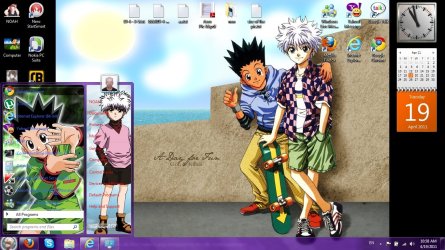
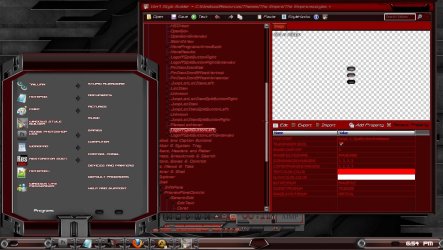
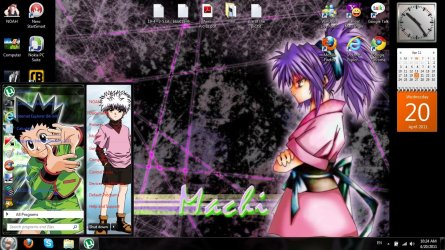
Start menu color change ??

Thanks for the info Bongo

If i get you right changing the start menu colour also changes other parts of the explorer gui then so its not possible just to change the start menu alone.

Thanks Danny
 

My Computer

Computer Manufacturer/Model Number
acer aspire 5935g
OS
Windows 7 Home Premium x64 SP1
CPU
intel(R)core(TM)2 duo CPU T6600 @ 2.20GHz
Motherboard
intel gm45/gm47 revision 07
Memory
3 gb ddr3
Graphics Card(s)
ati radeon hd4570/512mb
Monitor(s) Displays
lop156wh2-tle1 15.3 flat
Screen Resolution
1366x768
Hard Drives
OCZ-Agility3 60gig ssd
320gig external hdd
500gig external hdd
Mouse
Optical
Internet Speed
30Mbps Down/30Mbps Up
Imperfect1: i dont think you get what i mean? i mean the white color ? maybe im the one who understand what you mean ?well it dosn't work for me..

My Start Menu "white area" is now yellow because I used the method I gave you. But remember, I mentioned that you have to be using a theme that allows for the color change!

And by the way, getting multiple ways to accomplish something doesn't necessarily mean that any of them are wrong. There are usually several different ways to accomplish tasks in Microsoft products.
 

My Computer

Computer Manufacturer/Model Number
HP Pavillion dv5t (generation 1)
OS
Vista 64 bit and 32 bit (SP2)
CPU
Intel(R) Core(TM)2 Duo Processor T9400 (2.53 GHz
Memory
4GB DDR2 System Memory (2 Dimm)
Graphics Card(s)
512 MB NVIDIA GeForce 9600M GT
Monitor(s) Displays
15.4" diagonal WSXGA+ High-Definition HP BrightView Widescre
Screen Resolution
1680 x 1050
Hard Drives
320GB 5400RPM SATA Hard Drive with HP ProtectSmart Hard Drive Protection
Keyboard
Built-in HP
Mouse
Built in - Synaptics TouchPad V6.5 on PS/2 Port
Internet Speed
Max
Other Info
~ Intel Next-Gen Wireless-N Mini-card w/Bluetooth ~ Blu-Ray ROM DVD+/-R/RW ~ Integ. HDTV Hybrid Tuner ~ 12 Cell Battery ~ MS Office (Home Premium) 2007 ~
Last edited:

My Computer

Computer type
Laptop
Computer Manufacturer/Model Number
Sager NP9170
OS
Win 7 Pro x64 / Win 10 Pro
CPU
Intel(R) Core(TM) i7-3630QM CPU @ 2.40GHz
Motherboard
CLEVO P170EM
Memory
12 GB
Graphics Card(s)
(1) Intel(R) HD Graphics 4000 (2) NVIDIA GeForce GTX 675M
Sound Card
(1) Realtek High Definition Audio (2) Intel(R) Display Aud
Monitor(s) Displays
17.3
Screen Resolution
1920x1080
Hard Drives
(1) Samsung 860 EVO 500GB(OS) (1) Samsung 860 EVO 500GB(Data)
Keyboard
Backlite
Antivirus
MSE, Malwarebytes Pro
Browser
Firefox
Other Info
DESKTOP: Custom-built.
OS: Win 10 Pro x64.
CASE: Rosewill R5.
CPU: Intel I5 4670K CPU @ 3.40GHz.
CPU COOLER: Cool Master Hyper 212 EVO.
MOTHERBOARD: Asus Z87-A.
MEMORY: Kingston HyperX 2x4 GB.
GPU: Nvidia Geforce 650 TI.
PSU: Corsair TX750.
DRIVES: (1) Samsung 840 120 GB SSD (2) Western Digital blue 500 GB 7200 RPM.
Thanks for the info Bongo

If i get you right changing the start menu colour also changes other parts of the explorer gui then so its not possible just to change the start menu alone.

Thanks Danny

Only if I change the all programs menu will it change some of explorer
Jerry

Edit if you want I will change the all program menu back for you. Check out My theme I made BlackBlend7 by ~jryprt on deviantART

Hi Bongo

No dont want it changing back just wondered why it changed other bits of explorer.
That theme is great mate will pinch that one

Thanks

Danny
 

My Computer

Computer Manufacturer/Model Number
acer aspire 5935g
OS
Windows 7 Home Premium x64 SP1
CPU
intel(R)core(TM)2 duo CPU T6600 @ 2.20GHz
Motherboard
intel gm45/gm47 revision 07
Memory
3 gb ddr3
Graphics Card(s)
ati radeon hd4570/512mb
Monitor(s) Displays
lop156wh2-tle1 15.3 flat
Screen Resolution
1366x768
Hard Drives
OCZ-Agility3 60gig ssd
320gig external hdd
500gig external hdd
Mouse
Optical
Internet Speed
30Mbps Down/30Mbps Up
Thanks for the info Bongo

If i get you right changing the start menu colour also changes other parts of the explorer gui then so its not possible just to change the start menu alone.

Thanks Danny

Only if I change the all programs menu will it change some of explorer
Jerry

Edit if you want I will change the all program menu back for you. Check out My theme I made BlackBlend7 by ~jryprt on deviantART

Hi Bongo

No dont want it changing back just wondered why it changed other bits of explorer.
That theme is great mate will pinch that one

Thanks

Danny

:cool:
Jerry
 

My Computer

Computer type
Laptop
Computer Manufacturer/Model Number
Sager NP9170
OS
Win 7 Pro x64 / Win 10 Pro
CPU
Intel(R) Core(TM) i7-3630QM CPU @ 2.40GHz
Motherboard
CLEVO P170EM
Memory
12 GB
Graphics Card(s)
(1) Intel(R) HD Graphics 4000 (2) NVIDIA GeForce GTX 675M
Sound Card
(1) Realtek High Definition Audio (2) Intel(R) Display Aud
Monitor(s) Displays
17.3
Screen Resolution
1920x1080
Hard Drives
(1) Samsung 860 EVO 500GB(OS) (1) Samsung 860 EVO 500GB(Data)
Keyboard
Backlite
Antivirus
MSE, Malwarebytes Pro
Browser
Firefox
Other Info
DESKTOP: Custom-built.
OS: Win 10 Pro x64.
CASE: Rosewill R5.
CPU: Intel I5 4670K CPU @ 3.40GHz.
CPU COOLER: Cool Master Hyper 212 EVO.
MOTHERBOARD: Asus Z87-A.
MEMORY: Kingston HyperX 2x4 GB.
GPU: Nvidia Geforce 650 TI.
PSU: Corsair TX750.
DRIVES: (1) Samsung 840 120 GB SSD (2) Western Digital blue 500 GB 7200 RPM.
hi bongo (jerry)

i have question about the shutdown button do you know what is the hex address for the text color of the shut down button and do you know how to shift the whole button a little bet to the right?

please see attach

Noah
 

Attachments

  • Untitled.jpg
    Untitled.jpg
    422.8 KB · Views: 29

My Computer

Computer Manufacturer/Model Number
E machine E725
OS
Win 7 ultimate 64 bit
CPU
itel pentium proccessor T4400
Memory
2 GB
Graphics Card(s)
intel with 256 mb cash memory
Screen Resolution
1366 x 768
Hard Drives
400 GB
Shut Down is Start Menu > Panels > Basic > LogOffSplitButtonLeft > TextColor:Color. Change when hot with HotTrackingColor
and
Start Menu > Panels > Basic > LogoffSplitButtonLeftExtended

and to shift it is in the margins. As you see from my screen you can actually take the text all together by using script and setting it to 1. Hope this helps

help screen.jpg
 

My Computer

Computer Manufacturer/Model Number
Alienware Aurora
OS
windows 7 rtm
CPU
amd 64 fx51
Motherboard
asus sk8n
Memory
3gb
Monitor(s) Displays
32inch element
Hard Drives
120gb
1tb
1tb
1.5tb
many thanks

lol actually i made a mistake sorry :p

which is i don't have style builder i have restorator

do you know what is the image number for the button?and there is small arrow next to shutdown (the extension to restart and log off etc..) you know whats there button number cause restorator is a little bit different .

thanks again
 

My Computer

Computer Manufacturer/Model Number
E machine E725
OS
Win 7 ultimate 64 bit
CPU
itel pentium proccessor T4400
Memory
2 GB
Graphics Card(s)
intel with 256 mb cash memory
Screen Resolution
1366 x 768
Hard Drives
400 GB
many thanks

lol actually i made a mistake sorry :p

which is i don't have style builder i have restorator

do you know what is the image number for the button?and there is small arrow next to shutdown (the extension to restart and log off etc..) you know whats there button number cause restorator is a little bit different .

thanks again
The button on the left is #787 extended is#788
Sorry I don't know where to find the text color for you, in Windows Style Builder is with these two buttons.

On the right side is a button and an arrow
The button on the right side is #767 extended is#791

There are three numbers for the arrows, it depends on the DPI setting you have
The arrow is #768 #789 #790 extended is #792 #793 #794
Jerry
 

My Computer

Computer type
Laptop
Computer Manufacturer/Model Number
Sager NP9170
OS
Win 7 Pro x64 / Win 10 Pro
CPU
Intel(R) Core(TM) i7-3630QM CPU @ 2.40GHz
Motherboard
CLEVO P170EM
Memory
12 GB
Graphics Card(s)
(1) Intel(R) HD Graphics 4000 (2) NVIDIA GeForce GTX 675M
Sound Card
(1) Realtek High Definition Audio (2) Intel(R) Display Aud
Monitor(s) Displays
17.3
Screen Resolution
1920x1080
Hard Drives
(1) Samsung 860 EVO 500GB(OS) (1) Samsung 860 EVO 500GB(Data)
Keyboard
Backlite
Antivirus
MSE, Malwarebytes Pro
Browser
Firefox
Other Info
DESKTOP: Custom-built.
OS: Win 10 Pro x64.
CASE: Rosewill R5.
CPU: Intel I5 4670K CPU @ 3.40GHz.
CPU COOLER: Cool Master Hyper 212 EVO.
MOTHERBOARD: Asus Z87-A.
MEMORY: Kingston HyperX 2x4 GB.
GPU: Nvidia Geforce 650 TI.
PSU: Corsair TX750.
DRIVES: (1) Samsung 840 120 GB SSD (2) Western Digital blue 500 GB 7200 RPM.
I have some images for Start Menu, but the dimensions of these images do include the white background of start menu too, so 12x31 dimension on aero.mstyles - Menu Programs Image - is 261x31 on my image, or 20x342 - Programs List Image - is 261x424. How can I fix this? How can I remove the white background and use my images? (Instead of white background, there is the image on my images).

I have Ave Style Builder and ResHacker, and I can use some other trial software if necessary.

By the way, I haven't made any changes in the system. I did not use any patch. If I just edit the aero.msstyles file and replace it with the new one - keeping the old one same somewhere - , do I still need a patch?
 
Last edited:

My Computer

Computer Manufacturer/Model Number
ASUS G72 Notebook
OS
Windows 7 Ultimate 64-bit
CPU
Intel® Core™2 Duo mobile processor P8700 2.53 GHz
Memory
6GB DDRII
Graphics Card(s)
NVIDIA GeForce GTX 260M
Sound Card
EAX Advanced HD 4.0 + Logitech Wireless Headset G930
Monitor(s) Displays
17.3" LED-backlit LCD high-definition plus widescreen
Screen Resolution
1600 x 900
Hard Drives
2 x Seagate Momentus 500 GB 5400.6 SATA 3Gb/s
Cooling
Targus
Mouse
Logitech Wireless Trackball M570
Internet Speed
3 to 6 Mbps Download / .5 to 1 Mbps Upload
Other Info
Clear Modem with Wi-fi*
Comodo Internet Security Premium
I have some images for Start Menu, but the dimensions of these images do include the white background of start menu too, so 12x31 dimension on aero.mstyles - Menu Programs Image - is 261x31 on my image, or 20x342 - Programs List Image - is 261x424. How can I fix this? How can I remove the white background and use my images? (Instead of white background, there is the image on my images).

I have Ave Style Builder and ResHacker, and I can use some other trial software if necessary.

By the way, I haven't made any changes in the system. I did not use any patch. If I just edit the aero.msstyles file and replace it with the new one - keeping the old one same somewhere - , do I still need a patch?
First you will need to patch your system files for it to work.
Second you cannot work on the aero.msstyles while you are using it you need to switch to Windows Classic theme then log off and then log on then you can work on the aero.msstyles.
Jerry
 

My Computer

Computer type
Laptop
Computer Manufacturer/Model Number
Sager NP9170
OS
Win 7 Pro x64 / Win 10 Pro
CPU
Intel(R) Core(TM) i7-3630QM CPU @ 2.40GHz
Motherboard
CLEVO P170EM
Memory
12 GB
Graphics Card(s)
(1) Intel(R) HD Graphics 4000 (2) NVIDIA GeForce GTX 675M
Sound Card
(1) Realtek High Definition Audio (2) Intel(R) Display Aud
Monitor(s) Displays
17.3
Screen Resolution
1920x1080
Hard Drives
(1) Samsung 860 EVO 500GB(OS) (1) Samsung 860 EVO 500GB(Data)
Keyboard
Backlite
Antivirus
MSE, Malwarebytes Pro
Browser
Firefox
Other Info
DESKTOP: Custom-built.
OS: Win 10 Pro x64.
CASE: Rosewill R5.
CPU: Intel I5 4670K CPU @ 3.40GHz.
CPU COOLER: Cool Master Hyper 212 EVO.
MOTHERBOARD: Asus Z87-A.
MEMORY: Kingston HyperX 2x4 GB.
GPU: Nvidia Geforce 650 TI.
PSU: Corsair TX750.
DRIVES: (1) Samsung 840 120 GB SSD (2) Western Digital blue 500 GB 7200 RPM.
I am not trying to change the all theme. I am trying to change the Start Menu and Taskbar. Do I still need a patch?

Is there anyway to know if I have already installed UxStyle (When you say patch; that is what you mean, right?) on this machine - I have more than one machine with more than one Windows installations, I do not know if I have already installed it on this installation or not -? If I install it again, would it be any problem?

Can you explain editing, going back to basic, and then going back to aero again.

Which one is first:

- Copying aero.msstyles
- Editing aero.msstyles
- Saving aero.msstyles
- Changing theme to basic
- Changing theme to aero

What is the order?

Thanks.
 

My Computer

Computer Manufacturer/Model Number
ASUS G72 Notebook
OS
Windows 7 Ultimate 64-bit
CPU
Intel® Core™2 Duo mobile processor P8700 2.53 GHz
Memory
6GB DDRII
Graphics Card(s)
NVIDIA GeForce GTX 260M
Sound Card
EAX Advanced HD 4.0 + Logitech Wireless Headset G930
Monitor(s) Displays
17.3" LED-backlit LCD high-definition plus widescreen
Screen Resolution
1600 x 900
Hard Drives
2 x Seagate Momentus 500 GB 5400.6 SATA 3Gb/s
Cooling
Targus
Mouse
Logitech Wireless Trackball M570
Internet Speed
3 to 6 Mbps Download / .5 to 1 Mbps Upload
Other Info
Clear Modem with Wi-fi*
Comodo Internet Security Premium
many thanks

lol actually i made a mistake sorry :p

which is i don't have style builder i have restorator

do you know what is the image number for the button?and there is small arrow next to shutdown (the extension to restart and log off etc..) you know whats there button number cause restorator is a little bit different .

thanks again
The button on the left is #787 extended is#788
Sorry I don't know where to find the text color for you, in Windows Style Builder is with these two buttons.

On the right side is a button and an arrow
The button on the right side is #767 extended is#791

There are three numbers for the arrows, it depends on the DPI setting you have
The arrow is #768 #789 #790 extended is #792 #793 #794
Jerry


thanks bongo

by the way i found the text color it is in hex address 19a40 a file called normal in restorator
 

My Computer

Computer Manufacturer/Model Number
E machine E725
OS
Win 7 ultimate 64 bit
CPU
itel pentium proccessor T4400
Memory
2 GB
Graphics Card(s)
intel with 256 mb cash memory
Screen Resolution
1366 x 768
Hard Drives
400 GB
thanks bongo

by the way i found the text color it is in hex address 19a40 a file called normal in restorator
Your Welcome
Jerry
 

My Computer

Computer type
Laptop
Computer Manufacturer/Model Number
Sager NP9170
OS
Win 7 Pro x64 / Win 10 Pro
CPU
Intel(R) Core(TM) i7-3630QM CPU @ 2.40GHz
Motherboard
CLEVO P170EM
Memory
12 GB
Graphics Card(s)
(1) Intel(R) HD Graphics 4000 (2) NVIDIA GeForce GTX 675M
Sound Card
(1) Realtek High Definition Audio (2) Intel(R) Display Aud
Monitor(s) Displays
17.3
Screen Resolution
1920x1080
Hard Drives
(1) Samsung 860 EVO 500GB(OS) (1) Samsung 860 EVO 500GB(Data)
Keyboard
Backlite
Antivirus
MSE, Malwarebytes Pro
Browser
Firefox
Other Info
DESKTOP: Custom-built.
OS: Win 10 Pro x64.
CASE: Rosewill R5.
CPU: Intel I5 4670K CPU @ 3.40GHz.
CPU COOLER: Cool Master Hyper 212 EVO.
MOTHERBOARD: Asus Z87-A.
MEMORY: Kingston HyperX 2x4 GB.
GPU: Nvidia Geforce 650 TI.
PSU: Corsair TX750.
DRIVES: (1) Samsung 840 120 GB SSD (2) Western Digital blue 500 GB 7200 RPM.
I am not trying to change the all theme. I am trying to change the Start Menu and Taskbar. Do I still need a patch?

Is there anyway to know if I have already installed UxStyle (When you say patch; that is what you mean, right?) on this machine - I have more than one machine with more than one Windows installations, I do not know if I have already installed it on this installation or not -? If I install it again, would it be any problem?

Can you explain editing, going back to basic, and then going back to aero again.

Which one is first:

- Copying aero.msstyles
- Editing aero.msstyles
- Saving aero.msstyles
- Changing theme to basic
- Changing theme to aero

What is the order?

Thanks.

Yes you will need to patch being as you are changing the .msstyle it becomes a custom theme.
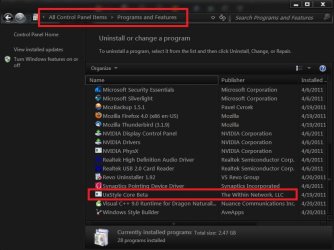
To see if you have UxStyle installed go to Control Panel\Programs and Features and see if it's there (see screenshot)if you had it installed and try to install it again it will not work you will need to uninstall it and then reinstall it.
cp.jpg
#1 make a copy of aero.msstyles
#2 switch to Windows classic theme log off and log on.
#3 edit the aero.msstyles
#4 save the aero.msstyles
#5 use it
give me a couple minutes to put together but you should rename the aero.msstyles and the theme folder and the theme file. I will post how in a few minutes.
Jerry
 

My Computer

Computer type
Laptop
Computer Manufacturer/Model Number
Sager NP9170
OS
Win 7 Pro x64 / Win 10 Pro
CPU
Intel(R) Core(TM) i7-3630QM CPU @ 2.40GHz
Motherboard
CLEVO P170EM
Memory
12 GB
Graphics Card(s)
(1) Intel(R) HD Graphics 4000 (2) NVIDIA GeForce GTX 675M
Sound Card
(1) Realtek High Definition Audio (2) Intel(R) Display Aud
Monitor(s) Displays
17.3
Screen Resolution
1920x1080
Hard Drives
(1) Samsung 860 EVO 500GB(OS) (1) Samsung 860 EVO 500GB(Data)
Keyboard
Backlite
Antivirus
MSE, Malwarebytes Pro
Browser
Firefox
Other Info
DESKTOP: Custom-built.
OS: Win 10 Pro x64.
CASE: Rosewill R5.
CPU: Intel I5 4670K CPU @ 3.40GHz.
CPU COOLER: Cool Master Hyper 212 EVO.
MOTHERBOARD: Asus Z87-A.
MEMORY: Kingston HyperX 2x4 GB.
GPU: Nvidia Geforce 650 TI.
PSU: Corsair TX750.
DRIVES: (1) Samsung 840 120 GB SSD (2) Western Digital blue 500 GB 7200 RPM.

Attachments

  • Untitled.jpg
    Untitled.jpg
    433.8 KB · Views: 111

My Computer

Computer Manufacturer/Model Number
E machine E725
OS
Win 7 ultimate 64 bit
CPU
itel pentium proccessor T4400
Memory
2 GB
Graphics Card(s)
intel with 256 mb cash memory
Screen Resolution
1366 x 768
Hard Drives
400 GB
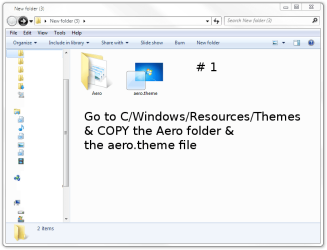
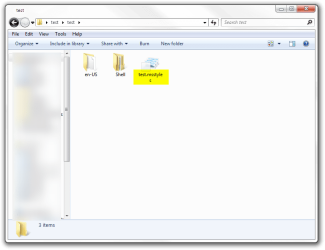
To start a new custom theme you need to. I used test as a name anywhere you see test as a name that's where you put your theme name.
#1 Go to C/Windows/Resources/Themes
Get a copy of the Aero folder and aero.theme file.
1.png
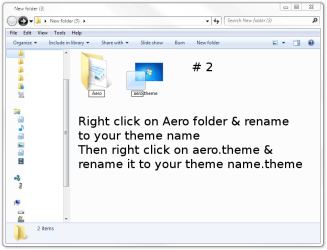
# 2 Right click & rename the 2 (Screenshot below step # 2)
2.png
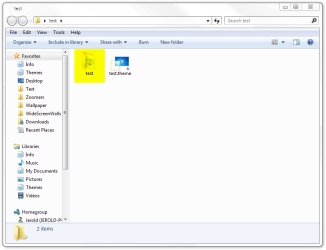
The Aero folder needs renamed to your theme name
The Aero.theme file needs renamed to your theme name.theme

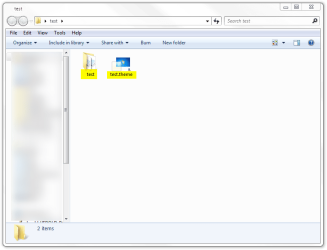
After (Screenshot below)
2b.png
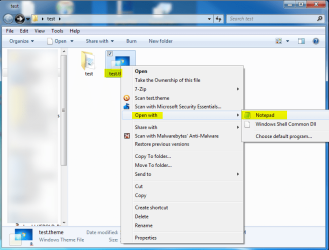
# 3 The your theme name.theme file needs opened up with notepad and renamed. (Screenshot below step # 3)
3b.png
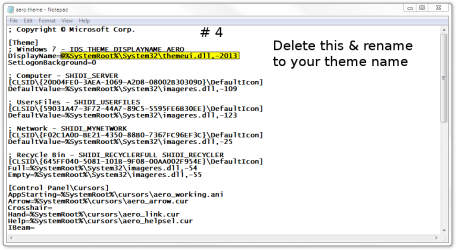
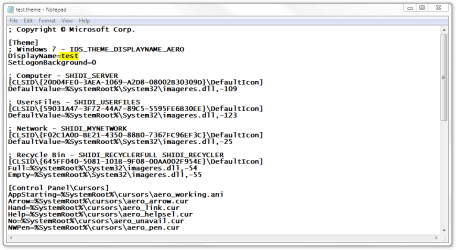
# 4 Delete @%SystemRoot%\System32\themeui.dll,-2013 & replace with
your theme name Look at screenshot. This is the top of notepad
(Screenshot below step # 4)
4.png
After (Screenshot below)
4b.png
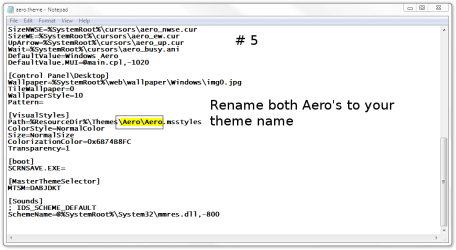
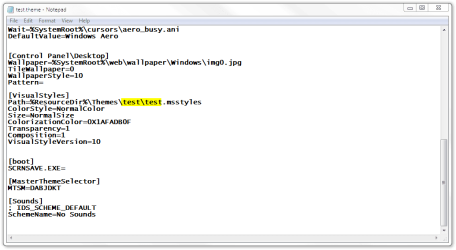
# 5 Delete Aero\Aero & replace with your theme name
Look at screenshot this is the bottom of notepad. your theme name\your theme name
(Screenshot below step # 5)
5.png
After (Screenshot below)
5b.png
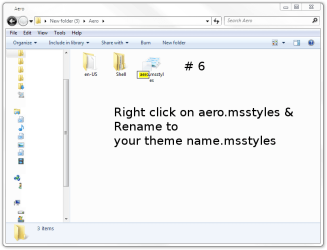
# 6 Open your theme name folder you need to rename the Aero.msstyle inside it.
6.png
to your theme name.msstyle
(Screenshot below step # 6)
6a.png
After (Screenshot below)
6b.png
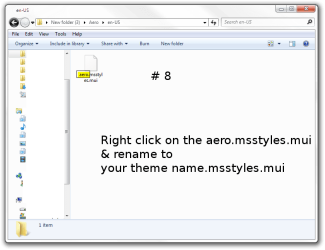
# 7 Then open the en-US folder. (Screenshot below step # 7)
7.png

# 8 Rename the aero.msstyles.mui file to
your theme name.msstyles.mui (Screenshot below step # 8)
8.png
After (Screenshot below)
8b.png
Edit your theme name.msstyle & save it
Put all of it in new folder with your theme name & zip it & share with others
Jerry
 

My Computer

Computer type
Laptop
Computer Manufacturer/Model Number
Sager NP9170
OS
Win 7 Pro x64 / Win 10 Pro
CPU
Intel(R) Core(TM) i7-3630QM CPU @ 2.40GHz
Motherboard
CLEVO P170EM
Memory
12 GB
Graphics Card(s)
(1) Intel(R) HD Graphics 4000 (2) NVIDIA GeForce GTX 675M
Sound Card
(1) Realtek High Definition Audio (2) Intel(R) Display Aud
Monitor(s) Displays
17.3
Screen Resolution
1920x1080
Hard Drives
(1) Samsung 860 EVO 500GB(OS) (1) Samsung 860 EVO 500GB(Data)
Keyboard
Backlite
Antivirus
MSE, Malwarebytes Pro
Browser
Firefox
Other Info
DESKTOP: Custom-built.
OS: Win 10 Pro x64.
CASE: Rosewill R5.
CPU: Intel I5 4670K CPU @ 3.40GHz.
CPU COOLER: Cool Master Hyper 212 EVO.
MOTHERBOARD: Asus Z87-A.
MEMORY: Kingston HyperX 2x4 GB.
GPU: Nvidia Geforce 650 TI.
PSU: Corsair TX750.
DRIVES: (1) Samsung 840 120 GB SSD (2) Western Digital blue 500 GB 7200 RPM.

My Computer

Computer type
Laptop
Computer Manufacturer/Model Number
Sager NP9170
OS
Win 7 Pro x64 / Win 10 Pro
CPU
Intel(R) Core(TM) i7-3630QM CPU @ 2.40GHz
Motherboard
CLEVO P170EM
Memory
12 GB
Graphics Card(s)
(1) Intel(R) HD Graphics 4000 (2) NVIDIA GeForce GTX 675M
Sound Card
(1) Realtek High Definition Audio (2) Intel(R) Display Aud
Monitor(s) Displays
17.3
Screen Resolution
1920x1080
Hard Drives
(1) Samsung 860 EVO 500GB(OS) (1) Samsung 860 EVO 500GB(Data)
Keyboard
Backlite
Antivirus
MSE, Malwarebytes Pro
Browser
Firefox
Other Info
DESKTOP: Custom-built.
OS: Win 10 Pro x64.
CASE: Rosewill R5.
CPU: Intel I5 4670K CPU @ 3.40GHz.
CPU COOLER: Cool Master Hyper 212 EVO.
MOTHERBOARD: Asus Z87-A.
MEMORY: Kingston HyperX 2x4 GB.
GPU: Nvidia Geforce 650 TI.
PSU: Corsair TX750.
DRIVES: (1) Samsung 840 120 GB SSD (2) Western Digital blue 500 GB 7200 RPM.
Thanks Bongo.
 

My Computer

Computer Manufacturer/Model Number
ASUS G72 Notebook
OS
Windows 7 Ultimate 64-bit
CPU
Intel® Core™2 Duo mobile processor P8700 2.53 GHz
Memory
6GB DDRII
Graphics Card(s)
NVIDIA GeForce GTX 260M
Sound Card
EAX Advanced HD 4.0 + Logitech Wireless Headset G930
Monitor(s) Displays
17.3" LED-backlit LCD high-definition plus widescreen
Screen Resolution
1600 x 900
Hard Drives
2 x Seagate Momentus 500 GB 5400.6 SATA 3Gb/s
Cooling
Targus
Mouse
Logitech Wireless Trackball M570
Internet Speed
3 to 6 Mbps Download / .5 to 1 Mbps Upload
Other Info
Clear Modem with Wi-fi*
Comodo Internet Security Premium
Back
Top