Solved Start Menu Dropdown Menus Not Working

ZomBrony

New member
Local time
4:11 PM
Messages
9
Location
Canada
Well that's kind of a redundant title.. I'll explain it better down here. I have several programs pinned to the start menu for convenience sake and part of the convenience of pinning programs like Wordpad to the start menu is the dropdown submenus that some programs have. I could just scroll over Wordpad and open the document I want to like that. Now the dropdown menu isn't working so I have to open it first and maneuver from the C drive that I hardly even use to my D drive and several more folders inside. Now that's still not too bad, I know. But I miss my shortcuts. :c Anyone know why this might not be working?

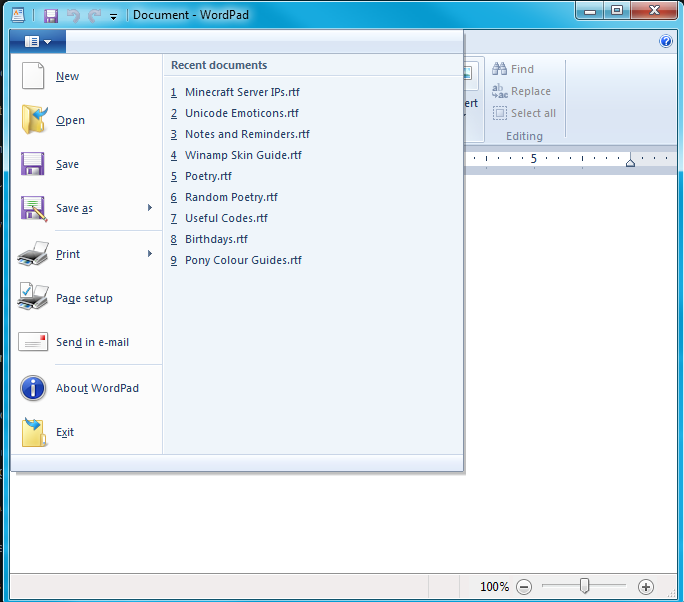
To be extra clear, this is what I mean by "dropdown menu:"
v80zXnd.png
 

My Computer

Computer type
PC/Desktop
Computer Manufacturer/Model Number
Acer
OS
Windows 7 Ultimate 64-Bit
CPU
AMD Phenom, 2.20 GHz
Motherboard
[Don't know how to check]
Memory
4.00 GB
Graphics Card(s)
AMD Radeon HD 6700
Hard Drives
1 TB split into 200/800 GB
Antivirus
Avast!
Browser
Google Chrome
Hello ZomBrony, and welcome to Seven Forums.

Do the menus open if you click on the arrow?

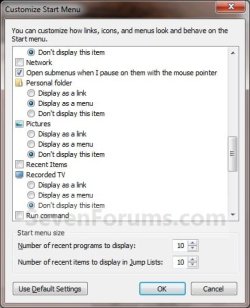
If so, then see if checking the Open submenus when I pause on them with the mouse pointer box in Customize Start Menu settings may help. :)

Customize-3.jpg
 

My Computer

Computer type
PC/Desktop
Computer Manufacturer/Model Number
Self built custom
OS
64-bit Windows 11 Pro for Workstations
CPU
Intel i7-8700K OC'd to 5 GHz
Motherboard
ASUS ROG Maximus XI Formula Z390
Memory
64 GB (4x16GB) G.SKILL TridentZ RGB DDR4 3600 MHz
Graphics Card(s)
ASUS ROG-STRIX-GTX1080TI-O11G-GAMING
Sound Card
Integrated
Monitor(s) Displays
2 x Samsung Odyssey G7 27"
Screen Resolution
2560x1440
Hard Drives
1TB Samsung 990 PRO M.2,
4TB Samsung 990 PRO PRO M.2,
TerraMaster F8 SSD Plus NAS
PSU
Seasonic Prime Titanium 850W
Case
Thermaltake Core P3
Cooling
Corsair Hydro H115i
Keyboard
Logitech wireless K800
Mouse
Logitech MX Master 4
Internet Speed
2 Gb/s Download and 100 Mb/s Upload
Antivirus
Malwarebyte Anti-Malware Premium
Browser
Google Chrome
Other Info
Logitech Z625 speaker system,
Logitech BRIO 4K Pro webcam,
HP Color LaserJet Pro MFP M477fdn,
APC SMART-UPS RT 1000 XL - SURT1000XLI,
Galaxy S23 Plus phone
Hello ZomBrony, and welcome to Seven Forums.

Do the menus open if you click on the arrow?

If so, then see if checking the Open submenus when I pause on them with the mouse pointer box in Customize Start Menu settings may help. :)

View attachment 349451
Well thanks for the offer, sir. But this didn't help me. The submenus option was still checked as by default and it didn't even work when I unchecked and rechecked it again either.
 

My Computer

Computer type
PC/Desktop
Computer Manufacturer/Model Number
Acer
OS
Windows 7 Ultimate 64-Bit
CPU
AMD Phenom, 2.20 GHz
Motherboard
[Don't know how to check]
Memory
4.00 GB
Graphics Card(s)
AMD Radeon HD 6700
Hard Drives
1 TB split into 200/800 GB
Antivirus
Avast!
Browser
Google Chrome
If this has just recently started to happen, then you could see if doing a system restore using a restore point dated before it started may undo and fix it.
 

My Computer

Computer type
PC/Desktop
Computer Manufacturer/Model Number
Self built custom
OS
64-bit Windows 11 Pro for Workstations
CPU
Intel i7-8700K OC'd to 5 GHz
Motherboard
ASUS ROG Maximus XI Formula Z390
Memory
64 GB (4x16GB) G.SKILL TridentZ RGB DDR4 3600 MHz
Graphics Card(s)
ASUS ROG-STRIX-GTX1080TI-O11G-GAMING
Sound Card
Integrated
Monitor(s) Displays
2 x Samsung Odyssey G7 27"
Screen Resolution
2560x1440
Hard Drives
1TB Samsung 990 PRO M.2,
4TB Samsung 990 PRO PRO M.2,
TerraMaster F8 SSD Plus NAS
PSU
Seasonic Prime Titanium 850W
Case
Thermaltake Core P3
Cooling
Corsair Hydro H115i
Keyboard
Logitech wireless K800
Mouse
Logitech MX Master 4
Internet Speed
2 Gb/s Download and 100 Mb/s Upload
Antivirus
Malwarebyte Anti-Malware Premium
Browser
Google Chrome
Other Info
Logitech Z625 speaker system,
Logitech BRIO 4K Pro webcam,
HP Color LaserJet Pro MFP M477fdn,
APC SMART-UPS RT 1000 XL - SURT1000XLI,
Galaxy S23 Plus phone
If this has just recently started to happen, then you could see if doing a system restore using a restore point dated before it started may undo and fix it.
Thank you, but that was the first thing I did. I've also recently discovered that even stranger than the Wordpad dropdown menu not working, other entries' submenus still work fine.
 

My Computer

Computer type
PC/Desktop
Computer Manufacturer/Model Number
Acer
OS
Windows 7 Ultimate 64-Bit
CPU
AMD Phenom, 2.20 GHz
Motherboard
[Don't know how to check]
Memory
4.00 GB
Graphics Card(s)
AMD Radeon HD 6700
Hard Drives
1 TB split into 200/800 GB
Antivirus
Avast!
Browser
Google Chrome
If there hasn't been anything recently opened with the app (ex: WordPad) then there wouldn't be anything in the menu to be able to open it.

Just to verify, did you also try clicking on the menu arrow to see if it would open?

As a test, open something with WordPad to see if it shows up later in it's recent items menu.

As another test, "Pin to taskbar" WordPad to see if it's jumplist is populated with recent items.
 

My Computer

Computer type
PC/Desktop
Computer Manufacturer/Model Number
Self built custom
OS
64-bit Windows 11 Pro for Workstations
CPU
Intel i7-8700K OC'd to 5 GHz
Motherboard
ASUS ROG Maximus XI Formula Z390
Memory
64 GB (4x16GB) G.SKILL TridentZ RGB DDR4 3600 MHz
Graphics Card(s)
ASUS ROG-STRIX-GTX1080TI-O11G-GAMING
Sound Card
Integrated
Monitor(s) Displays
2 x Samsung Odyssey G7 27"
Screen Resolution
2560x1440
Hard Drives
1TB Samsung 990 PRO M.2,
4TB Samsung 990 PRO PRO M.2,
TerraMaster F8 SSD Plus NAS
PSU
Seasonic Prime Titanium 850W
Case
Thermaltake Core P3
Cooling
Corsair Hydro H115i
Keyboard
Logitech wireless K800
Mouse
Logitech MX Master 4
Internet Speed
2 Gb/s Download and 100 Mb/s Upload
Antivirus
Malwarebyte Anti-Malware Premium
Browser
Google Chrome
Other Info
Logitech Z625 speaker system,
Logitech BRIO 4K Pro webcam,
HP Color LaserJet Pro MFP M477fdn,
APC SMART-UPS RT 1000 XL - SURT1000XLI,
Galaxy S23 Plus phone
I use WordPad very frequently. In the time I made this post, I would bet that I opened and even modified at least 20 different documents. The issue is definitely not having any recently used items to display. And there were no recent items when I tried pinning it to the taskbar either, a jumplist didn't even open.
Edit: My apologies for missing that. Yes, I tried clicking the menu arrow as well.

Here's another screenshot to show that I indeed have recently used items. Yes, I know I said "at least 20" and it only shows nine but it's limited to showing 10 items by default, as you probably know.
SgQq26B.png
 

My Computer

Computer type
PC/Desktop
Computer Manufacturer/Model Number
Acer
OS
Windows 7 Ultimate 64-Bit
CPU
AMD Phenom, 2.20 GHz
Motherboard
[Don't know how to check]
Memory
4.00 GB
Graphics Card(s)
AMD Radeon HD 6700
Hard Drives
1 TB split into 200/800 GB
Antivirus
Avast!
Browser
Google Chrome

My Computer

Computer type
PC/Desktop
Computer Manufacturer/Model Number
Self built custom
OS
64-bit Windows 11 Pro for Workstations
CPU
Intel i7-8700K OC'd to 5 GHz
Motherboard
ASUS ROG Maximus XI Formula Z390
Memory
64 GB (4x16GB) G.SKILL TridentZ RGB DDR4 3600 MHz
Graphics Card(s)
ASUS ROG-STRIX-GTX1080TI-O11G-GAMING
Sound Card
Integrated
Monitor(s) Displays
2 x Samsung Odyssey G7 27"
Screen Resolution
2560x1440
Hard Drives
1TB Samsung 990 PRO M.2,
4TB Samsung 990 PRO PRO M.2,
TerraMaster F8 SSD Plus NAS
PSU
Seasonic Prime Titanium 850W
Case
Thermaltake Core P3
Cooling
Corsair Hydro H115i
Keyboard
Logitech wireless K800
Mouse
Logitech MX Master 4
Internet Speed
2 Gb/s Download and 100 Mb/s Upload
Antivirus
Malwarebyte Anti-Malware Premium
Browser
Google Chrome
Other Info
Logitech Z625 speaker system,
Logitech BRIO 4K Pro webcam,
HP Color LaserJet Pro MFP M477fdn,
APC SMART-UPS RT 1000 XL - SURT1000XLI,
Galaxy S23 Plus phone
Well that would be great in any other situation.. But WordPad is my only application whose jumplist isn't working. I don't want to reset all of them because of it. And I already tried simply unpinning and repinning it. That was the first thing I did before I even posted about this.
 

My Computer

Computer type
PC/Desktop
Computer Manufacturer/Model Number
Acer
OS
Windows 7 Ultimate 64-Bit
CPU
AMD Phenom, 2.20 GHz
Motherboard
[Don't know how to check]
Memory
4.00 GB
Graphics Card(s)
AMD Radeon HD 6700
Hard Drives
1 TB split into 200/800 GB
Antivirus
Avast!
Browser
Google Chrome
I'm not sure what else to suggest. That would help if the problem is corruption.

If you choose to reset, they will repopulate after as you manually open them until you have them all back again.
 

My Computer

Computer type
PC/Desktop
Computer Manufacturer/Model Number
Self built custom
OS
64-bit Windows 11 Pro for Workstations
CPU
Intel i7-8700K OC'd to 5 GHz
Motherboard
ASUS ROG Maximus XI Formula Z390
Memory
64 GB (4x16GB) G.SKILL TridentZ RGB DDR4 3600 MHz
Graphics Card(s)
ASUS ROG-STRIX-GTX1080TI-O11G-GAMING
Sound Card
Integrated
Monitor(s) Displays
2 x Samsung Odyssey G7 27"
Screen Resolution
2560x1440
Hard Drives
1TB Samsung 990 PRO M.2,
4TB Samsung 990 PRO PRO M.2,
TerraMaster F8 SSD Plus NAS
PSU
Seasonic Prime Titanium 850W
Case
Thermaltake Core P3
Cooling
Corsair Hydro H115i
Keyboard
Logitech wireless K800
Mouse
Logitech MX Master 4
Internet Speed
2 Gb/s Download and 100 Mb/s Upload
Antivirus
Malwarebyte Anti-Malware Premium
Browser
Google Chrome
Other Info
Logitech Z625 speaker system,
Logitech BRIO 4K Pro webcam,
HP Color LaserJet Pro MFP M477fdn,
APC SMART-UPS RT 1000 XL - SURT1000XLI,
Galaxy S23 Plus phone
I'm not sure what else to suggest. That would help if the problem is corruption.

If you choose to reset, they will repopulate after as you manually open them until you have them all back again.
Hmmm.. I guess I'll give it a try. I've been wanting to reorganise my Windows Explorer pinned items anyway. Thank you.
 

My Computer

Computer type
PC/Desktop
Computer Manufacturer/Model Number
Acer
OS
Windows 7 Ultimate 64-Bit
CPU
AMD Phenom, 2.20 GHz
Motherboard
[Don't know how to check]
Memory
4.00 GB
Graphics Card(s)
AMD Radeon HD 6700
Hard Drives
1 TB split into 200/800 GB
Antivirus
Avast!
Browser
Google Chrome
You're welcome. Please let us know how it went. :)
 

My Computer

Computer type
PC/Desktop
Computer Manufacturer/Model Number
Self built custom
OS
64-bit Windows 11 Pro for Workstations
CPU
Intel i7-8700K OC'd to 5 GHz
Motherboard
ASUS ROG Maximus XI Formula Z390
Memory
64 GB (4x16GB) G.SKILL TridentZ RGB DDR4 3600 MHz
Graphics Card(s)
ASUS ROG-STRIX-GTX1080TI-O11G-GAMING
Sound Card
Integrated
Monitor(s) Displays
2 x Samsung Odyssey G7 27"
Screen Resolution
2560x1440
Hard Drives
1TB Samsung 990 PRO M.2,
4TB Samsung 990 PRO PRO M.2,
TerraMaster F8 SSD Plus NAS
PSU
Seasonic Prime Titanium 850W
Case
Thermaltake Core P3
Cooling
Corsair Hydro H115i
Keyboard
Logitech wireless K800
Mouse
Logitech MX Master 4
Internet Speed
2 Gb/s Download and 100 Mb/s Upload
Antivirus
Malwarebyte Anti-Malware Premium
Browser
Google Chrome
Other Info
Logitech Z625 speaker system,
Logitech BRIO 4K Pro webcam,
HP Color LaserJet Pro MFP M477fdn,
APC SMART-UPS RT 1000 XL - SURT1000XLI,
Galaxy S23 Plus phone
You're welcome. Please let us know how it went. :)
I thought I did. o.o My bad. x3 That seems to have fixed it. Thank you very much for your time and patience. I know a slow guy like me can be hard to work with sometimes.
 

My Computer

Computer type
PC/Desktop
Computer Manufacturer/Model Number
Acer
OS
Windows 7 Ultimate 64-Bit
CPU
AMD Phenom, 2.20 GHz
Motherboard
[Don't know how to check]
Memory
4.00 GB
Graphics Card(s)
AMD Radeon HD 6700
Hard Drives
1 TB split into 200/800 GB
Antivirus
Avast!
Browser
Google Chrome
Great news. :party:

It's never a bother for me to help.
 

My Computer

Computer type
PC/Desktop
Computer Manufacturer/Model Number
Self built custom
OS
64-bit Windows 11 Pro for Workstations
CPU
Intel i7-8700K OC'd to 5 GHz
Motherboard
ASUS ROG Maximus XI Formula Z390
Memory
64 GB (4x16GB) G.SKILL TridentZ RGB DDR4 3600 MHz
Graphics Card(s)
ASUS ROG-STRIX-GTX1080TI-O11G-GAMING
Sound Card
Integrated
Monitor(s) Displays
2 x Samsung Odyssey G7 27"
Screen Resolution
2560x1440
Hard Drives
1TB Samsung 990 PRO M.2,
4TB Samsung 990 PRO PRO M.2,
TerraMaster F8 SSD Plus NAS
PSU
Seasonic Prime Titanium 850W
Case
Thermaltake Core P3
Cooling
Corsair Hydro H115i
Keyboard
Logitech wireless K800
Mouse
Logitech MX Master 4
Internet Speed
2 Gb/s Download and 100 Mb/s Upload
Antivirus
Malwarebyte Anti-Malware Premium
Browser
Google Chrome
Other Info
Logitech Z625 speaker system,
Logitech BRIO 4K Pro webcam,
HP Color LaserJet Pro MFP M477fdn,
APC SMART-UPS RT 1000 XL - SURT1000XLI,
Galaxy S23 Plus phone
Back
Top