Recent items under Start Menu items, not working

JustWatching

New member
Member
Local time
1:25 PM
Messages
71
I have Steam, RDP, VLC, Notepad all pinned to start menu, they all have 'Recent' sub-menus. The items in the Recent sub-menus for Steam and RDP do nothing. I click on them, get the circle for half a second and that is it. VLC and Notepad "Recent' sub-menu items open without issue. I tried unpinning Steam and RDP, and still the 'recent' sub-menu items do not work. I can go to Start>All Programs>Steam and click on any game I want and it opens without issue. Just not from the 'Recent' Steam sub-menu. Stumped on how to resolve this.
 

My Computer

Computer type
PC/Desktop
Computer Manufacturer/Model Number
Custom
OS
Windows 7 Ultimate x64
CPU
Intel Core i5-3350P Ivy Bridge Quad-Core 3.1GHzz
Motherboard
Asus P8H77-v
Memory
HyperX XMP 10th Anniversary Series 16GB
Graphics Card(s)
EVGA GeForce GTX 970 4GB
Sound Card
Onboard
Monitor(s) Displays
Acer S241HL 24", ASUS V238h 23"
Screen Resolution
1920x1080
Hard Drives
Kingston SSD 240GB
Samsung 2TB
PSU
XION AXP-700K14XE 700W ATX
Case
HEC 6C28BBX585 Black Steel ATX Mid Tower
Cooling
ZALMAN CNPS9500 AT 2 Ball CPU Cooling Fan/Heatsink
Keyboard
Logitech G710+
Mouse
Anker Wireless Vertical Mouse
Internet Speed
220/20
Antivirus
Webroot
Browser
Chrome
I have Steam, RDP, VLC, Notepad all pinned to start menu, they all have 'Recent' sub-menus. The items in the Recent sub-menus for Steam and RDP do nothing. I click on them, get the circle for half a second and that is it. VLC and Notepad "Recent' sub-menu items open without issue. I tried unpinning Steam and RDP, and still the 'recent' sub-menu items do not work. I can go to Start>All Programs>Steam and click on any game I want and it opens without issue. Just not from the 'Recent' Steam sub-menu. Stumped on how to resolve this.

When did you notice the issue for the first time?
 

My Computer

Computer type
PC/Desktop
OS
Win7 Ultimate/X84
CPU
Intel Celeron 336/2.8Ghz
Motherboard
MS-7592
Memory
DDR3/2GB
Hard Drives
ATA-100/160GB
Browser
FirefoX
I have Steam, RDP, VLC, Notepad all pinned to start menu, they all have 'Recent' sub-menus. The items in the Recent sub-menus for Steam and RDP do nothing. I click on them, get the circle for half a second and that is it. VLC and Notepad "Recent' sub-menu items open without issue. I tried unpinning Steam and RDP, and still the 'recent' sub-menu items do not work. I can go to Start>All Programs>Steam and click on any game I want and it opens without issue. Just not from the 'Recent' Steam sub-menu. Stumped on how to resolve this.

When did you notice the issue for the first time?

Shoot, sorry for not putting that in there, not 100% sure when it first started. But I think it was after I installed webroot. I uninstalled webroot and removed all traces of it yet the problem still persisted. It's especially odd that is only happening to the Steam and RDP Recent submenus, and no others(that I can tell) . I th0ought maybe a registry issue, but not sure.
 

My Computer

Computer type
PC/Desktop
Computer Manufacturer/Model Number
Custom
OS
Windows 7 Ultimate x64
CPU
Intel Core i5-3350P Ivy Bridge Quad-Core 3.1GHzz
Motherboard
Asus P8H77-v
Memory
HyperX XMP 10th Anniversary Series 16GB
Graphics Card(s)
EVGA GeForce GTX 970 4GB
Sound Card
Onboard
Monitor(s) Displays
Acer S241HL 24", ASUS V238h 23"
Screen Resolution
1920x1080
Hard Drives
Kingston SSD 240GB
Samsung 2TB
PSU
XION AXP-700K14XE 700W ATX
Case
HEC 6C28BBX585 Black Steel ATX Mid Tower
Cooling
ZALMAN CNPS9500 AT 2 Ball CPU Cooling Fan/Heatsink
Keyboard
Logitech G710+
Mouse
Anker Wireless Vertical Mouse
Internet Speed
220/20
Antivirus
Webroot
Browser
Chrome
Any ideas of where I can look to track this issue down?
 

My Computer

Computer type
PC/Desktop
Computer Manufacturer/Model Number
Custom
OS
Windows 7 Ultimate x64
CPU
Intel Core i5-3350P Ivy Bridge Quad-Core 3.1GHzz
Motherboard
Asus P8H77-v
Memory
HyperX XMP 10th Anniversary Series 16GB
Graphics Card(s)
EVGA GeForce GTX 970 4GB
Sound Card
Onboard
Monitor(s) Displays
Acer S241HL 24", ASUS V238h 23"
Screen Resolution
1920x1080
Hard Drives
Kingston SSD 240GB
Samsung 2TB
PSU
XION AXP-700K14XE 700W ATX
Case
HEC 6C28BBX585 Black Steel ATX Mid Tower
Cooling
ZALMAN CNPS9500 AT 2 Ball CPU Cooling Fan/Heatsink
Keyboard
Logitech G710+
Mouse
Anker Wireless Vertical Mouse
Internet Speed
220/20
Antivirus
Webroot
Browser
Chrome
What about creating a new user account? I found this option very helpful for several times. just try this and let me know what happens.
 

My Computer

Computer type
PC/Desktop
OS
Win7 Ultimate/X84
CPU
Intel Celeron 336/2.8Ghz
Motherboard
MS-7592
Memory
DDR3/2GB
Hard Drives
ATA-100/160GB
Browser
FirefoX
What about creating a new user account? I found this option very helpful for several times. just try this and let me know what happens.


Good idea, did not think to try that.

Unfortunately, issue is the same on the new created account.
 

My Computer

Computer type
PC/Desktop
Computer Manufacturer/Model Number
Custom
OS
Windows 7 Ultimate x64
CPU
Intel Core i5-3350P Ivy Bridge Quad-Core 3.1GHzz
Motherboard
Asus P8H77-v
Memory
HyperX XMP 10th Anniversary Series 16GB
Graphics Card(s)
EVGA GeForce GTX 970 4GB
Sound Card
Onboard
Monitor(s) Displays
Acer S241HL 24", ASUS V238h 23"
Screen Resolution
1920x1080
Hard Drives
Kingston SSD 240GB
Samsung 2TB
PSU
XION AXP-700K14XE 700W ATX
Case
HEC 6C28BBX585 Black Steel ATX Mid Tower
Cooling
ZALMAN CNPS9500 AT 2 Ball CPU Cooling Fan/Heatsink
Keyboard
Logitech G710+
Mouse
Anker Wireless Vertical Mouse
Internet Speed
220/20
Antivirus
Webroot
Browser
Chrome
Have you tried refreshing the whole "start menu"? If not,then you should...

Right-click on the taskbar ,click properties >start menu> customize > number of recent programs to display(make it equal to zero). Then click "OK" and "ok" again. There will be no icon on start menu after that.

Then again,go to the same location and set default settings(number of recent programs to display is 10 by default) and save the settings. See if this helps
 

My Computer

Computer type
PC/Desktop
OS
Win7 Ultimate/X84
CPU
Intel Celeron 336/2.8Ghz
Motherboard
MS-7592
Memory
DDR3/2GB
Hard Drives
ATA-100/160GB
Browser
FirefoX
Have you tried refreshing the whole "start menu"? If not,then you should...

Right-click on the taskbar ,click properties >start menu> customize > number of recent programs to display(make it equal to zero). Then click "OK" and "ok" again. There will be no icon on start menu after that.

Then again,go to the same location and set default settings(number of recent programs to display is 10 by default) and save the settings. See if this helps

Ok tried that, all recent icons went away, the pinned ones stayed, but the recent from the pinned went away. Set it back to 10. Still cannot run anything from Steam or RDP recent submenu
 

My Computer

Computer type
PC/Desktop
Computer Manufacturer/Model Number
Custom
OS
Windows 7 Ultimate x64
CPU
Intel Core i5-3350P Ivy Bridge Quad-Core 3.1GHzz
Motherboard
Asus P8H77-v
Memory
HyperX XMP 10th Anniversary Series 16GB
Graphics Card(s)
EVGA GeForce GTX 970 4GB
Sound Card
Onboard
Monitor(s) Displays
Acer S241HL 24", ASUS V238h 23"
Screen Resolution
1920x1080
Hard Drives
Kingston SSD 240GB
Samsung 2TB
PSU
XION AXP-700K14XE 700W ATX
Case
HEC 6C28BBX585 Black Steel ATX Mid Tower
Cooling
ZALMAN CNPS9500 AT 2 Ball CPU Cooling Fan/Heatsink
Keyboard
Logitech G710+
Mouse
Anker Wireless Vertical Mouse
Internet Speed
220/20
Antivirus
Webroot
Browser
Chrome
Hmm, can you run Steam and RDP from the desktop?or from the partition,that's Steam and RDP are installed on?
 

My Computer

Computer type
PC/Desktop
OS
Win7 Ultimate/X84
CPU
Intel Celeron 336/2.8Ghz
Motherboard
MS-7592
Memory
DDR3/2GB
Hard Drives
ATA-100/160GB
Browser
FirefoX
Steam and RDP run fine from the Start Menu with no issues. I can even run Steam games from the subfolder under All Programs. It is only the 'Recent' sub-menu(recent under steam and recent under RDP) on both that are not working. Remote Desktop (RDP) and Steam are both on the same partition as my OS.
 

My Computer

Computer type
PC/Desktop
Computer Manufacturer/Model Number
Custom
OS
Windows 7 Ultimate x64
CPU
Intel Core i5-3350P Ivy Bridge Quad-Core 3.1GHzz
Motherboard
Asus P8H77-v
Memory
HyperX XMP 10th Anniversary Series 16GB
Graphics Card(s)
EVGA GeForce GTX 970 4GB
Sound Card
Onboard
Monitor(s) Displays
Acer S241HL 24", ASUS V238h 23"
Screen Resolution
1920x1080
Hard Drives
Kingston SSD 240GB
Samsung 2TB
PSU
XION AXP-700K14XE 700W ATX
Case
HEC 6C28BBX585 Black Steel ATX Mid Tower
Cooling
ZALMAN CNPS9500 AT 2 Ball CPU Cooling Fan/Heatsink
Keyboard
Logitech G710+
Mouse
Anker Wireless Vertical Mouse
Internet Speed
220/20
Antivirus
Webroot
Browser
Chrome
Wondering if a fresh install is my only option at this point?
 

My Computer

Computer type
PC/Desktop
Computer Manufacturer/Model Number
Custom
OS
Windows 7 Ultimate x64
CPU
Intel Core i5-3350P Ivy Bridge Quad-Core 3.1GHzz
Motherboard
Asus P8H77-v
Memory
HyperX XMP 10th Anniversary Series 16GB
Graphics Card(s)
EVGA GeForce GTX 970 4GB
Sound Card
Onboard
Monitor(s) Displays
Acer S241HL 24", ASUS V238h 23"
Screen Resolution
1920x1080
Hard Drives
Kingston SSD 240GB
Samsung 2TB
PSU
XION AXP-700K14XE 700W ATX
Case
HEC 6C28BBX585 Black Steel ATX Mid Tower
Cooling
ZALMAN CNPS9500 AT 2 Ball CPU Cooling Fan/Heatsink
Keyboard
Logitech G710+
Mouse
Anker Wireless Vertical Mouse
Internet Speed
220/20
Antivirus
Webroot
Browser
Chrome
Ok I realize I have not been using the correct terminology in reporting my issue. Maybe that is causing some confusion on what my problem is.


My Steam and Remote Desktop Connection Jumplist items do not work.
Other programs jump lists (VLC) work without issue.
I have cleared and reset jump lists as per this link: http://www.sevenforums.com/tutorials/81483-jump-lists-reset-clear-all-items.html

Still having the same problem.

(If a mod could change the title of my thread to reflect jump lists that would be great. )
Jump list items for two programs will not work.
 

My Computer

Computer type
PC/Desktop
Computer Manufacturer/Model Number
Custom
OS
Windows 7 Ultimate x64
CPU
Intel Core i5-3350P Ivy Bridge Quad-Core 3.1GHzz
Motherboard
Asus P8H77-v
Memory
HyperX XMP 10th Anniversary Series 16GB
Graphics Card(s)
EVGA GeForce GTX 970 4GB
Sound Card
Onboard
Monitor(s) Displays
Acer S241HL 24", ASUS V238h 23"
Screen Resolution
1920x1080
Hard Drives
Kingston SSD 240GB
Samsung 2TB
PSU
XION AXP-700K14XE 700W ATX
Case
HEC 6C28BBX585 Black Steel ATX Mid Tower
Cooling
ZALMAN CNPS9500 AT 2 Ball CPU Cooling Fan/Heatsink
Keyboard
Logitech G710+
Mouse
Anker Wireless Vertical Mouse
Internet Speed
220/20
Antivirus
Webroot
Browser
Chrome
When you tested using another account (post #6), did you pin a shortcut for RDC/RDP to the Start Menu and then complete a Remote Desktop Connection?

Jump list info is kept in files in one's profile folder. Creating a new account should have answered any questions about those files being corrupted. If you are interested, visit this post (and/or that whole thread).

BTW, I knew that you meant jump lists all along. I subscribed to your thread when you made it and I've run some tests making RDC/RDP jump lists. I've just not found anything for you to try to fix your issue.
 

My Computer

Computer type
Laptop
Computer Manufacturer/Model Number
Employer provided Dell Latitude
OS
W7 Pro SP1 64bit
CPU
i7
Memory
8GB
Graphics Card(s)
Intel HD Graphics
Hard Drives
crappy SSD
Antivirus
Employer mandated Symantec Endpoint Protection
Browser
Pale Moon 64bit, IE11 64bit & Chrome 64bit
Re: calling it jumplist, just making sure :) and yes, on that other profile, I connected via RDP and it created the the shortcut in the jump list. Also when I ran steam on that profile, it automatically filled in the entire jump list under steam. They stil did not work.

I also just found I can drag an item from the steam (non working)jumplist to the desktop and it creates a shortcut that runs without issue. I am completely baffled.

I tried some more trouble shooting, cleared both jumplist appdata locations. Then while those two fodlers were opened, I opened a movie in VLC. a file was created in %APPDATA%\Microsoft\Windows\Recent\AutomaticDestinations and I now had a jump list under vlc. ANd I could open the item just fine.
Connected to a rdp connection and another file was created in that same folder. Jumplist created, but still cannot run from that jump list.
With steam a file was created in: %APPDATA%\Microsoft\Windows\Recent\CustomDestinations an d jumplist was created but still unable to run anything from that jump list
 

My Computer

Computer type
PC/Desktop
Computer Manufacturer/Model Number
Custom
OS
Windows 7 Ultimate x64
CPU
Intel Core i5-3350P Ivy Bridge Quad-Core 3.1GHzz
Motherboard
Asus P8H77-v
Memory
HyperX XMP 10th Anniversary Series 16GB
Graphics Card(s)
EVGA GeForce GTX 970 4GB
Sound Card
Onboard
Monitor(s) Displays
Acer S241HL 24", ASUS V238h 23"
Screen Resolution
1920x1080
Hard Drives
Kingston SSD 240GB
Samsung 2TB
PSU
XION AXP-700K14XE 700W ATX
Case
HEC 6C28BBX585 Black Steel ATX Mid Tower
Cooling
ZALMAN CNPS9500 AT 2 Ball CPU Cooling Fan/Heatsink
Keyboard
Logitech G710+
Mouse
Anker Wireless Vertical Mouse
Internet Speed
220/20
Antivirus
Webroot
Browser
Chrome
So it seems that something in your operating system creates a bad jump list file for RDC/RDP and Steam... no matter which profile that you use. If I were really desperate, I would use Process Monitor to record the events that take place when a jump list entry is being made for RDC/RDP on a computer that works and compare it to the events that happen on your computer. Sadly, there will be lots of entries to look at and often times - in the end - no significant differences are found.

If you opt to use Process Monitor, filter the results for:
Path > contains > AppData\Roaming\Microsoft\Windows\Recent
 

My Computer

Computer type
Laptop
Computer Manufacturer/Model Number
Employer provided Dell Latitude
OS
W7 Pro SP1 64bit
CPU
i7
Memory
8GB
Graphics Card(s)
Intel HD Graphics
Hard Drives
crappy SSD
Antivirus
Employer mandated Symantec Endpoint Protection
Browser
Pale Moon 64bit, IE11 64bit & Chrome 64bit
Okay well I'll just jump in with this observation. You asked about registry settings. I don't know much about that except that I have had problems with recent items, recent docs, recent programs not being displayed in the start menu and managed to find the registry entries for those.

Aslo in the past I've used Jump List Editor to troubleshoot or create Jumplists.

Here's an example I've just created.

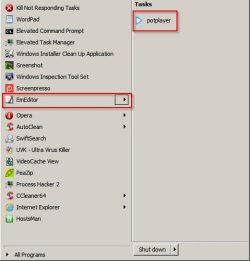
Create Jumplist for EMEditor (text editor) to open PotPlayer (media player:

JLE1.jpg

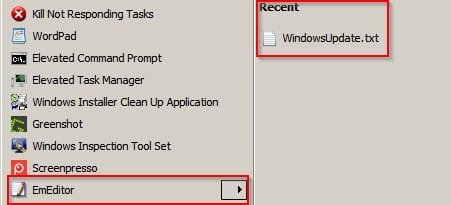
Restore defualt jumplist for EMeditor (recently opened docs)

JLE2.jpg

Perhaps you could give it a try and look at or attempt to modify existing jumplists.

Jumplist Editor

Note: I keep this software installed on my own machine.

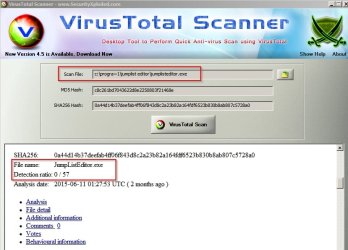
File safety scan:

VirusTotal Scan.jpg
 

My Computer

Computer type
Laptop
Computer Manufacturer/Model Number
ASUS
OS
Microsoft Windows 7 Home Premium 64-bit 7601 Multiprocessor Free Service Pack 1
CPU
AMD C-60 APU with Radeon(tm) HD Graphics
Motherboard
ASUSTeK COMPUTER INC. X501U
Memory
4.00 GB
Graphics Card(s)
AMD Radeon HD 6290 Graphics
Sound Card
(1) AMD High Definition Audio Device (2) Realtek High Defi
Screen Resolution
1366 x 768 x 32 bits (4294967296 colors) @ 60 Hz
Hard Drives
Hitachi HTS545050A7E380 SATA Disk Device
Antivirus
Comodo CIS & FW, SecureAplus App Whitelisting, Threatfire
Browser
Cyberfox 64bit, Opera 64bit, Airfox
Other Info
Spy-The-Spy, HitmanPro.Alert, Norton Connect Safe, MJRegWatcher, BitDefender TrafficLight, Voodoo Shield, Zemana AntiMalware

My Computer

Computer type
Laptop
Computer Manufacturer/Model Number
ASUS
OS
Microsoft Windows 7 Home Premium 64-bit 7601 Multiprocessor Free Service Pack 1
CPU
AMD C-60 APU with Radeon(tm) HD Graphics
Motherboard
ASUSTeK COMPUTER INC. X501U
Memory
4.00 GB
Graphics Card(s)
AMD Radeon HD 6290 Graphics
Sound Card
(1) AMD High Definition Audio Device (2) Realtek High Defi
Screen Resolution
1366 x 768 x 32 bits (4294967296 colors) @ 60 Hz
Hard Drives
Hitachi HTS545050A7E380 SATA Disk Device
Antivirus
Comodo CIS & FW, SecureAplus App Whitelisting, Threatfire
Browser
Cyberfox 64bit, Opera 64bit, Airfox
Other Info
Spy-The-Spy, HitmanPro.Alert, Norton Connect Safe, MJRegWatcher, BitDefender TrafficLight, Voodoo Shield, Zemana AntiMalware
Thanks Callender, saw that as well, except I can customize em to my hearts content, they just don't do anything, unless I drag them to desktop then they work fine, and I am having the same issue with RDP jumplists. I tried the editor, however it does not let me modify existing jump lists, and when I use it to create jump list for steam or RDP, it creates the jumplist but still nothing happens when clicking on them.


Used procmon to test rdp recent creation on both machines, no difference, both showed io errors at some point, both showed success in creating the file. Just works on that other computer, but not on my own.

Update: I also cannot right click on a start menu item and 'pin to task bar', I can select it, but nothing happens. I can drag an item to the taskbar and it is pinned, but I cannot RTclick to Pin to task bar. Dragged Steam to taskbar, it pinned to taskbar but nothing in that jump list works , same with RDP.
 
Last edited:

My Computer

Computer type
PC/Desktop
Computer Manufacturer/Model Number
Custom
OS
Windows 7 Ultimate x64
CPU
Intel Core i5-3350P Ivy Bridge Quad-Core 3.1GHzz
Motherboard
Asus P8H77-v
Memory
HyperX XMP 10th Anniversary Series 16GB
Graphics Card(s)
EVGA GeForce GTX 970 4GB
Sound Card
Onboard
Monitor(s) Displays
Acer S241HL 24", ASUS V238h 23"
Screen Resolution
1920x1080
Hard Drives
Kingston SSD 240GB
Samsung 2TB
PSU
XION AXP-700K14XE 700W ATX
Case
HEC 6C28BBX585 Black Steel ATX Mid Tower
Cooling
ZALMAN CNPS9500 AT 2 Ball CPU Cooling Fan/Heatsink
Keyboard
Logitech G710+
Mouse
Anker Wireless Vertical Mouse
Internet Speed
220/20
Antivirus
Webroot
Browser
Chrome
Hmm. Well unfortunately I don't use Steam or RDP (is disabled)

I wonder what would happen if you chose to rename a start menu item and the tried to pin it to the taskbar?

Right click start menu item > properties > general tab. Then rename.

Try pinning it.
 

My Computer

Computer type
Laptop
Computer Manufacturer/Model Number
ASUS
OS
Microsoft Windows 7 Home Premium 64-bit 7601 Multiprocessor Free Service Pack 1
CPU
AMD C-60 APU with Radeon(tm) HD Graphics
Motherboard
ASUSTeK COMPUTER INC. X501U
Memory
4.00 GB
Graphics Card(s)
AMD Radeon HD 6290 Graphics
Sound Card
(1) AMD High Definition Audio Device (2) Realtek High Defi
Screen Resolution
1366 x 768 x 32 bits (4294967296 colors) @ 60 Hz
Hard Drives
Hitachi HTS545050A7E380 SATA Disk Device
Antivirus
Comodo CIS & FW, SecureAplus App Whitelisting, Threatfire
Browser
Cyberfox 64bit, Opera 64bit, Airfox
Other Info
Spy-The-Spy, HitmanPro.Alert, Norton Connect Safe, MJRegWatcher, BitDefender TrafficLight, Voodoo Shield, Zemana AntiMalware
Hmm. Well unfortunately I don't use Steam or RDP (is disabled)

I wonder what would happen if you chose to rename a start menu item and the tried to pin it to the taskbar?

Right click start menu item > properties > general tab. Then rename.

Try pinning it.

No luck, same issue.
 

My Computer

Computer type
PC/Desktop
Computer Manufacturer/Model Number
Custom
OS
Windows 7 Ultimate x64
CPU
Intel Core i5-3350P Ivy Bridge Quad-Core 3.1GHzz
Motherboard
Asus P8H77-v
Memory
HyperX XMP 10th Anniversary Series 16GB
Graphics Card(s)
EVGA GeForce GTX 970 4GB
Sound Card
Onboard
Monitor(s) Displays
Acer S241HL 24", ASUS V238h 23"
Screen Resolution
1920x1080
Hard Drives
Kingston SSD 240GB
Samsung 2TB
PSU
XION AXP-700K14XE 700W ATX
Case
HEC 6C28BBX585 Black Steel ATX Mid Tower
Cooling
ZALMAN CNPS9500 AT 2 Ball CPU Cooling Fan/Heatsink
Keyboard
Logitech G710+
Mouse
Anker Wireless Vertical Mouse
Internet Speed
220/20
Antivirus
Webroot
Browser
Chrome
Back
Top