Start Menu Order + Catastrophe

CtrlAltDel

New member
Hello,

I need help with my start menu order. In the Taskbar and Start Menu Items dialogue under Customize Start Menu I have *Sort All Menu Items by name* unchecked.

Regardless of this, my All Programs start menu will not maintain the order that I choose to put it in. I run the box as an administrator and I am the only user of the computer and have no other user accounts other than the one Administrator account that I use and the Guest account, which is turned off.

The folders in the Start Menu seem to maintain their modified order that I arrange them in until I delete a random icon in one of the folders or use Add/Remove programs to remove a program or install a program that adds an icon or folder to the start menu.

At this point, all folders and icons go back to alphabetical order. Then I have to painstakingly drag each folder back to the order I wish it to be in and then open each folder and rearrange all the icons inside each individual folder back to an order that I prefer.

They also rearrange themselves on every restart of the computer.

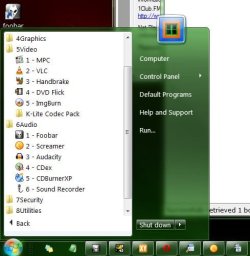
I have had to resort to numbering the folders like this:

Clipboard02.jpg


to prevent them from reverting to alphabetical ordering.

I can't tell you how many times I have had to drag and drop all the folders, and all the icons within those folders, back to a position that I like having them in. The folders, when they are numbered as they are in the photo above, do not reorganize themselves but, the icons within the folders still do.

I would really hate to have to number the icons within each folder.

If I have left out any pertinent information I will be happy to supply it.

Thank you,

Altie
 
Last edited:

My Computer

Computer Manufacturer/Model Number
Dell 537s
OS
Windows 7 (Home Premium) x64
CPU
Pentium(R) Dual-Core CPU E5300 @ 2.60GHz
Motherboard
Dell OU880P v.AO1
Memory
4.00 GB DDR2 (PC2-6400) @ 400MHz (DDR2 800)
Graphics Card(s)
Intel(R) G41 Express Chipset
Sound Card
Realtek High Definition Audio
Monitor(s) Displays
Dell ST2210 22'' HD
Screen Resolution
1920x1080
Hard Drives
Seagate Barracuda 500GB
Internet Speed
20Mbps
I guess no one here has run into this difficulty and successfully fixed it. Unfortunately, even a complete reinstall doesn't help. This board was my last hope considering the lack of available help venues online for Windows 7.
 

My Computer

Computer Manufacturer/Model Number
Dell 537s
OS
Windows 7 (Home Premium) x64
CPU
Pentium(R) Dual-Core CPU E5300 @ 2.60GHz
Motherboard
Dell OU880P v.AO1
Memory
4.00 GB DDR2 (PC2-6400) @ 400MHz (DDR2 800)
Graphics Card(s)
Intel(R) G41 Express Chipset
Sound Card
Realtek High Definition Audio
Monitor(s) Displays
Dell ST2210 22'' HD
Screen Resolution
1920x1080
Hard Drives
Seagate Barracuda 500GB
Internet Speed
20Mbps
You have 9 customized folders ... why not make just one folder, put the other 9 in it then pin the one folder to the start menu? (drag the folder to the start orb)
 

My Computer

Computer type
PC/Desktop
Computer Manufacturer/Model Number
Bruce ... somewhere in his 40's
OS
Windows 7 Ultimate 32bit SP1
CPU
Intel(R) Core(TM)2 Quad CPU @ 2.40GHz, 2400 MHz
Motherboard
INTEL/D975XBX2
Memory
4 GB
Graphics Card(s)
ATI Radeon HD 2600 Pro
Monitor(s) Displays
Samsung SyncMaster 914v
Screen Resolution
1280 x 1024
Hard Drives
2/500GB each ... ST3500630AS ATA Device.
One is not connected
PSU
Rocketfish 700 W
Case
G.Skill Gigabyte Chassis
Keyboard
Standard PS/2 Keyboard
Mouse
Microsoft PS/2 Mouse
Internet Speed
DSL
Antivirus
Avira Internet Security
Browser
IE 11
Other Info
ATI HDMI Audio
You have 9 customized folders ... why not make just one folder, put the other 9 in it then pin the one folder to the start menu? (drag the folder to the start orb)

Because then I would have one collapsed folder that would require another click to open and then more clicks to open folders within that master folder.

Also, I would then have to constantly rearrange all the folders within that master folder if I didn't # them and have to constantly rearrange the shortcuts in each individual folder also.

I don't see the point in creating another click if it doesn't solve the original issue.

It's pretty bad. For example, I can create an empty text file on the desktop and drag it to

C:\Users\**MyuserName\Application Data\Microsoft\Windows\Start Menu\Programs\One of the Folders I have in the start Menu

and drop it in one of those folders and then open the folder in Explorer and delete that empty text file that I just created and go back to the All Programs start button and check and the shortcuts within my numbered folders have reverted back to alphabetical order.
 

My Computer

Computer Manufacturer/Model Number
Dell 537s
OS
Windows 7 (Home Premium) x64
CPU
Pentium(R) Dual-Core CPU E5300 @ 2.60GHz
Motherboard
Dell OU880P v.AO1
Memory
4.00 GB DDR2 (PC2-6400) @ 400MHz (DDR2 800)
Graphics Card(s)
Intel(R) G41 Express Chipset
Sound Card
Realtek High Definition Audio
Monitor(s) Displays
Dell ST2210 22'' HD
Screen Resolution
1920x1080
Hard Drives
Seagate Barracuda 500GB
Internet Speed
20Mbps
And working with your "Library" doesn't work for you either?

I know it's a couple of extra clicks, but I've never found this to be an issue. But that's me. :o

Hopefully someone knows how to get around the issues you're having and can give you the clue.
 

My Computer

Computer type
PC/Desktop
Computer Manufacturer/Model Number
Bruce ... somewhere in his 40's
OS
Windows 7 Ultimate 32bit SP1
CPU
Intel(R) Core(TM)2 Quad CPU @ 2.40GHz, 2400 MHz
Motherboard
INTEL/D975XBX2
Memory
4 GB
Graphics Card(s)
ATI Radeon HD 2600 Pro
Monitor(s) Displays
Samsung SyncMaster 914v
Screen Resolution
1280 x 1024
Hard Drives
2/500GB each ... ST3500630AS ATA Device.
One is not connected
PSU
Rocketfish 700 W
Case
G.Skill Gigabyte Chassis
Keyboard
Standard PS/2 Keyboard
Mouse
Microsoft PS/2 Mouse
Internet Speed
DSL
Antivirus
Avira Internet Security
Browser
IE 11
Other Info
ATI HDMI Audio
You have 9 customized folders ... why not make just one folder, put the other 9 in it then pin the one folder to the start menu? (drag the folder to the start orb)

Disadvantage of this approach is (besides the extra clicks) that the folder you dragged from the desktop to the orb has to stay on the desktop (unless you hide it somewhere and drag it from there). But I think the left pane of the start menu is not the ideal place for folders anyhow. E.g. Rocket Dock (hidden) is much better and one less click (or button pressing).
 

My Computer

Computer Manufacturer/Model Number
HP, Dell, Gateway, Toshiba - 4 laptops and 2 desktops
OS
Vista, Windows7, Mint Mate, Zorin, Windows 8
CPU
from 1.6GHz Duo to i7
Monitor(s) Displays
2x HP w2207
Hard Drives
5x HDD, 7x SSD, 12x Externals
Keyboard
with trackball - no mices
Mouse
Trackball mice
Internet Speed
DSL 6000
I would like to thank each of you for trying to help me with the problem I have. I have decided to just be done with it and # everything.
 

Attachments

  • Clipboard01.jpg
    Clipboard01.jpg
    37.7 KB · Views: 28

My Computer

Computer Manufacturer/Model Number
Dell 537s
OS
Windows 7 (Home Premium) x64
CPU
Pentium(R) Dual-Core CPU E5300 @ 2.60GHz
Motherboard
Dell OU880P v.AO1
Memory
4.00 GB DDR2 (PC2-6400) @ 400MHz (DDR2 800)
Graphics Card(s)
Intel(R) G41 Express Chipset
Sound Card
Realtek High Definition Audio
Monitor(s) Displays
Dell ST2210 22'' HD
Screen Resolution
1920x1080
Hard Drives
Seagate Barracuda 500GB
Internet Speed
20Mbps
I think you are trying to do something with the start menu that it was not designed for. It is basically only for programs that you pin from "All Programs".
May I suggest you consider toolbars for your Video and Audio. I have 4 of those for different purposes and the one I opened for the picture happens to be for a variety of programs - but it will do just as well for folders. And there you can sequence them by dragging - and they stay put. E.g in the pic they are alphabetical (except the folder that I kept at the top).

2010-02-08_1931.png
 

My Computer

Computer Manufacturer/Model Number
HP, Dell, Gateway, Toshiba - 4 laptops and 2 desktops
OS
Vista, Windows7, Mint Mate, Zorin, Windows 8
CPU
from 1.6GHz Duo to i7
Monitor(s) Displays
2x HP w2207
Hard Drives
5x HDD, 7x SSD, 12x Externals
Keyboard
with trackball - no mices
Mouse
Trackball mice
Internet Speed
DSL 6000
Hello,

This is my first time here on this forum. I am posting this to get the original users attn: CtrlAltDel

I wish I had a solution for this. It has been driving me insane for months. Your post is the closest thing I have found on the net. I saw that you made a quick work around. I believe that the OS should be customizable and that because people like us should look for solutions to these problems and not settle for the work around, or be blasted by other posters because we seek a solution. Looks like Microsoft is still behind in the bug department. Also I do not think this is specific to Win7, I have encountered this on many Vista type machines as well.

If anybody sees this post, and has found any leads on a solution please let us know.

Thanks,
 

My Computer

Computer Manufacturer/Model Number
Hp DV6
OS
Windows 7 Home Premium 64 Bit
CPU
Intel i3
Memory
4GB DDR3
Graphics Card(s)
Intel Accelerated Media Graphics HD
Sound Card
IDT HD Audio
Hard Drives
500GB 7200 RPM

My Computer

Computer Manufacturer/Model Number
HP, Dell, Gateway, Toshiba - 4 laptops and 2 desktops
OS
Vista, Windows7, Mint Mate, Zorin, Windows 8
CPU
from 1.6GHz Duo to i7
Monitor(s) Displays
2x HP w2207
Hard Drives
5x HDD, 7x SSD, 12x Externals
Keyboard
with trackball - no mices
Mouse
Trackball mice
Internet Speed
DSL 6000
Look I not trying to start a fight or anything like that but , this is what I am talking about.

First off its 2010, OS's especially Windows OS should be functional customizable and streamlined. This is not a off the wall Idea.

More importantly a start menu should function properly. Obviously if you have read the previous posts, what was described is abnormal behavior or rather (bug)

Bugs need to get fixed which is why there are forums like (The Windows Seven Forums) in the first place.

On a side note, the Windows Start menu has worked this way since before Windows 98. Just like Linux OS, or simply organizing your internet bookmarks.

I hope somebody out there has had the same problem, lead to a fix and or just takes the concern here seriously.
 

My Computer

Computer Manufacturer/Model Number
Hp DV6
OS
Windows 7 Home Premium 64 Bit
CPU
Intel i3
Memory
4GB DDR3
Graphics Card(s)
Intel Accelerated Media Graphics HD
Sound Card
IDT HD Audio
Hard Drives
500GB 7200 RPM
Of course we are not going to fight over this. We are just exchanging our views. But I really think you are barking at the wrong tree.
1. A bug is if a function does not work as designed. But as far as the start menu is concerned, it works as designed.
2. You are talking about an additional requirement. And that is fair game. If you can convince 10% of the windows users (that is about 100 million users) that this function is absolutely required, Microsoft might listen to you.
3. The fact that some function was present in an earlier product does not require that it needs to be there forever. Cars do not have cranks any more to get them started. But that was a useful function all the way until the 60's.
4. I am not sure whether I share your interpretation of the purpose of technical forums. But that is neither here not there.
 

My Computer

Computer Manufacturer/Model Number
HP, Dell, Gateway, Toshiba - 4 laptops and 2 desktops
OS
Vista, Windows7, Mint Mate, Zorin, Windows 8
CPU
from 1.6GHz Duo to i7
Monitor(s) Displays
2x HP w2207
Hard Drives
5x HDD, 7x SSD, 12x Externals
Keyboard
with trackball - no mices
Mouse
Trackball mice
Internet Speed
DSL 6000
Start Menu Order

I have had this same frustration with Windows 7. As noted in the forum, Windows XP allowed the user to customize the menu under "All Programs" without restraint.

Windows 7 appears not to provide this level of customization. I have found a potential fix (it has survived two reboots so far). Try the following to see if it helps:

1. Run the Local Group Policy Editor. It is located at C:\Windows\System32\gpedit.msc. I'm running Win 7 Pro, so I don't know if this is included in all versions of Windows 7 or not.

2. Click on "User Configuration", "Administrative Templates", "Start Menu and Taskbar" on the left hand side.

3. On the right hand side, click "Turn of personalized menus" and set to disabled.

4. Exit the Local Group Policy Editor and rearrange your menus.

5. If you then reboot, the menus should stay the way you had them. As I indicated, mine menus have survived two reboots (which hasn't happened before).

For the record, if the above doesn't work this is a bug, not an additional feature. The help files clearly show that if "Sort All Program menus by name" is unchecked, and "Enable context menus and dragging and dropping" is checked, the menus should behave as they did in Windows XP. I think that the "personalized menus" were somehow forcing the menus to be resorted, but that is just a theory.

I'd be interested to know if this works for others.
 

My Computer

Computer Manufacturer/Model Number
Generic
OS
Windows 7 Pro
CPU
AMD Athlon 64 X2 3800+
Motherboard
ASUS M2NPV-VM
Memory
3 GB
Graphics Card(s)
NVidia GeForce 9400 GT
Sound Card
SoundMax
Monitor(s) Displays
Samsung SyncMaster 2433sw
Screen Resolution
1920 x 1200
Hard Drives
WDC 150GB (SATA)
Samsugn 300GB (SATA)
Keyboard
Logitech
Mouse
Logitech
Update to my Prior Post

The fix described in my prior post worked fine until I installed some new software. At that point, all the menus below the "All Programs" menu were resorted alphabetcially. Not of the menu items were moved from the folders I had moved them to, nor did menu folders get moved. It just alphabetized all the menu folders below "All Programs".

I don't see a way to prevent this, so just be aware of it.
 

My Computer

Computer Manufacturer/Model Number
Generic
OS
Windows 7 Pro
CPU
AMD Athlon 64 X2 3800+
Motherboard
ASUS M2NPV-VM
Memory
3 GB
Graphics Card(s)
NVidia GeForce 9400 GT
Sound Card
SoundMax
Monitor(s) Displays
Samsung SyncMaster 2433sw
Screen Resolution
1920 x 1200
Hard Drives
WDC 150GB (SATA)
Samsugn 300GB (SATA)
Keyboard
Logitech
Mouse
Logitech
First of all, this is a bug - not new functionality (the functionality has been around since Windows XP and was ported to Windows Vista, and on to Windows 7).

In windows XP it worked flawlessly.
In Windows Vista it tended to mess up when new programs were installed.
And as we know here - they have 'improved the quality of the bugs' in Windows 7.

Anyway, here is a solution that works for me:
1. Backup first(!) and then delete the following registry key:
HKEY_CURRENT_USER\Software\Microsoft\Windows\CurrentVersion\Explorer\StartPage\NewShortcuts

That's it - should work from now on.
I believe that the problem occurs because, at reboot, windows attempts to put the shortcuts listed under this key back in to the start menu at every boot, and when it finds that they are missing or moved, it reorders the start menus back to alphabetical (default order).

As this implies, any installation of a new program can cause the problem to reoccur.

It can also be that one of your programs consistently adds this key whenever you run it - and if this can't be disabled, then you have a hard choice of swapping the program for one that does not force you / nanny you in to having the shortcut - or just living with the problem.
 

My Computer

OS
Windows 7
Back
Top