Hello,
I need help with my start menu order. In the Taskbar and Start Menu Items dialogue under Customize Start Menu I have *Sort All Menu Items by name* unchecked.
Regardless of this, my All Programs start menu will not maintain the order that I choose to put it in. I run the box as an administrator and I am the only user of the computer and have no other user accounts other than the one Administrator account that I use and the Guest account, which is turned off.
The folders in the Start Menu seem to maintain their modified order that I arrange them in until I delete a random icon in one of the folders or use Add/Remove programs to remove a program or install a program that adds an icon or folder to the start menu.
At this point, all folders and icons go back to alphabetical order. Then I have to painstakingly drag each folder back to the order I wish it to be in and then open each folder and rearrange all the icons inside each individual folder back to an order that I prefer.
They also rearrange themselves on every restart of the computer.
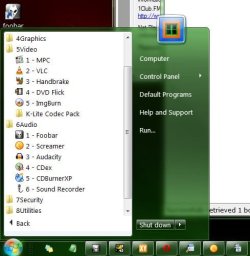
I have had to resort to numbering the folders like this:

to prevent them from reverting to alphabetical ordering.
I can't tell you how many times I have had to drag and drop all the folders, and all the icons within those folders, back to a position that I like having them in. The folders, when they are numbered as they are in the photo above, do not reorganize themselves but, the icons within the folders still do.
I would really hate to have to number the icons within each folder.
If I have left out any pertinent information I will be happy to supply it.
Thank you,
Altie
I need help with my start menu order. In the Taskbar and Start Menu Items dialogue under Customize Start Menu I have *Sort All Menu Items by name* unchecked.
Regardless of this, my All Programs start menu will not maintain the order that I choose to put it in. I run the box as an administrator and I am the only user of the computer and have no other user accounts other than the one Administrator account that I use and the Guest account, which is turned off.
The folders in the Start Menu seem to maintain their modified order that I arrange them in until I delete a random icon in one of the folders or use Add/Remove programs to remove a program or install a program that adds an icon or folder to the start menu.
At this point, all folders and icons go back to alphabetical order. Then I have to painstakingly drag each folder back to the order I wish it to be in and then open each folder and rearrange all the icons inside each individual folder back to an order that I prefer.
They also rearrange themselves on every restart of the computer.
I have had to resort to numbering the folders like this:
to prevent them from reverting to alphabetical ordering.
I can't tell you how many times I have had to drag and drop all the folders, and all the icons within those folders, back to a position that I like having them in. The folders, when they are numbered as they are in the photo above, do not reorganize themselves but, the icons within the folders still do.
I would really hate to have to number the icons within each folder.
If I have left out any pertinent information I will be happy to supply it.
Thank you,
Altie
Last edited:
My Computer
- Computer Manufacturer/Model Number
- Dell 537s
- OS
- Windows 7 (Home Premium) x64
- CPU
- Pentium(R) Dual-Core CPU E5300 @ 2.60GHz
- Motherboard
- Dell OU880P v.AO1
- Memory
- 4.00 GB DDR2 (PC2-6400) @ 400MHz (DDR2 800)
- Graphics Card(s)
- Intel(R) G41 Express Chipset
- Sound Card
- Realtek High Definition Audio
- Monitor(s) Displays
- Dell ST2210 22'' HD
- Screen Resolution
- 1920x1080
- Hard Drives
- Seagate Barracuda 500GB
- Internet Speed
- 20Mbps