Solved Start Orb won't Restore to original

Darkydude

Typical Lucario
Local time
9:28 PM
Messages
7
Location
Ireland
Hello, first post here. :p

I signed up on this forum to post a thread about this problem I'm currently having.
Explains why my profile is quite empty and that I won't be posting alot.
Well... I'd probably need help in future anyways, so I'll come here when I need help.

Ok, so I got a brand new Netbook, and decided to install Windows 7 on it, even though it was designed for Windows XP, the specs were suitable enough for Win 7.

As I'm a freak when it comes to themes and appearance, I went ahead and successfully installed new themes.
I then launched Windows 7 Start Button Changer V2.6 that was included with the theme and changed the default 7 orb to a custom one.

Now, here's the problem.
While I was doing all the Visual Style business, I accidentally deleted a folder that contained Windows 7 Start Button Changer! And I was using a custom orb!
So, with the program and its custom .bmp's gone, the next time I reboot - everything should be restored to default, because the whole thing is gone of course.

Anyways, I was actually going to change the custom orb later because it didn't look cool.

I rebooted, and I was wrong. The stupid custom orb was still there, so I guess the W7SBC made a permanent change to explorer.exe

I downloaded a new Windows 7 Start Button Changer v2.6 and clicked the button 'restore'.
It did the trick for about a couple of seconds but then it reverted to the custom orb again, like the deleted process was still running.

I downloaded the latest version of another Windows 7 Start Button Changer and the restore didn't work either.
I've tried changing it to the other custom orb I was going to use, but to no avail.

Any help? I really don't want to use sfc /scannow command because then I'd have to do all that theme stuff again. :confused:
 
Last edited:

My Computer My Computer

At a glance

Windows 7 Ultimate x64 -64bitAMD Athlon(tm) X2 Dual-Core QL-65, 2.10 GHz3.00 GB RAMATI Radeon HD 3200 Graphics
Computer Manufacturer/Model Number
TOSHIBA
OS
Windows 7 Ultimate x64 -64bit
CPU
AMD Athlon(tm) X2 Dual-Core QL-65, 2.10 GHz
Memory
3.00 GB RAM
Graphics Card(s)
ATI Radeon HD 3200 Graphics
Sound Card
Realtek High Definition Audio & AMD High Definition Audio
Monitor(s) Displays
Mobile PC Display
Screen Resolution
1366 x 768 x 60 hertz
Welcome to the Seven Forums
If you do not want to use sfc /scannow you will need to manually change the explorer.exe I have provided one in a zip folder at the bottom of this post.
You will need to take ownership give yourself permission and to rename and replace the explorer.exe in C/Windows look at post #6 of this thread and it will show you how to do that http://www.sevenforums.com/customization/179502-basic-networking-information.html#post1525656
If you need further help let me know
Jerry
 
Last edited:

My Computer My Computer

At a glance

Win 7 Pro x64 / Win 10 ProIntel(R) Core(TM) i7-3630QM CPU @ 2.40GHz12 GB(1) Intel(R) HD Graphics 4000 (2) NVIDIA GeFo...
Computer type
Laptop
Computer Manufacturer/Model Number
Sager NP9170
OS
Win 7 Pro x64 / Win 10 Pro
CPU
Intel(R) Core(TM) i7-3630QM CPU @ 2.40GHz
Motherboard
CLEVO P170EM
Memory
12 GB
Graphics Card(s)
(1) Intel(R) HD Graphics 4000 (2) NVIDIA GeForce GTX 675M
Sound Card
(1) Realtek High Definition Audio (2) Intel(R) Display Aud
Monitor(s) Displays
17.3
Screen Resolution
1920x1080
Hard Drives
(1) Samsung 860 EVO 500GB(OS) (1) Samsung 860 EVO 500GB(Data)
Keyboard
Backlite
Antivirus
MSE, Malwarebytes Pro
Browser
Firefox
Other Info
DESKTOP: Custom-built.
OS: Win 10 Pro x64.
CASE: Rosewill R5.
CPU: Intel I5 4670K CPU @ 3.40GHz.
CPU COOLER: Cool Master Hyper 212 EVO.
MOTHERBOARD: Asus Z87-A.
MEMORY: Kingston HyperX 2x4 GB.
GPU: Nvidia Geforce 650 TI.
PSU: Corsair TX750.
DRIVES: (1) Samsung 840 120 GB SSD (2) Western Digital blue 500 GB 7200 RPM.
Thanks for the introduction & reply. ;)

I was going to do what you asked, but I believe the explorer.exe you've supplied me with is a 64-bit version.
I run a 32-bit version of Windows 7 Ultimate.

Also, I found backups of explorer.exe in the C:\Windows\ folder, I used them but it didn't work.
 

My Computer My Computer

At a glance

Windows 7 Ultimate x64 -64bitAMD Athlon(tm) X2 Dual-Core QL-65, 2.10 GHz3.00 GB RAMATI Radeon HD 3200 Graphics
Computer Manufacturer/Model Number
TOSHIBA
OS
Windows 7 Ultimate x64 -64bit
CPU
AMD Athlon(tm) X2 Dual-Core QL-65, 2.10 GHz
Memory
3.00 GB RAM
Graphics Card(s)
ATI Radeon HD 3200 Graphics
Sound Card
Realtek High Definition Audio & AMD High Definition Audio
Monitor(s) Displays
Mobile PC Display
Screen Resolution
1366 x 768 x 60 hertz
Here is one from 32-bit and it doesn't matter if it's ultimate are Pro or home premium they're all the same.

All the backup ones you found are from the different start button changers you used when you get it straightened out you should be able to delete them.
Let me know if you need more help.
Jerry
 
Last edited:

My Computer My Computer

At a glance

Win 7 Pro x64 / Win 10 ProIntel(R) Core(TM) i7-3630QM CPU @ 2.40GHz12 GB(1) Intel(R) HD Graphics 4000 (2) NVIDIA GeFo...
Computer type
Laptop
Computer Manufacturer/Model Number
Sager NP9170
OS
Win 7 Pro x64 / Win 10 Pro
CPU
Intel(R) Core(TM) i7-3630QM CPU @ 2.40GHz
Motherboard
CLEVO P170EM
Memory
12 GB
Graphics Card(s)
(1) Intel(R) HD Graphics 4000 (2) NVIDIA GeForce GTX 675M
Sound Card
(1) Realtek High Definition Audio (2) Intel(R) Display Aud
Monitor(s) Displays
17.3
Screen Resolution
1920x1080
Hard Drives
(1) Samsung 860 EVO 500GB(OS) (1) Samsung 860 EVO 500GB(Data)
Keyboard
Backlite
Antivirus
MSE, Malwarebytes Pro
Browser
Firefox
Other Info
DESKTOP: Custom-built.
OS: Win 10 Pro x64.
CASE: Rosewill R5.
CPU: Intel I5 4670K CPU @ 3.40GHz.
CPU COOLER: Cool Master Hyper 212 EVO.
MOTHERBOARD: Asus Z87-A.
MEMORY: Kingston HyperX 2x4 GB.
GPU: Nvidia Geforce 650 TI.
PSU: Corsair TX750.
DRIVES: (1) Samsung 840 120 GB SSD (2) Western Digital blue 500 GB 7200 RPM.
I don't know why, but it didn't work.

I replaced the explorer.exe with the one you gave me.
No difference.

Is it a process?
When I log on, it stays as the Windows 7 Orb for a couple of seconds while all of the services and processes starts, then it reverts to the custom one.

Any suggestions? :huh:
 

My Computer My Computer

At a glance

Windows 7 Ultimate x64 -64bitAMD Athlon(tm) X2 Dual-Core QL-65, 2.10 GHz3.00 GB RAMATI Radeon HD 3200 Graphics
Computer Manufacturer/Model Number
TOSHIBA
OS
Windows 7 Ultimate x64 -64bit
CPU
AMD Athlon(tm) X2 Dual-Core QL-65, 2.10 GHz
Memory
3.00 GB RAM
Graphics Card(s)
ATI Radeon HD 3200 Graphics
Sound Card
Realtek High Definition Audio & AMD High Definition Audio
Monitor(s) Displays
Mobile PC Display
Screen Resolution
1366 x 768 x 60 hertz
Download and install Restorator - Bome Software - Restorator - the resource editor for customization, localization, and translation. you will be able to use it for 30 days for free and delete it at any time when you are done.
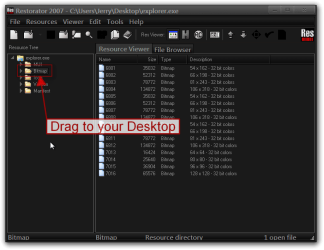
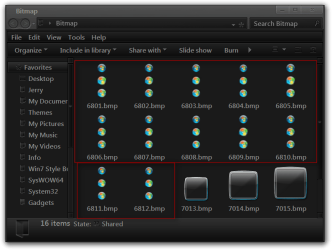
After installing it open up the explorer.exe in C/Windows and drag and drop the Bitmap folder to your desktop and look inside their and see what the bitmap images look like do that to all of the backup explorer.exe also, then try to delete any explorer.exe that has any custom start menu buttons in it, when done try to only have one explorer.exe in their with the right start orb and restart and see what happens.
Jerry
Restorator 2007 - CUsersJerryDesktopexplorer.exe.png

Bitmap.png
 

My Computer My Computer

At a glance

Win 7 Pro x64 / Win 10 ProIntel(R) Core(TM) i7-3630QM CPU @ 2.40GHz12 GB(1) Intel(R) HD Graphics 4000 (2) NVIDIA GeFo...
Computer type
Laptop
Computer Manufacturer/Model Number
Sager NP9170
OS
Win 7 Pro x64 / Win 10 Pro
CPU
Intel(R) Core(TM) i7-3630QM CPU @ 2.40GHz
Motherboard
CLEVO P170EM
Memory
12 GB
Graphics Card(s)
(1) Intel(R) HD Graphics 4000 (2) NVIDIA GeForce GTX 675M
Sound Card
(1) Realtek High Definition Audio (2) Intel(R) Display Aud
Monitor(s) Displays
17.3
Screen Resolution
1920x1080
Hard Drives
(1) Samsung 860 EVO 500GB(OS) (1) Samsung 860 EVO 500GB(Data)
Keyboard
Backlite
Antivirus
MSE, Malwarebytes Pro
Browser
Firefox
Other Info
DESKTOP: Custom-built.
OS: Win 10 Pro x64.
CASE: Rosewill R5.
CPU: Intel I5 4670K CPU @ 3.40GHz.
CPU COOLER: Cool Master Hyper 212 EVO.
MOTHERBOARD: Asus Z87-A.
MEMORY: Kingston HyperX 2x4 GB.
GPU: Nvidia Geforce 650 TI.
PSU: Corsair TX750.
DRIVES: (1) Samsung 840 120 GB SSD (2) Western Digital blue 500 GB 7200 RPM.
Sorry for not replying in a while, I was busy.

I did what you asked, but the orbs were the originals?

:confused: What?
 

My Computer My Computer

At a glance

Windows 7 Ultimate x64 -64bitAMD Athlon(tm) X2 Dual-Core QL-65, 2.10 GHz3.00 GB RAMATI Radeon HD 3200 Graphics
Computer Manufacturer/Model Number
TOSHIBA
OS
Windows 7 Ultimate x64 -64bit
CPU
AMD Athlon(tm) X2 Dual-Core QL-65, 2.10 GHz
Memory
3.00 GB RAM
Graphics Card(s)
ATI Radeon HD 3200 Graphics
Sound Card
Realtek High Definition Audio & AMD High Definition Audio
Monitor(s) Displays
Mobile PC Display
Screen Resolution
1366 x 768 x 60 hertz

My Computer My Computer

At a glance

Win 7 Pro x64 / Win 10 ProIntel(R) Core(TM) i7-3630QM CPU @ 2.40GHz12 GB(1) Intel(R) HD Graphics 4000 (2) NVIDIA GeFo...
Computer type
Laptop
Computer Manufacturer/Model Number
Sager NP9170
OS
Win 7 Pro x64 / Win 10 Pro
CPU
Intel(R) Core(TM) i7-3630QM CPU @ 2.40GHz
Motherboard
CLEVO P170EM
Memory
12 GB
Graphics Card(s)
(1) Intel(R) HD Graphics 4000 (2) NVIDIA GeForce GTX 675M
Sound Card
(1) Realtek High Definition Audio (2) Intel(R) Display Aud
Monitor(s) Displays
17.3
Screen Resolution
1920x1080
Hard Drives
(1) Samsung 860 EVO 500GB(OS) (1) Samsung 860 EVO 500GB(Data)
Keyboard
Backlite
Antivirus
MSE, Malwarebytes Pro
Browser
Firefox
Other Info
DESKTOP: Custom-built.
OS: Win 10 Pro x64.
CASE: Rosewill R5.
CPU: Intel I5 4670K CPU @ 3.40GHz.
CPU COOLER: Cool Master Hyper 212 EVO.
MOTHERBOARD: Asus Z87-A.
MEMORY: Kingston HyperX 2x4 GB.
GPU: Nvidia Geforce 650 TI.
PSU: Corsair TX750.
DRIVES: (1) Samsung 840 120 GB SSD (2) Western Digital blue 500 GB 7200 RPM.
There is no such folder 'Start Orb Manager'

Actually, could I ask you to do something for me?

Can you open Restorator and see if there is a expstart.exe in C:\Windows\

If there is, can you please tell me what is in there.
 

My Computer My Computer

At a glance

Windows 7 Ultimate x64 -64bitAMD Athlon(tm) X2 Dual-Core QL-65, 2.10 GHz3.00 GB RAMATI Radeon HD 3200 Graphics
Computer Manufacturer/Model Number
TOSHIBA
OS
Windows 7 Ultimate x64 -64bit
CPU
AMD Athlon(tm) X2 Dual-Core QL-65, 2.10 GHz
Memory
3.00 GB RAM
Graphics Card(s)
ATI Radeon HD 3200 Graphics
Sound Card
Realtek High Definition Audio & AMD High Definition Audio
Monitor(s) Displays
Mobile PC Display
Screen Resolution
1366 x 768 x 60 hertz
Nevermind, I fixed the problem.

I just reinstalled the Windows 7 Start Orb Changer V2.6 and Windows 7 Start Orb Changer V5 .

Clicked restore on them both, then changed them to my custom one which worked.
In v5, I clicked the arrow on the bottom right and changed to my custom orb by patching and editing.

Thanks for your help. :p
 

My Computer My Computer

At a glance

Windows 7 Ultimate x64 -64bitAMD Athlon(tm) X2 Dual-Core QL-65, 2.10 GHz3.00 GB RAMATI Radeon HD 3200 Graphics
Computer Manufacturer/Model Number
TOSHIBA
OS
Windows 7 Ultimate x64 -64bit
CPU
AMD Athlon(tm) X2 Dual-Core QL-65, 2.10 GHz
Memory
3.00 GB RAM
Graphics Card(s)
ATI Radeon HD 3200 Graphics
Sound Card
Realtek High Definition Audio & AMD High Definition Audio
Monitor(s) Displays
Mobile PC Display
Screen Resolution
1366 x 768 x 60 hertz
That's good to hear.
 

My Computer My Computer

At a glance

Win 7 Pro x64 / Win 10 ProIntel(R) Core(TM) i7-3630QM CPU @ 2.40GHz12 GB(1) Intel(R) HD Graphics 4000 (2) NVIDIA GeFo...
Computer type
Laptop
Computer Manufacturer/Model Number
Sager NP9170
OS
Win 7 Pro x64 / Win 10 Pro
CPU
Intel(R) Core(TM) i7-3630QM CPU @ 2.40GHz
Motherboard
CLEVO P170EM
Memory
12 GB
Graphics Card(s)
(1) Intel(R) HD Graphics 4000 (2) NVIDIA GeForce GTX 675M
Sound Card
(1) Realtek High Definition Audio (2) Intel(R) Display Aud
Monitor(s) Displays
17.3
Screen Resolution
1920x1080
Hard Drives
(1) Samsung 860 EVO 500GB(OS) (1) Samsung 860 EVO 500GB(Data)
Keyboard
Backlite
Antivirus
MSE, Malwarebytes Pro
Browser
Firefox
Other Info
DESKTOP: Custom-built.
OS: Win 10 Pro x64.
CASE: Rosewill R5.
CPU: Intel I5 4670K CPU @ 3.40GHz.
CPU COOLER: Cool Master Hyper 212 EVO.
MOTHERBOARD: Asus Z87-A.
MEMORY: Kingston HyperX 2x4 GB.
GPU: Nvidia Geforce 650 TI.
PSU: Corsair TX750.
DRIVES: (1) Samsung 840 120 GB SSD (2) Western Digital blue 500 GB 7200 RPM.
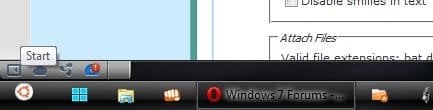
I'm using windows 7 home basic x64. Recently, I used a ubuntu skin pack for customizing windows. The start orb was replaced by a ubuntu start button like the one bellow.
I wanted my windows start orb back, so I had "windows 7 start orb loader" with which i loaded my original start orb and clicked "Save changes" but a message " windows start orb configuration has stopped working appeared.
Please help me get my start orb.
I've attached a screen shot of the button.

:(
 

Attachments

  • Untitled.jpg
    Untitled.jpg
    7.4 KB · Views: 9

My Computer My Computer

At a glance

Windows 7 Home Basic x64 service pack 1Intel core i3-2370M CPU @ 2.40 GHz2.00 system memory1.00 gb Radeon graphics
Computer Manufacturer/Model Number
Hewlett-Packard Pavilion g6 Notebook pc
OS
Windows 7 Home Basic x64 service pack 1
CPU
Intel core i3-2370M CPU @ 2.40 GHz
Memory
2.00 system memory
Graphics Card(s)
1.00 gb Radeon graphics
Hard Drives
500 gb
I'm using windows 7 home basic x64. Recently, I used a ubuntu skin pack for customizing windows. The start orb was replaced by a ubuntu start button like the one bellow.
I wanted my windows start orb back, so I had "windows 7 start orb loader" with which i loaded my original start orb and clicked "Save changes" but a message " windows start orb configuration has stopped working appeared.
Please help me get my start orb.
I've attached a screen shot of the button.

:(

Welcome to the Seven Forums

Do Option 2 of this tutorial http://www.sevenforums.com/tutorials/1538-sfc-scannow-command-system-file-checker.html it will not harm any data or programs you have installed it will try to find and repair any corrupt system files that you have. You may need to do this up to three times with a reboot between each scan.

If you use the Universal Theme Patcher to enable the custom theme you'll need to run it again after the above scan.

Let us know if this worked.
Jerry
 

My Computer My Computer

At a glance

Win 7 Pro x64 / Win 10 ProIntel(R) Core(TM) i7-3630QM CPU @ 2.40GHz12 GB(1) Intel(R) HD Graphics 4000 (2) NVIDIA GeFo...
Computer type
Laptop
Computer Manufacturer/Model Number
Sager NP9170
OS
Win 7 Pro x64 / Win 10 Pro
CPU
Intel(R) Core(TM) i7-3630QM CPU @ 2.40GHz
Motherboard
CLEVO P170EM
Memory
12 GB
Graphics Card(s)
(1) Intel(R) HD Graphics 4000 (2) NVIDIA GeForce GTX 675M
Sound Card
(1) Realtek High Definition Audio (2) Intel(R) Display Aud
Monitor(s) Displays
17.3
Screen Resolution
1920x1080
Hard Drives
(1) Samsung 860 EVO 500GB(OS) (1) Samsung 860 EVO 500GB(Data)
Keyboard
Backlite
Antivirus
MSE, Malwarebytes Pro
Browser
Firefox
Other Info
DESKTOP: Custom-built.
OS: Win 10 Pro x64.
CASE: Rosewill R5.
CPU: Intel I5 4670K CPU @ 3.40GHz.
CPU COOLER: Cool Master Hyper 212 EVO.
MOTHERBOARD: Asus Z87-A.
MEMORY: Kingston HyperX 2x4 GB.
GPU: Nvidia Geforce 650 TI.
PSU: Corsair TX750.
DRIVES: (1) Samsung 840 120 GB SSD (2) Western Digital blue 500 GB 7200 RPM.
The problem is you have two Windows Start Orb Managers (WSOM) operating at the same time. One has got to cancel the other out, since two can't be running at the same time. That was my problem. In your case, you need to find the WSOM that came with your Ubuntu skin pack. On it, restore original, uninstall and delete what else is left over. Go to the WSOM you downloaded and click restore the default orb. It should work for you then.
Good luck. ;3
 

My Computer My Computer

At a glance

Windows 7 Ultimate x64 -64bitAMD Athlon(tm) X2 Dual-Core QL-65, 2.10 GHz3.00 GB RAMATI Radeon HD 3200 Graphics
Computer Manufacturer/Model Number
TOSHIBA
OS
Windows 7 Ultimate x64 -64bit
CPU
AMD Athlon(tm) X2 Dual-Core QL-65, 2.10 GHz
Memory
3.00 GB RAM
Graphics Card(s)
ATI Radeon HD 3200 Graphics
Sound Card
Realtek High Definition Audio & AMD High Definition Audio
Monitor(s) Displays
Mobile PC Display
Screen Resolution
1366 x 768 x 60 hertz
Thank Bongo, Since my internet is too slow I chose to restore my system back.
Now my windows is just like as it used to be
:D
 

My Computer My Computer

At a glance

Windows 7 Home Basic x64 service pack 1Intel core i3-2370M CPU @ 2.40 GHz2.00 system memory1.00 gb Radeon graphics
Computer Manufacturer/Model Number
Hewlett-Packard Pavilion g6 Notebook pc
OS
Windows 7 Home Basic x64 service pack 1
CPU
Intel core i3-2370M CPU @ 2.40 GHz
Memory
2.00 system memory
Graphics Card(s)
1.00 gb Radeon graphics
Hard Drives
500 gb
Thank Bongo, Since my internet is too slow I chose to restore my system back.
Now my windows is just like as it used to be
:D

You're Welcome
 

My Computer My Computer

At a glance

Win 7 Pro x64 / Win 10 ProIntel(R) Core(TM) i7-3630QM CPU @ 2.40GHz12 GB(1) Intel(R) HD Graphics 4000 (2) NVIDIA GeFo...
Computer type
Laptop
Computer Manufacturer/Model Number
Sager NP9170
OS
Win 7 Pro x64 / Win 10 Pro
CPU
Intel(R) Core(TM) i7-3630QM CPU @ 2.40GHz
Motherboard
CLEVO P170EM
Memory
12 GB
Graphics Card(s)
(1) Intel(R) HD Graphics 4000 (2) NVIDIA GeForce GTX 675M
Sound Card
(1) Realtek High Definition Audio (2) Intel(R) Display Aud
Monitor(s) Displays
17.3
Screen Resolution
1920x1080
Hard Drives
(1) Samsung 860 EVO 500GB(OS) (1) Samsung 860 EVO 500GB(Data)
Keyboard
Backlite
Antivirus
MSE, Malwarebytes Pro
Browser
Firefox
Other Info
DESKTOP: Custom-built.
OS: Win 10 Pro x64.
CASE: Rosewill R5.
CPU: Intel I5 4670K CPU @ 3.40GHz.
CPU COOLER: Cool Master Hyper 212 EVO.
MOTHERBOARD: Asus Z87-A.
MEMORY: Kingston HyperX 2x4 GB.
GPU: Nvidia Geforce 650 TI.
PSU: Corsair TX750.
DRIVES: (1) Samsung 840 120 GB SSD (2) Western Digital blue 500 GB 7200 RPM.
Back
Top