Start Search broken, doesn't return search.

EmDash

New member
Local time
9:14 AM
Messages
9
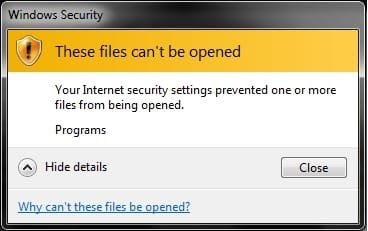
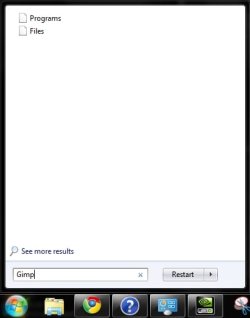
I'm not really sure how to explain this and this is my first post so I think I will just show you, yeah, that's probably the best way. The best way I see to explain it is instead of a list of the files and programs found in the start search showing up it just shows a few files like Documents.file, Programs.file, Files.file, or crap like that, when I click one of them it gives me a Windows Security Error message that I will put in a thumbnail like the search.. Please help? I need this searcher, everything else works fine but the start search. (SearchFail.zip is both images in a zip)
 

Attachments
  • wtfSearch.jpg
    wtfSearch.jpg
    13.2 KB · Views: 10
  • Warning.jpg
    Warning.jpg
    13.1 KB · Views: 8
  • SearchFail.zip
    SearchFail.zip
    71.4 KB · Views: 6

My Computer

Computer Manufacturer/Model Number
HP
OS
Windows 7 Enterprise 32bit
CPU
AMD
Graphics Card(s)
Nvidea GeForce 6150SE nForce 430
Hi,

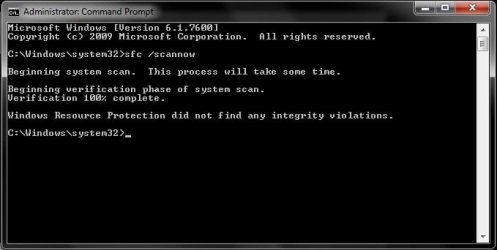
Please open an elevated command prompt using Start Orb > Programs > Accessories, and then right-click on Command Prompt, and then select Run as Administrator.

In the Command Prompt window, type

sfc /scannow

Let in run through, and then post the results here.

Regards,
Golden
 
Last edited by a moderator:

My Computer

Computer type
PC/Desktop
Computer Manufacturer/Model Number
Golden Mk. I.4
OS
Windows 10 Pro x64 ; Xubuntu x64
CPU
Intel i7 860 @ 2.80 GHz O/C'ed to 4.0GHz
Motherboard
Gigabyte P55A-UD3R Rev.1. Award BIOS F13
Memory
16GB Corsair Vengance DDR3 @ 661 MHz Dual Channel (9-9-9-24)
Graphics Card(s)
EVGA NVidia GTX 560 1024MB
Sound Card
Realtek Integrated
Monitor(s) Displays
Dual Samsung SyncMaster 2494HS
Screen Resolution
1920*1080 and 1920*1080
Hard Drives
1*Samsung 840 EVO 120GB SSD;
1*OCZ Vertex 2 60GB SSD;
2*Samsung F3 SpinPoint 1TB in RAID0;
1*Samsung F1 SpinPoint 1TB;
2*Western Digital 1TB External USB 3.0
1*Western Digital 500GB External USB 3.0
1*Seagate 500GB External USB 2.0
PSU
Thermaltake ToughPower QFan 750W
Case
Thermaltake Element S VK60001W2Z
Cooling
Corsair H60 Water Cooling, 2*230mm and 2*80mm case fans
Keyboard
Logitech G110
Mouse
Logitech MX518
Here is an image.
 

Attachments

  • Results.jpg
    Results.jpg
    23.7 KB · Views: 33

My Computer

Computer Manufacturer/Model Number
HP
OS
Windows 7 Enterprise 32bit
CPU
AMD
Graphics Card(s)
Nvidea GeForce 6150SE nForce 430
OK. Does your search still have the same issues?
 

My Computer

Computer type
PC/Desktop
Computer Manufacturer/Model Number
Golden Mk. I.4
OS
Windows 10 Pro x64 ; Xubuntu x64
CPU
Intel i7 860 @ 2.80 GHz O/C'ed to 4.0GHz
Motherboard
Gigabyte P55A-UD3R Rev.1. Award BIOS F13
Memory
16GB Corsair Vengance DDR3 @ 661 MHz Dual Channel (9-9-9-24)
Graphics Card(s)
EVGA NVidia GTX 560 1024MB
Sound Card
Realtek Integrated
Monitor(s) Displays
Dual Samsung SyncMaster 2494HS
Screen Resolution
1920*1080 and 1920*1080
Hard Drives
1*Samsung 840 EVO 120GB SSD;
1*OCZ Vertex 2 60GB SSD;
2*Samsung F3 SpinPoint 1TB in RAID0;
1*Samsung F1 SpinPoint 1TB;
2*Western Digital 1TB External USB 3.0
1*Western Digital 500GB External USB 3.0
1*Seagate 500GB External USB 2.0
PSU
Thermaltake ToughPower QFan 750W
Case
Thermaltake Element S VK60001W2Z
Cooling
Corsair H60 Water Cooling, 2*230mm and 2*80mm case fans
Keyboard
Logitech G110
Mouse
Logitech MX518
Also smells malicious, do a full scan with Malwarebytes
 

My Computer

Computer Manufacturer/Model Number
HCL
OS
Winbdows 7 ultimate x64 | Ubuntu 12.04 x64 LTS
CPU
Core 2 Duo e7400 @ 2.90GHz
Motherboard
Gigabyte G31M-ES2L
Memory
3GB DDR2
Graphics Card(s)
Asus Nvidia GTX 560Ti 1GB
Sound Card
On-board
Monitor(s) Displays
HCL eZeeBee 18.5" LCD
Screen Resolution
1366x768 @ 60Hz
Hard Drives
Western Digital 320GB
PSU
Corsair CX500 V2 500W
Cooling
Stock
Keyboard
Stock
Mouse
Stock
Internet Speed
15-25kBps D/L | 10kBps U/L | Hey Don't laugh
OK. Does your search still have the same issues?

Yes it is still doing the exact same thing as shown in the first images, I will take the other advice now and do a full system scan with malwarebytes and install it first xD but I don't think it's malicious.. It's a small possibility but I have been doing a lot of organization to my computer and just created this new account. Have been transferring user files like pictures and documents to this new account as well.
 

My Computer

Computer Manufacturer/Model Number
HP
OS
Windows 7 Enterprise 32bit
CPU
AMD
Graphics Card(s)
Nvidea GeForce 6150SE nForce 430
OK. Does your search still have the same issues?

Yes it is still doing the exact same thing as shown in the first images, I will take the other advice now and do a full system scan with malwarebytes and install it first xD but I don't think it's malicious.. It's a small possibility but I have been doing a lot of organization to my computer and just created this new account. Have been transferring user files like pictures and documents to this new account as well.

I've seen the second pic u posted to be related with malware, thats why I suggested that.:eek:
 

My Computer

Computer Manufacturer/Model Number
HCL
OS
Winbdows 7 ultimate x64 | Ubuntu 12.04 x64 LTS
CPU
Core 2 Duo e7400 @ 2.90GHz
Motherboard
Gigabyte G31M-ES2L
Memory
3GB DDR2
Graphics Card(s)
Asus Nvidia GTX 560Ti 1GB
Sound Card
On-board
Monitor(s) Displays
HCL eZeeBee 18.5" LCD
Screen Resolution
1366x768 @ 60Hz
Hard Drives
Western Digital 320GB
PSU
Corsair CX500 V2 500W
Cooling
Stock
Keyboard
Stock
Mouse
Stock
Internet Speed
15-25kBps D/L | 10kBps U/L | Hey Don't laugh
Please, I am begging for someone to help me, It seems simple but I can't put my finger on it, look at the image I first put up, It shows a file with the name of the category or directory it finds a relationship to the searched thing, Gimp is an image editing program so it is only natural that it would show up under the shown files categories, I hope you see what I mean, I just cannot find it what it is, oh and so far the scan is almost done and has found 2 infections but I still doubt that is what it is.. We will see though. If anyone else has any ideas let me know.
 

My Computer

Computer Manufacturer/Model Number
HP
OS
Windows 7 Enterprise 32bit
CPU
AMD
Graphics Card(s)
Nvidea GeForce 6150SE nForce 430
Have you got Windows security enabled along with a third party program causing a conflict?
 

My Computer

Computer type
PC/Desktop
Computer Manufacturer/Model Number
Own build
OS
Windows 7x64 Home Premium SP1
CPU
Intel i7 2600k
Motherboard
ASUS P8Z68 Deluxe
Memory
G.Skill Ripjaws (DDR3-1600) 2x4GB
Graphics Card(s)
Nvidia GeForce GTS 450; Intel HD Graphics 3000(GT2+)
Monitor(s) Displays
Dell Ultrasharp IPS panel U2311H, Samsung SyncMaster P2350
Screen Resolution
1920x1080
Hard Drives
Samsung 850 Pro SSD 256GB, Samsung SSD 840 120GB, Seagates 1TB Barracuda ST31000528AS x2
PSU
Seasonic M12II 520W
Case
Lian Li Lancool PC-K60
Cooling
Case: 1x120mm, 3x140mm CPU: Hyper 212+
Keyboard
Logitech MK520 (wireless)
Mouse
Logitech MK520
Internet Speed
6-7 Mbps
Antivirus
Norton Security Premium, Malwarebytes on 2 (MSE on 3rd PC)
Browser
FireFox
Other Info
Audio: Logitech Z523 2.1

My Computer

OS
XP / Win7 x64 Pro
CPU
Intel Quad-Core Q9450 @ 3.2GHz
Motherboard
Asus P5-E
Memory
2x2GB GSkill DDR2
Graphics Card(s)
NVIDIA GeForce 8600 GTS (EVGA)
Monitor(s) Displays
Dell 2408WFP
Screen Resolution
1920x1200
Have you got Windows security enabled along with a third party program causing a conflict?

I have AVG Virus protection I just reinstalled with the update and I am not sure what Windows Security is other than firewall and defender, help me out?
 

My Computer

Computer Manufacturer/Model Number
HP
OS
Windows 7 Enterprise 32bit
CPU
AMD
Graphics Card(s)
Nvidea GeForce 6150SE nForce 430
Have you got Windows security enabled along with a third party program causing a conflict?

I have AVG Virus protection I just reinstalled with the update and I am not sure what Windows Security is other than firewall and defender, help me out?
I was mainly talking about potential conflict between MSE (Microsoft Security Essentials). But I understand AVG v9 should turn off Windows Defender.
See this thread for a discussion.
 

My Computer

Computer type
PC/Desktop
Computer Manufacturer/Model Number
Own build
OS
Windows 7x64 Home Premium SP1
CPU
Intel i7 2600k
Motherboard
ASUS P8Z68 Deluxe
Memory
G.Skill Ripjaws (DDR3-1600) 2x4GB
Graphics Card(s)
Nvidia GeForce GTS 450; Intel HD Graphics 3000(GT2+)
Monitor(s) Displays
Dell Ultrasharp IPS panel U2311H, Samsung SyncMaster P2350
Screen Resolution
1920x1080
Hard Drives
Samsung 850 Pro SSD 256GB, Samsung SSD 840 120GB, Seagates 1TB Barracuda ST31000528AS x2
PSU
Seasonic M12II 520W
Case
Lian Li Lancool PC-K60
Cooling
Case: 1x120mm, 3x140mm CPU: Hyper 212+
Keyboard
Logitech MK520 (wireless)
Mouse
Logitech MK520
Internet Speed
6-7 Mbps
Antivirus
Norton Security Premium, Malwarebytes on 2 (MSE on 3rd PC)
Browser
FireFox
Other Info
Audio: Logitech Z523 2.1
Malwarebytes got rid of three things, restarted, still didnt work, getting upset, running an entire reindexing thingy, 108 thousand items so far.. going to class, be back later on tonight. Any more ideas please help. -.-
 

My Computer

Computer Manufacturer/Model Number
HP
OS
Windows 7 Enterprise 32bit
CPU
AMD
Graphics Card(s)
Nvidea GeForce 6150SE nForce 430
Ok the entire indexing thing didnt work either, i just got home, i am still begging for someone to help me out, this is only on this user account. please help so I dont have to create a whole new account and transfer user data to the new one AGAIN
 

My Computer

Computer Manufacturer/Model Number
HP
OS
Windows 7 Enterprise 32bit
CPU
AMD
Graphics Card(s)
Nvidea GeForce 6150SE nForce 430
Found this to work for some...

1. End Task on EXPLORER.EXE from Task Manager.

2. Start the Registry Editor

3. Look for the following key:

HKEY_CURRENT_USER\Software\Microsoft\Windows\CurrentVersion\Explorer\FolderTypes\{EF87B4CB-F2CE-4785-8658-4CA6C63E38C6}\TopViews\{00000000-0000-0000-0000-000000000000}

4. Rename the key so it looks like the following:

HKEY_CURRENT_USER\Software\Microsoft\Windows\CurrentVersion\Explorer\FolderTypes\{EF87B4CB-F2CE-4785-8658-4CA6C63E38C6}\TopViews\{00000000-0000-0000-0000-000000000000}.BACKUP

5. From Task Manager click on File | New Task (Run) and type EXPLORER.EXE and hit return.

6. Now try your search from the Start Menu again.

If the above process doesn't work for you, you can always put it back the way it was by reversing the process above.
 

My Computer

Computer Manufacturer/Model Number
Vostro
OS
Windows 7 Ultimate (SP1)
CPU
AMD Sempron 3600+
Graphics Card(s)
ATI Radeon Xpress 1150
Screen Resolution
1200 x 800
Hard Drives
WD Scorpio Blue 500 GB
Found this to work for some...

1. End Task on EXPLORER.EXE from Task Manager.

2. Start the Registry Editor

3. Look for the following key:

HKEY_CURRENT_USER\Software\Microsoft\Windows\CurrentVersion\Explorer\FolderTypes\{EF87B4CB-F2CE-4785-8658-4CA6C63E38C6}\TopViews\{00000000-0000-0000-0000-000000000000}

4. Rename the key so it looks like the following:

HKEY_CURRENT_USER\Software\Microsoft\Windows\CurrentVersion\Explorer\FolderTypes\{EF87B4CB-F2CE-4785-8658-4CA6C63E38C6}\TopViews\{00000000-0000-0000-0000-000000000000}.BACKUP

5. From Task Manager click on File | New Task (Run) and type EXPLORER.EXE and hit return.

6. Now try your search from the Start Menu again.

If the above process doesn't work for you, you can always put it back the way it was by reversing the process above.

Didn't work.. Start menu search still failed and gave me the exact same things.
 

My Computer

Computer Manufacturer/Model Number
HP
OS
Windows 7 Enterprise 32bit
CPU
AMD
Graphics Card(s)
Nvidea GeForce 6150SE nForce 430
Can you post the Malwarebytes's log? It's under the logs tab. Post the latest one.
 

My Computer

Computer Manufacturer/Model Number
HCL
OS
Winbdows 7 ultimate x64 | Ubuntu 12.04 x64 LTS
CPU
Core 2 Duo e7400 @ 2.90GHz
Motherboard
Gigabyte G31M-ES2L
Memory
3GB DDR2
Graphics Card(s)
Asus Nvidia GTX 560Ti 1GB
Sound Card
On-board
Monitor(s) Displays
HCL eZeeBee 18.5" LCD
Screen Resolution
1366x768 @ 60Hz
Hard Drives
Western Digital 320GB
PSU
Corsair CX500 V2 500W
Cooling
Stock
Keyboard
Stock
Mouse
Stock
Internet Speed
15-25kBps D/L | 10kBps U/L | Hey Don't laugh
Here
 

Attachments

My Computer

Computer Manufacturer/Model Number
HP
OS
Windows 7 Enterprise 32bit
CPU
AMD
Graphics Card(s)
Nvidea GeForce 6150SE nForce 430
Are these items checked?

11566d1242933568t-search-start-menu-broken-customize.jpg
11567d1242933568t-search-start-menu-broken-folder_options_serach.jpg
 

My Computer

Computer Manufacturer/Model Number
HCL
OS
Winbdows 7 ultimate x64 | Ubuntu 12.04 x64 LTS
CPU
Core 2 Duo e7400 @ 2.90GHz
Motherboard
Gigabyte G31M-ES2L
Memory
3GB DDR2
Graphics Card(s)
Asus Nvidia GTX 560Ti 1GB
Sound Card
On-board
Monitor(s) Displays
HCL eZeeBee 18.5" LCD
Screen Resolution
1366x768 @ 60Hz
Hard Drives
Western Digital 320GB
PSU
Corsair CX500 V2 500W
Cooling
Stock
Keyboard
Stock
Mouse
Stock
Internet Speed
15-25kBps D/L | 10kBps U/L | Hey Don't laugh
Back
Top