
StartOrbz - Start Orb Manager & Creator

I didnt want to make that public since im not sure it will work. Oh well.

Tell me what you guys think.

It really needs a 'Restore Defaults' button ;)

kinda ended up looking through the source code to find what it was doing and hopefully revert the changes after I tried it, luckily you create the backup of explorer.exe :)

I dont think its using the right resource offset since it left my Start Icon like this:
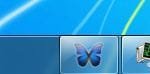
smenu.JPG

I also noticed the KillsExplorer function doesn't cleanly exit explorer but merely kills it :eek:

It looks like your using VB so heres the code you require to exit explorer cleanly.

Code:
    Imports System.ComponentModel
    Imports System.Runtime.InteropServices


    Private Const WM_QUIT As UInt32 = &H12

    <DllImport("user32.dll", SetLastError:=True, CharSet:=CharSet.Auto)> _
    Private Shared Function PostMessage(ByVal hWnd As IntPtr, ByVal Msg As UInteger, ByVal wParam As IntPtr, ByVal lParam As IntPtr) As Boolean
    End Function

    <DllImport("user32.dll", EntryPoint:="FindWindow", SetLastError:=True, CharSet:=CharSet.Auto)> _
    Private Shared Function FindWindowByClass(ByVal lpClassName As String, ByVal zero As IntPtr) As IntPtr
    End Function

    Private Sub Form1_Load(ByVal sender As System.Object, ByVal e As System.EventArgs) Handles MyBase.Load
       
        Dim pExplorer As IntPtr = FindWindowByClass("Progman", IntPtr.Zero)
        If Not pExplorer = IntPtr.Zero Then

            Dim result = PostMessage(pExplorer, WM_QUIT, IntPtr.Zero, IntPtr.Zero)
            If result Then
                'do something here, explorer has exited
            Else
                Throw New Win32Exception(Marshal.GetLastWin32Error())
            End If
        Else
            Throw New Win32Exception(Marshal.GetLastWin32Error())
        End If

    End Sub

If you need code for anything then let me know and ill be happy to help ;)
 
I didnt want to make that public since im not sure it will work. Oh well.

Tell me what you guys think.

It really needs a 'Restore Defaults' button ;)

kinda ended up looking through the source code to find what it was doing and hopefully revert the changes after I tried it, luckily you create the backup of explorer.exe :)

I dont think its using the right resource offset since it left my Start Icon like this:

View attachment 56082

I also noticed the KillsExplorer function doesn't cleanly exit explorer but merely kills it :eek:

It looks like your using VB so heres the code you require to exit explorer cleanly.

Code:
    Imports System.ComponentModel
    Imports System.Runtime.InteropServices
 
 
    Private Const WM_QUIT As UInt32 = &H12
 
    <DllImport("user32.dll", SetLastError:=True, CharSet:=CharSet.Auto)> _
    Private Shared Function PostMessage(ByVal hWnd As IntPtr, ByVal Msg As UInteger, ByVal wParam As IntPtr, ByVal lParam As IntPtr) As Boolean
    End Function
 
    <DllImport("user32.dll", EntryPoint:="FindWindow", SetLastError:=True, CharSet:=CharSet.Auto)> _
    Private Shared Function FindWindowByClass(ByVal lpClassName As String, ByVal zero As IntPtr) As IntPtr
    End Function
 
    Private Sub Form1_Load(ByVal sender As System.Object, ByVal e As System.EventArgs) Handles MyBase.Load
 
        Dim pExplorer As IntPtr = FindWindowByClass("Progman", IntPtr.Zero)
        If Not pExplorer = IntPtr.Zero Then
 
            Dim result = PostMessage(pExplorer, WM_QUIT, IntPtr.Zero, IntPtr.Zero)
            If result Then
                'do something here, explorer has exited
            Else
                Throw New Win32Exception(Marshal.GetLastWin32Error())
            End If
        Else
            Throw New Win32Exception(Marshal.GetLastWin32Error())
        End If
 
    End Sub

If you need code for anything then let me know and ill be happy to help ;)


Thanks for the code. I already coded a real restore button. I will release later. Im going to pull the file from DA
 

My Computer

OS
Windows 7 Ultimate x86
CPU
amd64
Hmm... looks nice, Better then the other ones (e.g: Kishan's Start Orb Changer) from the looks of the screenshots. Could I be a tester too?
 

My Computer

Computer Manufacturer/Model Number
HP Pavilion DV6-6090
OS
Windows 7 Ultimate 64-Bit
CPU
Intel Core i7-2630QM 2.0 - 2.9 GHZ
Motherboard
Unknown
Memory
8GB Ram
Graphics Card(s)
AMD Radeon 6770M + Switchable Intel Graphics
Sound Card
Beats Audio
Screen Resolution
1366 x 768
Hard Drives
Laptop Hard Drive: 1TB
FreeAgent Go: 250GB
FreeAgent 2: 1TB
PSU
Stock
Case
Stock
Cooling
Stock
Keyboard
Stock
Mouse
Some generic HP mouse XD
Internet Speed
Download:125Kbps
Other Info
USB 3.0, LED Screen, Fingerprint Reader, Beats Audio 4 Speakers, Blu-Ray Drive.
This looks like the perfect peice of software to fulfill everyone's need to customize the start orb with their own image!

I'd love to test this software, please send me the link!
 

My Computer

OS
Windows 7 Ultimate x64
Link 2 posts above yours :huh:
 

My Computer

Computer type
PC/Desktop
Computer Manufacturer/Model Number
Self Build
OS
MS Windows 7 Professional 64-bit SP1
CPU
AMD FX(tm)-6100 Six-Core Processor Socket AM3+ (942)
Motherboard
ASUSTeK COMPUTER INC. SABERTOOTH 990FX (AM3r2)
Memory
8.00 GB Dual-Channel DDR3 @ 802MHz (11-11-11-36) 1.5Volts
Graphics Card(s)
NVIDIA GeForce GTX 560 Ti
Sound Card
Onboard Realtek HD
Monitor(s) Displays
shimian (1920x1080@60Hz)
Screen Resolution
1920*1080
Hard Drives
OCZ-AGIL ITY3 SATA Disk Device 120GB
PSU
Corsair TX 750
Case
Corsair
Cooling
WaterCooled
Keyboard
Microsoft Wired
Mouse
Logitech USB Optical TiltWheel Mouse
Internet Speed
Realtek PCIe GBE Family Controller 20MB*1MB
Antivirus
Avast
Browser
Firefox
Other Info
150GB Internal Hard Drive for Backing Up Important Files -
Hauppauge Nova-DT Dual DVB-T Tuner Device (+IR) -
USB PC Camera with Mic (SN9C105)
very nice look forward to seeing this.
 

My Computer

Computer Manufacturer/Model Number
Custom
OS
Windows 7 Ultimate Signature Edition
CPU
Intel Core i7 Extreme 3.33GHz
Motherboard
EVGA X-58 SLI Classified
Memory
12GB DDR3
Graphics Card(s)
2x EVGA 285 2GB in SLI
Sound Card
Creative Labs X-Fi ExtremeGamer
Monitor(s) Displays
30" Viewsonic
Hard Drives
2x1TB Western Digital 7200RPM in RAID 0/1TB WD My Book External HDD
PSU
Thermaltake 1000w supporting quad SLI
Case
Thermaltake Armor Full Tower
Cooling
Thermaltake V1 CPU+DIY Liquid cooling
Link 2 posts above yours :huh:

Thanks...
It doesnt seem to work though, when i click apply startorb it just restarts explorer.exe, and then there is a blank space were it should be!

Please someone help me?
 

My Computer

OS
Windows 7 Ultimate x64
I know how to do it. But its buggy. 8 times out of 10 it works. The rest it crashes telling me there is a problem with the taskdialog api. I used MSDN code.
 

My Computer

OS
Windows 7 Ultimate x86
CPU
amd64
I dont think its using the right resource offset since it left my Start Icon like this:

View attachment 56082


Can you open up your explorere.exe and see if all the bitmaps are there? StartOrbz resized the images to fit THE OTHER images that dont get modded by W7SBC. Thats why my images are way biggger.

I wonder if thery are there but just "blank" images. Please let me know.
 

My Computer

OS
Windows 7 Ultimate x86
CPU
amd64
So 3 releases later. Any other issues not discussed so far? comments? Requests?

I wish I could see some creations made with StartOrbz!
 

My Computer

OS
Windows 7 Ultimate x86
CPU
amd64
I know how to do it. But its buggy. 8 times out of 10 it works. The rest it crashes telling me there is a problem with the taskdialog api. I used MSDN code.

If you used the code found on the MSDN site, I posted it, It needs updating but I dont have access.

I dont think its using the right resource offset since it left my Start Icon like this:

View attachment 56082


Can you open up your explorere.exe and see if all the bitmaps are there? StartOrbz resized the images to fit THE OTHER images that dont get modded by W7SBC. Thats why my images are way biggger.

I wonder if thery are there but just "blank" images. Please let me know.

Ill get back to you shortly. ;)
 
If you used the code found on the MSDN site, I posted it, It needs updating but I dont have access.

Ill get back to you shortly. ;)


Thanks a lot. If you got updated code, then yes I give it a try. I was disappointed I couldnt use it here. Trust me I thought about it. My fix involved reverting back to the old msgbox's when the api failed. Now that was ugly. Got so used to those nice taskdialogs.

Thanks again.
 

My Computer

OS
Windows 7 Ultimate x86
CPU
amd64
Looks good. Will try this.
 

My Computer

Computer Manufacturer/Model Number
Asus G73SW-XN2
OS
Windows 2000 5.0 Build 2195
CPU
Intel Core i7-2630QM@2GHz(2.9GHz Turbo Boost) [Sandy Bridge]
Motherboard
Asus G73SW (Intel HM65 Chipset)
Memory
Kingston DDR3 1333 16GB (4GBx4)
Graphics Card(s)
nVidia GTX 460m 1.5GB
Sound Card
EAX Advanced HD 5.0, THX TruStudio
Monitor(s) Displays
17.3 in. primary & 23 in. secondary
Screen Resolution
1920x1080
Hard Drives
Seagate Momentus XT (SATA II) 500 GB @ 7200 RPM
Hitachi (SATA II) 500GB @ 7200 RPM

Non Raid because ASUS was crappy to choose an HM65 Chipset
Keyboard
Built-in 102-Key Backlit Keyboard
Other Info
It's a Laptop.
First encountered error: changing color gets it stuck to black and it stays there unless you return to home.
2nd: crashed when applying

Other observations: IT'S FREAKING COOL! if it worked :3

Will do more testing and give out more info after I rest first :cool:
 

My Computer

Computer Manufacturer/Model Number
Asus G73SW-XN2
OS
Windows 2000 5.0 Build 2195
CPU
Intel Core i7-2630QM@2GHz(2.9GHz Turbo Boost) [Sandy Bridge]
Motherboard
Asus G73SW (Intel HM65 Chipset)
Memory
Kingston DDR3 1333 16GB (4GBx4)
Graphics Card(s)
nVidia GTX 460m 1.5GB
Sound Card
EAX Advanced HD 5.0, THX TruStudio
Monitor(s) Displays
17.3 in. primary & 23 in. secondary
Screen Resolution
1920x1080
Hard Drives
Seagate Momentus XT (SATA II) 500 GB @ 7200 RPM
Hitachi (SATA II) 500GB @ 7200 RPM

Non Raid because ASUS was crappy to choose an HM65 Chipset
Keyboard
Built-in 102-Key Backlit Keyboard
Other Info
It's a Laptop.
Used program worked a treat

moz-screenshot.png
Have attached Winrar of the one i've created and is working fine on my machine.
This is the Arsenal badge.
 

Attachments

My Computer

OS
Windows 7
First encountered error: changing color gets it stuck to black and it stays there unless you return to home.
2nd: crashed when applying

Other observations: IT'S FREAKING COOL! if it worked :3

Will do more testing and give out more info after I rest first :cool:

Thanks!!

To remove the effect, you should be able to "uncheck" the desired effect and it will clear everything out for that effect and reset the image back to normal. When you go back to home page, all im doing is auto unchecking any effects.

About applying. Can you give me system specs? So far I noticed most problems are with x64.

Again thanks for the input.
 

My Computer

OS
Windows 7 Ultimate x86
CPU
amd64
Back
Top