Solved Startup delay with blank screen...

SRV.sys not loading isn't necessarily indicative of a failure, and you'd need basically the same drivers, OS, and software load on both machines to make an informed comparison. I strongly suggest using xbootmgr at this point to make a trace file we can analyze for you.
 

My Computer

Computer type
PC/Desktop
Computer Manufacturer/Model Number
Custom
OS
Windows 10 Pro x64
CPU
Intel Core i7 4790K @ 4.5GHz
Motherboard
Asus Maximus Hero VII
Memory
32GB DDR3
Graphics Card(s)
Nvidia GeForce GTX970
Sound Card
Realtek HD Audio
Screen Resolution
1920x1200
Hard Drives
1x Samsung 250GB SSD
4x WD RE 2TB (RAIDZ)
PSU
Corsair AX760i
Case
Fractal Design Define R4
Cooling
Noctua NH-D15
Looks like I'm having exactly the same problem that you are, pcfreak. Just checked my bootlog and it looks almost identical - all the same drivers are failing to load right down to having NDProxy.sys appear four times. Just updated my video drivers and that made no difference.
I just reviewed your system configuration and mine is somewhat similar. We're both running Gigabyte motherboards with Intel i-series processors and we both have nVidia GTX video. The only significant difference is that I have multiple drives and my boot drive is an SSD.
I've been running this setup since early summer and this problem only showed up in January. I tried using system restore to go back before I saw the problem and it didn't help. I then went back to an Acronis backup image from late November and that got rid of the problem temporarily but it showed up again a couple of days later. I'm thinking it may have to do with an update from Microsoft but haven't been able to narrow that down and I don't have enough free time to keep restoring to that November image and running experiments - at least not until next weekend. Does anyone have any other ideas on how we might proceed to debug this?
 

My Computer

Computer Manufacturer/Model Number
Home built
OS
Windows 7 Professional x64
CPU
Intel i7-960 3.2 GHz
Motherboard
Gigabyte X58A-UD5
Memory
12GB
Graphics Card(s)
nVidia GeForce GTX285
Sound Card
Onboard audio (Realtek ALC889) and Bose Companion 5 USB
Monitor(s) Displays
Samsung SyncMaster T260 and an old Gateway monitor
Hard Drives
Internal: Crucial 256GB SSD (system), Crucial 128GB SSD, Seagate Barracuda 2TB and 1.5TB, WD Caviar Black 1TB
External: Synology 1010 disk array with 5 WD Caviar Green WD20EARS 2TB drives
PSU
SilverStone Strider 75F (750W)
Case
Antec 1200
Cooling
Corsair H50 Hydro (sealed liquid cooled)
Alright after tons of reboots and all running all utilities i have made the boot time <1min but still i see the blank screen for maybe say 5 sec. not bad but i was expecting more. Now at least its usable...anyone with answers are still welcome..
 

My Computer

Computer Manufacturer/Model Number
Gigabyte
OS
Windows 7 Ultimate 64-bit
CPU
Intel i5-760
Motherboard
GA-P55-USB3
Memory
2X2GB Kingstom Valueram
Graphics Card(s)
nVidia GTX 460
Sound Card
Onboard
Monitor(s) Displays
Samsung LED BX2050
Screen Resolution
1600X900
Hard Drives
1TB Western Digital. 64 MB cache, 7200rpm
PSU
Mercury 700W
Case
Gigabyte iSolo 210
Cooling
Stock
Keyboard
USB Multimedia
Mouse
Logitech USB Optical
Internet Speed
Broadband: 100MB/s
Other Info
New Home-built PC for personal and moderate gaming. Not Overclocked.
If you take a trace, post it so we can look at it. Otherwise, I don't think we have any further help we can give you if you're down to 5secs or less. It's a driver, likely, but we're at the point where hard data is necessary.
 

My Computer

Computer type
PC/Desktop
Computer Manufacturer/Model Number
Custom
OS
Windows 10 Pro x64
CPU
Intel Core i7 4790K @ 4.5GHz
Motherboard
Asus Maximus Hero VII
Memory
32GB DDR3
Graphics Card(s)
Nvidia GeForce GTX970
Sound Card
Realtek HD Audio
Screen Resolution
1920x1200
Hard Drives
1x Samsung 250GB SSD
4x WD RE 2TB (RAIDZ)
PSU
Corsair AX760i
Case
Fractal Design Define R4
Cooling
Noctua NH-D15
Hi,

Sorry for posting in here as its an old thread and it doesnt appear to have a proper solution :)

I think i have possibly found the culprit though.

I have ran a log and got the exact same 3 files that dont load, they are:

Did not load driver \SystemRoot\System32\drivers\vga.sys
Did not load driver \SystemRoot\System32\Drivers\NDProxy.SYS
Did not load driver \SystemRoot\System32\DRIVERS\srv.sys

I then used MSCONFIG and done a diagnostic startup, the PC booted immediately without the black screen after the welcome screen, i thought this was down to my AV sotware (NOD32) as this didnt load.

I have then rebooted normally to uninstall NOD (wouldnt allow me in diagnostic mode) and i decided to remove ethernet cable so i had no internet connectivity while i was without AV and the PC booted perfectly, plug ethernet back in and back to the black screen.

The issue appears to be caused by the realtek network adapter, now i noticed that 2 other people on here mentioned that they were using gigabyte mobos and thats what im using aswell.

I would be interested to know if anyone is having this issue with alternative mobo manufacturers (i know my main PC has an asus mobo with same OS etc and this works fine). I would also be interested in hearing from anyone else with the issue to see if removing the ethernet cable at boot up cures it as well.

Its also worth mentioning that the above log does not change when removing ethernet, i still get the same failed drivers, so i believe this is irrelevant.

The only issue im having now is trying to find a fix, i have uninstalled/re-installed the network adapter drivers but had no luck, im going to do a little more digging, but any thoughts on this would be appreciated :)

Mick
 

My Computer

OS
Windows 7 Ultimate X64 RTM (Technet)
CPU
Q6600 OCed to 3.01Ghz
Motherboard
Asus Maximus Formula
Memory
8Gb OCZ
Graphics Card(s)
9800GT
Sound Card
Built into mobo
Monitor(s) Displays
Samsung Syncmaster 226BW
Screen Resolution
1680 x 1050
Hard Drives
4 x 1Tb RAID5
2 x 1Tb
1 x 80Gb Raptor for OS
PSU
Seasonic 600W
Case
Antec P182
Cooling
Akasa AK-965
Keyboard
Logitech Illuminated Keyboard
Mouse
Logitech Trackball
Internet Speed
ADSL2+ (upto 24meg)
Alright after tons of reboots and all running all utilities i have made the boot time <1min but still i see the blank screen for maybe say 5 sec. not bad but i was expecting more. Now at least its usable...anyone with answers are still welcome..

Hello,

I got exactly the same symptoms as you described in your first post.
Same drivers dont load on my startup, after logon the black screen with mouse cursor etc.
I have read all thread but I think I miss somewhere what actually you did to solve this problem?

I'm running win7 pro 64bit on Lenovo X230,
Thanks in advance for any tips,
Starting brand new notebook and watching black screen for 1min is annoying.

Ps. I'm login on domain user, if it's relevant to the case?
 

My Computer

OS
Windows 7 Professional 64bit
Update the wireless network adapter. Try various drivers until you find one that works. You can use ethernet connection via wire to do this.

Try a USB wireless adapter to see if the problem persists. If not then it's the built-in wireless adapter either failing, shorting or needing different driver.
 
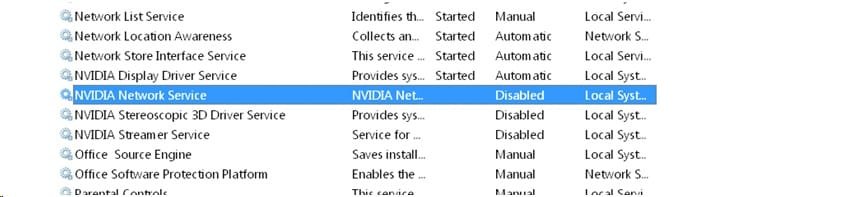
I had been struggling all day with the exact same issue. I followed everyone's ideas, and you all were on the right track for sure. Well for me I solved the issue. It appears to be caused by Nvidia, specifically geforce experience components. I Started by doing diagnostic start up and I did not have the black screen at all--windows booted quickly like normal.

here are the services I selectively disabled:

error.jpg


these 3 nvidia services seemed to be the culprit. I did not narrow it down anymore. It could be just one or all 3 of them.

Hope this helps. Worked for me.

Solved.
 

My Computer

Computer type
PC/Desktop
Computer Manufacturer/Model Number
custom
OS
windows 7 64 bit
CPU
q6700 @ 3.5 gHz
Motherboard
gigabyte GA EP45-UD3P
Memory
8 GB
Graphics Card(s)
GTX 770
Hard Drives
ssd
Yes, always disable those Nvidia services, Catalyst on AMD and most everything else except your AV and programs you want starting up with Windows because they must be running when the OS starts. If you don't restrict this then you'll be spied on by every program you install none of which need to start with Windows.
 
I have this slow boot issue too. The same three files, including the NDProxy.sys failing four times. I also have a Gigabyte mobo, a Geforce GPU and I am using NOD32 as my AV.

My issue is that when I turn on my computer, it takes about ten seconds for the central monitor to turn on and for my keyboard to light up. It used to be much quicker; within a second or two. After that, the central monitor displays the American Megatrends writing and logo. Nothing else. I disabled the splash screen ages ago, preferring to see the scrolling boot info. None of that boot info appears. This screen stays exactly like this, without letting me hit DEL to go into BIOS, for maybe two minutes.

If I try to cause a keyboard error by hitting DEL too many times, once this two minute window is up, the left monitor shows a blinking cursor indefinitely without allowing me to do anything. This necessitates shutting down and rebooting.

To recap, there is no way I can get into the BIOS. If I leave the computer, after hanging on this American Megatrends logo for two minutes it will shut down the main monitor and display the 'Starting Windows' logo on my left monitor. After that processes, it will turn on the central monitor and show the Widows 7 blue splash screen and load as normal. Once in Windows, the computer behaves perfectly normally.

I've tried removing and reinstalling NOD32, all my USB drivers and even the superfluous Geforce programs loaded on Boot (Experience, Stream etc), none hare remedied the issue.

I can't find the correct network adapter drivers on the Gigabyte website for my x79-UD3

Any other help gratefully received please.
 

My Computer

Computer type
PC/Desktop
Computer Manufacturer/Model Number
Custom build
OS
Windows 7 x64
CPU
intel i7 3930K Hex core
Motherboard
Gigabyte X79-UD3
Memory
16Gb Corsair Dominator
Graphics Card(s)
Gigabyte geforce GTX 780 Ti Windforce
Sound Card
Onboard
Monitor(s) Displays
3x 24" WS Dell U2413
Screen Resolution
5760x1200
Hard Drives
1x 120Gb SSD Root drive
4x 1.5Tb SCSI HDD storage
PSU
850w Enermax Galaxy
Case
Silverstone TJ07
Cooling
H100 Hydro CPU watercooling system
Keyboard
Logitech G19
Mouse
Logitech G700S
Internet Speed
70Mb fibre Optic
Antivirus
ESET Nod 32
Browser
Firefox 27
Reset the BIOS to defaults by clearing the CMOS using the jumper or battery method: Clear CMOS - 3 Ways to Clear the CMOS - Reset BIOS.

Be sure to guard against static shock to mobo by not working on carpet, using grounding strap or holding case whenever reaching inside to ground against static spark jumping from finger to mobo.

Once you have default BIOS, boot in to make the changes you want after trying it first at default settings.

Then go over steps to Clean Up Factory Bloatware starting with nothing starting including AV, then adding only the AV in both tabs specified in msconfig.

YOu can alo install Soluto – Anti-Frustration Software to watch a timeline of your startup, or if all else fails try Gathering a Startup, Shutdown, Sleep, Hibernate, or Reboot Trace - Windows 7 Forums
http://pcsupport.about.com/od/fixtheproblem/tp/clearcmos.htm
 
Thanks gregrocker that was an option I had considered but wanted to see if there was anything else I could do first. I've heard it needs about an hour for the capacitors to discharge after poweringoff, power cord unplugged and the CMOS battery out, is that about right please?
 

My Computer

Computer type
PC/Desktop
Computer Manufacturer/Model Number
Custom build
OS
Windows 7 x64
CPU
intel i7 3930K Hex core
Motherboard
Gigabyte X79-UD3
Memory
16Gb Corsair Dominator
Graphics Card(s)
Gigabyte geforce GTX 780 Ti Windforce
Sound Card
Onboard
Monitor(s) Displays
3x 24" WS Dell U2413
Screen Resolution
5760x1200
Hard Drives
1x 120Gb SSD Root drive
4x 1.5Tb SCSI HDD storage
PSU
850w Enermax Galaxy
Case
Silverstone TJ07
Cooling
H100 Hydro CPU watercooling system
Keyboard
Logitech G19
Mouse
Logitech G700S
Internet Speed
70Mb fibre Optic
Antivirus
ESET Nod 32
Browser
Firefox 27
Now the computer won't boot at all.

It just sits sat the American Megatrends logo for maybe two minutes then a flashing cursor appears top left. No CLI though. No inputs are recognised. It just sits there until I hit the power button.

Yay
 

My Computer

Computer type
PC/Desktop
Computer Manufacturer/Model Number
Custom build
OS
Windows 7 x64
CPU
intel i7 3930K Hex core
Motherboard
Gigabyte X79-UD3
Memory
16Gb Corsair Dominator
Graphics Card(s)
Gigabyte geforce GTX 780 Ti Windforce
Sound Card
Onboard
Monitor(s) Displays
3x 24" WS Dell U2413
Screen Resolution
5760x1200
Hard Drives
1x 120Gb SSD Root drive
4x 1.5Tb SCSI HDD storage
PSU
850w Enermax Galaxy
Case
Silverstone TJ07
Cooling
H100 Hydro CPU watercooling system
Keyboard
Logitech G19
Mouse
Logitech G700S
Internet Speed
70Mb fibre Optic
Antivirus
ESET Nod 32
Browser
Firefox 27
Yes I did follow the guide exactly as stated. I used option 3 as it was easier to get to. Thanks very much. My post above still stands though.

Next I thought I'd disconnect my OS drive and see if I could force a boot from my Windows CD. The computer STILL hangs there, so I'm guessing a motherboard issue now..

Any ideas?
 

My Computer

Computer type
PC/Desktop
Computer Manufacturer/Model Number
Custom build
OS
Windows 7 x64
CPU
intel i7 3930K Hex core
Motherboard
Gigabyte X79-UD3
Memory
16Gb Corsair Dominator
Graphics Card(s)
Gigabyte geforce GTX 780 Ti Windforce
Sound Card
Onboard
Monitor(s) Displays
3x 24" WS Dell U2413
Screen Resolution
5760x1200
Hard Drives
1x 120Gb SSD Root drive
4x 1.5Tb SCSI HDD storage
PSU
850w Enermax Galaxy
Case
Silverstone TJ07
Cooling
H100 Hydro CPU watercooling system
Keyboard
Logitech G19
Mouse
Logitech G700S
Internet Speed
70Mb fibre Optic
Antivirus
ESET Nod 32
Browser
Firefox 27
Try Partition Wizard bootable CD which will boot itself.

If disk will not boot I'd unplug everything except the mobo, HD and monitor to see if anything changes at all.

Then power down (carefully follow anti-static precautions I gave you earlier) to unplug HD and plug back in OD to try booting disk again.
 
Fortunately I have another PC to use, otherwise I'd be scuppered. I burnt the Partition Magic CD and tried that. No joy.

I disconnected everything except the motherboard, HD and monitor. Still no changes.

I reseated all components too; no change. I'm not sure what to do next.
 

My Computer

Computer type
PC/Desktop
Computer Manufacturer/Model Number
Custom build
OS
Windows 7 x64
CPU
intel i7 3930K Hex core
Motherboard
Gigabyte X79-UD3
Memory
16Gb Corsair Dominator
Graphics Card(s)
Gigabyte geforce GTX 780 Ti Windforce
Sound Card
Onboard
Monitor(s) Displays
3x 24" WS Dell U2413
Screen Resolution
5760x1200
Hard Drives
1x 120Gb SSD Root drive
4x 1.5Tb SCSI HDD storage
PSU
850w Enermax Galaxy
Case
Silverstone TJ07
Cooling
H100 Hydro CPU watercooling system
Keyboard
Logitech G19
Mouse
Logitech G700S
Internet Speed
70Mb fibre Optic
Antivirus
ESET Nod 32
Browser
Firefox 27
On the off chance that my new Gigabyte GTX 780 Ti is the issue, i removed and replaced it with my old 5970 Black edition and boom, we're into Windows normally.

So either my new graphics card is b0rked or my Enermax Galaxy PSU isn't up to the task. I'd hate to RMA the card only for them to say it's fine. Equally, i'd hate to shell out on a new PSU only to find it hasn't fixed the issue.
 

My Computer

Computer type
PC/Desktop
Computer Manufacturer/Model Number
Custom build
OS
Windows 7 x64
CPU
intel i7 3930K Hex core
Motherboard
Gigabyte X79-UD3
Memory
16Gb Corsair Dominator
Graphics Card(s)
Gigabyte geforce GTX 780 Ti Windforce
Sound Card
Onboard
Monitor(s) Displays
3x 24" WS Dell U2413
Screen Resolution
5760x1200
Hard Drives
1x 120Gb SSD Root drive
4x 1.5Tb SCSI HDD storage
PSU
850w Enermax Galaxy
Case
Silverstone TJ07
Cooling
H100 Hydro CPU watercooling system
Keyboard
Logitech G19
Mouse
Logitech G700S
Internet Speed
70Mb fibre Optic
Antivirus
ESET Nod 32
Browser
Firefox 27
Back
Top