Solved Startup repair after SSD upgrade on dual boot system, need help!

toner

New member
Local time
12:27 AM
Messages
8
Hello all, Having a little issue here, though I have a slight workaround to get my system running it's still very annoying and confusing.

I have a dual boot system. I had 2 Samsung 840 120GB SSDs and a separate Win 7 x64 installation on each (one tweak for Pro Tools DAW). I got a brand new Intel 520 180GB cheap and did the drive clone with EaseUS Todo backup which worked GREAT (typing from that Intel SSD install now).


Here is my problem:

When I turn on my computer and the dual boot screen comes up, it asks which windows I want to load and the timer is @ 30 seconds, and whatever option I pick it says to run startup repair and I can't go any further.

When I load my startup repair disc and pick either of the Windows 7 installations, it says it could not detect any problems and to restart.

When I restart, the default selection timer is back at the 3 seconds I originally had before I upgraded the SSD and either Windows Installation loads.

I've been thinking and thinking and maybe this has something to do with it:
When I originally installed my SSDs, I had the cables swapped and wanted SATA0 as Win 7 home use and SATA1 as Win 7 DAW use (OCD thing with the numbering and cabling). Well I accidentally plugged them in wrong. So when I switched to the intel drive I switched my cabling the way I wanted it.

But the more I think about it, the startup repair disc says no errors and when I restart from the startup repair options it works, until I shut down of course, then I need to use the startup disc/restart method again.

Anyways, any Ideas?

Thanks!
 

My Computer My Computer

At a glance

Windows 7 Professional 64Intel 3930K32GB Corsair XMS 1600MSI GTX 560ti 448 Core Nvidia
Computer type
PC/Desktop
Computer Manufacturer/Model Number
Custom Build
OS
Windows 7 Professional 64
CPU
Intel 3930K
Motherboard
Asus Sabertooth X79
Memory
32GB Corsair XMS 1600
Graphics Card(s)
MSI GTX 560ti 448 Core Nvidia
Sound Card
Built-in
Monitor(s) Displays
Asus 27" LED
Screen Resolution
1920x1080
Hard Drives
Intel 180GB SSD, 2x Samsung 840 SSD, Toshiba 1TB&2TB, WD Black 1TB, 2x WD Green 2TB.
PSU
Corsair HX750
Case
Corsair 600T
Cooling
Corsair H100i
Keyboard
Dell
Mouse
X7 gaming mouse
Internet Speed
Cable
Antivirus
Windows Defender
Browser
Chrome, IE10
EasyBCD

Cloning may have given the same UUID to both W7 drives.
If that happened your PC is probably getting "confused" about which install to start.

I accidentally did this with a Ubuntu partition (on my old setup).
I had Ubuntu partitions on my old and new HDDs.
The Ubuntu partition that responded first was the one that started, not necessarily the one I wanted (i.e. it was totally random which HDD was actually running Ubuntu).

You are supposed to be able to change the UUID, but I have no idea how you do that in W7. :(

Do you have a access to EasyBCD?
You may be able to fix your issue using it.

There seems to be a free version:
EasyBCD - NeoSmart Technologies

You may want to wait until one of the "boot experts" looks at this thread.
 

My Computer My Computer

At a glance

W7 Ultimate SP1, LM19.2 MATE, W10 Home 1703, ...AMD Phenom II x6 1100T, 3.3 GHz12GB DDR3 1333 G-Skill (4GB x 2), G-Skill (2G...NVIDIA GeForce GTX 660
Computer type
PC/Desktop
Computer Manufacturer/Model Number
n/a
OS
W7 Ultimate SP1, LM19.2 MATE, W10 Home 1703, W10 Pro 1703 VM, #All 64 bit
CPU
AMD Phenom II x6 1100T, 3.3 GHz
Motherboard
ASUS M4A88T-M/USB3 (AM3)
Memory
12GB DDR3 1333 G-Skill (4GB x 2), G-Skill (2GB x 2)
Graphics Card(s)
NVIDIA GeForce GTX 660
Sound Card
Realtek?
Monitor(s) Displays
Samsung S23B350
Screen Resolution
1920x1080
Hard Drives
WD Green 2TB (SATA), WD Green 3TB (SATA), WD Blue 4TB (SATA), WD Blue 6TB (SATA)
PSU
Cooler Master
Case
Antec GX300 Tower
Cooling
3x Antec TRICOOL 120mm Fans
Mouse
Wired Optical
Internet Speed
DSL
Antivirus
Avast
Browser
Pale Moon (64 bit)
Other Info
2018-12-27 Upgraded HDDs
2015-12-10 Upgraded case, graphics card, storage
2015-08-15 Upgraded motherboard & RAM
2015-07-15 Upgraded LM17.1 to LM17.2
Thanks for the reply, I will download it and wait for further instruction since I don't want to mess anything up! :D
 

My Computer My Computer

At a glance

Windows 7 Professional 64Intel 3930K32GB Corsair XMS 1600MSI GTX 560ti 448 Core Nvidia
Computer type
PC/Desktop
Computer Manufacturer/Model Number
Custom Build
OS
Windows 7 Professional 64
CPU
Intel 3930K
Motherboard
Asus Sabertooth X79
Memory
32GB Corsair XMS 1600
Graphics Card(s)
MSI GTX 560ti 448 Core Nvidia
Sound Card
Built-in
Monitor(s) Displays
Asus 27" LED
Screen Resolution
1920x1080
Hard Drives
Intel 180GB SSD, 2x Samsung 840 SSD, Toshiba 1TB&2TB, WD Black 1TB, 2x WD Green 2TB.
PSU
Corsair HX750
Case
Corsair 600T
Cooling
Corsair H100i
Keyboard
Dell
Mouse
X7 gaming mouse
Internet Speed
Cable
Antivirus
Windows Defender
Browser
Chrome, IE10
Can you post a screen shot of Disk Management?
http://www.sevenforums.com/tutorials/274797-disk-management-post-screen-capture-image.html

A clone "copies" an entire Disk (HD or SSD), including all partitions.
Or, did your clone copy 2 SSD's to a single SSD???

It's not clear to me how/what you cloned from a dual boot using two SSD's to a new SSD, and retained dual booting...
Do you have the new cloned SSD, and the original two SSD's with the OS's still intact?
So, you now have 3 SSD's connected that have an OS installed...???
I think the DM screen print will help answer this...

Imaging may work better for you, as it "copies" per partition.
Wait for the experts for best advice...
 

My Computer My Computer

At a glance

Multi-Boot W7_Pro_x64 W8.1_Pro_x64 W10_Pro_x6...AMD Athlon II x4 6206GB GSkill DDR2 800AMD 4670 GPU + AMD 4200 IGP
Computer type
PC/Desktop
Computer Manufacturer/Model Number
home built
OS
Multi-Boot W7_Pro_x64 W8.1_Pro_x64 W10_Pro_x64 +Linux_VMs +Chromium_VM
CPU
AMD Athlon II x4 620
Motherboard
Gigabyte GA-MA785G-UD3H
Memory
6GB GSkill DDR2 800
Graphics Card(s)
AMD 4670 GPU + AMD 4200 IGP
Sound Card
on board Realtek ALC889A
Monitor(s) Displays
RCA 40" LCD TV, Insignia 32" LCD TV, HP 15" LCD monitor
Screen Resolution
1680 x 1050
Hard Drives
OCZ Vertex 3 120GB,
Samsung F3 1TB (3),
Several others - WD, Seagate, Hitachi, ...
PSU
Corsair 500 W
Case
Rosewill mid tower
Cooling
CM 90mm rifle
Keyboard
Gyration wireless, Logitech wireless, Dell USB wired
Mouse
Gyration wireless, Logitech wireless, V7 USB wired
Internet Speed
Spectrum - 100Mbps D / 10Mbps U
Antivirus
Avast, MBAM3, EMET, WinPatrol
Browser
Pale Moon, Firefox, IE
Other Info
2 multi-boot PC's
Mainly HTPC/Office/Gen purpose (no gaming).
Trendnet USB KVM.
LG DVD burner/Blue Ray Player.
Tray system for removable SATA backup drives.

Not currently OCd, under-volted.
I use Hybrid sleep, rarely re-boot or shutdown.

Hauppauge HD-PVR, Avermedia PCIe TV Tuner, Hauppauge PCI TV Tuner.
I had a similar problem when 8 was in beta and I ended up wiping and doing away with the dual 7 & 8 boot.

Now I don't know if it is possible but could the SSD that toner wants be wiped clean and then use Macrium Reflect to drag and drop the partitions (OS's) from the other two drives onto it??

Just a thought.

An after thought WHS might be the fellow who would know about this stuff
 

My Computer My Computer

At a glance

Desk1 7 Home Prem / Desk2 10 Pro / Main lap A...Desk1 i5 3750K / Laptop i7 GTX 860M / Desk2 i...Desk1 8GB (1866) / Desk2 16GB (1333) / Laptop...Desk 1& 2NVidia GTX 650 & Laptops on board Intel
Computer type
PC/Desktop
Computer Manufacturer/Model Number
Own build (new) Desk1 / Asus ROG Win 7 / Desk2 1st build
OS
Desk1 7 Home Prem / Desk2 10 Pro / Main lap Asus ROG 10 Pro 2 laptop Toshiba 7 Pro Asus P2520 7 & 10
CPU
Desk1 i5 3750K / Laptop i7 GTX 860M / Desk2 i5 2500
Motherboard
Desk1 Asus P877-V / Desk2 Gigabyte H67 UD3H / Laptop ?
Memory
Desk1 8GB (1866) / Desk2 16GB (1333) / Laptop 8Gb DDR3
Graphics Card(s)
Desk 1& 2NVidia GTX 650 & Laptops on board Intel
Sound Card
Desk 1 & 2 -XONAR DG Realtek High Def audio Laptop
Monitor(s) Displays
Desk 1 Benq HD 2450 / Desk2 Philips 24" / Laptop 17.5"
Screen Resolution
1920x1080 D1 & D2 & Laptop 1
Hard Drives
Desk1 Samsung 120GB 830 SSD
Asus ROG 256GB 850 Pro SSD
Desk2 Samsung 840 256 SSD
Toshiba 120GB EVO
PSU
Desk 1 Corsair HX 1050/ Laptop ? / Desk 2 Corsair HX 650
Case
Desk 1 Cooler HAF XM ? Toshiba laptop / Desk2 Coolermaster
Cooling
Fans on all Desk1 -2 Desk2 - all Coolermasters 5 Laptop ?
Keyboard
Desk 1 MS Sidewinder X6 Desk 2 MS Sidewinder X 4
Mouse
Desk 1&2 - Gigabyte MS 900 gamer - laptop - Logitec wireless
Internet Speed
ADSL2+
Other Info
One other Desktop (tester) and spare Toshba laptop both with SSD's
Running Kaspersky 2016 ISS on all machines config'd identically
Logitec audio stereo systems on each machine (x3)
Canon MG5250MFC
Router/modem TP-Link running WPA2SK
We need to see the screenshot of Disk Mgmt first.

But in general with separate HD's it's best to install each OS with the other HD unplugged, then set preferred HD to boot first, boot the other(s) using the one-time BIOS Boot Menu key. If you don't like this arrangement then install EasyBCD to the primary to add the other OS HD's. This still keeps them independent however so that you can remove one.

You can still arrange them this way by Marking Partition Active any OS or it's System Reserved partition that lacks a System flag, then unplugging all other HD/SSD's to run Startup Repair - Run up to 3 Separate Times until it boots itself and wears the System Active flags. Then plug others back in, boot preferred via the BIOS.
 
DiskMgmtwindow_zpscf370361.png


DiskMgmtwindow3_zpsf699f3cf.png


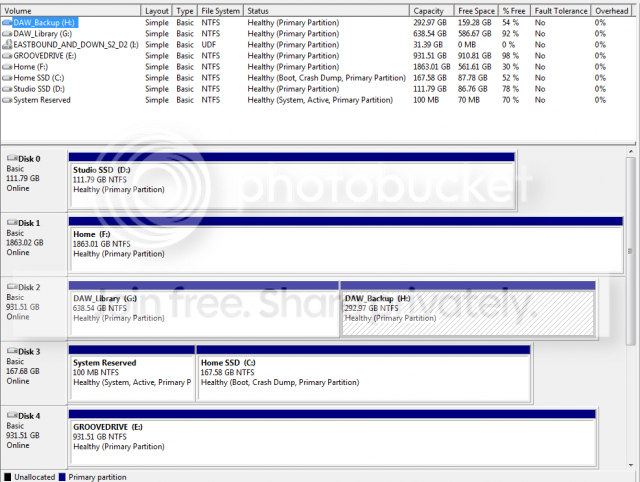
Disk Management window screenshot attached as requested. Photobucket makes it barely legible, sorry.
 

My Computer My Computer

At a glance

Windows 7 Professional 64Intel 3930K32GB Corsair XMS 1600MSI GTX 560ti 448 Core Nvidia
Computer type
PC/Desktop
Computer Manufacturer/Model Number
Custom Build
OS
Windows 7 Professional 64
CPU
Intel 3930K
Motherboard
Asus Sabertooth X79
Memory
32GB Corsair XMS 1600
Graphics Card(s)
MSI GTX 560ti 448 Core Nvidia
Sound Card
Built-in
Monitor(s) Displays
Asus 27" LED
Screen Resolution
1920x1080
Hard Drives
Intel 180GB SSD, 2x Samsung 840 SSD, Toshiba 1TB&2TB, WD Black 1TB, 2x WD Green 2TB.
PSU
Corsair HX750
Case
Corsair 600T
Cooling
Corsair H100i
Keyboard
Dell
Mouse
X7 gaming mouse
Internet Speed
Cable
Antivirus
Windows Defender
Browser
Chrome, IE10
Next time use the tutorial David provided for how we want to see screenshots. It would also help since you posted two if each one showed the config with each OS booted. For example I need to know now if Disk0 boots as C as it should provided you correctly told the cloning image to select Auto drive letter.

Nevertheless, mark Disk0 Win7 Active: Partition - Mark as Active (Method Two)

Power down to unplug all HD's. Swap the Disk0 cable to the System drive (now Disk3) which is booting both OS HD's so it will be first in order as it should be. Make sure it remains set to boot first in BIOS setup. See if it boots on its own correctly. If necessary install EasyBCD to delete the other OS boot option.

Then power down to swap in the new OS HD which you marked Active, boot the Win7 installer to Startup Repair - Run up to 3 Separate Times until Win7 starts and the partition is marked System Active.

Now plug back in the other OS HD to DIsk1 and boot it when needed using the BIOS Boot Menu shortcut key. If you don't like this arrangement install EasyBCD to the primary OS HD to add the other one, which will keep them independent anyway.

Now plug back in the other HD's one at a time to see if one interferes with either OS booting. If so move its data off and run Diskpart Clean Command to clear the boot sector of possibly interfering code. Then repartition in Disk Mgmt as Logical which is best for data drives so they cannot interfere at all with OS drives.
 
Next time use the tutorial David provided for how we want to see screenshots. It would also help since you posted two if each one showed the config with each OS booted. For example I need to know now if Disk0 boots as C as it should provided you correctly told the cloning image to select Auto drive letter.

Nevertheless, mark Disk0 Win7 Active: Partition - Mark as Active (Method Two)

Power down to unplug all HD's. Swap the Disk0 cable to the System drive (now Disk3) which is booting both OS HD's so it will be first in order as it should be. Make sure it remains set to boot first in BIOS setup. See if it boots on its own correctly. If necessary install EasyBCD to delete the other OS boot option.

Then power down to swap in the new OS HD which you marked Active, boot the Win7 installer to Startup Repair - Run up to 3 Separate Times until Win7 starts and the partition is marked System Active.

Now plug back in the other OS HD to DIsk1 and boot it when needed using the BIOS Boot Menu shortcut key. If you don't like this arrangement install EasyBCD to the primary OS HD to add the other one, which will keep them independent anyway.

Now plug back in the other HD's one at a time to see if one interferes with either OS booting. If so move its data off and run Diskpart Clean Command to clear the boot sector of possibly interfering code. Then repartition in Disk Mgmt as Logical which is best for data drives so they cannot interfere at all with OS drives.

Ok, so I did all the steps EXCEPT the last one "Diskpart Clean Command" and with just the Intel SSD plugged in it would boot. When I plugged in the Samsung SSD neither would boot. So I deleted the entry for the Samsung SSD with EasyBCD, restarted, adjusted my BIOS to make sure boot order was INTEL SSD first (since it wasnt), re-added it with EasyBCD and now everything works.

AND, in all this mess with unplugging I still swapped the cables so my DAW install is still DISK0, BUT I dont have to use the repair disk to boot anymore since cloning to the larger INTEL SSD so you know what I'm good, it works!

Thanks!
 

My Computer My Computer

At a glance

Windows 7 Professional 64Intel 3930K32GB Corsair XMS 1600MSI GTX 560ti 448 Core Nvidia
Computer type
PC/Desktop
Computer Manufacturer/Model Number
Custom Build
OS
Windows 7 Professional 64
CPU
Intel 3930K
Motherboard
Asus Sabertooth X79
Memory
32GB Corsair XMS 1600
Graphics Card(s)
MSI GTX 560ti 448 Core Nvidia
Sound Card
Built-in
Monitor(s) Displays
Asus 27" LED
Screen Resolution
1920x1080
Hard Drives
Intel 180GB SSD, 2x Samsung 840 SSD, Toshiba 1TB&2TB, WD Black 1TB, 2x WD Green 2TB.
PSU
Corsair HX750
Case
Corsair 600T
Cooling
Corsair H100i
Keyboard
Dell
Mouse
X7 gaming mouse
Internet Speed
Cable
Antivirus
Windows Defender
Browser
Chrome, IE10
If you'd post back another screenshot of Disk Mgmt we can look it over for you for any potential problems.

Glad it's worked for you so far! :)
 
Back
Top