"Startup repair" failing - hard disk space issue?

AnnaNYC

New member
Local time
5:59 AM
Messages
29
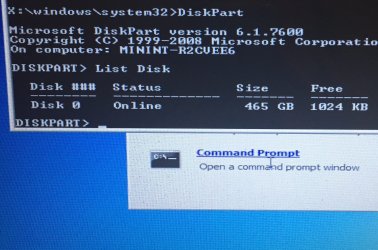
I'm hoping this is a simple fix. I'm trying to fix my elderly uncle's Asus laptop. System Repair pops up and fails. I booted to command prompt and found out it may be hard disk space. 400+ GB Hard drive (only one drive) and there's only 1024kb Free. I'm thinking that could be the issue. Hardware was checked out at the computer store and is fine. But they were going to charge him $200 to fix this failure to boot up issue. I told him to let me try first.

Can I possible "compact" this drive from the command prompt screen?


Note: I have no other Win 7 systems, so can't create a disk, and I have no original disks.
Also, no restore point has ever been set, and there are no partitions on the drive.
 

My Computer My Computer

At a glance

Windows 7 Home Premium
Computer type
Laptop
Computer Manufacturer/Model Number
Asus
OS
Windows 7 Home Premium
Hard Drives
465 GB
Normally, I'd tell you to download a program or two to examine what's using the space or to clean up unnecessary files.

But with only 1024 kb of space, you probably can't install anything.

So--try this:

Start button, search box, type in "disk cleanup" and then poke the disk cleanup listing that shows up.

Let it clean up the drive and report back with how much space you then have.

You'll see an option in disc cleanup where it asks if you want to clean up system files as well. Say yes.

It should calculate how much space it will recover.

Let it run to completion. Might take a few minutes.

Then check your recycle bin to see if it's empty.

Report back with available space.
 

My Computer My Computer

At a glance

Windows 7 Home Premium SP1, 64-bitIntel Skylake i5-6600K, not overclocked8 GB HyperX DDR4-2666 (2 x 4 GB)none; graphics are integrated on CPU
Computer type
PC/Desktop
Computer Manufacturer/Model Number
Ignatz Special; 4 speed manual gearbox; factory air conditioning; one of one
OS
Windows 7 Home Premium SP1, 64-bit
CPU
Intel Skylake i5-6600K, not overclocked
Motherboard
AsRock Z170M Extreme 4, micro ATX
Memory
8 GB HyperX DDR4-2666 (2 x 4 GB)
Graphics Card(s)
none; graphics are integrated on CPU
Sound Card
onboard: Realtek ALC1150; external: USB Behringer UF0-202
Monitor(s) Displays
Dell S2340M 23 inch IPS
Screen Resolution
1600 x 900
Hard Drives
System: Crucial MX100 series SSD, 128 GB;
Data: Samsung Spinpoint 103SJ, 1 TB;
Backup: WD Caviar Green WD30EZRX-00D8PB0, 3 TB
PSU
Rosewill SilentNight 500 watt fanless, semi-modular
Case
Antec Solo II
Cooling
Noctua NH-U12S; Noctua F12 intake, Noctua S12A exhaust
Keyboard
Microsoft 200 6JH-00001 USB
Mouse
Dell or Microsoft optical wired; USB
Antivirus
Microsoft Security Essentials and Malwarebytes Premium
Browser
Pale Moon
Other Info
All fans PWM; speeds at idle: CPU circa 500 rpm; intake circa 600 rpm; exhaust circa 600 rpm; CPU temps 27 idle and 47 C load in a warm room (27 C/81 F) when running Intel Extreme Tuning Utility stress test.
Normally, I'd tell you to download a program or two to examine what's using the space or to clean up unnecessary files.

But with only 1024 kb of space, you probably can't install anything.

So--try this:

Start button, search box, type in "disk cleanup" and then poke the disk cleanup listing that shows up.

Let it clean up the drive and report back with how much space you then have.

You'll see an option in disc cleanup where it asks if you want to clean up system files as well. Say yes.

It should calculate how much space it will recover.

Let it run to completion. Might take a few minutes.

Then check your recycle bin to see if it's empty.

Report back with available space.

Thank you. I'm sorry I wasn't more clear. I can't get into Windows at all. Startup repair starts automatically upon powering up. It fails and the only options I'm given are to restart or shut down. I can boot up to BIOS using the F8 button. But "Safe Mode" doesn't work (Startup Repair starts automatically and fails).
 
Last edited:

My Computer My Computer

At a glance

Windows 7 Home Premium
Computer type
Laptop
Computer Manufacturer/Model Number
Asus
OS
Windows 7 Home Premium
Hard Drives
465 GB
Excuse me. I overlooked the fact that you can't boot at all.

Let me think a bit.
 

My Computer My Computer

At a glance

Windows 7 Home Premium SP1, 64-bitIntel Skylake i5-6600K, not overclocked8 GB HyperX DDR4-2666 (2 x 4 GB)none; graphics are integrated on CPU
Computer type
PC/Desktop
Computer Manufacturer/Model Number
Ignatz Special; 4 speed manual gearbox; factory air conditioning; one of one
OS
Windows 7 Home Premium SP1, 64-bit
CPU
Intel Skylake i5-6600K, not overclocked
Motherboard
AsRock Z170M Extreme 4, micro ATX
Memory
8 GB HyperX DDR4-2666 (2 x 4 GB)
Graphics Card(s)
none; graphics are integrated on CPU
Sound Card
onboard: Realtek ALC1150; external: USB Behringer UF0-202
Monitor(s) Displays
Dell S2340M 23 inch IPS
Screen Resolution
1600 x 900
Hard Drives
System: Crucial MX100 series SSD, 128 GB;
Data: Samsung Spinpoint 103SJ, 1 TB;
Backup: WD Caviar Green WD30EZRX-00D8PB0, 3 TB
PSU
Rosewill SilentNight 500 watt fanless, semi-modular
Case
Antec Solo II
Cooling
Noctua NH-U12S; Noctua F12 intake, Noctua S12A exhaust
Keyboard
Microsoft 200 6JH-00001 USB
Mouse
Dell or Microsoft optical wired; USB
Antivirus
Microsoft Security Essentials and Malwarebytes Premium
Browser
Pale Moon
Other Info
All fans PWM; speeds at idle: CPU circa 500 rpm; intake circa 600 rpm; exhaust circa 600 rpm; CPU temps 27 idle and 47 C load in a warm room (27 C/81 F) when running Intel Extreme Tuning Utility stress test.

My Computer My Computer

At a glance

Windows 7 Home Premium
Computer type
Laptop
Computer Manufacturer/Model Number
Asus
OS
Windows 7 Home Premium
Hard Drives
465 GB
How recent is this non-boot behavior?

Did it boot fine a week ago when he likely had very little free space?

Did it boot fine yesterday?

I'm just wondering if the lack of space is necessarily the cause. If low boot space can cause boot issues, I'd think the issues would show up before it got down to only 1024 kb free.

Provide as much detail as you can about recent history.

Anything new installed?

When did the PC last have, say, at least 1 GB free? Is that known?

Does he make any attempt at maintenance?
 

My Computer My Computer

At a glance

Windows 7 Home Premium SP1, 64-bitIntel Skylake i5-6600K, not overclocked8 GB HyperX DDR4-2666 (2 x 4 GB)none; graphics are integrated on CPU
Computer type
PC/Desktop
Computer Manufacturer/Model Number
Ignatz Special; 4 speed manual gearbox; factory air conditioning; one of one
OS
Windows 7 Home Premium SP1, 64-bit
CPU
Intel Skylake i5-6600K, not overclocked
Motherboard
AsRock Z170M Extreme 4, micro ATX
Memory
8 GB HyperX DDR4-2666 (2 x 4 GB)
Graphics Card(s)
none; graphics are integrated on CPU
Sound Card
onboard: Realtek ALC1150; external: USB Behringer UF0-202
Monitor(s) Displays
Dell S2340M 23 inch IPS
Screen Resolution
1600 x 900
Hard Drives
System: Crucial MX100 series SSD, 128 GB;
Data: Samsung Spinpoint 103SJ, 1 TB;
Backup: WD Caviar Green WD30EZRX-00D8PB0, 3 TB
PSU
Rosewill SilentNight 500 watt fanless, semi-modular
Case
Antec Solo II
Cooling
Noctua NH-U12S; Noctua F12 intake, Noctua S12A exhaust
Keyboard
Microsoft 200 6JH-00001 USB
Mouse
Dell or Microsoft optical wired; USB
Antivirus
Microsoft Security Essentials and Malwarebytes Premium
Browser
Pale Moon
Other Info
All fans PWM; speeds at idle: CPU circa 500 rpm; intake circa 600 rpm; exhaust circa 600 rpm; CPU temps 27 idle and 47 C load in a warm room (27 C/81 F) when running Intel Extreme Tuning Utility stress test.
Two more questions:

How do you know there are no system restore points?

How (exactly) did you decide the free space is 1024 kb? What commands did you issue at the prompt?
 

My Computer My Computer

At a glance

Windows 7 Home Premium SP1, 64-bitIntel Skylake i5-6600K, not overclocked8 GB HyperX DDR4-2666 (2 x 4 GB)none; graphics are integrated on CPU
Computer type
PC/Desktop
Computer Manufacturer/Model Number
Ignatz Special; 4 speed manual gearbox; factory air conditioning; one of one
OS
Windows 7 Home Premium SP1, 64-bit
CPU
Intel Skylake i5-6600K, not overclocked
Motherboard
AsRock Z170M Extreme 4, micro ATX
Memory
8 GB HyperX DDR4-2666 (2 x 4 GB)
Graphics Card(s)
none; graphics are integrated on CPU
Sound Card
onboard: Realtek ALC1150; external: USB Behringer UF0-202
Monitor(s) Displays
Dell S2340M 23 inch IPS
Screen Resolution
1600 x 900
Hard Drives
System: Crucial MX100 series SSD, 128 GB;
Data: Samsung Spinpoint 103SJ, 1 TB;
Backup: WD Caviar Green WD30EZRX-00D8PB0, 3 TB
PSU
Rosewill SilentNight 500 watt fanless, semi-modular
Case
Antec Solo II
Cooling
Noctua NH-U12S; Noctua F12 intake, Noctua S12A exhaust
Keyboard
Microsoft 200 6JH-00001 USB
Mouse
Dell or Microsoft optical wired; USB
Antivirus
Microsoft Security Essentials and Malwarebytes Premium
Browser
Pale Moon
Other Info
All fans PWM; speeds at idle: CPU circa 500 rpm; intake circa 600 rpm; exhaust circa 600 rpm; CPU temps 27 idle and 47 C load in a warm room (27 C/81 F) when running Intel Extreme Tuning Utility stress test.
Hold on. Trying to post screenshots for you. I was able to access the drive details from the command screen. As far as recent activity, I just spoke with him and yes, he was getting "low disk space" warnings for about two weeks before it would no longer boot up to Win7.
 

My Computer My Computer

At a glance

Windows 7 Home Premium
Computer type
Laptop
Computer Manufacturer/Model Number
Asus
OS
Windows 7 Home Premium
Hard Drives
465 GB
Here's the hard drive info (photo) I found via commands...
 

Attachments

  • image.jpg
    image.jpg
    310.8 KB · Views: 1

My Computer My Computer

At a glance

Windows 7 Home Premium
Computer type
Laptop
Computer Manufacturer/Model Number
Asus
OS
Windows 7 Home Premium
Hard Drives
465 GB
And no, he made no attempts at maintenance. I don't think he knows how. He writes emails, plays games and buys movies and downloads them. He said he has close to 100 movies and even more games downloaded. No wonder he's out of hard drive space!
 

My Computer My Computer

At a glance

Windows 7 Home Premium
Computer type
Laptop
Computer Manufacturer/Model Number
Asus
OS
Windows 7 Home Premium
Hard Drives
465 GB
And no, he made no attempts at maintenance. I don't think he knows how. He writes emails, plays games and buys movies and downloads them. He said he has close to 100 movies and even more games downloaded. No wonder he's out of hard drive space!

Yeah, no wonder.

Which of his downloaded movies or games is he willing to sacrifice?

I'd delete something sizable that I could replace at little or no cost and see if the machine will then boot.

He may not even know where stuff he downloads is stored, but it's likely somewhere under his C:\users\his-user-name-whatever-it-is directory if he just uses defaults.

Does he acknowledge that his hard drive cannot store an infinite number of items?

Will he entertain the notion that he may have to either buy a new hard drive or start deleting stuff?

He could always get an external drive.

I assume he has no interest in backing up any of this and is willing to lose it all when his hard drive fails, as they all do---possibly not in his lifetime, given "elderly".
 

My Computer My Computer

At a glance

Windows 7 Home Premium SP1, 64-bitIntel Skylake i5-6600K, not overclocked8 GB HyperX DDR4-2666 (2 x 4 GB)none; graphics are integrated on CPU
Computer type
PC/Desktop
Computer Manufacturer/Model Number
Ignatz Special; 4 speed manual gearbox; factory air conditioning; one of one
OS
Windows 7 Home Premium SP1, 64-bit
CPU
Intel Skylake i5-6600K, not overclocked
Motherboard
AsRock Z170M Extreme 4, micro ATX
Memory
8 GB HyperX DDR4-2666 (2 x 4 GB)
Graphics Card(s)
none; graphics are integrated on CPU
Sound Card
onboard: Realtek ALC1150; external: USB Behringer UF0-202
Monitor(s) Displays
Dell S2340M 23 inch IPS
Screen Resolution
1600 x 900
Hard Drives
System: Crucial MX100 series SSD, 128 GB;
Data: Samsung Spinpoint 103SJ, 1 TB;
Backup: WD Caviar Green WD30EZRX-00D8PB0, 3 TB
PSU
Rosewill SilentNight 500 watt fanless, semi-modular
Case
Antec Solo II
Cooling
Noctua NH-U12S; Noctua F12 intake, Noctua S12A exhaust
Keyboard
Microsoft 200 6JH-00001 USB
Mouse
Dell or Microsoft optical wired; USB
Antivirus
Microsoft Security Essentials and Malwarebytes Premium
Browser
Pale Moon
Other Info
All fans PWM; speeds at idle: CPU circa 500 rpm; intake circa 600 rpm; exhaust circa 600 rpm; CPU temps 27 idle and 47 C load in a warm room (27 C/81 F) when running Intel Extreme Tuning Utility stress test.
vssadmin list shadowstorage

Enter the above command at a command prompt and post a screen shot of the output.
 

My Computer My Computer

At a glance

Windows 7 Home Premium SP1, 64-bitIntel Skylake i5-6600K, not overclocked8 GB HyperX DDR4-2666 (2 x 4 GB)none; graphics are integrated on CPU
Computer type
PC/Desktop
Computer Manufacturer/Model Number
Ignatz Special; 4 speed manual gearbox; factory air conditioning; one of one
OS
Windows 7 Home Premium SP1, 64-bit
CPU
Intel Skylake i5-6600K, not overclocked
Motherboard
AsRock Z170M Extreme 4, micro ATX
Memory
8 GB HyperX DDR4-2666 (2 x 4 GB)
Graphics Card(s)
none; graphics are integrated on CPU
Sound Card
onboard: Realtek ALC1150; external: USB Behringer UF0-202
Monitor(s) Displays
Dell S2340M 23 inch IPS
Screen Resolution
1600 x 900
Hard Drives
System: Crucial MX100 series SSD, 128 GB;
Data: Samsung Spinpoint 103SJ, 1 TB;
Backup: WD Caviar Green WD30EZRX-00D8PB0, 3 TB
PSU
Rosewill SilentNight 500 watt fanless, semi-modular
Case
Antec Solo II
Cooling
Noctua NH-U12S; Noctua F12 intake, Noctua S12A exhaust
Keyboard
Microsoft 200 6JH-00001 USB
Mouse
Dell or Microsoft optical wired; USB
Antivirus
Microsoft Security Essentials and Malwarebytes Premium
Browser
Pale Moon
Other Info
All fans PWM; speeds at idle: CPU circa 500 rpm; intake circa 600 rpm; exhaust circa 600 rpm; CPU temps 27 idle and 47 C load in a warm room (27 C/81 F) when running Intel Extreme Tuning Utility stress test.
Exactly. He already told me I can delete any/all of the movies, and he understands he needs to do that from now on. I just don't know how to do that without getting into windows. I don't see how I can delete anythinb from the command prompt screen. As soon as I manage to get into Windows, I'll set up auto system restore points, etc. -- plus I'm giving him easy written instructions on how to delete things and empty the recycle bin.
 

My Computer My Computer

At a glance

Windows 7 Home Premium
Computer type
Laptop
Computer Manufacturer/Model Number
Asus
OS
Windows 7 Home Premium
Hard Drives
465 GB

My Computer My Computer

At a glance

Windows 7 Home Premium
Computer type
Laptop
Computer Manufacturer/Model Number
Asus
OS
Windows 7 Home Premium
Hard Drives
465 GB
States: "is not recognized as an internal or external command"
(The vssadmin... command) I'm trying the C drive / username command now
 

My Computer My Computer

At a glance

Windows 7 Home Premium
Computer type
Laptop
Computer Manufacturer/Model Number
Asus
OS
Windows 7 Home Premium
Hard Drives
465 GB
Hmmm - not working either. I'm researching a bit to find any other commands that may work to access files, or a command to compress the drive... something.
 

My Computer My Computer

At a glance

Windows 7 Home Premium
Computer type
Laptop
Computer Manufacturer/Model Number
Asus
OS
Windows 7 Home Premium
Hard Drives
465 GB
I'm trying the C drive / username command now

It's not a command.

It's a location on the C drive.

Do you know how to navigate at a command prompt?
 

My Computer My Computer

At a glance

Windows 7 Home Premium SP1, 64-bitIntel Skylake i5-6600K, not overclocked8 GB HyperX DDR4-2666 (2 x 4 GB)none; graphics are integrated on CPU
Computer type
PC/Desktop
Computer Manufacturer/Model Number
Ignatz Special; 4 speed manual gearbox; factory air conditioning; one of one
OS
Windows 7 Home Premium SP1, 64-bit
CPU
Intel Skylake i5-6600K, not overclocked
Motherboard
AsRock Z170M Extreme 4, micro ATX
Memory
8 GB HyperX DDR4-2666 (2 x 4 GB)
Graphics Card(s)
none; graphics are integrated on CPU
Sound Card
onboard: Realtek ALC1150; external: USB Behringer UF0-202
Monitor(s) Displays
Dell S2340M 23 inch IPS
Screen Resolution
1600 x 900
Hard Drives
System: Crucial MX100 series SSD, 128 GB;
Data: Samsung Spinpoint 103SJ, 1 TB;
Backup: WD Caviar Green WD30EZRX-00D8PB0, 3 TB
PSU
Rosewill SilentNight 500 watt fanless, semi-modular
Case
Antec Solo II
Cooling
Noctua NH-U12S; Noctua F12 intake, Noctua S12A exhaust
Keyboard
Microsoft 200 6JH-00001 USB
Mouse
Dell or Microsoft optical wired; USB
Antivirus
Microsoft Security Essentials and Malwarebytes Premium
Browser
Pale Moon
Other Info
All fans PWM; speeds at idle: CPU circa 500 rpm; intake circa 600 rpm; exhaust circa 600 rpm; CPU temps 27 idle and 47 C load in a warm room (27 C/81 F) when running Intel Extreme Tuning Utility stress test.

My Computer My Computer

At a glance

Windows 10 Pro. 64/ version 1709 Windows 7 Pr...Intel i7-6800K @ 4.3Corsair Platinum 16 gig @2400EVGA GTX 1070 OC
Computer type
PC/Desktop
Computer Manufacturer/Model Number
Home made Desktop
OS
Windows 10 Pro. 64/ version 1709 Windows 7 Pro/64
CPU
Intel i7-6800K @ 4.3
Motherboard
ASUS X-99 Deluxe II
Memory
Corsair Platinum 16 gig @2400
Graphics Card(s)
EVGA GTX 1070 OC
Monitor(s) Displays
Asus 27" LED LCD/VE278Q
Screen Resolution
1920-1080 or 1280-720 HDMI
Hard Drives
INTEL SSD 730-240 Gb Sata 3.0/
PSU
EVGA Platium 1200W
Case
Phanteks Luxe Tempered Glass 8 fans/ one radiator
Cooling
XSPC/ Water Cooled CPU
Keyboard
Das 4 Professional
Mouse
Logitech M705/MX Anywhere 2-S
Internet Speed
100 mbits
Antivirus
Microsoft Security Essentials/ Malwarebytes Premium 3.0/ SAS
Browser
I.E. 11 default/Firefox/ ISP Time Warner Cable/Spectrum
Other Info
LG BluRay Burner/
Sound system-KLipsch-THX/
Icy Dock ssd Hot Swap bays.
Get to a command prompt.

enter this:

cd..

That's cd followed by two dots.

Hit the enter key.

Do it again and again until the prompt appears as

C:\

and nothing more.

Advise when you are sitting at C:\ for a prompt, not some sub directory.
 

My Computer My Computer

At a glance

Windows 7 Home Premium SP1, 64-bitIntel Skylake i5-6600K, not overclocked8 GB HyperX DDR4-2666 (2 x 4 GB)none; graphics are integrated on CPU
Computer type
PC/Desktop
Computer Manufacturer/Model Number
Ignatz Special; 4 speed manual gearbox; factory air conditioning; one of one
OS
Windows 7 Home Premium SP1, 64-bit
CPU
Intel Skylake i5-6600K, not overclocked
Motherboard
AsRock Z170M Extreme 4, micro ATX
Memory
8 GB HyperX DDR4-2666 (2 x 4 GB)
Graphics Card(s)
none; graphics are integrated on CPU
Sound Card
onboard: Realtek ALC1150; external: USB Behringer UF0-202
Monitor(s) Displays
Dell S2340M 23 inch IPS
Screen Resolution
1600 x 900
Hard Drives
System: Crucial MX100 series SSD, 128 GB;
Data: Samsung Spinpoint 103SJ, 1 TB;
Backup: WD Caviar Green WD30EZRX-00D8PB0, 3 TB
PSU
Rosewill SilentNight 500 watt fanless, semi-modular
Case
Antec Solo II
Cooling
Noctua NH-U12S; Noctua F12 intake, Noctua S12A exhaust
Keyboard
Microsoft 200 6JH-00001 USB
Mouse
Dell or Microsoft optical wired; USB
Antivirus
Microsoft Security Essentials and Malwarebytes Premium
Browser
Pale Moon
Other Info
All fans PWM; speeds at idle: CPU circa 500 rpm; intake circa 600 rpm; exhaust circa 600 rpm; CPU temps 27 idle and 47 C load in a warm room (27 C/81 F) when running Intel Extreme Tuning Utility stress test.
No, I have no idea how to use commands to navigate the hard drive. I'll post when I'm at the C prompt. I need a little while on this end.
 

My Computer My Computer

At a glance

Windows 7 Home Premium
Computer type
Laptop
Computer Manufacturer/Model Number
Asus
OS
Windows 7 Home Premium
Hard Drives
465 GB
Back
Top