Startup Repair Not working after disk defragmentation

Rokeugon

New member
Local time
6:45 PM
Messages
45
Location
Somewhere in scotland
so im having problems currently getting back onto my HP 340-uk Pavilion..

so i was doing a disk de-fragmentation last night and decided to restart after noticing choppy-ness within games + windows 7 , but it failed to restart and is putting me into "Windows is loading files" > Start up repair..

it trys to correct and repair the problem but it always fails. and when i get a detailed look at the log its something like this

problem event name : StartupRepairOffline
problem signature 01 : 6.1.7600.16385
problem signature 02 : 6.1.7600.16385
problem signature 03 : unkown
problem signature 04 : -1
problem signature 05 : ExternalMedia
problem signature 06 : 1
problem signature 07 :No OS Installed
local ID : 1033


this is what happens when i boot without recovery disk

\boot\bcd

Status: 0xc0000098

info: The windows boot configuration data rules does not contain a valid OS entry


something is hiding my OS as i cannot find it when searching for it on the recovery panel straight after picking a keyboard layout

when trying to rebuild the bcd ive tried deleting it renaming it (does the same thing mostly) changing attributes however no successful command or anything like that was given (Dunno if tis supposed to but)

i still get total identified windows installations : 0 - Operation completed successfully

is there any possible way of recovering from this or do i actually need to restart to factory default (Fresh win7 install), because i really dont want to as i have so much stuff thats irreplaceable.

*Another question* could i be able to insert the HDD onto my backup computer and copy files from that HDD onto this as a means of backing up some files and do a factory reset so i get a fresh install.

:EDIT:
i can usually fix this problem as its mostly just false in most of my cases so i just restart my PC and when the HP blue screen pops up i keep pressing F8 - but nothing happens in this time. ive not tried managing boot options as of yet, so il see how that will go and if nothing of use happens then il just need to wait

im in need of help fast here if anyone can help that is ?

HP Specialist Said after countless bcd rebuilding trys
"At this point, my best guess would be that interrupting the defrag has corrupted to OS to some degree - it shouldn't, but it would explain why re-building the boot configuration datafile is failing as it can't find the OS entry point."
 
Last edited:

My Computer

Computer type
PC/Desktop
Computer Manufacturer/Model Number
HPE Pavilion 340-uk (Modified)
OS
Windows 7 Home Premium x64
CPU
Intel i3 540 @ 3.07GHz
Motherboard
MS-7613 (LONA-GL8E)
Memory
4GB
Graphics Card(s)
Nvidia Geforce GT640 OC
Monitor(s) Displays
LG
Screen Resolution
1680x1050
Hard Drives
Segagate 1TB 7200RPM
PSU
XFX 550W 80+ Bronze PSU
Keyboard
Perixx PX-1100
Mouse
Perixx MX-2000
Internet Speed
1.6MB's (Down) - 270KB's (Up)
Antivirus
MSE , Comodo Firewall , Malwarebytes
Browser
Firefox , chrome

My Computer

Computer type
PC/Desktop
Computer Manufacturer/Model Number
Dell optiplex 740
OS
Win 7 Home Premium SP1 32 bit
CPU
AMD Athlon 64 X2 5000B
Motherboard
Dell Inc. 0YP696 (Socket M2 )
Memory
4.00 GB Dual-Channel DDR2 @ 370MHz (6-6-6-18)
Graphics Card(s)
Acer E181H (1366x768@60Hz) 64MB GeForce 6150 LE (Dell)
Sound Card
SigmaTel High Definition Audio CODEC
Monitor(s) Displays
Acer E181H (1366x768@60Hz) 64MB GeForce 6150 LE (Dell)
Hard Drives
699GB Seagate ST375064 0NS SCSI Disk Device (ATA)
Case
Mini tower
Internet Speed
Ping 36 ms, Download 57.71 mbps , Upload 11.79mbps
Antivirus
Free Avast. Pro paid Mbam , Free Sas
Browser
Palemoon .

My Computer

Computer type
PC/Desktop
Computer Manufacturer/Model Number
HPE Pavilion 340-uk (Modified)
OS
Windows 7 Home Premium x64
CPU
Intel i3 540 @ 3.07GHz
Motherboard
MS-7613 (LONA-GL8E)
Memory
4GB
Graphics Card(s)
Nvidia Geforce GT640 OC
Monitor(s) Displays
LG
Screen Resolution
1680x1050
Hard Drives
Segagate 1TB 7200RPM
PSU
XFX 550W 80+ Bronze PSU
Keyboard
Perixx PX-1100
Mouse
Perixx MX-2000
Internet Speed
1.6MB's (Down) - 270KB's (Up)
Antivirus
MSE , Comodo Firewall , Malwarebytes
Browser
Firefox , chrome
Then just go right into step 11..
 

My Computer

Computer type
PC/Desktop
Computer Manufacturer/Model Number
Dell optiplex 740
OS
Win 7 Home Premium SP1 32 bit
CPU
AMD Athlon 64 X2 5000B
Motherboard
Dell Inc. 0YP696 (Socket M2 )
Memory
4.00 GB Dual-Channel DDR2 @ 370MHz (6-6-6-18)
Graphics Card(s)
Acer E181H (1366x768@60Hz) 64MB GeForce 6150 LE (Dell)
Sound Card
SigmaTel High Definition Audio CODEC
Monitor(s) Displays
Acer E181H (1366x768@60Hz) 64MB GeForce 6150 LE (Dell)
Hard Drives
699GB Seagate ST375064 0NS SCSI Disk Device (ATA)
Case
Mini tower
Internet Speed
Ping 36 ms, Download 57.71 mbps , Upload 11.79mbps
Antivirus
Free Avast. Pro paid Mbam , Free Sas
Browser
Palemoon .
Then just go right into step 11..

thats the thing tho i dont want to do a full recovery as il lose so much irreplaceable progress on so many programs

the microsoft MVP / HP expert is taking me threw single steps ? is there any way other than that to get my back up and running on my HP PC ?

il only end up doing a factory reset if its truly a last resort / also i dont even think i can get to the HP recovery window anymore as it just puts me into a screen that says

\boot\bcd

Status: 0xc0000098

info: The windows boot configuration data rules does not contain a valid OS entry
 

My Computer

Computer type
PC/Desktop
Computer Manufacturer/Model Number
HPE Pavilion 340-uk (Modified)
OS
Windows 7 Home Premium x64
CPU
Intel i3 540 @ 3.07GHz
Motherboard
MS-7613 (LONA-GL8E)
Memory
4GB
Graphics Card(s)
Nvidia Geforce GT640 OC
Monitor(s) Displays
LG
Screen Resolution
1680x1050
Hard Drives
Segagate 1TB 7200RPM
PSU
XFX 550W 80+ Bronze PSU
Keyboard
Perixx PX-1100
Mouse
Perixx MX-2000
Internet Speed
1.6MB's (Down) - 270KB's (Up)
Antivirus
MSE , Comodo Firewall , Malwarebytes
Browser
Firefox , chrome

My Computer

Computer type
PC/Desktop
Computer Manufacturer/Model Number
Dell optiplex 740
OS
Win 7 Home Premium SP1 32 bit
CPU
AMD Athlon 64 X2 5000B
Motherboard
Dell Inc. 0YP696 (Socket M2 )
Memory
4.00 GB Dual-Channel DDR2 @ 370MHz (6-6-6-18)
Graphics Card(s)
Acer E181H (1366x768@60Hz) 64MB GeForce 6150 LE (Dell)
Sound Card
SigmaTel High Definition Audio CODEC
Monitor(s) Displays
Acer E181H (1366x768@60Hz) 64MB GeForce 6150 LE (Dell)
Hard Drives
699GB Seagate ST375064 0NS SCSI Disk Device (ATA)
Case
Mini tower
Internet Speed
Ping 36 ms, Download 57.71 mbps , Upload 11.79mbps
Antivirus
Free Avast. Pro paid Mbam , Free Sas
Browser
Palemoon .
well il most likely not be able to recover the HP partition as i never heard nor done that when i first got this HP PC
 

My Computer

Computer type
PC/Desktop
Computer Manufacturer/Model Number
HPE Pavilion 340-uk (Modified)
OS
Windows 7 Home Premium x64
CPU
Intel i3 540 @ 3.07GHz
Motherboard
MS-7613 (LONA-GL8E)
Memory
4GB
Graphics Card(s)
Nvidia Geforce GT640 OC
Monitor(s) Displays
LG
Screen Resolution
1680x1050
Hard Drives
Segagate 1TB 7200RPM
PSU
XFX 550W 80+ Bronze PSU
Keyboard
Perixx PX-1100
Mouse
Perixx MX-2000
Internet Speed
1.6MB's (Down) - 270KB's (Up)
Antivirus
MSE , Comodo Firewall , Malwarebytes
Browser
Firefox , chrome
Well.. you have your options.. order one from your manufacturer. . or make one.. or if you are sure it is not a hardware issue.. then you can do a clean install . Your choice.. I just give you options that I am aware of.
 

My Computer

Computer type
PC/Desktop
Computer Manufacturer/Model Number
Dell optiplex 740
OS
Win 7 Home Premium SP1 32 bit
CPU
AMD Athlon 64 X2 5000B
Motherboard
Dell Inc. 0YP696 (Socket M2 )
Memory
4.00 GB Dual-Channel DDR2 @ 370MHz (6-6-6-18)
Graphics Card(s)
Acer E181H (1366x768@60Hz) 64MB GeForce 6150 LE (Dell)
Sound Card
SigmaTel High Definition Audio CODEC
Monitor(s) Displays
Acer E181H (1366x768@60Hz) 64MB GeForce 6150 LE (Dell)
Hard Drives
699GB Seagate ST375064 0NS SCSI Disk Device (ATA)
Case
Mini tower
Internet Speed
Ping 36 ms, Download 57.71 mbps , Upload 11.79mbps
Antivirus
Free Avast. Pro paid Mbam , Free Sas
Browser
Palemoon .
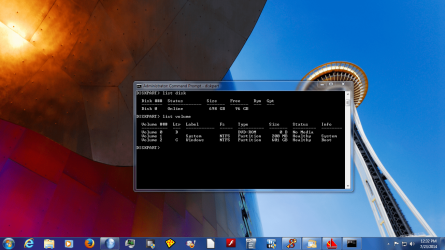
in recovery environment->command prompt:
Code:
diskpart
list disk  (how many disks do you see? I'm not interested in dvd, external disks)
list volume
exit
How many volumes do you see? Make a camshot and post it if possible.
What is the drive letter of the win7 partition in "list volume" output?
 

My Computer

Computer type
Laptop
Computer Manufacturer/Model Number
ACER ASPIRE 5742G
OS
Microsoft Windows 7 Home Premium 64-bits 7601 Multiprocessor Free Service Pack 1
CPU
Intel(R) Core(TM) i3 CPU M 370 @ 2.40GHz
Motherboard
Acer Aspire 5742G
Memory
4,00 GB
Graphics Card(s)
ATI Mobility Radeon HD 5400 Series
Sound Card
(1) AMD High Definition Audio Device (2) Realtek High Defi
Screen Resolution
1366 x 768 x 32 bits (4294967296 colors) @ 60 Hz
Hard Drives
WDC WD5000BEVT-22ZAT0
it never listed me any any disks just a VERY long listed of command actions to do

Example:

active -
add-
assign-
attributes-
autmount-
break-
clean-
etc etc etc

i was told to follow this video to see if it would help..
[**************************tube.com/watch?v=a5W4ERo6w_Y[/YOUTUBE]
i did it however its showing "total identified windows installations : 0 - Operation completed successfully"
 

My Computer

Computer type
PC/Desktop
Computer Manufacturer/Model Number
HPE Pavilion 340-uk (Modified)
OS
Windows 7 Home Premium x64
CPU
Intel i3 540 @ 3.07GHz
Motherboard
MS-7613 (LONA-GL8E)
Memory
4GB
Graphics Card(s)
Nvidia Geforce GT640 OC
Monitor(s) Displays
LG
Screen Resolution
1680x1050
Hard Drives
Segagate 1TB 7200RPM
PSU
XFX 550W 80+ Bronze PSU
Keyboard
Perixx PX-1100
Mouse
Perixx MX-2000
Internet Speed
1.6MB's (Down) - 270KB's (Up)
Antivirus
MSE , Comodo Firewall , Malwarebytes
Browser
Firefox , chrome
You did something wrong then.. I just did above instructions and have my results :
 

Attachments

  • diskpart.PNG
    diskpart.PNG
    1.7 MB · Views: 4

My Computer

Computer type
PC/Desktop
Computer Manufacturer/Model Number
Dell optiplex 740
OS
Win 7 Home Premium SP1 32 bit
CPU
AMD Athlon 64 X2 5000B
Motherboard
Dell Inc. 0YP696 (Socket M2 )
Memory
4.00 GB Dual-Channel DDR2 @ 370MHz (6-6-6-18)
Graphics Card(s)
Acer E181H (1366x768@60Hz) 64MB GeForce 6150 LE (Dell)
Sound Card
SigmaTel High Definition Audio CODEC
Monitor(s) Displays
Acer E181H (1366x768@60Hz) 64MB GeForce 6150 LE (Dell)
Hard Drives
699GB Seagate ST375064 0NS SCSI Disk Device (ATA)
Case
Mini tower
Internet Speed
Ping 36 ms, Download 57.71 mbps , Upload 11.79mbps
Antivirus
Free Avast. Pro paid Mbam , Free Sas
Browser
Palemoon .
it never listed me any any disks just a VERY long listed of command actions to do

Example:

active -
add-
assign-
attributes-
autmount-
break-
clean-
etc etc etc

i was told to follow this video to see if it would help..
[**************************tube.com/watch?v=a5W4ERo6w_Y[/YOUTUBE]
i did it however its showing "total identified windows installations : 0 - Operation completed successfully"
Do #9 and make a camshot of it. Post that camshot.
 

My Computer

Computer type
Laptop
Computer Manufacturer/Model Number
ACER ASPIRE 5742G
OS
Microsoft Windows 7 Home Premium 64-bits 7601 Multiprocessor Free Service Pack 1
CPU
Intel(R) Core(TM) i3 CPU M 370 @ 2.40GHz
Motherboard
Acer Aspire 5742G
Memory
4,00 GB
Graphics Card(s)
ATI Mobility Radeon HD 5400 Series
Sound Card
(1) AMD High Definition Audio Device (2) Realtek High Defi
Screen Resolution
1366 x 768 x 32 bits (4294967296 colors) @ 60 Hz
Hard Drives
WDC WD5000BEVT-22ZAT0
Do #9 and make a camshot of it. Post that camshot.

well cant now that ive shutdown the PC so i cba re-plugging it back up and doing it all over again but here is the info anyways

Volume 1 - C - System - NTFS - Partition - 100mb
Volume 2 - D - OS - NTFS - Partition - 919 GB's
volume 3 - E - HP_Recovery - NTFS - Partition - 11GB's

Disk 0 - Online - Healthy
 

My Computer

Computer type
PC/Desktop
Computer Manufacturer/Model Number
HPE Pavilion 340-uk (Modified)
OS
Windows 7 Home Premium x64
CPU
Intel i3 540 @ 3.07GHz
Motherboard
MS-7613 (LONA-GL8E)
Memory
4GB
Graphics Card(s)
Nvidia Geforce GT640 OC
Monitor(s) Displays
LG
Screen Resolution
1680x1050
Hard Drives
Segagate 1TB 7200RPM
PSU
XFX 550W 80+ Bronze PSU
Keyboard
Perixx PX-1100
Mouse
Perixx MX-2000
Internet Speed
1.6MB's (Down) - 270KB's (Up)
Antivirus
MSE , Comodo Firewall , Malwarebytes
Browser
Firefox , chrome
Do #9 and make a camshot of it. Post that camshot.

well cant now that ive shutdown the PC so i cba re-plugging it back up and doing it all over again but here is the info anyways

Volume 1 - C - System - NTFS - Partition - 100mb
Volume 2 - D - OS - NTFS - Partition - 919 GB's
volume 3 - E - HP_Recovery - NTFS - Partition - 11GB's

Disk 0 - Online - Healthy
C: the small 100MB partition with bootmanager and bootmenu.
D: WIN7 partition

Code:
diskpart
select volume C
detail part
exit

Is it active? Also do:
Code:
bootsect /nt60 c /force /mbr
bootsect /nt60 c /force
Both commands succesful?

Code:
attrib  -h  -s  -r  c:\boot\*.*
del   c:\boot\*.*

Then
Code:
chkdsk/f  c:
chkdsk/f  d:

All successful? If so reboot and perfom a "startup repair". Post results
 
Last edited:

My Computer

Computer type
Laptop
Computer Manufacturer/Model Number
ACER ASPIRE 5742G
OS
Microsoft Windows 7 Home Premium 64-bits 7601 Multiprocessor Free Service Pack 1
CPU
Intel(R) Core(TM) i3 CPU M 370 @ 2.40GHz
Motherboard
Acer Aspire 5742G
Memory
4,00 GB
Graphics Card(s)
ATI Mobility Radeon HD 5400 Series
Sound Card
(1) AMD High Definition Audio Device (2) Realtek High Defi
Screen Resolution
1366 x 768 x 32 bits (4294967296 colors) @ 60 Hz
Hard Drives
WDC WD5000BEVT-22ZAT0
Do #9 and make a camshot of it. Post that camshot.

well cant now that ive shutdown the PC so i cba re-plugging it back up and doing it all over again but here is the info anyways

Volume 1 - C - System - NTFS - Partition - 100mb
Volume 2 - D - OS - NTFS - Partition - 919 GB's
volume 3 - E - HP_Recovery - NTFS - Partition - 11GB's

Disk 0 - Online - Healthy
C: the small 100MB partition with bootmanager and bootmenu.
D: WIN7 partition

Code:
diskpart
select volume C
detail part

Is it active? Also do:
Code:
bootsect /nt60 c /force /mbr
bootsect /nt60 c /force
Both commands succesful?

Code:
attrib  -h  -s  -r  c:\boot\*.*
del   c:\boot\*.*

Then
Code:
chkdsk/f  c:
chkdsk/f  d:

All successful? If so reboot and perfom a "startup repair". Post results
huh are is that what ive to actually type *.* ? anyways thx for the help in the mean time

il get to doing this in about an hours time as i need to go atm - spent an entire day on this problem with no fixes
 

My Computer

Computer type
PC/Desktop
Computer Manufacturer/Model Number
HPE Pavilion 340-uk (Modified)
OS
Windows 7 Home Premium x64
CPU
Intel i3 540 @ 3.07GHz
Motherboard
MS-7613 (LONA-GL8E)
Memory
4GB
Graphics Card(s)
Nvidia Geforce GT640 OC
Monitor(s) Displays
LG
Screen Resolution
1680x1050
Hard Drives
Segagate 1TB 7200RPM
PSU
XFX 550W 80+ Bronze PSU
Keyboard
Perixx PX-1100
Mouse
Perixx MX-2000
Internet Speed
1.6MB's (Down) - 270KB's (Up)
Antivirus
MSE , Comodo Firewall , Malwarebytes
Browser
Firefox , chrome
Do commands exactly as shown in previous post.
 

My Computer

Computer type
Laptop
Computer Manufacturer/Model Number
ACER ASPIRE 5742G
OS
Microsoft Windows 7 Home Premium 64-bits 7601 Multiprocessor Free Service Pack 1
CPU
Intel(R) Core(TM) i3 CPU M 370 @ 2.40GHz
Motherboard
Acer Aspire 5742G
Memory
4,00 GB
Graphics Card(s)
ATI Mobility Radeon HD 5400 Series
Sound Card
(1) AMD High Definition Audio Device (2) Realtek High Defi
Screen Resolution
1366 x 768 x 32 bits (4294967296 colors) @ 60 Hz
Hard Drives
WDC WD5000BEVT-22ZAT0
C: the small 100MB partition with bootmanager and bootmenu.
D: WIN7 partition

Code:
diskpart
select volume C
detail part

Is it active? Also do:
Code:
bootsect /nt60 c /force /mbr
bootsect /nt60 c /force
Both commands succesful?

Code:
attrib  -h  -s  -r  c:\boot\*.*
del   c:\boot\*.*

Then
Code:
chkdsk/f  c:
chkdsk/f  d:

All successful? If so reboot and perfom a "startup repair". Post results

1st. yes its active

2nd. well by successful you mean thatit shows me info on bootsect.exe and how it updates the master boot code etc. then i see it and can type /help for more info etc

3rd. well the attribute command line never worked at least i dont think it did. just hit enter and nothing after that however for the *
Code:
del c:\boot\*.*
it gave me a option to delete ? should i follow threw

4th. well the C drive checked quickly however the D: one is taking much longer as it has the OS on it il give you a update when it finishes or i might end up doing it tomorrow

Ps. could have let me known i should have exited diskpart
 

My Computer

Computer type
PC/Desktop
Computer Manufacturer/Model Number
HPE Pavilion 340-uk (Modified)
OS
Windows 7 Home Premium x64
CPU
Intel i3 540 @ 3.07GHz
Motherboard
MS-7613 (LONA-GL8E)
Memory
4GB
Graphics Card(s)
Nvidia Geforce GT640 OC
Monitor(s) Displays
LG
Screen Resolution
1680x1050
Hard Drives
Segagate 1TB 7200RPM
PSU
XFX 550W 80+ Bronze PSU
Keyboard
Perixx PX-1100
Mouse
Perixx MX-2000
Internet Speed
1.6MB's (Down) - 270KB's (Up)
Antivirus
MSE , Comodo Firewall , Malwarebytes
Browser
Firefox , chrome

My Computer

Computer type
Laptop
Computer Manufacturer/Model Number
ACER ASPIRE 5742G
OS
Microsoft Windows 7 Home Premium 64-bits 7601 Multiprocessor Free Service Pack 1
CPU
Intel(R) Core(TM) i3 CPU M 370 @ 2.40GHz
Motherboard
Acer Aspire 5742G
Memory
4,00 GB
Graphics Card(s)
ATI Mobility Radeon HD 5400 Series
Sound Card
(1) AMD High Definition Audio Device (2) Realtek High Defi
Screen Resolution
1366 x 768 x 32 bits (4294967296 colors) @ 60 Hz
Hard Drives
WDC WD5000BEVT-22ZAT0

My Computer

Computer type
PC/Desktop
Computer Manufacturer/Model Number
HPE Pavilion 340-uk (Modified)
OS
Windows 7 Home Premium x64
CPU
Intel i3 540 @ 3.07GHz
Motherboard
MS-7613 (LONA-GL8E)
Memory
4GB
Graphics Card(s)
Nvidia Geforce GT640 OC
Monitor(s) Displays
LG
Screen Resolution
1680x1050
Hard Drives
Segagate 1TB 7200RPM
PSU
XFX 550W 80+ Bronze PSU
Keyboard
Perixx PX-1100
Mouse
Perixx MX-2000
Internet Speed
1.6MB's (Down) - 270KB's (Up)
Antivirus
MSE , Comodo Firewall , Malwarebytes
Browser
Firefox , chrome
If I may.
What defrag program did you use?
 

My Computer

Computer type
PC/Desktop
Computer Manufacturer/Model Number
Home made Desktop
OS
Windows 10 Pro. 64/ version 1709 Windows 7 Pro/64
CPU
Intel i7-6800K @ 4.3
Motherboard
ASUS X-99 Deluxe II
Memory
Corsair Platinum 16 gig @2400
Graphics Card(s)
EVGA GTX 1070 OC
Monitor(s) Displays
Asus 27" LED LCD/VE278Q
Screen Resolution
1920-1080 or 1280-720 HDMI
Hard Drives
INTEL SSD 730-240 Gb Sata 3.0/
PSU
EVGA Platium 1200W
Case
Phanteks Luxe Tempered Glass 8 fans/ one radiator
Cooling
XSPC/ Water Cooled CPU
Keyboard
Das 4 Professional
Mouse
Logitech M705/MX Anywhere 2-S
Internet Speed
100 mbits
Antivirus
Microsoft Security Essentials/ Malwarebytes Premium 3.0/ SAS
Browser
I.E. 11 default/Firefox/ ISP Time Warner Cable/Spectrum
Other Info
LG BluRay Burner/
Sound system-KLipsch-THX/
Icy Dock ssd Hot Swap bays.
Back
Top