Windows 7 Startup Repair Loop (Boot manager failed to find OS Loader)

anglethang

New member
Local time
7:51 AM
Messages
17
Hey guys.. I am very anxious and frustrated about this issue. I have searched frantically all on multiple forums but the solutions are all over and I just can't..
I have seen some really knowledgeable users here while looking at threads to solve my problem so this is my best bet.. I really do not want to lose all my data :/

I am willing to follow any instructions provided as I am very desperate.

Background Information

My laptop automatically boots into Startup Repair, and once it finishes "repairing", the laptop restarts and boots into Startup Repair once again, looping the whole process. The diagnostic and repair details from Startup Repair showed that the "root cause found" was that the "Boot manager failed to find OS Loader", and the repair action for "File repair" and "Boot configuration data store repair failed".

This is the second time this issue has happened, where I tried to boot up my laptop after hibernating it. Prior to encountering this issue again, reboot, sleep, and shutting down my computer worked fine. Also, I think before the two times the issue happened, I was installing some Windows Updates. I am trying to avoid restoring the disk back to factory state.

What I have tried

  • Letting Startup Repair finish. Just simply loops back.
  • Running chkdsk /f on my C: drive. No errors and fixes.
  • Pressing F8 to access Advanced Boot Options does not work. Goes to Startup Repair.
  • System restore to the point before the Windows Update occurred. Did not work.
  • Windows Memory Diagnostic tool, Memtest86, Memtest86+ showed no errors.
  • Run this in CMD. This is where it gets weird.
    Code:
    Bootrec.exe
    bcdedit /export C:\BCD_Backup
    c:
    cd boot
    attrib bcd -s -h -r
    ren c:\boot\bcd bcd.old
    bootrec /RebuildBcd
    bootrec /fixmbr
    bootrec /fixboot
    I'm not sure what happened, but after rebooting, I encountered an error by Windows Boot Manager in which Windows cannot verify the digital signature for this file for \Windows\System32\winload.exe. Pressing Enter brings me onto this screen, where either pressing Enter once again or pressing F8 brings me back to the screen before with the error message. Restarting the computer or anything now always brings me to the screen with the error message by Windows Boot Manager.

    To resolve this, I tried following a bunch of instructions from this thread, and making C: (where Windows is) drive the active partition instead of D: (labelled System) solved this and returned me to the Startup Repair Loop issue.
    Additionally though, now if I try to boot from a USB, it says Bootmgr is missing, which is bad. I could boot to Kali Linux via USB before I attempted a bunch of solutions, where I could mount the Windows partition in read-only mode in Kali Linux.

Current situation

So far, I have deleted the bcd and bootmgr files and ran Startup Repair 3 times with reboots in between to restore them for a number of times. I'm not sure which of my actions contributed to what problems (such as the Bootmgr is missing problem appearing later) and I am confused and frustrated. Thus, I await your professional help. I'll return in about 12 hours because of sleep.
 

My Computer My Computer

Computer type
Laptop
Computer Manufacturer/Model Number
HP ProBook 440 G2
OS
Windows 7 Professional SP1 x64
What you didnt say is
I loaded the dvd prior to running the commands, did you??

Roy
 

My Computer My Computer

Computer type
PC/Desktop
Computer Manufacturer/Model Number
medionl/Aspire 6930G/acer x55a
OS
W7 home premium 32bit/W7HP 64bit/w10 tp insider ring
CPU
E5300 dual core
Motherboard
medion MS7366
Memory
3gb
Graphics Card(s)
Nvidia Geforce 7100 Nforce 630i
Monitor(s) Displays
avixc
Internet Speed
n (isp resticted to 72)
Antivirus
mse/pands
Browser
palemoon
Other Info
Belkin Fd7050 n USB using Railink RT2870 drivers, more upto date
Yea, though before the winload.exe error I could quickly cancel Startup Repair and get an option to run CMD (Hence the commands I ran before encountering the winload.exe error were not through the DVD).
While trying to get rid of the winload.exe error I probably ran a lot of other commands which resulted in not being able to boot from USB now (Bootmgr is missing).

Main issue is the Startup Repair loop for now, I guess.
 

My Computer My Computer

Computer type
Laptop
Computer Manufacturer/Model Number
HP ProBook 440 G2
OS
Windows 7 Professional SP1 x64
Bumping (not sure if this is allowed), really no help from you guys :/?

Or how about ways to salvage data?
 

My Computer My Computer

Computer type
Laptop
Computer Manufacturer/Model Number
HP ProBook 440 G2
OS
Windows 7 Professional SP1 x64
Did you updated your BIOS recently? Did you checked the BIOS settings?
What OS you have on the USB, Win 7 installation disk or Kali Linux?
Do you have any kind of encryption on the disk?
You said that you can't boot Kali Linux? You should always boot another OS on another disk, UNLESS:
- Your BIOS is set to boot UEFI mode and the disk is Legacy - MBR (or vice-versa)
-Your USB disk is corrupted. In this case, on another computer, format and rebuild the the bootable disk.

I've seen that your laptop can have different configurations.
Please edit you profile and add all hardware information you have.
Is your disk a M.2 SSD?
 

My Computers My Computers

System One System Two

  • Computer type
    PC/Desktop
    Computer Manufacturer/Model Number
    custom build
    OS
    Windows 7 HP 64
    CPU
    i5 6600K - 800MHz to 4200MHz
    Motherboard
    GA-Z170-HD3P
    Memory
    4+4G GSkill DDR4 3000
    Graphics Card(s)
    IG - Intel 530
    Monitor(s) Displays
    Samsung 226BW
    Screen Resolution
    1680x1050
    Hard Drives
    (1) -1 SM951 – 128GB M.2 AHCI PCIe SSD drive for Windows 7 and Lubuntu
    (2) -1 WD SATA 3 - 1T for Data
    (3) -1 WD SATA 3 - 1T for backup
    PSU
    Thermaltake 450W TR2 gold
    Keyboard
    Old and good Chicony mechanical keyboard
    Mouse
    Logitech mX performance - 9 buttons (had to disable some)
    Internet Speed
    500Mb/s
    Browser
    Firefox 64
    Other Info
    TinyWall firewall
  • Computer type
    Laptop
    System Manufacturer/Model Number
    Asus Q550LF
    OS
    Windows 7 Pro
    CPU
    i7-4500U 800MHz to 3.0GHz
    Motherboard
    Asus Q550LF
    Memory
    (4+4)G DDR3 1600
    Graphics Card(s)
    IG intel 4400 + NVIDIA GeForce GT 745M
    Sound Card
    Realtek
    Monitor(s) Displays
    LG Display LP156WF4-SPH1
    Screen Resolution
    1920 x 1080
    Hard Drives
    BX500 120G SSD for Windows and programs +
    1T HDD for data
    Internet Speed
    500 Mb/s
    Browser
    Firefox
    Other Info
    TinyWall firewall
Thank you so much for your reply!

- I have not updated my BIOS recently. I have access to the BIOS settings yes, nothing abnormal there.
- I have a bootable Kali Linux on USB, and a Windows Recovery Disc. The computer itself has Windows 7 Professional.
- There is no encryption on the disk to my knowledge.
- Prior to everything, I could boot anything from USB (as long as it's installed properly onto the USB) just fine. There wasn't a problem with the BIOS settings being set to the wrong mode/or the usb disk being corrupted.

Only when I made C: drive the active partition (as mentioned in my first post) as an attempt to solve my original issue, after the process, I somehow ended up with "Bootmgr is missing" message if I tried to boot by USB (I do this by going to Boot Options, and select the USB). The Windows 7 Recovery Disc still runs fine.

My disk is a 1TB HDD, there is no SSD at all. Also, I think the main issue is still the laptop not being able to boot up due to the errors encountered rather than not being able to boot from USB.
 

My Computer My Computer

Computer type
Laptop
Computer Manufacturer/Model Number
HP ProBook 440 G2
OS
Windows 7 Professional SP1 x64
Did you launch HP update? It could update the BIOS.
Did you did any kind of partition change to the disk?
Your BIOS type is UEFI not Legacy. The commands you gave are for Legacy.
I've looked at he manual http://h20566.www2.hp.com/hpsc/doc/...943810&docLocale=en_US&docId=emr_na-c04357136
To boot to a divice: (pag86)
To dynamically choose the boot device, by pressing esc while the “Press the ESC key for Startup Menu” message is displayed at the bottom of the screen, and then pressing f9 to enter the Boot Device Options menu.
Did you try to boot the Kali Linux on USB on UEFI mode?

Look this link Drivers & Software - HP Support Center.
 

My Computers My Computers

System One System Two

  • Computer type
    PC/Desktop
    Computer Manufacturer/Model Number
    custom build
    OS
    Windows 7 HP 64
    CPU
    i5 6600K - 800MHz to 4200MHz
    Motherboard
    GA-Z170-HD3P
    Memory
    4+4G GSkill DDR4 3000
    Graphics Card(s)
    IG - Intel 530
    Monitor(s) Displays
    Samsung 226BW
    Screen Resolution
    1680x1050
    Hard Drives
    (1) -1 SM951 – 128GB M.2 AHCI PCIe SSD drive for Windows 7 and Lubuntu
    (2) -1 WD SATA 3 - 1T for Data
    (3) -1 WD SATA 3 - 1T for backup
    PSU
    Thermaltake 450W TR2 gold
    Keyboard
    Old and good Chicony mechanical keyboard
    Mouse
    Logitech mX performance - 9 buttons (had to disable some)
    Internet Speed
    500Mb/s
    Browser
    Firefox 64
    Other Info
    TinyWall firewall
  • Computer type
    Laptop
    System Manufacturer/Model Number
    Asus Q550LF
    OS
    Windows 7 Pro
    CPU
    i7-4500U 800MHz to 3.0GHz
    Motherboard
    Asus Q550LF
    Memory
    (4+4)G DDR3 1600
    Graphics Card(s)
    IG intel 4400 + NVIDIA GeForce GT 745M
    Sound Card
    Realtek
    Monitor(s) Displays
    LG Display LP156WF4-SPH1
    Screen Resolution
    1920 x 1080
    Hard Drives
    BX500 120G SSD for Windows and programs +
    1T HDD for data
    Internet Speed
    500 Mb/s
    Browser
    Firefox
    Other Info
    TinyWall firewall

My Computers My Computers

System One System Two

  • Computer type
    PC/Desktop
    Computer Manufacturer/Model Number
    custom build
    OS
    Windows 7 HP 64
    CPU
    i5 6600K - 800MHz to 4200MHz
    Motherboard
    GA-Z170-HD3P
    Memory
    4+4G GSkill DDR4 3000
    Graphics Card(s)
    IG - Intel 530
    Monitor(s) Displays
    Samsung 226BW
    Screen Resolution
    1680x1050
    Hard Drives
    (1) -1 SM951 – 128GB M.2 AHCI PCIe SSD drive for Windows 7 and Lubuntu
    (2) -1 WD SATA 3 - 1T for Data
    (3) -1 WD SATA 3 - 1T for backup
    PSU
    Thermaltake 450W TR2 gold
    Keyboard
    Old and good Chicony mechanical keyboard
    Mouse
    Logitech mX performance - 9 buttons (had to disable some)
    Internet Speed
    500Mb/s
    Browser
    Firefox 64
    Other Info
    TinyWall firewall
  • Computer type
    Laptop
    System Manufacturer/Model Number
    Asus Q550LF
    OS
    Windows 7 Pro
    CPU
    i7-4500U 800MHz to 3.0GHz
    Motherboard
    Asus Q550LF
    Memory
    (4+4)G DDR3 1600
    Graphics Card(s)
    IG intel 4400 + NVIDIA GeForce GT 745M
    Sound Card
    Realtek
    Monitor(s) Displays
    LG Display LP156WF4-SPH1
    Screen Resolution
    1920 x 1080
    Hard Drives
    BX500 120G SSD for Windows and programs +
    1T HDD for data
    Internet Speed
    500 Mb/s
    Browser
    Firefox
    Other Info
    TinyWall firewall
Hmm ok... how does it help?

Any idea on what options I should use or any instructions that I can follow? I do not want to mess up further :/
 

My Computer My Computer

Computer type
Laptop
Computer Manufacturer/Model Number
HP ProBook 440 G2
OS
Windows 7 Professional SP1 x64
Make a bootable CD or USB flash drive of partition Wizard. Use Rufus
When you get a image of your disk, take a photo and post as an attachment (Go advanced - Mange Attachments - Browse - Upload)
 

My Computers My Computers

System One System Two

  • Computer type
    PC/Desktop
    Computer Manufacturer/Model Number
    custom build
    OS
    Windows 7 HP 64
    CPU
    i5 6600K - 800MHz to 4200MHz
    Motherboard
    GA-Z170-HD3P
    Memory
    4+4G GSkill DDR4 3000
    Graphics Card(s)
    IG - Intel 530
    Monitor(s) Displays
    Samsung 226BW
    Screen Resolution
    1680x1050
    Hard Drives
    (1) -1 SM951 – 128GB M.2 AHCI PCIe SSD drive for Windows 7 and Lubuntu
    (2) -1 WD SATA 3 - 1T for Data
    (3) -1 WD SATA 3 - 1T for backup
    PSU
    Thermaltake 450W TR2 gold
    Keyboard
    Old and good Chicony mechanical keyboard
    Mouse
    Logitech mX performance - 9 buttons (had to disable some)
    Internet Speed
    500Mb/s
    Browser
    Firefox 64
    Other Info
    TinyWall firewall
  • Computer type
    Laptop
    System Manufacturer/Model Number
    Asus Q550LF
    OS
    Windows 7 Pro
    CPU
    i7-4500U 800MHz to 3.0GHz
    Motherboard
    Asus Q550LF
    Memory
    (4+4)G DDR3 1600
    Graphics Card(s)
    IG intel 4400 + NVIDIA GeForce GT 745M
    Sound Card
    Realtek
    Monitor(s) Displays
    LG Display LP156WF4-SPH1
    Screen Resolution
    1920 x 1080
    Hard Drives
    BX500 120G SSD for Windows and programs +
    1T HDD for data
    Internet Speed
    500 Mb/s
    Browser
    Firefox
    Other Info
    TinyWall firewall
Ok, I'll update you with the details once I get on to it! I need to sleep now :)
 

My Computer My Computer

Computer type
Laptop
Computer Manufacturer/Model Number
HP ProBook 440 G2
OS
Windows 7 Professional SP1 x64

Attachments

  • Partition.JPG
    Partition.JPG
    80.1 KB · Views: 26

My Computers My Computers

System One System Two

  • Computer type
    PC/Desktop
    Computer Manufacturer/Model Number
    custom build
    OS
    Windows 7 HP 64
    CPU
    i5 6600K - 800MHz to 4200MHz
    Motherboard
    GA-Z170-HD3P
    Memory
    4+4G GSkill DDR4 3000
    Graphics Card(s)
    IG - Intel 530
    Monitor(s) Displays
    Samsung 226BW
    Screen Resolution
    1680x1050
    Hard Drives
    (1) -1 SM951 – 128GB M.2 AHCI PCIe SSD drive for Windows 7 and Lubuntu
    (2) -1 WD SATA 3 - 1T for Data
    (3) -1 WD SATA 3 - 1T for backup
    PSU
    Thermaltake 450W TR2 gold
    Keyboard
    Old and good Chicony mechanical keyboard
    Mouse
    Logitech mX performance - 9 buttons (had to disable some)
    Internet Speed
    500Mb/s
    Browser
    Firefox 64
    Other Info
    TinyWall firewall
  • Computer type
    Laptop
    System Manufacturer/Model Number
    Asus Q550LF
    OS
    Windows 7 Pro
    CPU
    i7-4500U 800MHz to 3.0GHz
    Motherboard
    Asus Q550LF
    Memory
    (4+4)G DDR3 1600
    Graphics Card(s)
    IG intel 4400 + NVIDIA GeForce GT 745M
    Sound Card
    Realtek
    Monitor(s) Displays
    LG Display LP156WF4-SPH1
    Screen Resolution
    1920 x 1080
    Hard Drives
    BX500 120G SSD for Windows and programs +
    1T HDD for data
    Internet Speed
    500 Mb/s
    Browser
    Firefox
    Other Info
    TinyWall firewall
Hey, I realised I missed out one of your posts, so I'll answer your questions here.

Did you launch HP update? It could update the BIOS.

I launched HP update quite a while back before I encountered this problem. There was an update for the BIOS, but I remember it was not carried out (the update).

Did you did any kind of partition change to the disk?

None.

Your BIOS type is UEFI not Legacy. The commands you gave are for Legacy.
I've looked at he manual http://h20566.www2.hp.com/hpsc/doc/...943810&docLocale=en_US&docId=emr_na-c04357136

I just checked my Boot Mode in my BIOS options again, and it actually says its Legacy, not UEFI. :o

To boot to a divice: (pag86)
To dynamically choose the boot device, by pressing esc while the “Press the ESC key for Startup Menu” message is displayed at the bottom of the screen, and then pressing f9 to enter the Boot Device Options menu.

Yeah, this is how I've been booting from removable media all along :)

Did you try to boot the Kali Linux on USB on UEFI mode?
Since the BIOS is actually Legacy... what should I do?


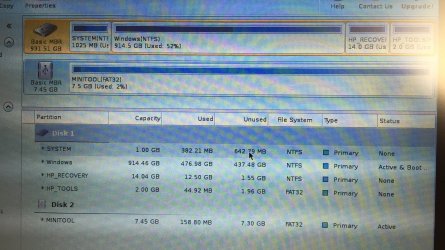
Nevertheless, I set up MiniTool Partition Wizard Bootable. Since my BIOS is actually Legacy, I still used Rufus to set up the bootable USB. It booted successfully via USB, and I've attached the image below.

(This might hint that the "Bootmgr is missing" issue only applies to the USB with Kali Linux? This current USB with MiniTool is a different USB as compared to the one with Kali. Maybe I'll reformat that USB again, though it's not very important to get Kali working right. Main issue is still the Startup Repair loop!)
 

Attachments

  • IMG_1923.JPG
    IMG_1923.JPG
    1.3 MB · Views: 1

My Computer My Computer

Computer type
Laptop
Computer Manufacturer/Model Number
HP ProBook 440 G2
OS
Windows 7 Professional SP1 x64
Does the Windows Partition also has a System after Active&Boot (Active&Boot&System)?
 

My Computers My Computers

System One System Two

  • Computer type
    PC/Desktop
    Computer Manufacturer/Model Number
    custom build
    OS
    Windows 7 HP 64
    CPU
    i5 6600K - 800MHz to 4200MHz
    Motherboard
    GA-Z170-HD3P
    Memory
    4+4G GSkill DDR4 3000
    Graphics Card(s)
    IG - Intel 530
    Monitor(s) Displays
    Samsung 226BW
    Screen Resolution
    1680x1050
    Hard Drives
    (1) -1 SM951 – 128GB M.2 AHCI PCIe SSD drive for Windows 7 and Lubuntu
    (2) -1 WD SATA 3 - 1T for Data
    (3) -1 WD SATA 3 - 1T for backup
    PSU
    Thermaltake 450W TR2 gold
    Keyboard
    Old and good Chicony mechanical keyboard
    Mouse
    Logitech mX performance - 9 buttons (had to disable some)
    Internet Speed
    500Mb/s
    Browser
    Firefox 64
    Other Info
    TinyWall firewall
  • Computer type
    Laptop
    System Manufacturer/Model Number
    Asus Q550LF
    OS
    Windows 7 Pro
    CPU
    i7-4500U 800MHz to 3.0GHz
    Motherboard
    Asus Q550LF
    Memory
    (4+4)G DDR3 1600
    Graphics Card(s)
    IG intel 4400 + NVIDIA GeForce GT 745M
    Sound Card
    Realtek
    Monitor(s) Displays
    LG Display LP156WF4-SPH1
    Screen Resolution
    1920 x 1080
    Hard Drives
    BX500 120G SSD for Windows and programs +
    1T HDD for data
    Internet Speed
    500 Mb/s
    Browser
    Firefox
    Other Info
    TinyWall firewall
Yeah, there is. Just booted from it to check again :)
 

My Computer My Computer

Computer type
Laptop
Computer Manufacturer/Model Number
HP ProBook 440 G2
OS
Windows 7 Professional SP1 x64
I have asked for more help. I really don't know what is missing.
 

My Computers My Computers

System One System Two

  • Computer type
    PC/Desktop
    Computer Manufacturer/Model Number
    custom build
    OS
    Windows 7 HP 64
    CPU
    i5 6600K - 800MHz to 4200MHz
    Motherboard
    GA-Z170-HD3P
    Memory
    4+4G GSkill DDR4 3000
    Graphics Card(s)
    IG - Intel 530
    Monitor(s) Displays
    Samsung 226BW
    Screen Resolution
    1680x1050
    Hard Drives
    (1) -1 SM951 – 128GB M.2 AHCI PCIe SSD drive for Windows 7 and Lubuntu
    (2) -1 WD SATA 3 - 1T for Data
    (3) -1 WD SATA 3 - 1T for backup
    PSU
    Thermaltake 450W TR2 gold
    Keyboard
    Old and good Chicony mechanical keyboard
    Mouse
    Logitech mX performance - 9 buttons (had to disable some)
    Internet Speed
    500Mb/s
    Browser
    Firefox 64
    Other Info
    TinyWall firewall
  • Computer type
    Laptop
    System Manufacturer/Model Number
    Asus Q550LF
    OS
    Windows 7 Pro
    CPU
    i7-4500U 800MHz to 3.0GHz
    Motherboard
    Asus Q550LF
    Memory
    (4+4)G DDR3 1600
    Graphics Card(s)
    IG intel 4400 + NVIDIA GeForce GT 745M
    Sound Card
    Realtek
    Monitor(s) Displays
    LG Display LP156WF4-SPH1
    Screen Resolution
    1920 x 1080
    Hard Drives
    BX500 120G SSD for Windows and programs +
    1T HDD for data
    Internet Speed
    500 Mb/s
    Browser
    Firefox
    Other Info
    TinyWall firewall
Alright.

Just a reminder that the original problem was the Startup Repair loop: "The diagnostic and repair details from Startup Repair showed that the "root cause found" was that the "Boot manager failed to find OS Loader", and the repair action for "File repair" and "Boot configuration data store repair failed"."

followed by the winload.exe error by Windows Boot Manager in which Windows cannot verify the digital signature for this file for \Windows\System32\winload.exe, after I attempted some fixes.

and finally back to the Startup Repair Loop after I attempted some more fixes. (all the details are in the original post, except maybe I forgot some stuff that I had tried)

Hope I can get help! This is not an easy issue..
 

My Computer My Computer

Computer type
Laptop
Computer Manufacturer/Model Number
HP ProBook 440 G2
OS
Windows 7 Professional SP1 x64
Can you get access to (or create) a Live Linux CD/DVD/USB Distro?

You could use it to recover your data to an external storage device.
Remember to copy your drivers, program installers and product keys as well.

Once your data is safe, you could reinstall Windows using the laptop's restore partition/tool.
 

My Computer My Computer

Computer type
PC/Desktop
Computer Manufacturer/Model Number
n/a
OS
W7 Ultimate SP1, LM19.2 MATE, W10 Home 1703, W10 Pro 1703 VM, #All 64 bit
CPU
AMD Phenom II x6 1100T, 3.3 GHz
Motherboard
ASUS M4A88T-M/USB3 (AM3)
Memory
12GB DDR3 1333 G-Skill (4GB x 2), G-Skill (2GB x 2)
Graphics Card(s)
NVIDIA GeForce GTX 660
Sound Card
Realtek?
Monitor(s) Displays
Samsung S23B350
Screen Resolution
1920x1080
Hard Drives
WD Green 2TB (SATA), WD Green 3TB (SATA), WD Blue 4TB (SATA), WD Blue 6TB (SATA)
PSU
Cooler Master
Case
Antec GX300 Tower
Cooling
3x Antec TRICOOL 120mm Fans
Mouse
Wired Optical
Internet Speed
DSL
Antivirus
Avast
Browser
Pale Moon (64 bit)
Other Info
2018-12-27 Upgraded HDDs
2015-12-10 Upgraded case, graphics card, storage
2015-08-15 Upgraded motherboard & RAM
2015-07-15 Upgraded LM17.1 to LM17.2
The screenshot in reply #13 looks odd. Assuming the computer originally came with Win7, I think HP systems normally default to the first partition ("SYSTEM") as active, but the screenshot shows partition 2 is active. If the repair attempts were looking for the BCD and boot loader files on the wrong partition, that could explain why they failed.

You have MiniTool Partition Wizard, so if it were me I would use that to set the first partition active (from menu tool bar, "Partition"->"Modify"->"Set Active"). Then reboot from the HDD and see if it boots or if Startup Repair gets any further.
 

My Computer My Computer

Computer type
PC/Desktop
Computer Manufacturer/Model Number
Dell Optiplex 7050
OS
Windows 7/8.1/10 multiboot
CPU
Intel Core i7-7700
Motherboard
Dell, Intel Q270 chipset
Memory
48GB (2x16GB Crucial DDR4-3200 + 2x8GB Hynix DDR4-2400)
Graphics Card(s)
Intel HD630 + AMD Radeon R7 450 PCIe
Monitor(s) Displays
Asus VC279 (27")
Screen Resolution
1920x1080
Hard Drives
Toshiba M.2 NVMe (256GB),
Samsung 960 Evo (500GB),
WD Red Plus 80EFBX (8TB)
Can you get access to (or create) a Live Linux CD/DVD/USB Distro?

You could use it to recover your data to an external storage device.
Remember to copy your drivers, program installers and product keys as well.

Once your data is safe, you could reinstall Windows using the laptop's restore partition/tool.

Yeah, I could create a Live Linux USB. I have actually copied all the files on the hard disk to an external storage device using CMD via the Windows Recovery Disc. I'm not sure how I would go about using that data to restore though, as well as how to copy the drivers, program installers and product keys.


The screenshot in reply #13 looks odd. Assuming the computer originally came with Win7, I think HP systems normally default to the first partition ("SYSTEM") as active, but the screenshot shows partition 2 is active. If the repair attempts were looking for the BCD and boot loader files on the wrong partition, that could explain why they failed.

You have MiniTool Partition Wizard, so if it were me I would use that to set the first partition active (from menu tool bar, "Partition"->"Modify"->"Set Active"). Then reboot from the HDD and see if it boots or if Startup Repair gets any further.

If I'm not wrong, the active partition was actually SYSTEM at first. I then tried making Windows C: the active partition instead, in attempt to resolve the error by Windows Boot Manager in which Windows cannot verify the digital signature for this file for \Windows\System32\winload.exe. This action seemed to eliminate the error, bringing me back to the Startup Repair Loop.

I'll try making the first partition (SYSTEM) active again. I think I saw the BCD and boot loader files on the C: drive? I could take a screenshot for you, if you want :)
 

My Computer My Computer

Computer type
Laptop
Computer Manufacturer/Model Number
HP ProBook 440 G2
OS
Windows 7 Professional SP1 x64
Back
Top