Startup Repair not Working on Windows 7 Home Premium

criminalist

New member
Local time
5:19 AM
Messages
37
Since only one person actually understood the issue, despite the in-depth explanation, I am closing this string. No, the issue is not resolved.
 
Last edited:

My Computers My Computers

  • At a glance

    Windows 7 Professional 64AMD Phenom II X4 840 3.2GHzBallistix Sport 16GB (2 x 8GB) DDR3 1600NVIDIA GeForce GT 610
    Computer type
    PC/Desktop
    Computer Manufacturer/Model Number
    Me
    OS
    Windows 7 Professional 64
    CPU
    AMD Phenom II X4 840 3.2GHz
    Motherboard
    MSI 970A-G43 Plus
    Memory
    Ballistix Sport 16GB (2 x 8GB) DDR3 1600
    Graphics Card(s)
    NVIDIA GeForce GT 610
    Hard Drives
    ST2000DM 008-2FR102 SATA Disk Device
  • At a glance

    Windows 10i5-45908GB DDR3Intel HD 4600
    Computer type
    PC/Desktop
    System Manufacturer/Model Number
    Dell Optiplex 3020
    OS
    Windows 10
    CPU
    i5-4590
    Motherboard
    0WMJ54
    Memory
    8GB DDR3
    Graphics Card(s)
    Intel HD 4600
    Monitor(s) Displays
    Samsung
    Hard Drives
    WD5000AAKX ATA Device
Something similar happened to me once. Even a system image would not work. I ended up reinstalling - an onerous task but it did work.

One thin you might try if you haven't already is to rebuild the bootloader. that has solved the problem for me on other occasions. I can't tell you how to do it, but I found a tutorial which worked. This is not the same as as a simple Macrium fix, it was a bit more involved. If I locate that tutorial I will post it here.

I think I had to write a new boot sector, not just fix the boot loader. I don't remember if this was the tutorial I used, but it looks like it might be helpful:

Repairing A Broken Bootloader Or Master Boot Record In Windows 7, 8, And 10 – Techgage
 

My Computer My Computer

At a glance

Windows 7 x64 SP1AMD Athlon 64 X2 6000+ / 3.0 GHz6 GB
Computer type
PC/Desktop
Computer Manufacturer/Model Number
Gateway GT5656
OS
Windows 7 x64 SP1
CPU
AMD Athlon 64 X2 6000+ / 3.0 GHz
Motherboard
NVIDIA GeForce 6150 SE
Memory
6 GB
Monitor(s) Displays
Lenovo LED
Screen Resolution
1920 X 1080
Hard Drives
Windows on 500 GB spinner; Ubuntu 16 on Sandisk 250GB SSD; Bodhi5 on Samsung 250GB SSD; another old spinner for fooling around.
PSU
Original that came with computer
Keyboard
Logitech wireless
Mouse
Logitech wireless
Antivirus
Microsoft Sec Essentials
Browser
Vivaldi
Thank you.

- - - Updated - - -

I followed all the steps. It was unsuccessful. When I get to the command prompt, it reads X?\Sources>. If I type bcdedit it responds with "The boot configuration data store could not be opened. The requested system device cannot be found."

I just realized I am in the wrong thread. I do not have a blue screen of death; I just have a startup.exe error issue.
 

My Computers My Computers

  • At a glance

    Windows 7 Professional 64AMD Phenom II X4 840 3.2GHzBallistix Sport 16GB (2 x 8GB) DDR3 1600NVIDIA GeForce GT 610
    Computer type
    PC/Desktop
    Computer Manufacturer/Model Number
    Me
    OS
    Windows 7 Professional 64
    CPU
    AMD Phenom II X4 840 3.2GHz
    Motherboard
    MSI 970A-G43 Plus
    Memory
    Ballistix Sport 16GB (2 x 8GB) DDR3 1600
    Graphics Card(s)
    NVIDIA GeForce GT 610
    Hard Drives
    ST2000DM 008-2FR102 SATA Disk Device
  • At a glance

    Windows 10i5-45908GB DDR3Intel HD 4600
    Computer type
    PC/Desktop
    System Manufacturer/Model Number
    Dell Optiplex 3020
    OS
    Windows 10
    CPU
    i5-4590
    Motherboard
    0WMJ54
    Memory
    8GB DDR3
    Graphics Card(s)
    Intel HD 4600
    Monitor(s) Displays
    Samsung
    Hard Drives
    WD5000AAKX ATA Device
Hi catherine,

please confirm the following

Your dual booting, if so is W10 on the first partition??
(would be handy to see your Disk management set-up....)

your repair disk is likely only W7... not W7 SP1, which you will need to complete the repair
 

My Computer My Computer

At a glance

W7 home premium 32bit/W7HP 64bit/w10 tp insid...E5300 dual core3gbNvidia Geforce 7100 Nforce 630i
Computer type
PC/Desktop
Computer Manufacturer/Model Number
medionl/Aspire 6930G/acer x55a
OS
W7 home premium 32bit/W7HP 64bit/w10 tp insider ring
CPU
E5300 dual core
Motherboard
medion MS7366
Memory
3gb
Graphics Card(s)
Nvidia Geforce 7100 Nforce 630i
Monitor(s) Displays
avixc
Internet Speed
n (isp resticted to 72)
Antivirus
mse/pands
Browser
palemoon
Other Info
Belkin Fd7050 n USB using Railink RT2870 drivers, more upto date
"The boot configuration data store could not be opened. The requested system device cannot be found."

You could borrow my boot media and take a screenshot of disk management window.

17514x64v30.iso
 

My Computers My Computers

  • At a glance

    7 X64i5 84002x8gb 3200mhz
    Computer type
    PC/Desktop
    OS
    7 X64
    CPU
    i5 8400
    Motherboard
    gigabyte b365m ds3h
    Memory
    2x8gb 3200mhz
    Hard Drives
    various
    PSU
    pure power 11 400w cm
    Case
    Coolermaster
    Cooling
    cryorig m9i
  • At a glance

    7x64g54008gb ddr4 2400
    Computer type
    PC/Desktop
    OS
    7x64
    CPU
    g5400
    Motherboard
    ga b365m ds3h
    Memory
    8gb ddr4 2400
    PSU
    xfx pro 450w
Hi catherine,

please confirm the following

Your dual booting, if so is W10 on the first partition??
(would be handy to see your Disk management set-up....)

your repair disk is likely only W7... not W7 SP1, which you will need to complete the repair


I am not dual-booting. I have two PC's: one with Windows 7 and one with Windows 10. The Windows 7 PC has a second hard drive installed in case it can be used to repair the first hard drive. (I only have a Windows 10 PC because Cricut stopped all function on Windows 7.)

My repair disk was made a while ago. I did not know I would have to create new ones for each update.

- - - Updated - - -

You could borrow my boot media and take a screenshot of disk management window.

17514x64v30.iso

I have a bootable installation disc and thumb drive. How do I get to the disc management window?

- - - Updated - - -

When I use the bootable thumb drive, the OS is not found and it requests that I insert the installation media for the device and click OK to select the driver. If I click OK on that dialogue box, it opens a box similar to "My Computer". It shows C:, D:, and X: drives, along with CD Drive (E): and GRMCHPXFRER (F:) drives. The F: drive is the thumb drive. I have the motherboard's installation disc in the E: drive.
Thank you, all, again for the assistance.
 

My Computers My Computers

  • At a glance

    Windows 7 Professional 64AMD Phenom II X4 840 3.2GHzBallistix Sport 16GB (2 x 8GB) DDR3 1600NVIDIA GeForce GT 610
    Computer type
    PC/Desktop
    Computer Manufacturer/Model Number
    Me
    OS
    Windows 7 Professional 64
    CPU
    AMD Phenom II X4 840 3.2GHz
    Motherboard
    MSI 970A-G43 Plus
    Memory
    Ballistix Sport 16GB (2 x 8GB) DDR3 1600
    Graphics Card(s)
    NVIDIA GeForce GT 610
    Hard Drives
    ST2000DM 008-2FR102 SATA Disk Device
  • At a glance

    Windows 10i5-45908GB DDR3Intel HD 4600
    Computer type
    PC/Desktop
    System Manufacturer/Model Number
    Dell Optiplex 3020
    OS
    Windows 10
    CPU
    i5-4590
    Motherboard
    0WMJ54
    Memory
    8GB DDR3
    Graphics Card(s)
    Intel HD 4600
    Monitor(s) Displays
    Samsung
    Hard Drives
    WD5000AAKX ATA Device
I have a bootable installation disc and thumb drive. How do I get to the disc management window?

Disk management is not included in the normal installation media boot.wim.

That is why I let you borrow mine, which does have disk management and also has explorer interface so it is easier to see what you are doing.

- - - Updated - - -

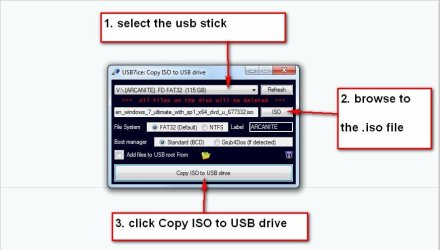
It is best to extract the 17514v30.iso to usb stick to create bootable usb you can use this :ar: View attachment Usb7ice.zip

usb7ice.JPG

( if you are familiar with ventoy and the wimboot plugin, you could use that instead )


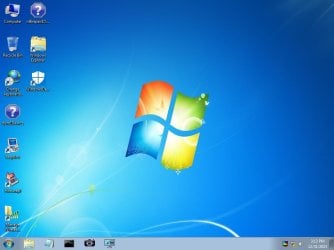
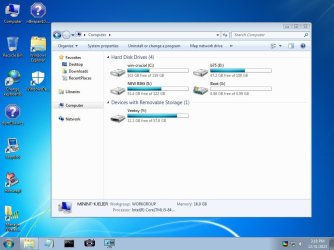
It boots to this desktop

17514v30-1.jpg

Rt click Computer and select Disk Management from the context menu

17514v30-2.jpg

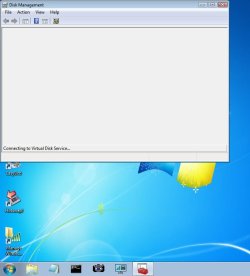
takes a few seconds for the vds service to start up and enumerate the disks

17514v30-3.jpg

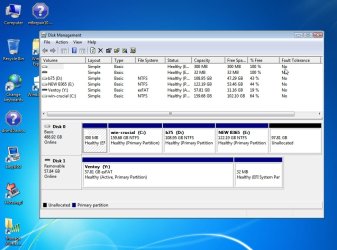
there it is

17514v30-4.jpg


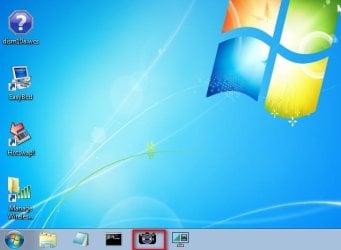
click little camera icon to take screenshots and save them to usb stick

17514v30-5.jpg

view with explorer

17514v30-7.jpg

If you want to view hidden partitions with explorer ( e.g. esp partition) type pecmd show in the run box and press enter
 

My Computers My Computers

  • At a glance

    7 X64i5 84002x8gb 3200mhz
    Computer type
    PC/Desktop
    OS
    7 X64
    CPU
    i5 8400
    Motherboard
    gigabyte b365m ds3h
    Memory
    2x8gb 3200mhz
    Hard Drives
    various
    PSU
    pure power 11 400w cm
    Case
    Coolermaster
    Cooling
    cryorig m9i
  • At a glance

    7x64g54008gb ddr4 2400
    Computer type
    PC/Desktop
    OS
    7x64
    CPU
    g5400
    Motherboard
    ga b365m ds3h
    Memory
    8gb ddr4 2400
    PSU
    xfx pro 450w
Before I continue, I would like to point out that in a command prompt, the volumes list shows Windows 7 on D: drive. Is that a problem?
 

My Computers My Computers

  • At a glance

    Windows 7 Professional 64AMD Phenom II X4 840 3.2GHzBallistix Sport 16GB (2 x 8GB) DDR3 1600NVIDIA GeForce GT 610
    Computer type
    PC/Desktop
    Computer Manufacturer/Model Number
    Me
    OS
    Windows 7 Professional 64
    CPU
    AMD Phenom II X4 840 3.2GHz
    Motherboard
    MSI 970A-G43 Plus
    Memory
    Ballistix Sport 16GB (2 x 8GB) DDR3 1600
    Graphics Card(s)
    NVIDIA GeForce GT 610
    Hard Drives
    ST2000DM 008-2FR102 SATA Disk Device
  • At a glance

    Windows 10i5-45908GB DDR3Intel HD 4600
    Computer type
    PC/Desktop
    System Manufacturer/Model Number
    Dell Optiplex 3020
    OS
    Windows 10
    CPU
    i5-4590
    Motherboard
    0WMJ54
    Memory
    8GB DDR3
    Graphics Card(s)
    Intel HD 4600
    Monitor(s) Displays
    Samsung
    Hard Drives
    WD5000AAKX ATA Device
Not a problem,it is normal. winpe assigns its own letters independent of the letters assigned in your installed registry.
 

My Computers My Computers

  • At a glance

    7 X64i5 84002x8gb 3200mhz
    Computer type
    PC/Desktop
    OS
    7 X64
    CPU
    i5 8400
    Motherboard
    gigabyte b365m ds3h
    Memory
    2x8gb 3200mhz
    Hard Drives
    various
    PSU
    pure power 11 400w cm
    Case
    Coolermaster
    Cooling
    cryorig m9i
  • At a glance

    7x64g54008gb ddr4 2400
    Computer type
    PC/Desktop
    OS
    7x64
    CPU
    g5400
    Motherboard
    ga b365m ds3h
    Memory
    8gb ddr4 2400
    PSU
    xfx pro 450w
I set the UEFI thumb drive as primary and it reads, "An operating system wasn't found. Try disconnecting any drives that don't contain an operating system. Press any key to restart. Yes, I followed your instructions. I forgot to copy the iso to the thumb drive.

It still is not booting into anything except startup repair.
 
Last edited:

My Computers My Computers

  • At a glance

    Windows 7 Professional 64AMD Phenom II X4 840 3.2GHzBallistix Sport 16GB (2 x 8GB) DDR3 1600NVIDIA GeForce GT 610
    Computer type
    PC/Desktop
    Computer Manufacturer/Model Number
    Me
    OS
    Windows 7 Professional 64
    CPU
    AMD Phenom II X4 840 3.2GHz
    Motherboard
    MSI 970A-G43 Plus
    Memory
    Ballistix Sport 16GB (2 x 8GB) DDR3 1600
    Graphics Card(s)
    NVIDIA GeForce GT 610
    Hard Drives
    ST2000DM 008-2FR102 SATA Disk Device
  • At a glance

    Windows 10i5-45908GB DDR3Intel HD 4600
    Computer type
    PC/Desktop
    System Manufacturer/Model Number
    Dell Optiplex 3020
    OS
    Windows 10
    CPU
    i5-4590
    Motherboard
    0WMJ54
    Memory
    8GB DDR3
    Graphics Card(s)
    Intel HD 4600
    Monitor(s) Displays
    Samsung
    Hard Drives
    WD5000AAKX ATA Device
Not a problem,it is normal. winpe assigns its own letters independent of the letters assigned in your installed registry.
 

My Computers My Computers

  • At a glance

    7 X64i5 84002x8gb 3200mhz
    Computer type
    PC/Desktop
    OS
    7 X64
    CPU
    i5 8400
    Motherboard
    gigabyte b365m ds3h
    Memory
    2x8gb 3200mhz
    Hard Drives
    various
    PSU
    pure power 11 400w cm
    Case
    Coolermaster
    Cooling
    cryorig m9i
  • At a glance

    7x64g54008gb ddr4 2400
    Computer type
    PC/Desktop
    OS
    7x64
    CPU
    g5400
    Motherboard
    ga b365m ds3h
    Memory
    8gb ddr4 2400
    PSU
    xfx pro 450w
Settings Image

When I went into settings because the thumb drive with your files on it would not boot the PC, I managed to get to this page. It appeared when I accidentally clicked on "save and exit". It reads "Boot Override" and UEFI: Built-in EFI Shell is first in line. I can't upload the image for some reason. Should UEFI be the first in line for boot override?
 

My Computers My Computers

  • At a glance

    Windows 7 Professional 64AMD Phenom II X4 840 3.2GHzBallistix Sport 16GB (2 x 8GB) DDR3 1600NVIDIA GeForce GT 610
    Computer type
    PC/Desktop
    Computer Manufacturer/Model Number
    Me
    OS
    Windows 7 Professional 64
    CPU
    AMD Phenom II X4 840 3.2GHz
    Motherboard
    MSI 970A-G43 Plus
    Memory
    Ballistix Sport 16GB (2 x 8GB) DDR3 1600
    Graphics Card(s)
    NVIDIA GeForce GT 610
    Hard Drives
    ST2000DM 008-2FR102 SATA Disk Device
  • At a glance

    Windows 10i5-45908GB DDR3Intel HD 4600
    Computer type
    PC/Desktop
    System Manufacturer/Model Number
    Dell Optiplex 3020
    OS
    Windows 10
    CPU
    i5-4590
    Motherboard
    0WMJ54
    Memory
    8GB DDR3
    Graphics Card(s)
    Intel HD 4600
    Monitor(s) Displays
    Samsung
    Hard Drives
    WD5000AAKX ATA Device
plug in the usb stick

start the pc and tap the key for the one time boot menu. Might be f12 or f8 or something else depending on your motherboard manufacturer.

select the usb stick from the one time menu. The one that says uefi ( usb stick name )
 

My Computers My Computers

  • At a glance

    7 X64i5 84002x8gb 3200mhz
    Computer type
    PC/Desktop
    OS
    7 X64
    CPU
    i5 8400
    Motherboard
    gigabyte b365m ds3h
    Memory
    2x8gb 3200mhz
    Hard Drives
    various
    PSU
    pure power 11 400w cm
    Case
    Coolermaster
    Cooling
    cryorig m9i
  • At a glance

    7x64g54008gb ddr4 2400
    Computer type
    PC/Desktop
    OS
    7x64
    CPU
    g5400
    Motherboard
    ga b365m ds3h
    Memory
    8gb ddr4 2400
    PSU
    xfx pro 450w
It claims there is no OS on the thumb drive. I must be doing something wrong or missing a step. Went into settings and ensured that the thumb drive was first choice, but it went straight into startup repair. I cannot disable automatic restart on system failure.

Is it possible to use the second hard drive to repair the first? I only attach one at a time, currently. I needed to get work done, hence adding the second drive and installing Windows 7 Professional (only CD I have, apparently).

- - - Updated - - -

I booted the PC using the second hard drive, then connected the first. I was able to get into Disk Management. The Windows I need is on E: drive.
 

Attachments

  • Capture.PNG
    Capture.PNG
    37 KB · Views: 1

My Computers My Computers

  • At a glance

    Windows 7 Professional 64AMD Phenom II X4 840 3.2GHzBallistix Sport 16GB (2 x 8GB) DDR3 1600NVIDIA GeForce GT 610
    Computer type
    PC/Desktop
    Computer Manufacturer/Model Number
    Me
    OS
    Windows 7 Professional 64
    CPU
    AMD Phenom II X4 840 3.2GHz
    Motherboard
    MSI 970A-G43 Plus
    Memory
    Ballistix Sport 16GB (2 x 8GB) DDR3 1600
    Graphics Card(s)
    NVIDIA GeForce GT 610
    Hard Drives
    ST2000DM 008-2FR102 SATA Disk Device
  • At a glance

    Windows 10i5-45908GB DDR3Intel HD 4600
    Computer type
    PC/Desktop
    System Manufacturer/Model Number
    Dell Optiplex 3020
    OS
    Windows 10
    CPU
    i5-4590
    Motherboard
    0WMJ54
    Memory
    8GB DDR3
    Graphics Card(s)
    Intel HD 4600
    Monitor(s) Displays
    Samsung
    Hard Drives
    WD5000AAKX ATA Device
Have you tried booting it with both drives connected? It could be that something you need to boot is on the other drive (the one that does boot).

Another thing I would try is to make a Macrium Rescue CD, using your good system. Boot the CD however you do that on your system, and select the disk that is not booting, and have Macrium install the boot loader there.

Get the Macrium software here: Macrium Reflect Free Download - 8.1.7784 | TechSpot
 

My Computer My Computer

At a glance

Windows 7 x64 SP1AMD Athlon 64 X2 6000+ / 3.0 GHz6 GB
Computer type
PC/Desktop
Computer Manufacturer/Model Number
Gateway GT5656
OS
Windows 7 x64 SP1
CPU
AMD Athlon 64 X2 6000+ / 3.0 GHz
Motherboard
NVIDIA GeForce 6150 SE
Memory
6 GB
Monitor(s) Displays
Lenovo LED
Screen Resolution
1920 X 1080
Hard Drives
Windows on 500 GB spinner; Ubuntu 16 on Sandisk 250GB SSD; Bodhi5 on Samsung 250GB SSD; another old spinner for fooling around.
PSU
Original that came with computer
Keyboard
Logitech wireless
Mouse
Logitech wireless
Antivirus
Microsoft Sec Essentials
Browser
Vivaldi
at admin cmd prompt type:

bcdboot e:\windows
(then press enter)
bcdboot e:\windows /s f:
(then press enter)
bootsect /nt60 all /mbr
(then press enter)
 
Last edited:

My Computers My Computers

  • At a glance

    7 X64i5 84002x8gb 3200mhz
    Computer type
    PC/Desktop
    OS
    7 X64
    CPU
    i5 8400
    Motherboard
    gigabyte b365m ds3h
    Memory
    2x8gb 3200mhz
    Hard Drives
    various
    PSU
    pure power 11 400w cm
    Case
    Coolermaster
    Cooling
    cryorig m9i
  • At a glance

    7x64g54008gb ddr4 2400
    Computer type
    PC/Desktop
    OS
    7x64
    CPU
    g5400
    Motherboard
    ga b365m ds3h
    Memory
    8gb ddr4 2400
    PSU
    xfx pro 450w
Have you tried booting it with both drives connected? It could be that something you need to boot is on the other drive (the one that does boot).

Another thing I would try is to make a Macrium Rescue CD, using your good system. Boot the CD however you do that on your system, and select the disk that is not booting, and have Macrium install the boot loader there.

Get the Macrium software here: Macrium Reflect Free Download - 8.1.7784 | TechSpot

I always fear doing that. Never know what will happen. I will do it.
 

My Computers My Computers

  • At a glance

    Windows 7 Professional 64AMD Phenom II X4 840 3.2GHzBallistix Sport 16GB (2 x 8GB) DDR3 1600NVIDIA GeForce GT 610
    Computer type
    PC/Desktop
    Computer Manufacturer/Model Number
    Me
    OS
    Windows 7 Professional 64
    CPU
    AMD Phenom II X4 840 3.2GHz
    Motherboard
    MSI 970A-G43 Plus
    Memory
    Ballistix Sport 16GB (2 x 8GB) DDR3 1600
    Graphics Card(s)
    NVIDIA GeForce GT 610
    Hard Drives
    ST2000DM 008-2FR102 SATA Disk Device
  • At a glance

    Windows 10i5-45908GB DDR3Intel HD 4600
    Computer type
    PC/Desktop
    System Manufacturer/Model Number
    Dell Optiplex 3020
    OS
    Windows 10
    CPU
    i5-4590
    Motherboard
    0WMJ54
    Memory
    8GB DDR3
    Graphics Card(s)
    Intel HD 4600
    Monitor(s) Displays
    Samsung
    Hard Drives
    WD5000AAKX ATA Device
Drat

I unplugged the SATA cable and the wires pulled out of the plug. I won't be able to get back to this until I get a new SATA cable. (I had several spares, but cannot find a one.)
 

My Computers My Computers

  • At a glance

    Windows 7 Professional 64AMD Phenom II X4 840 3.2GHzBallistix Sport 16GB (2 x 8GB) DDR3 1600NVIDIA GeForce GT 610
    Computer type
    PC/Desktop
    Computer Manufacturer/Model Number
    Me
    OS
    Windows 7 Professional 64
    CPU
    AMD Phenom II X4 840 3.2GHz
    Motherboard
    MSI 970A-G43 Plus
    Memory
    Ballistix Sport 16GB (2 x 8GB) DDR3 1600
    Graphics Card(s)
    NVIDIA GeForce GT 610
    Hard Drives
    ST2000DM 008-2FR102 SATA Disk Device
  • At a glance

    Windows 10i5-45908GB DDR3Intel HD 4600
    Computer type
    PC/Desktop
    System Manufacturer/Model Number
    Dell Optiplex 3020
    OS
    Windows 10
    CPU
    i5-4590
    Motherboard
    0WMJ54
    Memory
    8GB DDR3
    Graphics Card(s)
    Intel HD 4600
    Monitor(s) Displays
    Samsung
    Hard Drives
    WD5000AAKX ATA Device
It sounds like when you installed Windows you had another HDD connected at that same time and the bootloader wrote to that dive and not your main drive, thus drive D. Or you messed with the bootloader in some way with the use of Windows 10.

I think at this point you need to repair the Win 7 bootloader.

Repairing A Broken Bootloader Or Master Boot Record In Windows 7, 8, And 10 – Techgage

Do not have a second hard drive plugged when repairing the bootloader.

Do not have a second hard drive plugged in when installing Windows.

Use something like EasyBCD or one of these to make it easy to dual boot two OSs.

- - - Updated - - -

One of these will read your HDD on another computer to retrieve your data on the now non bootable HDD. You just copy/paste data back and fourth to another HDD.

Or you can live boot Hiren's Boot CD and use one of these USB to SATA adapters to navigate the HDD that doesn't boot to retrieve your data. Hiren's BootCD PE

Amazon.com: Vantec CB-ISATAU2 SATA/IDE to USB 2.0 Adapter Supports 2.5-Inch, 3.5-Inch, 5.25-Inch Hard Disk Drives (Black) : Electronics

Amazon.com

If the HDD is NVMe.

Amazon.com

Should also work with an mSATA HDD. There are two versions of product there at Chinazon...

If you need it.

Amazon.com: Temdan USB to USB C Adapter 4 Pack,【2*Type C Female to A Male Charger Converter】&【2*USB C Male to USB Female】 for Apple Watch Ultra 8 9,iPhone 15 Pro Max 14 13 12,AirPods,OTG Adapt USB to USB C-Black : Cell Phones & Accessories
 

My Computer My Computer

At a glance

Windows 7 Ultimate x64
Computer type
PC/Desktop
OS
Windows 7 Ultimate x64
Windows 10 is on a separate PC. I had to do that because of what happened before.

I did not have a second hard drive when I attempted the many repairs of the startup. I only installed a second hard drive to install windows 7 so I could obtain the data from the first hard drive. The first hard drive has programs that cannot be replaced.

I have followed all the steps previously laid out for me.

Right now, I am sick due to allergies. I need access to my Windows 7 to get work done.

Thank you.

- - - Updated - - -

at admin cmd prompt type:

bcdboot e:\windows
(then press enter)
bcdboot e:\windows /s f:
(then press enter)
bootsect /nt60 all /mbr
(then press enter)

Windows failed to start. A recent hardware or software change might be the cause. To fix the problem: ... It does read that File: \windows\System32\DRIVERS\fvevol.sys then Status: 0xc000000f.

I would love to start over, but some of the programs are no longer available or I have lost the keys to them.
 

My Computers My Computers

  • At a glance

    Windows 7 Professional 64AMD Phenom II X4 840 3.2GHzBallistix Sport 16GB (2 x 8GB) DDR3 1600NVIDIA GeForce GT 610
    Computer type
    PC/Desktop
    Computer Manufacturer/Model Number
    Me
    OS
    Windows 7 Professional 64
    CPU
    AMD Phenom II X4 840 3.2GHz
    Motherboard
    MSI 970A-G43 Plus
    Memory
    Ballistix Sport 16GB (2 x 8GB) DDR3 1600
    Graphics Card(s)
    NVIDIA GeForce GT 610
    Hard Drives
    ST2000DM 008-2FR102 SATA Disk Device
  • At a glance

    Windows 10i5-45908GB DDR3Intel HD 4600
    Computer type
    PC/Desktop
    System Manufacturer/Model Number
    Dell Optiplex 3020
    OS
    Windows 10
    CPU
    i5-4590
    Motherboard
    0WMJ54
    Memory
    8GB DDR3
    Graphics Card(s)
    Intel HD 4600
    Monitor(s) Displays
    Samsung
    Hard Drives
    WD5000AAKX ATA Device
Back
Top