
Startup Repair

Fai

New member
Local time
7:11 PM
Messages
19
Dear 7forums,
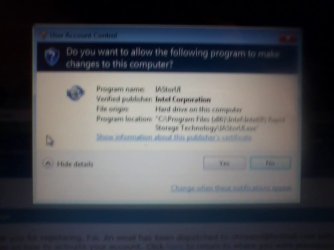
I was just curious and pressed this
0528110855.jpg
which was a program called IAStorUI
the publisher was Intel Corporation.
so i clicked yes on that and now my computer is stuck in the startup Repair phase. there was nothign wrong with my computer, i brought it 3 monthes ago it is a EB Series SONY. Sorry im really new at this and i dont know what other informations i need. ive tried using the http://www.sevenforums.com/tutorials/139576-startup-repair-infinite-loop-recovery.html and it didnt work out for me. i dont have a recovery disc. But i know for sure that it has never done this, or crashed, or had any problems!
EDIT: also when i pressed yes, it restarted my computer and has been stuck in Repair phase for a day, i did it multiple times and it has not worked yet. tried going on it with safe mode but did not work either, which just popped right back to the startup repair!

EDIT2: When i open up the startup repair, it tells me that they could not detect a problem. the Diagnostic and repair details show that
System Disk = \Device\Harddisk0
Windows directory = D:\Windows
Autochk Run = 0
Number of root causes = 1

under that it shows alot of different test that it preformed, everysingle one ended up like this-
Name: (name of the test)
Result: Completed successfully. Error code = 0x0
Time taken = (varry numbers, most of them were 0s) ms
and then after 11 Tests it shows
Boot Status indicates that the OS booted successfully

it repeats the steps for another 2 times.

EDIT: I am currently using a program called SystemRecoveryCD. im currently stuck on a process of what am i suppost to type when i get to this screen.

root@sysresccd /root % fsarchiver probe simple.
[======DISK======] [=============NAME==============] [====SIZE====] [MAJ] [MIN]
[sda ] [ST9500325AS ] [ 465.76 GB] [ 8] [ 0]

[=====DEVICE=====] [==FILESYS==] [======LABEL======] [====SIZE====] [MAJ] [MIN]
[loop0 ] [squashfs ] [<unknown> ] [ 240.36 MB] [ 7] [ 0]
[sda1 ] [ntfs ] [Recovery ] [ 13.85 GB] [ 8] [ 1]
[sda2 ] [ntfs ] [System Reserved ] [ 100.00 MB] [ 8] [ 2]
[sda3 ] [ntfs ] [<unknown> ] [ 451.81 GB] [ 8] [ 3]
root@sysresccd /root %

Please Help! thankyou!
 
Last edited:

My Computer

OS
Window 7 Home Perimium OA

My Computer

Computer Manufacturer/Model Number
Custom/DIY
OS
Windows 7 Ultimate x64
CPU
Intel C2D E8400@4Ghz OC
Motherboard
ASUS P5Q-E, bios 2101
Memory
4x2GB Kingston HyperX 8500@1066Mhz
Graphics Card(s)
Nvidia GTS450 OC
Sound Card
Onboard SoundMax
Monitor(s) Displays
Samsung Syncmaster 17"
Screen Resolution
1280x1024
Hard Drives
WD6402AAEX-640GB(system), WD10EALX-1TB(storage), other external disks & docking stations
PSU
Corsair TX-750 V2
Case
Custom Tower
Cooling
Air: Arctic Cooling 2xF8 & F12; Akasa AK-968, 2xAK-HD-BL
Mouse
Gigabyte M6900
Internet Speed
10M/1M
Thank you! alright. for alot of posts i have seen i still could never get to that step two screen, but everything else is alright. still on step 8 and probably would be there for a while. also there is an option of "Creating a recovery disc" would that be possible when im still stuck in the system recovery options?
 

My Computer

OS
Window 7 Home Perimium OA
Don't think so.
 

My Computer

Computer Manufacturer/Model Number
Custom/DIY
OS
Windows 7 Ultimate x64
CPU
Intel C2D E8400@4Ghz OC
Motherboard
ASUS P5Q-E, bios 2101
Memory
4x2GB Kingston HyperX 8500@1066Mhz
Graphics Card(s)
Nvidia GTS450 OC
Sound Card
Onboard SoundMax
Monitor(s) Displays
Samsung Syncmaster 17"
Screen Resolution
1280x1024
Hard Drives
WD6402AAEX-640GB(system), WD10EALX-1TB(storage), other external disks & docking stations
PSU
Corsair TX-750 V2
Case
Custom Tower
Cooling
Air: Arctic Cooling 2xF8 & F12; Akasa AK-968, 2xAK-HD-BL
Mouse
Gigabyte M6900
Internet Speed
10M/1M
You could try it.
 

My Computer

Computer type
PC/Desktop
Computer Manufacturer/Model Number
Bruce ... somewhere in his 40's
OS
Windows 7 Ultimate 32bit SP1
CPU
Intel(R) Core(TM)2 Quad CPU @ 2.40GHz, 2400 MHz
Motherboard
INTEL/D975XBX2
Memory
4 GB
Graphics Card(s)
ATI Radeon HD 2600 Pro
Monitor(s) Displays
Samsung SyncMaster 914v
Screen Resolution
1280 x 1024
Hard Drives
2/500GB each ... ST3500630AS ATA Device.
One is not connected
PSU
Rocketfish 700 W
Case
G.Skill Gigabyte Chassis
Keyboard
Standard PS/2 Keyboard
Mouse
Microsoft PS/2 Mouse
Internet Speed
DSL
Antivirus
Avira Internet Security
Browser
IE 11
Other Info
ATI HDMI Audio
  • Like
Reactions: Fai
What is IAStorUI?
Review: Intel Rapid Storage Technology is used to show information relating to Hard Drives and other storage devices. It shows information on Hard Drives installed and available storage ports.

What are all the options given, besides creating a recovery disc?
 

My Computer

Computer type
PC/Desktop
Computer Manufacturer/Model Number
Bruce ... somewhere in his 40's
OS
Windows 7 Ultimate 32bit SP1
CPU
Intel(R) Core(TM)2 Quad CPU @ 2.40GHz, 2400 MHz
Motherboard
INTEL/D975XBX2
Memory
4 GB
Graphics Card(s)
ATI Radeon HD 2600 Pro
Monitor(s) Displays
Samsung SyncMaster 914v
Screen Resolution
1280 x 1024
Hard Drives
2/500GB each ... ST3500630AS ATA Device.
One is not connected
PSU
Rocketfish 700 W
Case
G.Skill Gigabyte Chassis
Keyboard
Standard PS/2 Keyboard
Mouse
Microsoft PS/2 Mouse
Internet Speed
DSL
Antivirus
Avira Internet Security
Browser
IE 11
Other Info
ATI HDMI Audio
What is IAStorUI?
Review: Intel Rapid Storage Technology is used to show information relating to Hard Drives and other storage devices. It shows information on Hard Drives installed and available storage ports.

What are all the options given, besides creating a recovery disc?
how do you create a recovery disc? while i am only available being stuck on the system recovery option screen>
 

My Computer

OS
Window 7 Home Perimium OA
Just insert the Windows 7 installation DVD, if you haven't already. I don't know if it's possible to create a system recovery disc while in the sys. rec. options screen.
 

My Computer

Computer Manufacturer/Model Number
Custom/DIY
OS
Windows 7 Ultimate x64
CPU
Intel C2D E8400@4Ghz OC
Motherboard
ASUS P5Q-E, bios 2101
Memory
4x2GB Kingston HyperX 8500@1066Mhz
Graphics Card(s)
Nvidia GTS450 OC
Sound Card
Onboard SoundMax
Monitor(s) Displays
Samsung Syncmaster 17"
Screen Resolution
1280x1024
Hard Drives
WD6402AAEX-640GB(system), WD10EALX-1TB(storage), other external disks & docking stations
PSU
Corsair TX-750 V2
Case
Custom Tower
Cooling
Air: Arctic Cooling 2xF8 & F12; Akasa AK-968, 2xAK-HD-BL
Mouse
Gigabyte M6900
Internet Speed
10M/1M
Just insert the Windows 7 installation DVD, if you haven't already. I don't know if it's possible to create a system recovery disc while in the sys. rec. options screen.

When i brought the computer it never gave me a disc, i brought it at a Sony store 3 months ago.
Could i find a link as in where to get aa Windows 7 installation disk? my computer is a Windows 7 Home Perm OA.
i have the product key and everything,
or is there another option. because i clearly know that my computer does not have any problems! it was just because i pressed yes, on the screen Above and it restarted and gave me the screen.
 

My Computer

OS
Window 7 Home Perimium OA

My Computer

Computer Manufacturer/Model Number
Custom/DIY
OS
Windows 7 Ultimate x64
CPU
Intel C2D E8400@4Ghz OC
Motherboard
ASUS P5Q-E, bios 2101
Memory
4x2GB Kingston HyperX 8500@1066Mhz
Graphics Card(s)
Nvidia GTS450 OC
Sound Card
Onboard SoundMax
Monitor(s) Displays
Samsung Syncmaster 17"
Screen Resolution
1280x1024
Hard Drives
WD6402AAEX-640GB(system), WD10EALX-1TB(storage), other external disks & docking stations
PSU
Corsair TX-750 V2
Case
Custom Tower
Cooling
Air: Arctic Cooling 2xF8 & F12; Akasa AK-968, 2xAK-HD-BL
Mouse
Gigabyte M6900
Internet Speed
10M/1M
In the System Recovery Options menu, does the "Command Prompt" option work?

If it does, at the prompt type rstrui.exe then hit enter.

Hopefully that will launch System Restore and you will be able to select a Restore Point that was created before this problem started.
 

My Computer

Computer Manufacturer/Model Number
Dell Studio 15
OS
Windows 7 Ultimate 64 bit
In that case it should have an OEM recovery partition.
This should work: system recovery options.

I had that, and then i tried doing a system Restore, the first few times i tried it said completeld and when i restarted, it just went back to the System Recovery Options again.
But this time when i choose the earliest point to recover it gave me this
System Restore did not complete successfully. Your computer's system files and settings were not changed.
Details:
An unspecified error occurred during System Restore. (0x800700b7)

You can try system Restore again and choose a different restore point. If you continue to see this error, you can try an advanced recovery method. for more information, see What is Recovery?
So im going to run system restore again and see what pops up this time!

EDIT: it showed the same exact thing. this time when i pressed recovery, i pressed the latest date, (which was 5/27) and it gave me a different "error code"

Details:
An unspecified error occurred during System Restore. (0x80000ffff)

Edit2:
I used system restore again, using the first restore point, giving the information:

Details:
An unspecified error occurred during System Restore. (0x800700b7)

Which was the exact one as the first one
 
Last edited:

My Computer

OS
Window 7 Home Perimium OA
You said the computer is a Sony. What model is it please?
 

My Computer

Computer Manufacturer/Model Number
Dell Studio 15
OS
Windows 7 Ultimate 64 bit
In the System Recovery Options menu, does the "Command Prompt" option work?

If it does, at the prompt type rstrui.exe then hit enter.

Hopefully that will launch System Restore and you will be able to select a Restore Point that was created before this problem started.

I used that just now and it told me that it was completed, and when i restarted the computer once again, it shows the System Recovery Options again! :(
 

My Computer

OS
Window 7 Home Perimium OA
You said the computer is a Sony. What model is it please?

Im not sure if this is the information you need but:
SONY Model PCG-71315L
PERSONAL COMPUTER 19.5V
 

My Computer

OS
Window 7 Home Perimium OA
Fai, your computer should have a recovery partition that will allow you to restore the computer to the factory default. If you tell me the model of the computer, I can find how to do that (it is usually done by pressing F10 while the computer reboots).

Before doing that you can use these instructions to backup any important files.

SystemRescueCd
 

My Computer

Computer Manufacturer/Model Number
Dell Studio 15
OS
Windows 7 Ultimate 64 bit
Fai, your computer should have a recovery partition that will allow you to restore the computer to the factory default. If you tell me the model of the computer, I can find how to do that (it is usually done by pressing F10 while the computer reboots).

Before doing that you can use these instructions to backup any important files.

SystemRescueCd

For the System Rescue CD, i dont really get what is that and what it does, how to use it.
Im guessing saying that it is a USB or a Disc that when you download a certain file, you activate it on the computer that is having trouble, and it creates a backup for all the files on that computer, used before you completely reboot your computer?.
Sorry i am really new at everything, im trying to learn but its still hard :P.
 

My Computer

OS
Window 7 Home Perimium OA
For the System Rescue CD, i dont really get what is that and what it does, how to use it.
Im guessing saying that it is a USB or a Disc that when you download a certain file, you activate it on the computer that is having trouble, and it creates a backup for all the files on that computer, used before you completely reboot your computer?.

I think you have the basic concept. The System Rescue CD is a disk that you can use to boot your computer without using the Windows Operating System that is installed. Once booted, you can access all of the files on the hard drive and copy them to DVDs, USB flash drives, etc.

I know this sounds daunting, but the documentation will walk you through the process of creating the Rescue disk and backing up your files.

After you have done that, remove the Rescue Disk, reboot your computer and press F10 repeatedly until you see " Loading recovery tools please wait". From there you should be able to restore your hard drive to the factory image.

After you restore the drive, install an AV, create System Recovery Disks, and update Windows.
 

My Computer

Computer Manufacturer/Model Number
Dell Studio 15
OS
Windows 7 Ultimate 64 bit
  • Like
Reactions: Fai
I am currently still trying to find out more information on how to use it while downloading the systemrescuecd. during that time, ive been just constantly trying to use system restore, this time it was completed saying:

System Restore completed successfully. The system has been restored to 5/202011 4:33:34AM. Your documents have not been affected. Click Restart button to restart the computer.

This wasnt the first time that popped that up, i pressed restart and it went back to the same Startup Repair menus. and it says startup repair cannot repair this computer automatically. its just basically i could not start up window.
 

My Computer

OS
Window 7 Home Perimium OA
Back
Top