Solved Startup System Sound Stopped Playing...

Ratsneve

New member
Member
Local time
10:48 PM
Messages
12
Found several similar reports over this and MS's Answers forums with no final resolution/fix to problem. Worse they are dated several years ago and nothing current.

I feel I need to emphasize one-time that this problem only concerns the Startup system sound that plays right after warm or cold boots when the system first arrives at the desktop and _only_ that sound. All other system and program sounds work okay.

Up to 1 or 2 months ago for a couple years now the Startup sound has been playing just fine--then I all of a sudden realized it was no longer playing at all. All other system and program sounds/audio play fine.

1. SFC finds nothing needing fixing.
2. Startup sound check box in Sounds tab is and has always been checked though I do not recall when MS made this a security issue protecting it.
3. Talked to nVIDIA and learned nothing new.
4. Talked to Crucial and learned nothing new.
5. Talked to MS and learned nothing new. They are unaware of problem...even though for some it is a couple years old. MS's best recommendation though, which I might still try at some point because "what could possibly go wrong?" is to run an In-Place Upgrade on Windows 7 which supposedly will restore the OS leaving my programs/data and some customizations(?) in tact.
6. Actual Startup sound wave file apparently resides inside a .dll which iirc is threaded here in sevenforums.
7. I also looked through the Registry searching for "startupsound" and found string instances but they all looked correct for '1' turning on the Startup and '0' for point not wanting the sound to play.
8. The sound driver I've been using is the one MS includes in the Windows 7 SP 1 Install disk. I checked for updates but there are none. I then uninstalled it, let the system reboot, and installed it again automatically.

Outside of possibly changing the Startup sounds to something else one might prefer I've found no mention of a fix or solution to this problem. In fact the threads seem to all hang in mid-air with no solution--not even a mention to use an In-Place Upgrade or to do a clean install. That's frustrating--that even a hard solution like a clean install couldn't have been mentioned.

I hope someone familiar with this issue can give me some good advice or a good procedure to follow regardless of what that process might be including editing in this .dll or in the Registry for something specific?

Thank you.
 
Last edited:

My Computer

Computer type
PC/Desktop
Computer Manufacturer/Model Number
Home brew
OS
Windows 7 Home Premium, SP 1, 64-bit
CPU
Intel
Motherboard
ASRock
Memory
8 GB I think
Graphics Card(s)
2ea nVIDIA GTX 570, SLI sometimes
Hard Drives
Crucial SSD 256 GB, fantastic!
Antivirus
Microsoft Security Essentials
Browser
Chrome
Welcome to Seven Forums Ratsneve.
Personally I would be thankful at losing the sound. I have all turned off.
But seriously, I don't know what the issue could be. The sound files reside here. C:\Windows\Media
 

My Computer

Computer type
PC/Desktop
Computer Manufacturer/Model Number
Home Built Desktop By DataTech
OS
Windows 7 Ultimate X64 SP1
CPU
Intel i5-2550K, Differing ~4.4-4.8GHz No built in GPU
Motherboard
ASUS P8Z68-V PRO/GEN3
Memory
16GB G.Skill Sniper 1866MHz @ 2133MHz 2x8GB
Graphics Card(s)
ASUS GTX650TIB-DC2OC-2GD5, (650TI Boost)
Sound Card
Onboard Realtek 5-1
Monitor(s) Displays
Samsung P2570HD
Screen Resolution
1920x1080
Hard Drives
Samsung 840 Pro 256GB SSD for OS, 500GB Seagate Constellation (Enterprise drive) for Data
PSU
Corsair HX650W
Case
Inwin Dragon Rider
Cooling
Hyper 212 EVO w/two Noctua fans, push-pull, @1300 RPM
Keyboard
E-Z Eyes, bright yellow keys with large characters
Mouse
steelseries SENSEI Laser Pro Gaming
Internet Speed
48-51Mbs Mbs down, 11 Mbs up Xfinity Cable
Antivirus
Norton Internet Security 2013
Browser
IE 10, Opera, Pale Moon if needed
Other Info
4 case fans, LG BluRay-RE, ASUS DVD-RW, Mr. Fusion power supply, 1.21 gigawatts.
Welcome to the Seven Forums.

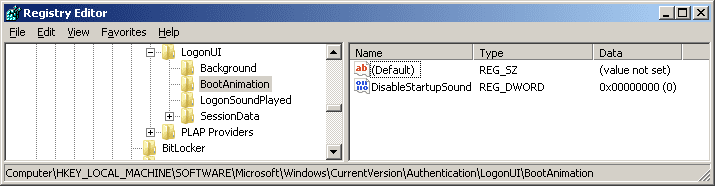
What is the value of this setting?

sound.png
 

My Computer

Computer type
Laptop
Computer Manufacturer/Model Number
Employer provided Dell Latitude
OS
W7 Pro SP1 64bit
CPU
i7
Memory
8GB
Graphics Card(s)
Intel HD Graphics
Hard Drives
crappy SSD
Antivirus
Employer mandated Symantec Endpoint Protection
Browser
Pale Moon 64bit, IE11 64bit & Chrome 64bit
if sound plays for system sounds and other apps (WMP -> mp3) then it's specific to windows startup sound. software or drivers won't fix what isn't broken.

sometimes just toggling a setting resolves an issue, but this might be Areo related.

Try changin your theme to Windows classic (a non Areo them)
then change sound scheme to 'no sounds' - make sure that windows startup sound is also unticked
save
reboot

start from the ground up - tick startup sound on the sound tab
save and reboot

at this point either the startup sound is working or it isn't
reset the windoes theme to what your prefer and reboot
 

My Computer

Computer type
Laptop
Computer Manufacturer/Model Number
HP Pavilion dv6-6c10us
OS
x64 (6.3.9600) Win8.1 Pro & soon dual boot x64 (6.1.7601) Win7_SP1 HomePrem
CPU
AMD A6-3420M APU with Radeon(tm) HD Graphics
Motherboard
Hewlett-Packard 1805
Memory
6.00 GB
Graphics Card(s)
AMD Radeon(TM) HD 6520G
Sound Card
(1) AMD High Definition Audio Device (2) IDT High Definiti
Monitor(s) Displays
HP W2072a 20" LCD (1600 x 900) @ 60 Hz
Screen Resolution
1366 x 768 x 32 bits (4294967296 colors) @ 60 Hz
Hard Drives
ST640LM0 00 HM641JI SATA Disk Device
Keyboard
Logitech k520 wireless KB
Mouse
Logitech m320 wireless mouse (bundled with KB)
Internet Speed
15/5 | 54 MB Wireless 'n'
Antivirus
Realtime: Defender or Avast | On-demand: Malwarebytes, ESET
Browser
IE 11 on Win8, IE 10 on win 7
Other Info
Media: [Gimp, Audacity, VLC] || Comm: [WEmail 2012, Skype] || Productivity: [OpenOffice,| Textpad] || Utils: [Sysinternals, cCleaner, Speccy, Defraggler]
Entered in error.
 
Last edited:

My Computer

Computer type
PC/Desktop
Computer Manufacturer/Model Number
Home brew
OS
Windows 7 Home Premium, SP 1, 64-bit
CPU
Intel
Motherboard
ASRock
Memory
8 GB I think
Graphics Card(s)
2ea nVIDIA GTX 570, SLI sometimes
Hard Drives
Crucial SSD 256 GB, fantastic!
Antivirus
Microsoft Security Essentials
Browser
Chrome
Welcome to the Seven Forums.

What is the value of this setting?

View attachment 288055
DisableStartupSound is set to 0. I thought this made sense. Checked several other searches for startupsound and those setting I thought were correct too. At this location I also looked at LogonSoundPlayed and both entries are set to 1 which still seems to make sense. Thank you for taking an interest in this--I'll keep looking at anything you suggest.
 

My Computer

Computer type
PC/Desktop
Computer Manufacturer/Model Number
Home brew
OS
Windows 7 Home Premium, SP 1, 64-bit
CPU
Intel
Motherboard
ASRock
Memory
8 GB I think
Graphics Card(s)
2ea nVIDIA GTX 570, SLI sometimes
Hard Drives
Crucial SSD 256 GB, fantastic!
Antivirus
Microsoft Security Essentials
Browser
Chrome
if sound plays for system sounds and other apps (WMP -> mp3) then it's specific to windows startup sound. software or drivers won't fix what isn't broken.

sometimes just toggling a setting resolves an issue, but this might be Areo related.

Try changin your theme to Windows classic (a non Areo them)
then change sound scheme to 'no sounds' - make sure that windows startup sound is also unticked
save
reboot

start from the ground up - tick startup sound on the sound tab
save and reboot

at this point either the startup sound is working or it isn't
reset the windoes theme to what your prefer and reboot
I'm going to work through the above again. Although I did it all once it did not include using a non-Aero theme and I meant to include it but didn't. Later on the results of this.
 

My Computer

Computer type
PC/Desktop
Computer Manufacturer/Model Number
Home brew
OS
Windows 7 Home Premium, SP 1, 64-bit
CPU
Intel
Motherboard
ASRock
Memory
8 GB I think
Graphics Card(s)
2ea nVIDIA GTX 570, SLI sometimes
Hard Drives
Crucial SSD 256 GB, fantastic!
Antivirus
Microsoft Security Essentials
Browser
Chrome
~~~
6. Actual Startup sound wave file apparently resides inside a .dll which iirc is threaded here in sevenforums.
~~~
Process Monitor shows the sound to be a WAV file.

Click to get a light box of this image.
Click again to see it larger.
sound2.png

Do you have that file?

Does it manually play for you?
 

My Computer

Computer type
Laptop
Computer Manufacturer/Model Number
Employer provided Dell Latitude
OS
W7 Pro SP1 64bit
CPU
i7
Memory
8GB
Graphics Card(s)
Intel HD Graphics
Hard Drives
crappy SSD
Antivirus
Employer mandated Symantec Endpoint Protection
Browser
Pale Moon 64bit, IE11 64bit & Chrome 64bit
Ok, toggling the Aero theme might not be enough. It's the easiest and 'quickest' test though.

I think there's a tutorial about areo issues on seven forums. Go ahead and muddle through the chages/reboots and I'll look around and post what I find in tutorials.

edit: Nope, couldn't find one here - I might have missed it though. I'll see what else turns up.
 
Last edited:

My Computer

Computer type
Laptop
Computer Manufacturer/Model Number
HP Pavilion dv6-6c10us
OS
x64 (6.3.9600) Win8.1 Pro & soon dual boot x64 (6.1.7601) Win7_SP1 HomePrem
CPU
AMD A6-3420M APU with Radeon(tm) HD Graphics
Motherboard
Hewlett-Packard 1805
Memory
6.00 GB
Graphics Card(s)
AMD Radeon(TM) HD 6520G
Sound Card
(1) AMD High Definition Audio Device (2) IDT High Definiti
Monitor(s) Displays
HP W2072a 20" LCD (1600 x 900) @ 60 Hz
Screen Resolution
1366 x 768 x 32 bits (4294967296 colors) @ 60 Hz
Hard Drives
ST640LM0 00 HM641JI SATA Disk Device
Keyboard
Logitech k520 wireless KB
Mouse
Logitech m320 wireless mouse (bundled with KB)
Internet Speed
15/5 | 54 MB Wireless 'n'
Antivirus
Realtime: Defender or Avast | On-demand: Malwarebytes, ESET
Browser
IE 11 on Win8, IE 10 on win 7
Other Info
Media: [Gimp, Audacity, VLC] || Comm: [WEmail 2012, Skype] || Productivity: [OpenOffice,| Textpad] || Utils: [Sysinternals, cCleaner, Speccy, Defraggler]
OP was informed of sounds location in post #2.
 

My Computer

Computer type
PC/Desktop
Computer Manufacturer/Model Number
Home Built Desktop By DataTech
OS
Windows 7 Ultimate X64 SP1
CPU
Intel i5-2550K, Differing ~4.4-4.8GHz No built in GPU
Motherboard
ASUS P8Z68-V PRO/GEN3
Memory
16GB G.Skill Sniper 1866MHz @ 2133MHz 2x8GB
Graphics Card(s)
ASUS GTX650TIB-DC2OC-2GD5, (650TI Boost)
Sound Card
Onboard Realtek 5-1
Monitor(s) Displays
Samsung P2570HD
Screen Resolution
1920x1080
Hard Drives
Samsung 840 Pro 256GB SSD for OS, 500GB Seagate Constellation (Enterprise drive) for Data
PSU
Corsair HX650W
Case
Inwin Dragon Rider
Cooling
Hyper 212 EVO w/two Noctua fans, push-pull, @1300 RPM
Keyboard
E-Z Eyes, bright yellow keys with large characters
Mouse
steelseries SENSEI Laser Pro Gaming
Internet Speed
48-51Mbs Mbs down, 11 Mbs up Xfinity Cable
Antivirus
Norton Internet Security 2013
Browser
IE 10, Opera, Pale Moon if needed
Other Info
4 case fans, LG BluRay-RE, ASUS DVD-RW, Mr. Fusion power supply, 1.21 gigawatts.
if sound plays for system sounds and other apps (WMP -> mp3) then it's specific to windows startup sound. software or drivers won't fix what isn't broken.

sometimes just toggling a setting resolves an issue, but this might be Areo related.

Try changin your theme to Windows classic (a non Areo them)
then change sound scheme to 'no sounds' - make sure that windows startup sound is also unticked
save
reboot

start from the ground up - tick startup sound on the sound tab
save and reboot

at this point either the startup sound is working or it isn't
reset the windoes theme to what your prefer and reboot
I'm going to work through the above again. Although I did it all once it did not include using a non-Aero theme and I meant to include it but didn't. Later on the results of this.
Drat...this had no affect on bringing the Startup sound back. Sure makes the desktop look like puke too.
 

My Computer

Computer type
PC/Desktop
Computer Manufacturer/Model Number
Home brew
OS
Windows 7 Home Premium, SP 1, 64-bit
CPU
Intel
Motherboard
ASRock
Memory
8 GB I think
Graphics Card(s)
2ea nVIDIA GTX 570, SLI sometimes
Hard Drives
Crucial SSD 256 GB, fantastic!
Antivirus
Microsoft Security Essentials
Browser
Chrome
~~~
6. Actual Startup sound wave file apparently resides inside a .dll which iirc is threaded here in sevenforums.
~~~
Process Monitor shows the sound to be a WAV file.

Click to get a light box of this image.
Click again to see it larger.
View attachment 288062

Do you have that file?

Does it manually play for you?
You are pointing to the wrong file. We are concerned with Windows Startup.wav down at the bottom of this folder. Try playing it and you get a sound very similar to Windows Navigation Start.wav.

Read this interesting thread on how to change the default Windows Startup sound to another sound.

http://www.sevenforums.com/tutorials/63398-startup-sound-change-windows-7-a.html

This may be the thread Slartybart (here) was looking for but it doesn't appear to deal with the problem of not being able to play the Startup sound but in how to change the sound so I have not fully read or considered it.

However this is where it sounds to me that the actual Startup.wav actually resides in or part of this .dll

imageres.dll

See what you think if I used one of these procedures to fix this mess? Heck, I'm going to go search for this .dll right now. Maybe it is missing for all I know?
 
Last edited:

My Computer

Computer type
PC/Desktop
Computer Manufacturer/Model Number
Home brew
OS
Windows 7 Home Premium, SP 1, 64-bit
CPU
Intel
Motherboard
ASRock
Memory
8 GB I think
Graphics Card(s)
2ea nVIDIA GTX 570, SLI sometimes
Hard Drives
Crucial SSD 256 GB, fantastic!
Antivirus
Microsoft Security Essentials
Browser
Chrome
Sounds (pardon the pun) as though you didn't complete the test.
Drat...this had no affect on bringing the Startup sound back. Sure makes the desktop look like puke too.

1) turn off areo theme and untick startup sound - presume this is done bc your desktop is not pretty
2) turn on (tick checkbox) startup sound - not sure if you did this
3) reset desktop theme to your preference - I don't think you did this

anyway, I couldn't find what I thought was out there.

if imageres.dll isn't there you'd know it - it contains all the system icons.

Sorry changing the theme didn't resolve the issue.

good luck

Bill
 

My Computer

Computer type
Laptop
Computer Manufacturer/Model Number
HP Pavilion dv6-6c10us
OS
x64 (6.3.9600) Win8.1 Pro & soon dual boot x64 (6.1.7601) Win7_SP1 HomePrem
CPU
AMD A6-3420M APU with Radeon(tm) HD Graphics
Motherboard
Hewlett-Packard 1805
Memory
6.00 GB
Graphics Card(s)
AMD Radeon(TM) HD 6520G
Sound Card
(1) AMD High Definition Audio Device (2) IDT High Definiti
Monitor(s) Displays
HP W2072a 20" LCD (1600 x 900) @ 60 Hz
Screen Resolution
1366 x 768 x 32 bits (4294967296 colors) @ 60 Hz
Hard Drives
ST640LM0 00 HM641JI SATA Disk Device
Keyboard
Logitech k520 wireless KB
Mouse
Logitech m320 wireless mouse (bundled with KB)
Internet Speed
15/5 | 54 MB Wireless 'n'
Antivirus
Realtime: Defender or Avast | On-demand: Malwarebytes, ESET
Browser
IE 11 on Win8, IE 10 on win 7
Other Info
Media: [Gimp, Audacity, VLC] || Comm: [WEmail 2012, Skype] || Productivity: [OpenOffice,| Textpad] || Utils: [Sysinternals, cCleaner, Speccy, Defraggler]
Sounds (pardon the pun) as though you didn't complete the test.
Drat...this had no affect on bringing the Startup sound back. Sure makes the desktop look like puke too.

1) turn off areo theme and untick startup sound - presume this is done bc your desktop is not pretty
2) turn on (tick checkbox) startup sound - not sure if you did this
3) reset desktop theme to your preference - I don't think you did this

anyway, I couldn't find what I thought was out there.

if imageres.dll isn't there you'd know it - it contains all the system icons.

Sorry changing the theme didn't resolve the issue.

good luck

Bill
Sorry, I got sidetracked. I did complete the whole test and none of it including returning to an Aero Theme after finishing resulted in the Startup sound playing once. One through three all done. Found four 'imageres.dll' files.
 

My Computer

Computer type
PC/Desktop
Computer Manufacturer/Model Number
Home brew
OS
Windows 7 Home Premium, SP 1, 64-bit
CPU
Intel
Motherboard
ASRock
Memory
8 GB I think
Graphics Card(s)
2ea nVIDIA GTX 570, SLI sometimes
Hard Drives
Crucial SSD 256 GB, fantastic!
Antivirus
Microsoft Security Essentials
Browser
Chrome
OP was informed of sounds location in post #2.
I saw that - but I had a question about the existence of the file that Process Monitor pointed to. I should have quoted your post and added to the discussion from there.


~~~
You are pointing to the wrong file. We are concerned with Windows Startup.wav down at the bottom of this folder. Try playing it and you get a sound very similar to Windows Navigation Start.wav.
~~~
Process Monitor shows that RunDLL32 checked (opened - got info - closed) that file when I toggled the setting named "Play Windows Startup Sound" in the Sound Control Panel applet.

I had the Sound Scheme set to "No Sounds" so that Sound Control Panel applet would not set the WAV file info for each event in a scheme. This meant the Process Monitor was only recording what happens behind the scenes when the user changes that setting named "Play Windows Startup Sound". I have no idea why W7 checks that file... I just thought that I would ask if you had it.

Also - the Sound Control Panel applet does not always check that file when the setting named "Play Windows Startup Sound" is changed. Sometimes there are no WAV files checked. I don't like things that don't repeat. It makes it that much harder to document and understand.

I read the link about the DLL - I don't understand it, but I read it :-)
 

My Computer

Computer type
Laptop
Computer Manufacturer/Model Number
Employer provided Dell Latitude
OS
W7 Pro SP1 64bit
CPU
i7
Memory
8GB
Graphics Card(s)
Intel HD Graphics
Hard Drives
crappy SSD
Antivirus
Employer mandated Symantec Endpoint Protection
Browser
Pale Moon 64bit, IE11 64bit & Chrome 64bit
Thanks

Ok, I figured you would complete the list... bc your desktop wasn't pretty.

4 imageres.dll is fine (x86 & x64 = 2 + Winsxs versions of same = 4).

To see if it's just a timing issue, try a clean boot: http://www.sevenforums.com/tutorial...ation-conflicts-performing-clean-startup.html
Sorry, I got sidetracked. I did complete the whole test and none of it including returning to an Aero Theme after finishing resulted in the Startup sound playing once. One through three all done. Found four 'imageres.dll' files.
 

My Computer

Computer type
Laptop
Computer Manufacturer/Model Number
HP Pavilion dv6-6c10us
OS
x64 (6.3.9600) Win8.1 Pro & soon dual boot x64 (6.1.7601) Win7_SP1 HomePrem
CPU
AMD A6-3420M APU with Radeon(tm) HD Graphics
Motherboard
Hewlett-Packard 1805
Memory
6.00 GB
Graphics Card(s)
AMD Radeon(TM) HD 6520G
Sound Card
(1) AMD High Definition Audio Device (2) IDT High Definiti
Monitor(s) Displays
HP W2072a 20" LCD (1600 x 900) @ 60 Hz
Screen Resolution
1366 x 768 x 32 bits (4294967296 colors) @ 60 Hz
Hard Drives
ST640LM0 00 HM641JI SATA Disk Device
Keyboard
Logitech k520 wireless KB
Mouse
Logitech m320 wireless mouse (bundled with KB)
Internet Speed
15/5 | 54 MB Wireless 'n'
Antivirus
Realtime: Defender or Avast | On-demand: Malwarebytes, ESET
Browser
IE 11 on Win8, IE 10 on win 7
Other Info
Media: [Gimp, Audacity, VLC] || Comm: [WEmail 2012, Skype] || Productivity: [OpenOffice,| Textpad] || Utils: [Sysinternals, cCleaner, Speccy, Defraggler]
Thanks

Ok, I figured you would complete the list... bc your desktop wasn't pretty.

4 imageres.dll is fine (x86 & x64 = 2 + Winsxs versions of same = 4).

To see if it's just a timing issue, try a clean boot: http://www.sevenforums.com/tutorial...ation-conflicts-performing-clean-startup.html
Sorry, I got sidetracked. I did complete the whole test and none of it including returning to an Aero Theme after finishing resulted in the Startup sound playing once. One through three all done. Found four 'imageres.dll' files.
I'm going to perform this clean boot when I get back from the store but I wanted to get out this other/related question first... Does this windows startup sound involve any Services? This is because I sometimes (but don't recall the last time) meddle with a Service I don't think I need. If there is a Service related/needed for this startup sound I might have deactivated it thinking it was stopping something unrelated that I knew I didn't need? :) Thank you for continuing your interest.
 

My Computer

Computer type
PC/Desktop
Computer Manufacturer/Model Number
Home brew
OS
Windows 7 Home Premium, SP 1, 64-bit
CPU
Intel
Motherboard
ASRock
Memory
8 GB I think
Graphics Card(s)
2ea nVIDIA GTX 570, SLI sometimes
Hard Drives
Crucial SSD 256 GB, fantastic!
Antivirus
Microsoft Security Essentials
Browser
Chrome
That would be Windows Audio and should be on auto start. Check in msconfig to see if you unchecked it.
 

My Computer

Computer type
PC/Desktop
Computer Manufacturer/Model Number
Home Built Desktop By DataTech
OS
Windows 7 Ultimate X64 SP1
CPU
Intel i5-2550K, Differing ~4.4-4.8GHz No built in GPU
Motherboard
ASUS P8Z68-V PRO/GEN3
Memory
16GB G.Skill Sniper 1866MHz @ 2133MHz 2x8GB
Graphics Card(s)
ASUS GTX650TIB-DC2OC-2GD5, (650TI Boost)
Sound Card
Onboard Realtek 5-1
Monitor(s) Displays
Samsung P2570HD
Screen Resolution
1920x1080
Hard Drives
Samsung 840 Pro 256GB SSD for OS, 500GB Seagate Constellation (Enterprise drive) for Data
PSU
Corsair HX650W
Case
Inwin Dragon Rider
Cooling
Hyper 212 EVO w/two Noctua fans, push-pull, @1300 RPM
Keyboard
E-Z Eyes, bright yellow keys with large characters
Mouse
steelseries SENSEI Laser Pro Gaming
Internet Speed
48-51Mbs Mbs down, 11 Mbs up Xfinity Cable
Antivirus
Norton Internet Security 2013
Browser
IE 10, Opera, Pale Moon if needed
Other Info
4 case fans, LG BluRay-RE, ASUS DVD-RW, Mr. Fusion power supply, 1.21 gigawatts.
That would be Windows Audio and should be on auto start. Check in msconfig to see if you unchecked it.
Very close but no cigar. Sorry. 'Windows Audio' was checked and 'running'. Please do read the next post!
 

My Computer

Computer type
PC/Desktop
Computer Manufacturer/Model Number
Home brew
OS
Windows 7 Home Premium, SP 1, 64-bit
CPU
Intel
Motherboard
ASRock
Memory
8 GB I think
Graphics Card(s)
2ea nVIDIA GTX 570, SLI sometimes
Hard Drives
Crucial SSD 256 GB, fantastic!
Antivirus
Microsoft Security Essentials
Browser
Chrome
Thanks

Ok, I figured you would complete the list... bc your desktop wasn't pretty.

4 imageres.dll is fine (x86 & x64 = 2 + Winsxs versions of same = 4).

To see if it's just a timing issue, try a clean boot: http://www.sevenforums.com/tutorial...ation-conflicts-performing-clean-startup.html
Sorry, I got sidetracked. I did complete the whole test and none of it including returning to an Aero Theme after finishing resulted in the Startup sound playing once. One through three all done. Found four 'imageres.dll' files.
Yippy! YIPPY! Cool! Thank you for pointing me via the tutorial process right to the problem. Following the instructions. I ended up running all my Startup items and all the MS Services but with all the non-MS Services remaining unchecked discovered the stupid Startup sound playing away consistently each time I restarted the machine. It was then a simple matter of checking these non-MS Services one at a time. In the order I took I actually guessed to within the last two remaining Services too! My Windows Startup problem boils down to...tada...

'NVIDIA Streamer Service -- Running'
Checked -- no startup sound
Unchecked -- startup sound plays like it should.

Will call NVIDIA back up who will be very interested in this and likely very helpful on what to do next--like resolving/solving the conflict, why it happens, and how to prevent it from happening again.

I'll post at least one more time to wrap up this thread.
 

My Computer

Computer type
PC/Desktop
Computer Manufacturer/Model Number
Home brew
OS
Windows 7 Home Premium, SP 1, 64-bit
CPU
Intel
Motherboard
ASRock
Memory
8 GB I think
Graphics Card(s)
2ea nVIDIA GTX 570, SLI sometimes
Hard Drives
Crucial SSD 256 GB, fantastic!
Antivirus
Microsoft Security Essentials
Browser
Chrome
Back
Top