Solved Startups/Boot Performance/100-all the time Critical

julio99

New member
Member
Local time
8:13 AM
Messages
83
Location
Canada
I did a reformat a week or so ago and tweaked my startups so I could get as few as possible and still make it run right. I even took some of the needless services according to Black Viper's Windows 7 Configurations. The time for the boot is still lingering around 2 minutes, with the shortest being 86 seconds. Not only that but every boot performance in event viewer #100 is Critical when it used to mostly be Warnings with the odd critical thrown in. As we talk I had uninstalled ESET Nod 32 AV6.0 to see if that was the reason it was doing Critical and it pretty well stayed the same. I am totally at a loss as to how I can fix this without going SSD or stripping more out of the startup.
 

My Computer My Computer

At a glance

Windows 7 home premium x64Core i5-430M8gbMobility Radeo 5650
Computer type
Laptop
Computer Manufacturer/Model Number
Acer 8943g
OS
Windows 7 home premium x64
CPU
Core i5-430M
Motherboard
Acer SM83-CP
Memory
8gb
Graphics Card(s)
Mobility Radeo 5650
Monitor(s) Displays
Generic
Screen Resolution
1920x1080
Hard Drives
Samsung HM641jI
Corsair SSD
Antivirus
ESET AV V7

My Computer My Computer

At a glance

Desk1 7 Home Prem / Desk2 10 Pro / Main lap A...Desk1 i5 3750K / Laptop i7 GTX 860M / Desk2 i...Desk1 8GB (1866) / Desk2 16GB (1333) / Laptop...Desk 1& 2NVidia GTX 650 & Laptops on board Intel
Computer type
PC/Desktop
Computer Manufacturer/Model Number
Own build (new) Desk1 / Asus ROG Win 7 / Desk2 1st build
OS
Desk1 7 Home Prem / Desk2 10 Pro / Main lap Asus ROG 10 Pro 2 laptop Toshiba 7 Pro Asus P2520 7 & 10
CPU
Desk1 i5 3750K / Laptop i7 GTX 860M / Desk2 i5 2500
Motherboard
Desk1 Asus P877-V / Desk2 Gigabyte H67 UD3H / Laptop ?
Memory
Desk1 8GB (1866) / Desk2 16GB (1333) / Laptop 8Gb DDR3
Graphics Card(s)
Desk 1& 2NVidia GTX 650 & Laptops on board Intel
Sound Card
Desk 1 & 2 -XONAR DG Realtek High Def audio Laptop
Monitor(s) Displays
Desk 1 Benq HD 2450 / Desk2 Philips 24" / Laptop 17.5"
Screen Resolution
1920x1080 D1 & D2 & Laptop 1
Hard Drives
Desk1 Samsung 120GB 830 SSD
Asus ROG 256GB 850 Pro SSD
Desk2 Samsung 840 256 SSD
Toshiba 120GB EVO
PSU
Desk 1 Corsair HX 1050/ Laptop ? / Desk 2 Corsair HX 650
Case
Desk 1 Cooler HAF XM ? Toshiba laptop / Desk2 Coolermaster
Cooling
Fans on all Desk1 -2 Desk2 - all Coolermasters 5 Laptop ?
Keyboard
Desk 1 MS Sidewinder X6 Desk 2 MS Sidewinder X 4
Mouse
Desk 1&2 - Gigabyte MS 900 gamer - laptop - Logitec wireless
Internet Speed
ADSL2+
Other Info
One other Desktop (tester) and spare Toshba laptop both with SSD's
Running Kaspersky 2016 ISS on all machines config'd identically
Logitec audio stereo systems on each machine (x3)
Canon MG5250MFC
Router/modem TP-Link running WPA2SK
You will find the specs under system specs. I had most of the things done in the link you left for me. I'll boot and let you know if things got better. I did add a few changes from the link, but I'm still interested in knowing why all these boot performances are Critical. That screen should have had the time on it, but to make a long story short the boot got worse. It went to 137 seconds and there were no errors with it. Just a red x on the critical line 100/Boot Performance
 

Attachments

  • perf.PNG
    perf.PNG
    5.3 KB · Views: 5
  • perf.PNG
    perf.PNG
    5.3 KB · Views: 6
Last edited:

My Computer My Computer

At a glance

Windows 7 home premium x64Core i5-430M8gbMobility Radeo 5650
Computer type
Laptop
Computer Manufacturer/Model Number
Acer 8943g
OS
Windows 7 home premium x64
CPU
Core i5-430M
Motherboard
Acer SM83-CP
Memory
8gb
Graphics Card(s)
Mobility Radeo 5650
Monitor(s) Displays
Generic
Screen Resolution
1920x1080
Hard Drives
Samsung HM641jI
Corsair SSD
Antivirus
ESET AV V7

My Computer My Computer

At a glance

Desk1 7 Home Prem / Desk2 10 Pro / Main lap A...Desk1 i5 3750K / Laptop i7 GTX 860M / Desk2 i...Desk1 8GB (1866) / Desk2 16GB (1333) / Laptop...Desk 1& 2NVidia GTX 650 & Laptops on board Intel
Computer type
PC/Desktop
Computer Manufacturer/Model Number
Own build (new) Desk1 / Asus ROG Win 7 / Desk2 1st build
OS
Desk1 7 Home Prem / Desk2 10 Pro / Main lap Asus ROG 10 Pro 2 laptop Toshiba 7 Pro Asus P2520 7 & 10
CPU
Desk1 i5 3750K / Laptop i7 GTX 860M / Desk2 i5 2500
Motherboard
Desk1 Asus P877-V / Desk2 Gigabyte H67 UD3H / Laptop ?
Memory
Desk1 8GB (1866) / Desk2 16GB (1333) / Laptop 8Gb DDR3
Graphics Card(s)
Desk 1& 2NVidia GTX 650 & Laptops on board Intel
Sound Card
Desk 1 & 2 -XONAR DG Realtek High Def audio Laptop
Monitor(s) Displays
Desk 1 Benq HD 2450 / Desk2 Philips 24" / Laptop 17.5"
Screen Resolution
1920x1080 D1 & D2 & Laptop 1
Hard Drives
Desk1 Samsung 120GB 830 SSD
Asus ROG 256GB 850 Pro SSD
Desk2 Samsung 840 256 SSD
Toshiba 120GB EVO
PSU
Desk 1 Corsair HX 1050/ Laptop ? / Desk 2 Corsair HX 650
Case
Desk 1 Cooler HAF XM ? Toshiba laptop / Desk2 Coolermaster
Cooling
Fans on all Desk1 -2 Desk2 - all Coolermasters 5 Laptop ?
Keyboard
Desk 1 MS Sidewinder X6 Desk 2 MS Sidewinder X 4
Mouse
Desk 1&2 - Gigabyte MS 900 gamer - laptop - Logitec wireless
Internet Speed
ADSL2+
Other Info
One other Desktop (tester) and spare Toshba laptop both with SSD's
Running Kaspersky 2016 ISS on all machines config'd identically
Logitec audio stereo systems on each machine (x3)
Canon MG5250MFC
Router/modem TP-Link running WPA2SK
I have ran all of these programs except Adw cleaner and I am awaiting a reply from them before I run it on a problem I am not sure about, so better safe than sorry. Have you ran that program before? Adw Cleaner I mean. On their dl page they have this block of writing underneath the downloads about disables ff detection; disables Chrome detection; disables ie detection?? These are obviously browsers he's talking about, but is this just a warning to us about what the program does or am I supposed to change something before I start? There's not much there about that so I thought I should ask. Getting back to the other things you suggested I have ran all of those within the last month and no problems. Even ran SeaTools to check the hard drive and that also was good. What I did do yesterday ; I had a 4port USB hub plugged in with all ports full and a external burner double plugged into it. I just thought that might cause the boot to slow and it does. Took 30 seconds off the minute I unplugged it. I put it away. Down to 90 second boot time.
 

My Computer My Computer

At a glance

Windows 7 home premium x64Core i5-430M8gbMobility Radeo 5650
Computer type
Laptop
Computer Manufacturer/Model Number
Acer 8943g
OS
Windows 7 home premium x64
CPU
Core i5-430M
Motherboard
Acer SM83-CP
Memory
8gb
Graphics Card(s)
Mobility Radeo 5650
Monitor(s) Displays
Generic
Screen Resolution
1920x1080
Hard Drives
Samsung HM641jI
Corsair SSD
Antivirus
ESET AV V7
Julio the ADW mate I have run it several times in my machines and fixes and have had no problems. I am not sure of what you mean by you are waiting for a reply from them.
If you run it will give you a report of the stuff it finds you close that screen and hit the delete. You then reboot the machine for the stuff to be fixed.

The fact that unplugging that hub means that something was hogging the resources and I am still wondering if you have tried all the tutorial tips?

The one that involves the Start up in msconfig should if you untick all except the security have made quite a difference in the boot time. I do this all the machines I have and the fixes I do.
 

My Computer My Computer

At a glance

Desk1 7 Home Prem / Desk2 10 Pro / Main lap A...Desk1 i5 3750K / Laptop i7 GTX 860M / Desk2 i...Desk1 8GB (1866) / Desk2 16GB (1333) / Laptop...Desk 1& 2NVidia GTX 650 & Laptops on board Intel
Computer type
PC/Desktop
Computer Manufacturer/Model Number
Own build (new) Desk1 / Asus ROG Win 7 / Desk2 1st build
OS
Desk1 7 Home Prem / Desk2 10 Pro / Main lap Asus ROG 10 Pro 2 laptop Toshiba 7 Pro Asus P2520 7 & 10
CPU
Desk1 i5 3750K / Laptop i7 GTX 860M / Desk2 i5 2500
Motherboard
Desk1 Asus P877-V / Desk2 Gigabyte H67 UD3H / Laptop ?
Memory
Desk1 8GB (1866) / Desk2 16GB (1333) / Laptop 8Gb DDR3
Graphics Card(s)
Desk 1& 2NVidia GTX 650 & Laptops on board Intel
Sound Card
Desk 1 & 2 -XONAR DG Realtek High Def audio Laptop
Monitor(s) Displays
Desk 1 Benq HD 2450 / Desk2 Philips 24" / Laptop 17.5"
Screen Resolution
1920x1080 D1 & D2 & Laptop 1
Hard Drives
Desk1 Samsung 120GB 830 SSD
Asus ROG 256GB 850 Pro SSD
Desk2 Samsung 840 256 SSD
Toshiba 120GB EVO
PSU
Desk 1 Corsair HX 1050/ Laptop ? / Desk 2 Corsair HX 650
Case
Desk 1 Cooler HAF XM ? Toshiba laptop / Desk2 Coolermaster
Cooling
Fans on all Desk1 -2 Desk2 - all Coolermasters 5 Laptop ?
Keyboard
Desk 1 MS Sidewinder X6 Desk 2 MS Sidewinder X 4
Mouse
Desk 1&2 - Gigabyte MS 900 gamer - laptop - Logitec wireless
Internet Speed
ADSL2+
Other Info
One other Desktop (tester) and spare Toshba laptop both with SSD's
Running Kaspersky 2016 ISS on all machines config'd identically
Logitec audio stereo systems on each machine (x3)
Canon MG5250MFC
Router/modem TP-Link running WPA2SK
/Disable FF Detection-This option disables specific firefox detections; /Disable Chrome Detection- This option disables detections for Chrome and Chromium based browsers. That is just 2 of the 5 settings that I don't have a clue about. They are some kind of setting that you either need to enable or disable before running it. Someone from the forum wrote me back and told me when he ran it his Google Chrome preferences were all disabled. On the MSCONFIG Tab; you are talking about the STARTUP Tab in MSCONFIG right. You said security were the only ones I should have checked. How about Acronis and Synaptics; Launch Manager if I disable it half of my settings for acer don't work. I have about 9 items checked. You think I should uncheck all but Comodo and ESET? I'll give it a go and see what happens.
 

My Computer My Computer

At a glance

Windows 7 home premium x64Core i5-430M8gbMobility Radeo 5650
Computer type
Laptop
Computer Manufacturer/Model Number
Acer 8943g
OS
Windows 7 home premium x64
CPU
Core i5-430M
Motherboard
Acer SM83-CP
Memory
8gb
Graphics Card(s)
Mobility Radeo 5650
Monitor(s) Displays
Generic
Screen Resolution
1920x1080
Hard Drives
Samsung HM641jI
Corsair SSD
Antivirus
ESET AV V7
Now the Acer settings Julio therein lie half the problems mate I have had Toshibas before I stuck SSD's in them with huge amounts of bloatware and that is what the Acer stuff is mate you don't need it. All you need is the security switched on just because Acronis is unticked doesn't mean it will not start up it just means you have to do it manually and unless you want it running for a specific reason it can stay dormant.

I also untick in Services any I don't want running such as the Bing desktop bar whatever I only download it because it pesters and I just disable it through that avenue.
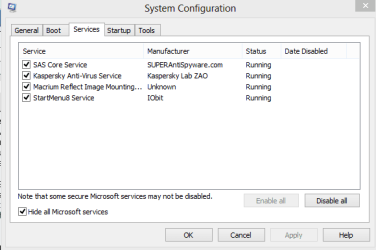
Go to msconfig > Services > hide all Microsoft stuff and go through the things you don't really need to run that much and untick them. In my pic there are very few services as I am trying 8 but in my 7 machines there are more just go through them and see what you have got.

You also mention Firefox and Chrome have you got both installed I am now just wondering what you do have on the machine. Before I got into computing in earnest I used to load my machines with all sorts of "goodies" never to be used and wondered why the thing was slow.
 

Attachments

  • A.PNG
    A.PNG
    8 KB · Views: 8

My Computer My Computer

At a glance

Desk1 7 Home Prem / Desk2 10 Pro / Main lap A...Desk1 i5 3750K / Laptop i7 GTX 860M / Desk2 i...Desk1 8GB (1866) / Desk2 16GB (1333) / Laptop...Desk 1& 2NVidia GTX 650 & Laptops on board Intel
Computer type
PC/Desktop
Computer Manufacturer/Model Number
Own build (new) Desk1 / Asus ROG Win 7 / Desk2 1st build
OS
Desk1 7 Home Prem / Desk2 10 Pro / Main lap Asus ROG 10 Pro 2 laptop Toshiba 7 Pro Asus P2520 7 & 10
CPU
Desk1 i5 3750K / Laptop i7 GTX 860M / Desk2 i5 2500
Motherboard
Desk1 Asus P877-V / Desk2 Gigabyte H67 UD3H / Laptop ?
Memory
Desk1 8GB (1866) / Desk2 16GB (1333) / Laptop 8Gb DDR3
Graphics Card(s)
Desk 1& 2NVidia GTX 650 & Laptops on board Intel
Sound Card
Desk 1 & 2 -XONAR DG Realtek High Def audio Laptop
Monitor(s) Displays
Desk 1 Benq HD 2450 / Desk2 Philips 24" / Laptop 17.5"
Screen Resolution
1920x1080 D1 & D2 & Laptop 1
Hard Drives
Desk1 Samsung 120GB 830 SSD
Asus ROG 256GB 850 Pro SSD
Desk2 Samsung 840 256 SSD
Toshiba 120GB EVO
PSU
Desk 1 Corsair HX 1050/ Laptop ? / Desk 2 Corsair HX 650
Case
Desk 1 Cooler HAF XM ? Toshiba laptop / Desk2 Coolermaster
Cooling
Fans on all Desk1 -2 Desk2 - all Coolermasters 5 Laptop ?
Keyboard
Desk 1 MS Sidewinder X6 Desk 2 MS Sidewinder X 4
Mouse
Desk 1&2 - Gigabyte MS 900 gamer - laptop - Logitec wireless
Internet Speed
ADSL2+
Other Info
One other Desktop (tester) and spare Toshba laptop both with SSD's
Running Kaspersky 2016 ISS on all machines config'd identically
Logitec audio stereo systems on each machine (x3)
Canon MG5250MFC
Router/modem TP-Link running WPA2SK
You dont' need to edit Services in Win7, it will only cause problems like you're seeing. Win7 developers followed the Black Viper's lead and set all Services needing standby to Manual on fast triggers developed for the OS. Windows 7 is the Black Viper.

Likewise nothing needs to start with Win7 but your AV in msconfig>Startup and >Services after Hiding all MS Services. I always run a Clean Boot for best performance with no freeloaders except for Gadgets, Sync and maybe Flash updater since it's web-critical.

Other tips here for getting and keeping a perfect Clean Reinstall - Factory OEM Windows 7
are same for retail installs. The factory preinstall is the worst possible install of Win7.
 
If I decide to do a clean reinstall down the line and I have my drivers backed up to double driver should I get rid of anything related to acer if it is to be a clean re-install?
 

My Computer My Computer

At a glance

Windows 7 home premium x64Core i5-430M8gbMobility Radeo 5650
Computer type
Laptop
Computer Manufacturer/Model Number
Acer 8943g
OS
Windows 7 home premium x64
CPU
Core i5-430M
Motherboard
Acer SM83-CP
Memory
8gb
Graphics Card(s)
Mobility Radeo 5650
Monitor(s) Displays
Generic
Screen Resolution
1920x1080
Hard Drives
Samsung HM641jI
Corsair SSD
Antivirus
ESET AV V7
If I decide to do a clean reinstall down the line and I have my drivers backed up to double driver should I get rid of anything related to acer if it is to be a clean re-install?
Absolutely mate it is like Greg and just about everyone who has done this with a bloated machine will tell you including me is the best thing you will ever do. I mean how many times have you used the Acer bloat?? My Toshibas are now very different machines than they were before I installe the SSD's and the ISO.
 

My Computer My Computer

At a glance

Desk1 7 Home Prem / Desk2 10 Pro / Main lap A...Desk1 i5 3750K / Laptop i7 GTX 860M / Desk2 i...Desk1 8GB (1866) / Desk2 16GB (1333) / Laptop...Desk 1& 2NVidia GTX 650 & Laptops on board Intel
Computer type
PC/Desktop
Computer Manufacturer/Model Number
Own build (new) Desk1 / Asus ROG Win 7 / Desk2 1st build
OS
Desk1 7 Home Prem / Desk2 10 Pro / Main lap Asus ROG 10 Pro 2 laptop Toshiba 7 Pro Asus P2520 7 & 10
CPU
Desk1 i5 3750K / Laptop i7 GTX 860M / Desk2 i5 2500
Motherboard
Desk1 Asus P877-V / Desk2 Gigabyte H67 UD3H / Laptop ?
Memory
Desk1 8GB (1866) / Desk2 16GB (1333) / Laptop 8Gb DDR3
Graphics Card(s)
Desk 1& 2NVidia GTX 650 & Laptops on board Intel
Sound Card
Desk 1 & 2 -XONAR DG Realtek High Def audio Laptop
Monitor(s) Displays
Desk 1 Benq HD 2450 / Desk2 Philips 24" / Laptop 17.5"
Screen Resolution
1920x1080 D1 & D2 & Laptop 1
Hard Drives
Desk1 Samsung 120GB 830 SSD
Asus ROG 256GB 850 Pro SSD
Desk2 Samsung 840 256 SSD
Toshiba 120GB EVO
PSU
Desk 1 Corsair HX 1050/ Laptop ? / Desk 2 Corsair HX 650
Case
Desk 1 Cooler HAF XM ? Toshiba laptop / Desk2 Coolermaster
Cooling
Fans on all Desk1 -2 Desk2 - all Coolermasters 5 Laptop ?
Keyboard
Desk 1 MS Sidewinder X6 Desk 2 MS Sidewinder X 4
Mouse
Desk 1&2 - Gigabyte MS 900 gamer - laptop - Logitec wireless
Internet Speed
ADSL2+
Other Info
One other Desktop (tester) and spare Toshba laptop both with SSD's
Running Kaspersky 2016 ISS on all machines config'd identically
Logitec audio stereo systems on each machine (x3)
Canon MG5250MFC
Router/modem TP-Link running WPA2SK
I should have been more clear on that last post when I said should I get rid of anything related to Acer if it's to be a clean install. What I meant was about the drivers. If they are all backed up,(the drivers I mean) should I get rid of all acer named drivers except maybe for the web-cam if I am going to use them on a clean install or does it matter? A driver is a driver right? I just went through some of the backed up drivers and I don't see any that have Acer attached to them, so I guess that's moot.
I got rid of all those services through msconfig. I did it before Greg posted and said leave those alone. No harm because if I needed one I could always re-check it right? It didn't make a big difference but it is consistently under 90 seconds now so there is some. I think I only have about 3 more than you running. I guess the proof will be in the pudding. When you got your SSD did you put all your programs on it too or do you put your programs on your regular hard drive and run the SSD for just booting and necessities?
 

My Computer My Computer

At a glance

Windows 7 home premium x64Core i5-430M8gbMobility Radeo 5650
Computer type
Laptop
Computer Manufacturer/Model Number
Acer 8943g
OS
Windows 7 home premium x64
CPU
Core i5-430M
Motherboard
Acer SM83-CP
Memory
8gb
Graphics Card(s)
Mobility Radeo 5650
Monitor(s) Displays
Generic
Screen Resolution
1920x1080
Hard Drives
Samsung HM641jI
Corsair SSD
Antivirus
ESET AV V7
When you get around to reading Clean Reinstall - Factory OEM Windows 7 you'll understand better how drivers are handled in Win7.

Win7 is driver-complete in the installer and after install when you run all rounds of Important and Optional Windows Updates after enabling Automatically deliver drivers via Windows Update (Step 3).

Put your wireless driver in your backup so if it isn't provided during install you can get online quickly to do all of your Updates, including requested reboots. Then go right back to check for more Updates.

Only after all Updates are installed should you then check Device Manager to see if any drivers are still missing, and if so import them from the Acer Support Downloads webpage for your model. It discusses further in the tutorial how to determine if you need any software due to features not working fully like webcam, backlighting, or Function Keys.
 
Thanks Greg, your post explained it perfectly. It appears as it says that the drivers will be supplied during Windows update and if I do come up short anything after the install I'll have the drivers that I backed up onhand in case I need any of them. It seems pretty straight forward. I have all this bookmarked and all of our emails are stored in a folder. Thanks for the help and hopefully if and when i decide to go for this it will go in as smoothly as it sounds.
 

My Computer My Computer

At a glance

Windows 7 home premium x64Core i5-430M8gbMobility Radeo 5650
Computer type
Laptop
Computer Manufacturer/Model Number
Acer 8943g
OS
Windows 7 home premium x64
CPU
Core i5-430M
Motherboard
Acer SM83-CP
Memory
8gb
Graphics Card(s)
Mobility Radeo 5650
Monitor(s) Displays
Generic
Screen Resolution
1920x1080
Hard Drives
Samsung HM641jI
Corsair SSD
Antivirus
ESET AV V7
Thanks Greg, your post explained it perfectly. It appears as it says that the drivers will be supplied during Windows update and if I do come up short anything after the install I'll have the drivers that I backed up onhand in case I need any of them. It seems pretty straight forward. I have all this bookmarked and all of our emails are stored in a folder. Thanks for the help and hopefully if and when i decide to go for this it will go in as smoothly as it sounds.
Sorry late reply Julio I see Greg has seen to what I would have told you except I would have said just download any absolutely and definitive drivers from the Acer site again as Greg has said but I am guessing you have done the back ups now.:)
 

My Computer My Computer

At a glance

Desk1 7 Home Prem / Desk2 10 Pro / Main lap A...Desk1 i5 3750K / Laptop i7 GTX 860M / Desk2 i...Desk1 8GB (1866) / Desk2 16GB (1333) / Laptop...Desk 1& 2NVidia GTX 650 & Laptops on board Intel
Computer type
PC/Desktop
Computer Manufacturer/Model Number
Own build (new) Desk1 / Asus ROG Win 7 / Desk2 1st build
OS
Desk1 7 Home Prem / Desk2 10 Pro / Main lap Asus ROG 10 Pro 2 laptop Toshiba 7 Pro Asus P2520 7 & 10
CPU
Desk1 i5 3750K / Laptop i7 GTX 860M / Desk2 i5 2500
Motherboard
Desk1 Asus P877-V / Desk2 Gigabyte H67 UD3H / Laptop ?
Memory
Desk1 8GB (1866) / Desk2 16GB (1333) / Laptop 8Gb DDR3
Graphics Card(s)
Desk 1& 2NVidia GTX 650 & Laptops on board Intel
Sound Card
Desk 1 & 2 -XONAR DG Realtek High Def audio Laptop
Monitor(s) Displays
Desk 1 Benq HD 2450 / Desk2 Philips 24" / Laptop 17.5"
Screen Resolution
1920x1080 D1 & D2 & Laptop 1
Hard Drives
Desk1 Samsung 120GB 830 SSD
Asus ROG 256GB 850 Pro SSD
Desk2 Samsung 840 256 SSD
Toshiba 120GB EVO
PSU
Desk 1 Corsair HX 1050/ Laptop ? / Desk 2 Corsair HX 650
Case
Desk 1 Cooler HAF XM ? Toshiba laptop / Desk2 Coolermaster
Cooling
Fans on all Desk1 -2 Desk2 - all Coolermasters 5 Laptop ?
Keyboard
Desk 1 MS Sidewinder X6 Desk 2 MS Sidewinder X 4
Mouse
Desk 1&2 - Gigabyte MS 900 gamer - laptop - Logitec wireless
Internet Speed
ADSL2+
Other Info
One other Desktop (tester) and spare Toshba laptop both with SSD's
Running Kaspersky 2016 ISS on all machines config'd identically
Logitec audio stereo systems on each machine (x3)
Canon MG5250MFC
Router/modem TP-Link running WPA2SK
As far as drivers go, you also read what Greg had to say on that issue. As long as they're backed up and ready in case I need them I should be fine. If the need arises I can always use the Acer site. They have nothing new there but at least you can get started.
Thanks for your help along the way my friend. I still have SSD in my head and I do have a question if you don't mind. What exactly do you run on your SSD? Just the Boot, or boot and programs, or boot and programs and data? I have 2 hard drive spaces on the bottom of my Acer 8943g, so I was going to put the SSD in the main spot and keep the Samsung in the second spot for Data and some programs. Do you have any ideas on this, and how do I move things from the hard drive now to the SSD? Would I use Acronis to move it over with the Acronis Plus Pack? Don't know if you're familiar with that program, but I thought I should ask.
 

My Computer My Computer

At a glance

Windows 7 home premium x64Core i5-430M8gbMobility Radeo 5650
Computer type
Laptop
Computer Manufacturer/Model Number
Acer 8943g
OS
Windows 7 home premium x64
CPU
Core i5-430M
Motherboard
Acer SM83-CP
Memory
8gb
Graphics Card(s)
Mobility Radeo 5650
Monitor(s) Displays
Generic
Screen Resolution
1920x1080
Hard Drives
Samsung HM641jI
Corsair SSD
Antivirus
ESET AV V7
If it were me I would just reinstall the OS onto a new SSD and then the data and stuff you want from the old drive on that drive the rest could be stored to one of the two spinners.

If you have the installation media then ok if not then there is this http://www.sevenforums.com/tutorials/2432-usb-windows-7-installation-key-drive-create.html I prefer the disk but it is up to you if you like the stick it works just as well I find booting from a disk easier to set.


I just use a 120GB for the boot Julio and my usual stuff like Partition Wizard and the CCleaner etc as I don't put on a lot of photos and documents plus I have a 500 spinner for backing up to plus some externals whatever.

No mate you can migrate the stuff from Users into the back spinner there is a tutorial on it um I think it is this one http://www.sevenforums.com/tutorial...reate-move-during-windows-7-installation.html though I have not had the need to use it yet:)
 

My Computer My Computer

At a glance

Desk1 7 Home Prem / Desk2 10 Pro / Main lap A...Desk1 i5 3750K / Laptop i7 GTX 860M / Desk2 i...Desk1 8GB (1866) / Desk2 16GB (1333) / Laptop...Desk 1& 2NVidia GTX 650 & Laptops on board Intel
Computer type
PC/Desktop
Computer Manufacturer/Model Number
Own build (new) Desk1 / Asus ROG Win 7 / Desk2 1st build
OS
Desk1 7 Home Prem / Desk2 10 Pro / Main lap Asus ROG 10 Pro 2 laptop Toshiba 7 Pro Asus P2520 7 & 10
CPU
Desk1 i5 3750K / Laptop i7 GTX 860M / Desk2 i5 2500
Motherboard
Desk1 Asus P877-V / Desk2 Gigabyte H67 UD3H / Laptop ?
Memory
Desk1 8GB (1866) / Desk2 16GB (1333) / Laptop 8Gb DDR3
Graphics Card(s)
Desk 1& 2NVidia GTX 650 & Laptops on board Intel
Sound Card
Desk 1 & 2 -XONAR DG Realtek High Def audio Laptop
Monitor(s) Displays
Desk 1 Benq HD 2450 / Desk2 Philips 24" / Laptop 17.5"
Screen Resolution
1920x1080 D1 & D2 & Laptop 1
Hard Drives
Desk1 Samsung 120GB 830 SSD
Asus ROG 256GB 850 Pro SSD
Desk2 Samsung 840 256 SSD
Toshiba 120GB EVO
PSU
Desk 1 Corsair HX 1050/ Laptop ? / Desk 2 Corsair HX 650
Case
Desk 1 Cooler HAF XM ? Toshiba laptop / Desk2 Coolermaster
Cooling
Fans on all Desk1 -2 Desk2 - all Coolermasters 5 Laptop ?
Keyboard
Desk 1 MS Sidewinder X6 Desk 2 MS Sidewinder X 4
Mouse
Desk 1&2 - Gigabyte MS 900 gamer - laptop - Logitec wireless
Internet Speed
ADSL2+
Other Info
One other Desktop (tester) and spare Toshba laptop both with SSD's
Running Kaspersky 2016 ISS on all machines config'd identically
Logitec audio stereo systems on each machine (x3)
Canon MG5250MFC
Router/modem TP-Link running WPA2SK
I keep forgetting that if I put the SSD in and I don't Ghost the OS over to the SSD from the hard drive that it's on now I'll have to create a new windows 7 install. I was thrown a little when I was reading your post and I let my mind drift a bit. Crap happens, right? Anyway, I'll have a talk with my friends at the store I use and see exactly what this will cost. If it runs into a fortune I'll just refer back to the 7 clean install and live with that.
 

My Computer My Computer

At a glance

Windows 7 home premium x64Core i5-430M8gbMobility Radeo 5650
Computer type
Laptop
Computer Manufacturer/Model Number
Acer 8943g
OS
Windows 7 home premium x64
CPU
Core i5-430M
Motherboard
Acer SM83-CP
Memory
8gb
Graphics Card(s)
Mobility Radeo 5650
Monitor(s) Displays
Generic
Screen Resolution
1920x1080
Hard Drives
Samsung HM641jI
Corsair SSD
Antivirus
ESET AV V7
Back
Top