Static internal ip slow's internet down.

Koen1993

New member
Local time
4:56 AM
Messages
9
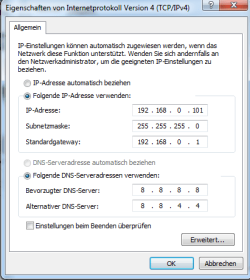
Well, i wanted to try to port forward a server, and while doing so i tried to change my internel IP to a static one (screen of what i mean is uploadet). As soon as i do change to a static ip, the internet is realy slow, and opening an website often takes 20-30 Seconds, and sometimes they don't even open at all.

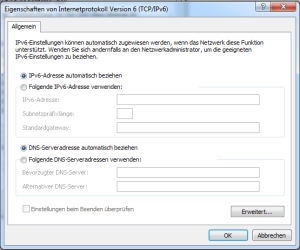
I only change my IPv6,

i can't or don't want to go on with trying to set up port forwarding (for a minecraft server) if my internet would slow down that much.
Any ideas?
 

My Computer

Computer type
PC/Desktop
OS
Windows 7 professional
CPU
AMD Phenom II X4 940
Motherboard
ASRock K10n78FullHD-hSLI.
Memory
DDR2 4GB
Graphics Card(s)
Radeon HD 5850
Antivirus
Avast
Browser
Firefox
Change the IPv6 address to DHCP.

Change the IPv4 address to a static IP address.
 

My Computer

Computer type
Laptop
Computer Manufacturer/Model Number
Employer provided Dell Latitude
OS
W7 Pro SP1 64bit
CPU
i7
Memory
8GB
Graphics Card(s)
Intel HD Graphics
Hard Drives
crappy SSD
Antivirus
Employer mandated Symantec Endpoint Protection
Browser
Pale Moon 64bit, IE11 64bit & Chrome 64bit
Hello,
IPv6 address is already changed to DHCP,
I will put 2 screenshoots for my IPv6 and for my IPv4 konfiguration.
So you can see how i have these two.
 

Attachments

  • StaticIp.png
    StaticIp.png
    13.6 KB · Views: 12
  • DynIP6.png
    DynIP6.png
    14 KB · Views: 12

My Computer

Computer type
PC/Desktop
OS
Windows 7 professional
CPU
AMD Phenom II X4 940
Motherboard
ASRock K10n78FullHD-hSLI.
Memory
DDR2 4GB
Graphics Card(s)
Radeon HD 5850
Antivirus
Avast
Browser
Firefox
I read it wrong when you said "I only change my IPv6,". I see what you mean by that now.

Try allowing your DNS to be set via DHCP... then restart the computer and test.
 

My Computer

Computer type
Laptop
Computer Manufacturer/Model Number
Employer provided Dell Latitude
OS
W7 Pro SP1 64bit
CPU
i7
Memory
8GB
Graphics Card(s)
Intel HD Graphics
Hard Drives
crappy SSD
Antivirus
Employer mandated Symantec Endpoint Protection
Browser
Pale Moon 64bit, IE11 64bit & Chrome 64bit
I read it wrong when you said "I only change my IPv6,".
Ahaha, sorry for that, my mistake.
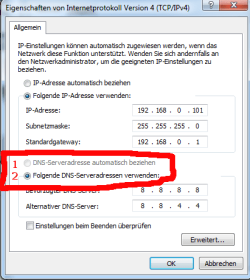
Anyway, thanks for your answere, i thought about that as well, but it seems rather impossible for me (see screenshoot below) The field to click is grey'ed out. Or do i missunderstand something here?


1. Seek DNS-Serveradress automaticle (grey'ed out)
2. Use the following DNS-Serveradress

(just in case someone didn't knew this, since the computer is put to my language, rather than english.
 

Attachments

  • StaticIpGreyField.png
    StaticIpGreyField.png
    13.7 KB · Views: 9

My Computer

Computer type
PC/Desktop
OS
Windows 7 professional
CPU
AMD Phenom II X4 940
Motherboard
ASRock K10n78FullHD-hSLI.
Memory
DDR2 4GB
Graphics Card(s)
Radeon HD 5850
Antivirus
Avast
Browser
Firefox
All changes you made were on computer.... not on router? What DNS servers do you get when using DHCP?
Fill it in instead of 8.8.8.8 and 8.8.4.4

In that case all is the same as DHCP. With dhcp you also get subnet mask 255.255.255.0 and standard gateway 192.168.0.1 and ip address 192.168.0.x
 

My Computer

Computer type
Laptop
Computer Manufacturer/Model Number
ACER ASPIRE 5742G
OS
Microsoft Windows 7 Home Premium 64-bits 7601 Multiprocessor Free Service Pack 1
CPU
Intel(R) Core(TM) i3 CPU M 370 @ 2.40GHz
Motherboard
Acer Aspire 5742G
Memory
4,00 GB
Graphics Card(s)
ATI Mobility Radeon HD 5400 Series
Sound Card
(1) AMD High Definition Audio Device (2) Realtek High Defi
Screen Resolution
1366 x 768 x 32 bits (4294967296 colors) @ 60 Hz
Hard Drives
WDC WD5000BEVT-22ZAT0
Well, because my internet was slowed down with an static ip, i put it to Dyn again. And even after i restarted my Router and PC my browser was loading websites realy slow or just did not load them. Right now i put it to static again and it seems to work without any problems (suddenly)

i will redo the process to portforward a minecraft Server on my PC and will see if the "Error" (slow Internet) happens to come by again.

I have literaly no idea why it's working again. I will let this thread open until i checked everything.


All changes you made were on computer.... not on router? What DNS servers do you get when using DHCP?
Fill it in instead of 8.8.8.8 and 8.8.4.4

In that case all is the same as DHCP. With dhcp you also get subnet mask 255.255.255.0 and standard gateway 192.168.0.1 and ip address 192.168.0.x

Yes, only on my Computer,

While i am using DHCP, i will get the standart gateway 192.168.0.1,

Yes, it is all the same.

It does seem to work with setting DNS Server for 192.168.0.1, i will stay with this one and test things further out.

I am still quit unsure why it does work now (see what i wrote above your qoute), maybe i messed with my pc while trying to set up the portforwarding(->Minecraft Server).

However, i will just try to set it up again, and i will see if it works now, or if i will humble somewhere again.

I will leave this thread open for now, until then.

Thank you for spending time, trying to help me.
 
Last edited:

My Computer

Computer type
PC/Desktop
OS
Windows 7 professional
CPU
AMD Phenom II X4 940
Motherboard
ASRock K10n78FullHD-hSLI.
Memory
DDR2 4GB
Graphics Card(s)
Radeon HD 5850
Antivirus
Avast
Browser
Firefox
DNS is likely to be a problem, so let's try to test that.

If you access Google by putting "www.google.com" does it takes forever to load? If you use its IP address directly instead (thus without requiring DNS), does it loads normally? (use https://173.194.42.49/, ignore the certificate error saying that hostname doesn't matches).

If so, it's a DNS problem, since you're using Google public DNS, they may be sometimes slower than regional ISPs. You can either try to determine what DNS server your DHCP recommends. However a far better choice is to run a benchmark of different servers and manually put the fastest ones, I used NameBench for that purpose (namebench - Open-source DNS Benchmark Utility - Google Project Hosting)
 

My Computer

Computer type
Laptop
Computer Manufacturer/Model Number
Toshiba Sattelite A665-S6092
OS
Windows 7 Ultimate x64
CPU
Intel Core i7-740QM
Memory
8 GB DDR3
Graphics Card(s)
NVIDIA GeForce 330GT
Screen Resolution
1366x768
Hard Drives
Samsung 840 SSD 500GB
1TB USB3 external HD
Cooling
Coolermaster Notepal U3 notebook cooling pad
Internet Speed
3mbps ASDL
Antivirus
ClamWin 0.98.7
Browser
Opera 12.17 x86 (main), Firefox 38 (sec), IE11 (last resort)
Back
Top