Static Ip or Dynamic?

ionbasa

New member
Guru
VIP
Local time
11:04 AM
Messages
744
Okay so I just started using opendns, well becouse they have a realy big rang of dns entries.
I decided to set up my modem which is a westell 327w. This router has a built in wifi ap, I have had this router ever since 2002 with verizon(its the one they gave me for free.)

For me to select my own cutom DNS servers the router needs to disable dhcp.

Before it looked like this:
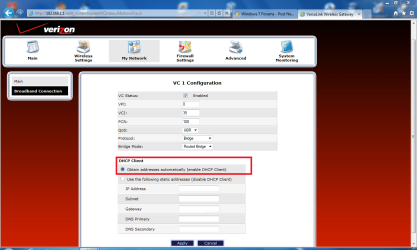
before1.png

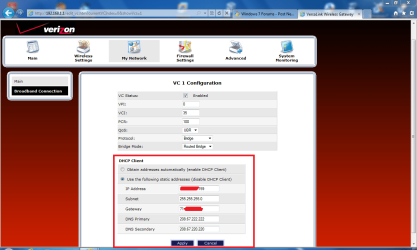
Now it looks like this:

after.PNG

My question will I get charged from my dsl provider( Verizon) for not using DHCP?
 
Last edited:

My Computer

Computer type
PC/Desktop
Computer Manufacturer/Model Number
HP Pavilion g7-1350dx
OS
Windows 7 Ultimate SP1 x64
CPU
AMD A6-3420M APU
Memory
4.0 Gb DDR3 838 MHz
Graphics Card(s)
AMD Radeon HD 6520G
Sound Card
IDT HD Audio
Screen Resolution
1600x 900
Hard Drives
500GB Hitachi HTS547550A9E384
You are confusing between an EXTERNAL (PUBLIC) static IP and an internal (private) IP. When you disable DHCP, you assign INTERNAL static IPs to the various computers on your INTERNAL network. When DHCP is enabled, this job is done by the router dynamically. Neither of these options affects your public ip address.

In short, your GATEWAY (router) has your Public IP address, and the computers in your networkhave private IP Addresses. So, there is an outside and an inside. Anyone "out there" can see your public IP, but only machines inside your own network know each other's individual private IP addresses (dynamic or static).

Your ISP will charge you if you request a PUBLIC static IP. E.g., if you want to host a website or a server from your home. With a static public IP, anybody can type that into the address bar and be directed to your website. E.g. typing http://74.125.45.100/ into your browser will take you staright to Google because that is Google's public IP.
 

My Computer

Computer Manufacturer/Model Number
Too many to describe...
OS
Windows 7 x64 pro/ Windows 7 x86 Pro/ XP SP3 x86
so the settings I changed shouldn't affect my puplic ip adress?

look at the box thats highlited, it requests a specific IP and specific Gatway, but if I turn on DHCP, these setting are automaticaly adgusted.
 

My Computer

Computer type
PC/Desktop
Computer Manufacturer/Model Number
HP Pavilion g7-1350dx
OS
Windows 7 Ultimate SP1 x64
CPU
AMD A6-3420M APU
Memory
4.0 Gb DDR3 838 MHz
Graphics Card(s)
AMD Radeon HD 6520G
Sound Card
IDT HD Audio
Screen Resolution
1600x 900
Hard Drives
500GB Hitachi HTS547550A9E384
For your modem config, suggest you consult its manual or get in touch with Verizon. BTW, does that screen actually let you change the gateway IP? Your modem is in bridge mode so the gateway IP would be the Public IP assigned by Verizon.
 

My Computer

Computer Manufacturer/Model Number
Too many to describe...
OS
Windows 7 x64 pro/ Windows 7 x86 Pro/ XP SP3 x86
ionbasa, Leave it assigned by DHCP unless you multiple computers and have dedicated IP address that you want assigned.
 

My Computer

OS
Windows 7 Ultimate x64 Service Pack 1 (Build 6.1.7601)
CPU
Intel Core 2 Quad Q6600 (G0 Kentsfield) LGA775 (FC-LGA6)
Motherboard
GIGABYTE GA-EP35C-DS3R (Rev. 2.1)
Memory
Corsair TW3X4G1333C9A 4GB PC-10600 (2x XMS3 2GB)
Graphics Card(s)
ASUS nVIDIA GeForce 560
Sound Card
RealTek ALC885/889A/890
Monitor(s) Displays
ChiMei CMV CT-730D 17inch (LCD Monitor)
Screen Resolution
1280-1024 60Hertz (Ture Colour 32bit)
Hard Drives
2x Barracuda 7200.10 SATA 3.0Gb/s 160-GB Hard Drive ST3160815AS (AHCI)
PSU
ANTEC 750w Earthwatts
Case
Thermaltake Shark (VA7000SWA ATX) Full Tower
Cooling
Front 120mm fan (1400 RPM) /Rear 120mm (1400 RPM) blue LED
Keyboard
Labtec Media Desktop Y-SAD65
Mouse
Razer DeathAdder 3G Infrared Sensor (1800DPI)
Internet Speed
Telstra BigPond Elite Liberty ADSL2+ 24Mbps/256kbps
Other Info
ASUS PCE-N13 802.11n Wireless LAN card
For your modem config, suggest you consult its manual or get in touch with Verizon. BTW, does that screen actually let you change the gateway IP? Your modem is in bridge mode so the gateway IP would be the Public IP assigned by Verizon.

Yes, my modem lets me asign my own gatway ip. I know that this is usualy asigned by verizon, I dont have the documentation anymore, and even if i could find it on the interent, verizon makes their own firmware for this box.

ionbasa, Leave it assigned by DHCP unless you multiple computers and have dedicated IP address that you want assigned.
Actualy this is for external, the DHCP for the external connection is disabled, but my inner network IP, 192.168.1.2 - 192.168.1.254 Still have it enabled, and then I have a printer and an ps3 which I asingned static/fixed IPs to for reliability, but of course that is outside the DHCP asigned IPs
 
Last edited:

My Computer

Computer type
PC/Desktop
Computer Manufacturer/Model Number
HP Pavilion g7-1350dx
OS
Windows 7 Ultimate SP1 x64
CPU
AMD A6-3420M APU
Memory
4.0 Gb DDR3 838 MHz
Graphics Card(s)
AMD Radeon HD 6520G
Sound Card
IDT HD Audio
Screen Resolution
1600x 900
Hard Drives
500GB Hitachi HTS547550A9E384
Okay new question. If you read my above post, and I can set my own gateway adress, isn't that bad. In a sence that I might get charged by verizon. Curently I was using Dynamic (public) IP, but if I set the default in the menu it will be static.

My fear: I might get charged by verizon, but rarelly does our dynamic IP change. I know this for a fact becouse it has't changed in 3.5 years.

What do you guys think?

(sorry for the duble post)
 

My Computer

Computer type
PC/Desktop
Computer Manufacturer/Model Number
HP Pavilion g7-1350dx
OS
Windows 7 Ultimate SP1 x64
CPU
AMD A6-3420M APU
Memory
4.0 Gb DDR3 838 MHz
Graphics Card(s)
AMD Radeon HD 6520G
Sound Card
IDT HD Audio
Screen Resolution
1600x 900
Hard Drives
500GB Hitachi HTS547550A9E384
Okay new question. If you read my above post, and I can set my own gateway adress, isn't that bad. In a sence that I might get charged by verizon. Curently I was using Dynamic (public) IP, but if I set the default in the menu it will be static.

My fear: I might get charged by verizon, but rarelly does our dynamic IP change. I know this for a fact becouse it has't changed in 3.5 years.

What do you guys think?

(sorry for the duble post)

You can set that however you want.
They should not just start charging you just cause you change it there.
The IP address will either be right or wrong. If it's wrong, no internet.
You would need to contact them requesting a Static Public IP to be charged.
Or at least I would hope so. Who knows. I would ask them though.
 

My Computer

Computer Manufacturer/Model Number
Self Built
OS
Win 7 Ultimate 32bit
CPU
C2D E6600 2.4Ghz
Motherboard
Intel D965WH
Memory
4G Kingston KHX5400D2
Graphics Card(s)
EVGA GTX 570 HD SC (012-P3-1573-KR)
Sound Card
On-Board
Monitor(s) Displays
Samsung 226BW
Screen Resolution
1680 x 1050
Hard Drives
2 x 250 Seagate Barracuda
2 x 500 Seagate Barracuda (Raid1)
PSU
Corsair TX750W
Case
In-Win C589
Cooling
Stock Intel Cooling
So as long as it is set to the default gatway Ip w/o puplic DHCP, i should not be charged? Verizon always has hidden ways and excuses to get you'r money:p
 

My Computer

Computer type
PC/Desktop
Computer Manufacturer/Model Number
HP Pavilion g7-1350dx
OS
Windows 7 Ultimate SP1 x64
CPU
AMD A6-3420M APU
Memory
4.0 Gb DDR3 838 MHz
Graphics Card(s)
AMD Radeon HD 6520G
Sound Card
IDT HD Audio
Screen Resolution
1600x 900
Hard Drives
500GB Hitachi HTS547550A9E384
Back
Top