
Hey all,
Since today I can't connect to the modem with my desktop pc(windows 7 x64). I get APIPA as IP adress(169.254.*.*).
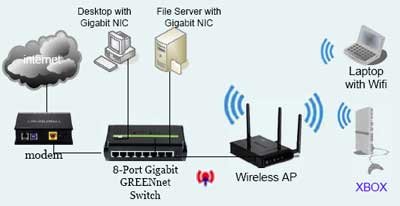
this is how my connection looks like. I got only modem & switch between my connection to the internet. edit: without the fileserver
I've checked the following things with my other PC(=notebook windows 7 x86): modem, switch, cable and my network card and everything did work fine.
note: I did use the same cable as I was using for the desktop PC to be sure that the cableline was fine.
edit:I made the next tests with my desktop PC.
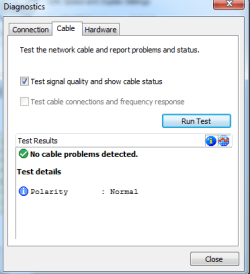
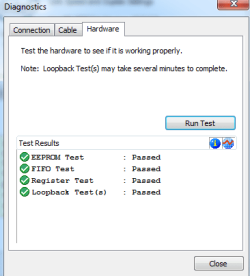
Then done the next ones without success:
My network card settings are the same for the both PC, set to automatically obtain IP address and DNS server addresses
ipconfig /all of my desktop pc.(not working)
ipconfig /all of my notebook pc.(working)
Since today I can't connect to the modem with my desktop pc(windows 7 x64). I get APIPA as IP adress(169.254.*.*).
this is how my connection looks like. I got only modem & switch between my connection to the internet. edit: without the fileserver
I've checked the following things with my other PC(=notebook windows 7 x86): modem, switch, cable and my network card and everything did work fine.
note: I did use the same cable as I was using for the desktop PC to be sure that the cableline was fine.
edit:I made the next tests with my desktop PC.
Then done the next ones without success:
- system restore(1 week)
- winsock fix
- reinstalling the networkcard
- giving static IP adress
My network card settings are the same for the both PC, set to automatically obtain IP address and DNS server addresses
ipconfig /all of my desktop pc.(not working)
Code:
Microsoft Windows [Version 6.1.7601]
Copyright (c) 2009 Microsoft Corporation.  All rights reserved.

ipconfig /all

Windows IP Configuration

   Host Name . . . . . . . . . . . . : PC
   Primary Dns Suffix  . . . . . . . :
   Node Type . . . . . . . . . . . . : Hybrid
   IP Routing Enabled. . . . . . . . : No
   WINS Proxy Enabled. . . . . . . . : No

Ethernet adapter Local Area Connection:

   Connection-specific DNS Suffix  . :
   Description . . . . . . . . . . . : Intel(R) 82578DC Gigabit Network Connecti
on
   Physical Address. . . . . . . . . : 70-71-BC-A8-20-52
   DHCP Enabled. . . . . . . . . . . : Yes
   Autoconfiguration Enabled . . . . : Yes
   Link-local IPv6 Address . . . . . : fe80::6c1e:8272:b8cb:7d94%22(Preferred)
   Autoconfiguration IPv4 Address. . : 169.254.125.148(Preferred)
   Subnet Mask . . . . . . . . . . . : 255.255.0.0
   Default Gateway . . . . . . . . . :
   DHCPv6 IAID . . . . . . . . . . . : 175141308
   DHCPv6 Client DUID. . . . . . . . : 00-01-00-01-14-DC-05-51-70-71-BC-A8-20-52

   DNS Servers . . . . . . . . . . . : fec0:0:0:ffff::1%1
                                       fec0:0:0:ffff::2%1
                                       fec0:0:0:ffff::3%1
   NetBIOS over Tcpip. . . . . . . . : Enabled

Tunnel adapter isatap.{1CF22D94-5DCF-45C1-8853-0A4E9A6D6E08}:

   Media State . . . . . . . . . . . : Media disconnected
   Connection-specific DNS Suffix  . :
   Description . . . . . . . . . . . : Microsoft ISATAP Adapter
   Physical Address. . . . . . . . . : 00-00-00-00-00-00-00-E0
   DHCP Enabled. . . . . . . . . . . : No
   Autoconfiguration Enabled . . . . : Yes

Tunnel adapter Teredo Tunneling Pseudo-Interface:

   Media State . . . . . . . . . . . : Media disconnected
   Connection-specific DNS Suffix  . :
   Description . . . . . . . . . . . : Teredo Tunneling Pseudo-Interface
   Physical Address. . . . . . . . . : 00-00-00-00-00-00-00-E0
   DHCP Enabled. . . . . . . . . . . : No
   Autoconfiguration Enabled . . . . : Yes
ipconfig /all of my notebook pc.(working)
Code:
Microsoft Windows [versie 6.1.7601]
Copyright (c) 2009 Microsoft Corporation. Alle rechten voorbehouden.

ipconfig /all

Windows IP-configuratie

   Hostnaam  . . . . . . . . . . . . : PC
   Primair DNS-achtervoegsel . . . . :
   Knooppunttype . . . . . . . . . . : hybride
   IP-routering ingeschakeld . . . . : nee
   WINS-proxy ingeschakeld . . . . . : nee
   DNS-achtervoegselzoeklijst. . . . : telenet.be

Ethernet-adapter voor LAN-verbinding:

   Verbindingsspec. DNS-achtervoegsel: telenet.be
   Beschrijving. . . . . . . . . . . : Marvell Yukon 88E8036 PCI-E Fast Ethernet-controller
   Fysiek adres. . . . . . . . . . . : 00-1A-80-18-5C-74
   DHCP ingeschakeld . . . . . . . . : ja
   Autom. configuratie ingeschakeld  : ja
   IPv6-adres. . . . . . . . . . . . : 2002:54c2:e306:b:29ed:5ff5:ba7e:600d(voorkeur)
   IPv6-adres. . . . . . . . . . . . : 2002:54c2:e369:b:29ed:5ff5:ba7e:600d(voorkeur)
   IPv6-adres in lokale site . . . . : fec0::b:29ed:5ff5:ba7e:600d%2(voorkeur)
   Tijdelijk IPv6-adres. . . . . . . : 2002:54c2:e306:b:29ee:eff9:48be:dc37(voorkeur)
   Tijdelijk IPv6-adres. . . . . . . : 2002:54c2:e369:b:29ee:eff9:48be:dc37(voorkeur)
   Link-local IPv6-adres . . . . . . : fe80::29ed:5ff5:ba7e:600d%11(voorkeur)
   IPv4-adres. . . . . . . . . . . . : 84.194.227.6(voorkeur)
   Subnetmasker. . . . . . . . . . . : 255.255.224.0
   Lease verkregen . . . . . . . . . : woensdag 28 september 2011 20:23:43
   Lease verlopen. . . . . . . . . . : woensdag 28 september 2011 21:23:43
   Standaardgateway. . . . . . . . . : 84.194.224.1
   DHCP-server . . . . . . . . . . . : 195.130.132.102
   DHCPv6 IAID . . . . . . . . . . . : 268442240
   DHCPv6-client DUID. . . . . . . . : 00-01-00-01-15-2E-2E-9E-00-1A-80-18-5C-74

   DNS-servers . . . . . . . . . . . : 195.130.131.131
                                       195.130.130.3
   NetBIOS via TCPIP . . . . . . . . : ingeschakeld

Draadloos LAN-adapter voor Draadloze netwerkverbinding:

   Mediumstatus. . . . . . . . . . . : medium ontkoppeld
   Verbindingsspec. DNS-achtervoegsel: telenet.be
   Beschrijving. . . . . . . . . . . : Intel(R) Wireless WiFi Link 4965AGN
   Fysiek adres. . . . . . . . . . . : 00-13-E8-EE-1F-B9
   DHCP ingeschakeld . . . . . . . . : ja
   Autom. configuratie ingeschakeld  : ja

Tunnel-adapter voor LAN-verbinding* 2:

   Verbindingsspec. DNS-achtervoegsel:
   Beschrijving. . . . . . . . . . . : Teredo Tunneling Pseudo-Interface
   Fysiek adres. . . . . . . . . . . : 00-00-00-00-00-00-00-E0
   DHCP ingeschakeld . . . . . . . . : nee
   Autom. configuratie ingeschakeld  : ja
   IPv6-adres. . . . . . . . . . . . : 2001:0:5ef5:79fd:2cac:57f:ab3d:1cf9(voorkeur)
   Link-local IPv6-adres . . . . . . : fe80::2cac:57f:ab3d:1cf9%33(voorkeur)
   Standaardgateway. . . . . . . . . :
   NetBIOS via TCPIP . . . . . . . . : uitgeschakeld

Tunnel-adapter voor isatap.telenet.be:

   Mediumstatus. . . . . . . . . . . : medium ontkoppeld
   Verbindingsspec. DNS-achtervoegsel: telenet.be
   Beschrijving. . . . . . . . . . . : Microsoft ISATAP Adapter #8
   Fysiek adres. . . . . . . . . . . : 00-00-00-00-00-00-00-E0
   DHCP ingeschakeld . . . . . . . . : nee
   Autom. configuratie ingeschakeld  : ja

Tunnel-adapter voor 6TO4 Adapter:

   Verbindingsspec. DNS-achtervoegsel: telenet.be
   Beschrijving. . . . . . . . . . . : Microsoft 6to4 Adapter
   Fysiek adres. . . . . . . . . . . : 00-00-00-00-00-00-00-E0
   DHCP ingeschakeld . . . . . . . . : nee
   Autom. configuratie ingeschakeld  : ja
   IPv6-adres. . . . . . . . . . . . : 2002:54c2:e306::54c2:e306(voorkeur)
   IPv6-adres. . . . . . . . . . . . : 2002:54c2:e369::54c2:e369(voorkeur)
   Standaardgateway. . . . . . . . . : 2002:c058:6301::c058:6301
   DNS-servers . . . . . . . . . . . : 195.130.131.131
                                       195.130.130.3
   NetBIOS via TCPIP . . . . . . . . : uitgeschakeld
Attachments
Last edited:
My Computer
At a glance
Windows 7 Ultimate x64
- OS
- Windows 7 Ultimate x64


