Steady degredation of network connection

sanspersonality

New member
Local time
9:51 AM
Messages
12
Hello,
I recently upgraded from vista to win7 and I have noticed that whenever I want to visit a website (this one included) i often have to click the link twice for my browser (firefox) to change pages. The first click sends the request and eventually times out. While the progress bar stalls out at about 50% if I hit the link again it goes right to the page. If I go to speakeasy.net and test my connection, 1 attempt will correctly display my 20mb connection, the next attempt shows 2mb, while further attempts either show any speeds inbetween or it will just time-out eventually. My upload speed is always correctly displayed at about 2mb. All other computers on my network have no trouble. I have my network card set for 100mbFD (changed with no effect from autonegotiate. When I try and download files from the internet (drivers, documents from attachments etc...) my transfer speed slowly and steadily degrades from 1mb/sec to idle. If a file does actually come close to fully dowloading, the file ends up corrupted due to data loss, or it cancels completley due to lost connection to server. My motherboard is asus M2N-SLI Deluxe with current nvidia nforce driver 73.1.4.0. Using the device manager, win7 shows my driver to be up-to-date (which is false because it said the driver it found for the card was current, but it isn't) and nvidia's driver manager also shows my driver to be up-to-date.

Even internal network transfers suffer. Files from my fileserver also start out fast and continue to deteriorate to idle.

I'm a pretty novice network person, but i've looked at my router/firewall, device manager, win7 network settings and nothing seems abnormal or unusual.

Like I said, every other computer on my network has 'normal' connectivity and it is just this comp. Any ideas? Thanks in advance
 

My Computer My Computer

At a glance

win76gb corsairnvidia 9800
OS
win7
Motherboard
asus m2n sli deluxe
Memory
6gb corsair
Graphics Card(s)
nvidia 9800
Sound Card
onboard
Monitor(s) Displays
samsung
Hello,
I recently upgraded from vista to win7 and I have noticed that whenever I want to visit a website (this one included) i often have to click the link twice for my browser (firefox) to change pages. The first click sends the request and eventually times out. While the progress bar stalls out at about 50% if I hit the link again it goes right to the page. If I go to speakeasy.net and test my connection, 1 attempt will correctly display my 20mb connection, the next attempt shows 2mb, while further attempts either show any speeds inbetween or it will just time-out eventually. My upload speed is always correctly displayed at about 2mb. All other computers on my network have no trouble. I have my network card set for 100mbFD (changed with no effect from autonegotiate. When I try and download files from the internet (drivers, documents from attachments etc...) my transfer speed slowly and steadily degrades from 1mb/sec to idle. If a file does actually come close to fully dowloading, the file ends up corrupted due to data loss, or it cancels completley due to lost connection to server. My motherboard is asus M2N-SLI Deluxe with current nvidia nforce driver 73.1.4.0. Using the device manager, win7 shows my driver to be up-to-date (which is false because it said the driver it found for the card was current, but it isn't) and nvidia's driver manager also shows my driver to be up-to-date.

Even internal network transfers suffer. Files from my fileserver also start out fast and continue to deteriorate to idle.

I'm a pretty novice network person, but i've looked at my router/firewall, device manager, win7 network settings and nothing seems abnormal or unusual.

Like I said, every other computer on my network has 'normal' connectivity and it is just this comp. Any ideas? Thanks in advance

A few common problems that can cause your situation is the Anti Virus (deactivate and see how things work), programs not closing completely (go to task manager (alt, cntrl, delete) and see whats running, when you have the problem) or worst scenario, a virus. Run your Anti Virus to make sure that you are clen. If these things do not help you, right click on network icon and then troubleshoot.
 

My Computer My Computer

At a glance

Windows 10, Home Clean InstallIntel Core2 processsor Q8200(2.33Ghz 1333FSB)...6 gbATI Radeon 256MB HD3650
Computer type
PC/Desktop
Computer Manufacturer/Model Number
Dell XPS 420
OS
Windows 10, Home Clean Install
CPU
Intel Core2 processsor Q8200(2.33Ghz 1333FSB) Quad Core Tech
Motherboard
Dell
Memory
6 gb
Graphics Card(s)
ATI Radeon 256MB HD3650
Sound Card
Intergrated 7.1 Channel Audio
Monitor(s) Displays
Dell SP2009W 20"
Hard Drives
640 GB Serial ATA Hard drive
Cooling
Fan
Keyboard
Dell USB Keyboard
Mouse
Dell Premium Optical USB
Internet Speed
DSL 2.85
It's not a virus, I tried disabling my anti virus program and it still persists. Also, with just the startup programs running this problem is still plaguing me.

The troubleshooter tells me that everything is fine or it didn't find a problem.
 

My Computer My Computer

At a glance

win76gb corsairnvidia 9800
OS
win7
Motherboard
asus m2n sli deluxe
Memory
6gb corsair
Graphics Card(s)
nvidia 9800
Sound Card
onboard
Monitor(s) Displays
samsung
Go to event viewer and see if any errors are noted.

Just type event viewer in search.
 

My Computer My Computer

At a glance

Windows 10, Home Clean InstallIntel Core2 processsor Q8200(2.33Ghz 1333FSB)...6 gbATI Radeon 256MB HD3650
Computer type
PC/Desktop
Computer Manufacturer/Model Number
Dell XPS 420
OS
Windows 10, Home Clean Install
CPU
Intel Core2 processsor Q8200(2.33Ghz 1333FSB) Quad Core Tech
Motherboard
Dell
Memory
6 gb
Graphics Card(s)
ATI Radeon 256MB HD3650
Sound Card
Intergrated 7.1 Channel Audio
Monitor(s) Displays
Dell SP2009W 20"
Hard Drives
640 GB Serial ATA Hard drive
Cooling
Fan
Keyboard
Dell USB Keyboard
Mouse
Dell Premium Optical USB
Internet Speed
DSL 2.85
negative, no errors. :(
 

My Computer My Computer

At a glance

win76gb corsairnvidia 9800
OS
win7
Motherboard
asus m2n sli deluxe
Memory
6gb corsair
Graphics Card(s)
nvidia 9800
Sound Card
onboard
Monitor(s) Displays
samsung
go to search type in cmd When you get the cmd prompt type in ipconfig and post here.

I or someone else might be able to give you information from what the ipconfig shows.
 

My Computer My Computer

At a glance

Windows 10, Home Clean InstallIntel Core2 processsor Q8200(2.33Ghz 1333FSB)...6 gbATI Radeon 256MB HD3650
Computer type
PC/Desktop
Computer Manufacturer/Model Number
Dell XPS 420
OS
Windows 10, Home Clean Install
CPU
Intel Core2 processsor Q8200(2.33Ghz 1333FSB) Quad Core Tech
Motherboard
Dell
Memory
6 gb
Graphics Card(s)
ATI Radeon 256MB HD3650
Sound Card
Intergrated 7.1 Channel Audio
Monitor(s) Displays
Dell SP2009W 20"
Hard Drives
640 GB Serial ATA Hard drive
Cooling
Fan
Keyboard
Dell USB Keyboard
Mouse
Dell Premium Optical USB
Internet Speed
DSL 2.85
C:\Users\nick>ipconfig /all
windows IP configuration

host name ..... NicksBox
primary Dns Suffix :
node type: ..... Hybrid
IP routing enabled: ...... no
wins proxy enabled ...... no

Ethernet adapter local area connection 2:
Connection-Specific DNS suffix . :
Description ..... : NVIDIA nForce 10/100/1000 Mbps Ethernet #2
physical address .... : 00-18-f3-73-d6-45
DHCP Enabled .... : no
Autoconfiguration Enabled .....: yes
link-local IPv6 address fe80::f4ae:6e92:8785:af21%13(preferred)
IPv4 Address..... 192.168.0.101 (preferred)
subnet mask .....: 255.255.255.0
Default Gateway ....: 192.168.0.1
DHCPv6 IAID ...... 301996275
DHCPv6 Client DVID .... : 00-01-00-01-12-9e-76-02-00-18-f3-73-ca-48
DNS servers ....: 192.168.0.1
Netbios over Tcpip ....:enabled


- is there a way to output that to a file? i had to hand-type all that in. in linux you can, from a command prompt type something like ipconfig < log.txt and upload the file or at least ctrl-c / ctrl-v
 

My Computer My Computer

At a glance

win76gb corsairnvidia 9800
OS
win7
Motherboard
asus m2n sli deluxe
Memory
6gb corsair
Graphics Card(s)
nvidia 9800
Sound Card
onboard
Monitor(s) Displays
samsung
Try this, until others more proficient in network connections come along. Disconnect your modem (some have off switch, mine requires a shut down from power supply ie plug the plug.) Turn off computer, wait few minutes, then boot up and reactivate modem and see what happens.

Why don't you, also, try using IE, see if it gives better results.
 

My Computer My Computer

At a glance

Windows 10, Home Clean InstallIntel Core2 processsor Q8200(2.33Ghz 1333FSB)...6 gbATI Radeon 256MB HD3650
Computer type
PC/Desktop
Computer Manufacturer/Model Number
Dell XPS 420
OS
Windows 10, Home Clean Install
CPU
Intel Core2 processsor Q8200(2.33Ghz 1333FSB) Quad Core Tech
Motherboard
Dell
Memory
6 gb
Graphics Card(s)
ATI Radeon 256MB HD3650
Sound Card
Intergrated 7.1 Channel Audio
Monitor(s) Displays
Dell SP2009W 20"
Hard Drives
640 GB Serial ATA Hard drive
Cooling
Fan
Keyboard
Dell USB Keyboard
Mouse
Dell Premium Optical USB
Internet Speed
DSL 2.85
i've already tried restarting my modem/router/switch, no change. Also, i don't think it's a firefox issue because network transfers suffer the same fate. i'll give the restart a try though, just to see if i get lucky :D.

thanks for the suggestions btw.
 

My Computer My Computer

At a glance

win76gb corsairnvidia 9800
OS
win7
Motherboard
asus m2n sli deluxe
Memory
6gb corsair
Graphics Card(s)
nvidia 9800
Sound Card
onboard
Monitor(s) Displays
samsung
I plan to watch this thread, while thinking of solutions. I know this problem will be solved, the combined knowledge available on this site is awesome.
 

My Computer My Computer

At a glance

Windows 10, Home Clean InstallIntel Core2 processsor Q8200(2.33Ghz 1333FSB)...6 gbATI Radeon 256MB HD3650
Computer type
PC/Desktop
Computer Manufacturer/Model Number
Dell XPS 420
OS
Windows 10, Home Clean Install
CPU
Intel Core2 processsor Q8200(2.33Ghz 1333FSB) Quad Core Tech
Motherboard
Dell
Memory
6 gb
Graphics Card(s)
ATI Radeon 256MB HD3650
Sound Card
Intergrated 7.1 Channel Audio
Monitor(s) Displays
Dell SP2009W 20"
Hard Drives
640 GB Serial ATA Hard drive
Cooling
Fan
Keyboard
Dell USB Keyboard
Mouse
Dell Premium Optical USB
Internet Speed
DSL 2.85
Is this your motherboard? ASUSTeK Computer Inc.

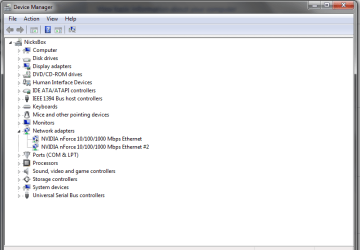
Can you take a snap shot of your device manager and post it?

Maybe go to device manger uninstall Network adapters and reboot.
 

My Computer My Computer

At a glance

Windows 7 x64Intel Core i7 930OCZ 6GBkit OCZ3G1600LV6GK 8-8-8-24-2T 1.65V(2) HIS ATI Radeon HD 5770 CROSSFIRE (H577QT1GD)
Computer Manufacturer/Model Number
Built by Mark
OS
Windows 7 x64
CPU
Intel Core i7 930
Motherboard
Gigabyte GA-X58A-UD3R Bios F5
Memory
OCZ 6GBkit OCZ3G1600LV6GK 8-8-8-24-2T 1.65V
Graphics Card(s)
(2) HIS ATI Radeon HD 5770 CROSSFIRE (H577QT1GD)
Sound Card
On board Realtek HD
Monitor(s) Displays
Samsung SyncMaster 2343 22" Wide Screen
Screen Resolution
2048x1152
Hard Drives
Two Western Digital 320 Gig Blue series WDC WD3200AAKS-00L9A0
PSU
Corsiar 750 watts TX750W
Case
Antec NINE Hundred Two (air filters & adjustable fan speed)
Cooling
Cooler Master Hyper 212 Plus CPU cooler
Keyboard
Logitech
Mouse
Logitech MX310
Internet Speed
20 meg down/ 5 meg up
Other Info
Hewlett Packard Deskjet 932C printer
Epson 4990 Photo scanner
yea, that's my MB, here's my devicemanager, i'll try to uninstall/re-install the network controller.
 

Attachments

  • device_manager.png
    device_manager.png
    18.1 KB · Views: 43

My Computer My Computer

At a glance

win76gb corsairnvidia 9800
OS
win7
Motherboard
asus m2n sli deluxe
Memory
6gb corsair
Graphics Card(s)
nvidia 9800
Sound Card
onboard
Monitor(s) Displays
samsung
ok, i uninstalled my network card, restarted my comp and windows found the card again and it's default driver is 1.0.1.211, it says it's up to date. And, unfortunately i'm still having issues.

Also, I'm sure it's relevant, just not sure how: I can play multiplayer games like Counterstrike: Source online, and the connection is fine (low ping < 50ms, no lag spikes etc...). I can connect to my ubuntu fileserver through ssh (putty), though the connection is pretty laggy.
 

My Computer My Computer

At a glance

win76gb corsairnvidia 9800
OS
win7
Motherboard
asus m2n sli deluxe
Memory
6gb corsair
Graphics Card(s)
nvidia 9800
Sound Card
onboard
Monitor(s) Displays
samsung
I told you that I would not forget about you try this:

Use IE, see if it works

Run your current browser without add on, if that is an option

Make sure your browser is either the correct version 32 or 64 bit
 

My Computer My Computer

At a glance

Windows 10, Home Clean InstallIntel Core2 processsor Q8200(2.33Ghz 1333FSB)...6 gbATI Radeon 256MB HD3650
Computer type
PC/Desktop
Computer Manufacturer/Model Number
Dell XPS 420
OS
Windows 10, Home Clean Install
CPU
Intel Core2 processsor Q8200(2.33Ghz 1333FSB) Quad Core Tech
Motherboard
Dell
Memory
6 gb
Graphics Card(s)
ATI Radeon 256MB HD3650
Sound Card
Intergrated 7.1 Channel Audio
Monitor(s) Displays
Dell SP2009W 20"
Hard Drives
640 GB Serial ATA Hard drive
Cooling
Fan
Keyboard
Dell USB Keyboard
Mouse
Dell Premium Optical USB
Internet Speed
DSL 2.85
i meant to put this in another post, but yea I tried already with explorer, same thing.
 

My Computer My Computer

At a glance

win76gb corsairnvidia 9800
OS
win7
Motherboard
asus m2n sli deluxe
Memory
6gb corsair
Graphics Card(s)
nvidia 9800
Sound Card
onboard
Monitor(s) Displays
samsung
yea, that's my MB, here's my devicemanager, i'll try to uninstall/re-install the network controller.

I see two network controllers?
Maybe you have the wrong driver?

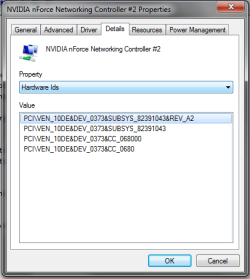
Open up device manager and copy the hardware ID's in the post.
 

Attachments

  • Capture.JPG
    Capture.JPG
    31.5 KB · Views: 22

My Computer My Computer

At a glance

Windows 7 x64Intel Core i7 930OCZ 6GBkit OCZ3G1600LV6GK 8-8-8-24-2T 1.65V(2) HIS ATI Radeon HD 5770 CROSSFIRE (H577QT1GD)
Computer Manufacturer/Model Number
Built by Mark
OS
Windows 7 x64
CPU
Intel Core i7 930
Motherboard
Gigabyte GA-X58A-UD3R Bios F5
Memory
OCZ 6GBkit OCZ3G1600LV6GK 8-8-8-24-2T 1.65V
Graphics Card(s)
(2) HIS ATI Radeon HD 5770 CROSSFIRE (H577QT1GD)
Sound Card
On board Realtek HD
Monitor(s) Displays
Samsung SyncMaster 2343 22" Wide Screen
Screen Resolution
2048x1152
Hard Drives
Two Western Digital 320 Gig Blue series WDC WD3200AAKS-00L9A0
PSU
Corsiar 750 watts TX750W
Case
Antec NINE Hundred Two (air filters & adjustable fan speed)
Cooling
Cooler Master Hyper 212 Plus CPU cooler
Keyboard
Logitech
Mouse
Logitech MX310
Internet Speed
20 meg down/ 5 meg up
Other Info
Hewlett Packard Deskjet 932C printer
Epson 4990 Photo scanner
the motherboard has 2 ports. I've tried using both ports and I get the same effect.
 

Attachments

  • Hardware_ID.png
    Hardware_ID.png
    12.7 KB · Views: 7

My Computer My Computer

At a glance

win76gb corsairnvidia 9800
OS
win7
Motherboard
asus m2n sli deluxe
Memory
6gb corsair
Graphics Card(s)
nvidia 9800
Sound Card
onboard
Monitor(s) Displays
samsung
You didn't say if your running Win 7 32 bit or 64 bit.

I'm sure you went to Drivers - Download NVIDIA Drivers and downloaded the latest drivers.

NVIDIA DRIVERS 15.51 WHQL Win 7 32 bit

NVIDIA DRIVERS 15.51 WHQL Win 7 64 bit

I tried a search for "M2N-SLI Deluxe network problem" and others have the same problem. They decided on buying a network card and disabling the on-board ethernet. You can buy one at bestbuy for $25 and see if that fixes your problem. You can always return it.
 

My Computer My Computer

At a glance

Windows 7 x64Intel Core i7 930OCZ 6GBkit OCZ3G1600LV6GK 8-8-8-24-2T 1.65V(2) HIS ATI Radeon HD 5770 CROSSFIRE (H577QT1GD)
Computer Manufacturer/Model Number
Built by Mark
OS
Windows 7 x64
CPU
Intel Core i7 930
Motherboard
Gigabyte GA-X58A-UD3R Bios F5
Memory
OCZ 6GBkit OCZ3G1600LV6GK 8-8-8-24-2T 1.65V
Graphics Card(s)
(2) HIS ATI Radeon HD 5770 CROSSFIRE (H577QT1GD)
Sound Card
On board Realtek HD
Monitor(s) Displays
Samsung SyncMaster 2343 22" Wide Screen
Screen Resolution
2048x1152
Hard Drives
Two Western Digital 320 Gig Blue series WDC WD3200AAKS-00L9A0
PSU
Corsiar 750 watts TX750W
Case
Antec NINE Hundred Two (air filters & adjustable fan speed)
Cooling
Cooler Master Hyper 212 Plus CPU cooler
Keyboard
Logitech
Mouse
Logitech MX310
Internet Speed
20 meg down/ 5 meg up
Other Info
Hewlett Packard Deskjet 932C printer
Epson 4990 Photo scanner
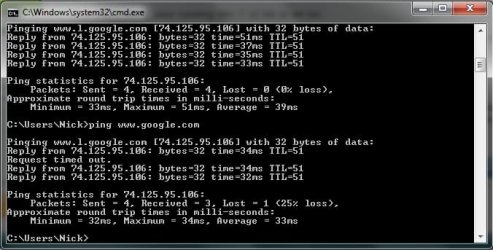
sorry, I have 64bit and I just installed that driver you linked, I had found a different one.73.1.4.0 was the version number I got it from NVIDIA DRIVERS 15.49 WHQL It'd be nice if my 2 onboard ports worked... :( I hadn't done a ping, so I thought I'd see what results I got. here's the pic if it helps any. Is there any way to test a bigger packet or make more attempts?
 

Attachments

  • ping.jpg
    ping.jpg
    44.7 KB · Views: 9

My Computer My Computer

At a glance

win76gb corsairnvidia 9800
OS
win7
Motherboard
asus m2n sli deluxe
Memory
6gb corsair
Graphics Card(s)
nvidia 9800
Sound Card
onboard
Monitor(s) Displays
samsung

My Computer My Computer

At a glance

Windows 7 x64Intel Core i7 930OCZ 6GBkit OCZ3G1600LV6GK 8-8-8-24-2T 1.65V(2) HIS ATI Radeon HD 5770 CROSSFIRE (H577QT1GD)
Computer Manufacturer/Model Number
Built by Mark
OS
Windows 7 x64
CPU
Intel Core i7 930
Motherboard
Gigabyte GA-X58A-UD3R Bios F5
Memory
OCZ 6GBkit OCZ3G1600LV6GK 8-8-8-24-2T 1.65V
Graphics Card(s)
(2) HIS ATI Radeon HD 5770 CROSSFIRE (H577QT1GD)
Sound Card
On board Realtek HD
Monitor(s) Displays
Samsung SyncMaster 2343 22" Wide Screen
Screen Resolution
2048x1152
Hard Drives
Two Western Digital 320 Gig Blue series WDC WD3200AAKS-00L9A0
PSU
Corsiar 750 watts TX750W
Case
Antec NINE Hundred Two (air filters & adjustable fan speed)
Cooling
Cooler Master Hyper 212 Plus CPU cooler
Keyboard
Logitech
Mouse
Logitech MX310
Internet Speed
20 meg down/ 5 meg up
Other Info
Hewlett Packard Deskjet 932C printer
Epson 4990 Photo scanner
Back
Top