Stereo Mix Distortion (Win7x64 HT Striker 7.1)

ThatEnglishDude

New member
Local time
2:32 AM
Messages
19
Hey Seven forums,

So I finally got the infamous Stereo Mix to work. Well, sorta. I have an issue whereby my spoken voice will be clear, yet the computer sounds are really...scratchy and distorted. As if it's being played too loud (yet it's volume is fine - without the scratching of course)

The odd thing is, I'll do a test record and it will be fine. I won't touch NOTHING, do another test and the problem will return. I have tried setting my playback volume and recording volume of the stereo mix to 60%, as with FME (Flash Media Encoder) recording volume. Turning it any lower just makes both my voice, and the computer too quiet to distinguish.

Using the latest drivers on a HT Striker 7.1 Sound Card.

Any help would be greatly appreciated!
 

My Computer My Computer

At a glance

Windows 7 x64Intel i5 750 2.67GHz Quad Core6GB Kingston DDR3BFG nVIDIA GTS 250 OC
OS
Windows 7 x64
CPU
Intel i5 750 2.67GHz Quad Core
Motherboard
GIGABYTE P55-UD3L
Memory
6GB Kingston DDR3
Graphics Card(s)
BFG nVIDIA GTS 250 OC
Sound Card
Onboard Realtek ALC888 HD Audio
I have a Striker 7.1 sound card.

Have you tried setting the microphone recording level, instead of the Stereo Mix recording level? Also, have you tried using the Windows Sound Recorder rather than whatever you are using?

Is the recorded mic voice the ONLY playback problem?
 
Last edited:

My Computer My Computer

At a glance

Windows 10 64 bitIntel i7 6700K16GB Corsair DominatorIntel CPU Graphics
Computer type
PC/Desktop
Computer Manufacturer/Model Number
My Own Build
OS
Windows 10 64 bit
CPU
Intel i7 6700K
Motherboard
ASUS ROG Maximus VIII Hero
Memory
16GB Corsair Dominator
Graphics Card(s)
Intel CPU Graphics
Sound Card
RealTek
Monitor(s) Displays
27" Dell S2719dgf
Screen Resolution
2560X1440
Hard Drives
1 TB Samsung 850 EVO SSD for Win 10 Pro
500GB Samsung 850 EVO SSD for Win 10 Insider
2 TB drive for backup
PSU
EVGA Supernova 750G2
Case
BeQuiet Silent Base 600
Cooling
Deepcool Captain 120EX
Keyboard
Microsoft Wireless 2000
Mouse
Microsoft wireless
Internet Speed
100 MB/sec (Cable)
Antivirus
Microsoft Defender and Malwarebytes
Browser
Edge/Firefox
Other Info
Cakewalk (Sonar) by BandLab and Studio One 4.1 Pro recording studio software. MOTU 896Mk3 Hybrid recording interface, Frontier Tranzport wireless control unit, Behringer X-Touch Control Surface.
Five USB connected optical drives for CD Audio production using Nero BurningROM
Thank you for your response,

I've tried what you suggested but it makes no difference. Any other suggestions?
 

My Computer My Computer

At a glance

Windows 7 x64Intel i5 750 2.67GHz Quad Core6GB Kingston DDR3BFG nVIDIA GTS 250 OC
OS
Windows 7 x64
CPU
Intel i5 750 2.67GHz Quad Core
Motherboard
GIGABYTE P55-UD3L
Memory
6GB Kingston DDR3
Graphics Card(s)
BFG nVIDIA GTS 250 OC
Sound Card
Onboard Realtek ALC888 HD Audio
Here's an example of what I mean. Note how it's scratchy. The actual sound of the music is fine otherwise.
 

Attachments

My Computer My Computer

At a glance

Windows 7 x64Intel i5 750 2.67GHz Quad Core6GB Kingston DDR3BFG nVIDIA GTS 250 OC
OS
Windows 7 x64
CPU
Intel i5 750 2.67GHz Quad Core
Motherboard
GIGABYTE P55-UD3L
Memory
6GB Kingston DDR3
Graphics Card(s)
BFG nVIDIA GTS 250 OC
Sound Card
Onboard Realtek ALC888 HD Audio
Yes, it sounds distorted and overdriven. If you play a commercial music CD or some other music, not generated on your PC is it OK or is it distorted too?

I have a home recording studio using Sonar (X1). If I record something too high and it distorts and clips it will sound like what you have.

One other thought, have you disabled the on board Realtek integrated audio? Make sure it's disabled in the BIOS or it can conflict and even cause the problem you are hearing. I worked with a user on the Dell Users Forum that was getting distortion with a newly installed SoundBlaster sound card and it turned out the user had not disabled the integrated audio and as soon as he did the distortion problem went away.
 

My Computer My Computer

At a glance

Windows 10 64 bitIntel i7 6700K16GB Corsair DominatorIntel CPU Graphics
Computer type
PC/Desktop
Computer Manufacturer/Model Number
My Own Build
OS
Windows 10 64 bit
CPU
Intel i7 6700K
Motherboard
ASUS ROG Maximus VIII Hero
Memory
16GB Corsair Dominator
Graphics Card(s)
Intel CPU Graphics
Sound Card
RealTek
Monitor(s) Displays
27" Dell S2719dgf
Screen Resolution
2560X1440
Hard Drives
1 TB Samsung 850 EVO SSD for Win 10 Pro
500GB Samsung 850 EVO SSD for Win 10 Insider
2 TB drive for backup
PSU
EVGA Supernova 750G2
Case
BeQuiet Silent Base 600
Cooling
Deepcool Captain 120EX
Keyboard
Microsoft Wireless 2000
Mouse
Microsoft wireless
Internet Speed
100 MB/sec (Cable)
Antivirus
Microsoft Defender and Malwarebytes
Browser
Edge/Firefox
Other Info
Cakewalk (Sonar) by BandLab and Studio One 4.1 Pro recording studio software. MOTU 896Mk3 Hybrid recording interface, Frontier Tranzport wireless control unit, Behringer X-Touch Control Surface.
Five USB connected optical drives for CD Audio production using Nero BurningROM
When I do a sample of my voice (or anything being recorded through the physical microphone) it sounds perfect. So I guess it's to do with audio volume levels.

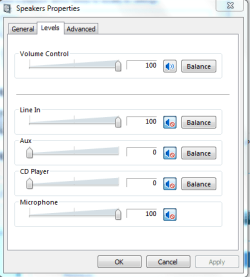
I've messed with these volume settings and nothing seems to make a difference. Lowering the volume just makes everything quiet, and the static is still there. Any other ideas? What makes it frustrating is that FRAPS performs this same operation seamlessly and with no problem whatsoever. I don't even need to enable stereo mix.

I've even tried unmuting the microphone slider on the first image, but it changes nothing and if anything - makes it worse. I've even tried setting everything to the same volume - but nothing.

I made another discovery. Since reinstalling the HT drivers yesterday - Even if I disable stereo mix, I have a strange issue whereby I'll be playing music, then if my Skype program bleeps from receiving a new message, or any other sound comes through - my music will mute, and after the sound byte from the program has ended, the music will return but in lower volume, without me changing anything.
 

Attachments

  • 1.PNG
    1.PNG
    12.2 KB · Views: 8
  • 2.PNG
    2.PNG
    8.3 KB · Views: 9

My Computer My Computer

At a glance

Windows 7 x64Intel i5 750 2.67GHz Quad Core6GB Kingston DDR3BFG nVIDIA GTS 250 OC
OS
Windows 7 x64
CPU
Intel i5 750 2.67GHz Quad Core
Motherboard
GIGABYTE P55-UD3L
Memory
6GB Kingston DDR3
Graphics Card(s)
BFG nVIDIA GTS 250 OC
Sound Card
Onboard Realtek ALC888 HD Audio
Maybe something in the Xear3D settings is causing it. (Btw I turned off Azalia audio in BIOS and some of the unavailable playback devices are no longer showing - which is good. But it still does the distort effect, so...it's not good)

So as you can see on this clip - http://www.justin.tv/madoverdose/b/283144743 it works fine

Then I tried streaming with a friend watching and the song I played sounded really static like. It's so frustrating. I'll do say 3 tests and it will work flawlessly, then the fourth time (or even fifth) it will just randomly decide to not work again.
 

Attachments

  • Capture.PNG
    Capture.PNG
    31.6 KB · Views: 7

My Computer My Computer

At a glance

Windows 7 x64Intel i5 750 2.67GHz Quad Core6GB Kingston DDR3BFG nVIDIA GTS 250 OC
OS
Windows 7 x64
CPU
Intel i5 750 2.67GHz Quad Core
Motherboard
GIGABYTE P55-UD3L
Memory
6GB Kingston DDR3
Graphics Card(s)
BFG nVIDIA GTS 250 OC
Sound Card
Onboard Realtek ALC888 HD Audio
You have only been referencing microphone recording and the problem. As I asked previously, what happens when you play a commercial music CD? or some other known good audio file? Do you get the noise or distortion on that?
 

My Computer My Computer

At a glance

Windows 10 64 bitIntel i7 6700K16GB Corsair DominatorIntel CPU Graphics
Computer type
PC/Desktop
Computer Manufacturer/Model Number
My Own Build
OS
Windows 10 64 bit
CPU
Intel i7 6700K
Motherboard
ASUS ROG Maximus VIII Hero
Memory
16GB Corsair Dominator
Graphics Card(s)
Intel CPU Graphics
Sound Card
RealTek
Monitor(s) Displays
27" Dell S2719dgf
Screen Resolution
2560X1440
Hard Drives
1 TB Samsung 850 EVO SSD for Win 10 Pro
500GB Samsung 850 EVO SSD for Win 10 Insider
2 TB drive for backup
PSU
EVGA Supernova 750G2
Case
BeQuiet Silent Base 600
Cooling
Deepcool Captain 120EX
Keyboard
Microsoft Wireless 2000
Mouse
Microsoft wireless
Internet Speed
100 MB/sec (Cable)
Antivirus
Microsoft Defender and Malwarebytes
Browser
Edge/Firefox
Other Info
Cakewalk (Sonar) by BandLab and Studio One 4.1 Pro recording studio software. MOTU 896Mk3 Hybrid recording interface, Frontier Tranzport wireless control unit, Behringer X-Touch Control Surface.
Five USB connected optical drives for CD Audio production using Nero BurningROM
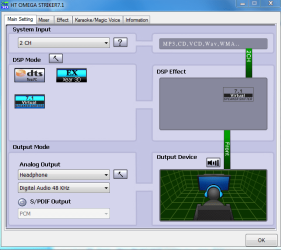
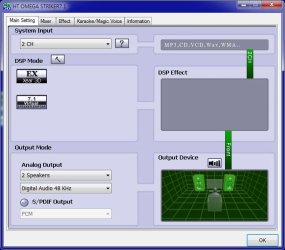
Update, I looked at my Striker control panel. I do not have any DSP Effect. DTS is not shown in my DSP Mode block.
I am not using any Effects.
 

My Computer My Computer

At a glance

Windows 10 64 bitIntel i7 6700K16GB Corsair DominatorIntel CPU Graphics
Computer type
PC/Desktop
Computer Manufacturer/Model Number
My Own Build
OS
Windows 10 64 bit
CPU
Intel i7 6700K
Motherboard
ASUS ROG Maximus VIII Hero
Memory
16GB Corsair Dominator
Graphics Card(s)
Intel CPU Graphics
Sound Card
RealTek
Monitor(s) Displays
27" Dell S2719dgf
Screen Resolution
2560X1440
Hard Drives
1 TB Samsung 850 EVO SSD for Win 10 Pro
500GB Samsung 850 EVO SSD for Win 10 Insider
2 TB drive for backup
PSU
EVGA Supernova 750G2
Case
BeQuiet Silent Base 600
Cooling
Deepcool Captain 120EX
Keyboard
Microsoft Wireless 2000
Mouse
Microsoft wireless
Internet Speed
100 MB/sec (Cable)
Antivirus
Microsoft Defender and Malwarebytes
Browser
Edge/Firefox
Other Info
Cakewalk (Sonar) by BandLab and Studio One 4.1 Pro recording studio software. MOTU 896Mk3 Hybrid recording interface, Frontier Tranzport wireless control unit, Behringer X-Touch Control Surface.
Five USB connected optical drives for CD Audio production using Nero BurningROM
The sound distorts from anything coming from the PC. Not just music. It just happens really sporadically. As for the Striker options, everything is now disabled but no luck still. Could you post your (presumably working) screenshots for the control panel.
 

My Computer My Computer

At a glance

Windows 7 x64Intel i5 750 2.67GHz Quad Core6GB Kingston DDR3BFG nVIDIA GTS 250 OC
OS
Windows 7 x64
CPU
Intel i5 750 2.67GHz Quad Core
Motherboard
GIGABYTE P55-UD3L
Memory
6GB Kingston DDR3
Graphics Card(s)
BFG nVIDIA GTS 250 OC
Sound Card
Onboard Realtek ALC888 HD Audio
Here is my Striker 7.1 control panel.
 

Attachments

  • Striker Panel 1.JPG
    Striker Panel 1.JPG
    49.8 KB · Views: 10

My Computer My Computer

At a glance

Windows 10 64 bitIntel i7 6700K16GB Corsair DominatorIntel CPU Graphics
Computer type
PC/Desktop
Computer Manufacturer/Model Number
My Own Build
OS
Windows 10 64 bit
CPU
Intel i7 6700K
Motherboard
ASUS ROG Maximus VIII Hero
Memory
16GB Corsair Dominator
Graphics Card(s)
Intel CPU Graphics
Sound Card
RealTek
Monitor(s) Displays
27" Dell S2719dgf
Screen Resolution
2560X1440
Hard Drives
1 TB Samsung 850 EVO SSD for Win 10 Pro
500GB Samsung 850 EVO SSD for Win 10 Insider
2 TB drive for backup
PSU
EVGA Supernova 750G2
Case
BeQuiet Silent Base 600
Cooling
Deepcool Captain 120EX
Keyboard
Microsoft Wireless 2000
Mouse
Microsoft wireless
Internet Speed
100 MB/sec (Cable)
Antivirus
Microsoft Defender and Malwarebytes
Browser
Edge/Firefox
Other Info
Cakewalk (Sonar) by BandLab and Studio One 4.1 Pro recording studio software. MOTU 896Mk3 Hybrid recording interface, Frontier Tranzport wireless control unit, Behringer X-Touch Control Surface.
Five USB connected optical drives for CD Audio production using Nero BurningROM
Changing my settings to match yours didn't help things either. Could it simply be the headset?

I just do not understand why it will perhaps work for a short while, then out of nowhere just change and become distorted again.
 

My Computer My Computer

At a glance

Windows 7 x64Intel i5 750 2.67GHz Quad Core6GB Kingston DDR3BFG nVIDIA GTS 250 OC
OS
Windows 7 x64
CPU
Intel i5 750 2.67GHz Quad Core
Motherboard
GIGABYTE P55-UD3L
Memory
6GB Kingston DDR3
Graphics Card(s)
BFG nVIDIA GTS 250 OC
Sound Card
Onboard Realtek ALC888 HD Audio
The next time it happens, wiggle the headset plug, that is plugged into the PC and see if that fixes it. Could be bad connection. If it only happens with this headset, try a different one or try this headset into a different computer.
 

My Computer My Computer

At a glance

Windows 10 64 bitIntel i7 6700K16GB Corsair DominatorIntel CPU Graphics
Computer type
PC/Desktop
Computer Manufacturer/Model Number
My Own Build
OS
Windows 10 64 bit
CPU
Intel i7 6700K
Motherboard
ASUS ROG Maximus VIII Hero
Memory
16GB Corsair Dominator
Graphics Card(s)
Intel CPU Graphics
Sound Card
RealTek
Monitor(s) Displays
27" Dell S2719dgf
Screen Resolution
2560X1440
Hard Drives
1 TB Samsung 850 EVO SSD for Win 10 Pro
500GB Samsung 850 EVO SSD for Win 10 Insider
2 TB drive for backup
PSU
EVGA Supernova 750G2
Case
BeQuiet Silent Base 600
Cooling
Deepcool Captain 120EX
Keyboard
Microsoft Wireless 2000
Mouse
Microsoft wireless
Internet Speed
100 MB/sec (Cable)
Antivirus
Microsoft Defender and Malwarebytes
Browser
Edge/Firefox
Other Info
Cakewalk (Sonar) by BandLab and Studio One 4.1 Pro recording studio software. MOTU 896Mk3 Hybrid recording interface, Frontier Tranzport wireless control unit, Behringer X-Touch Control Surface.
Five USB connected optical drives for CD Audio production using Nero BurningROM
Fireberd, thank you for your continued support.

I tried what you suggested, I tried a different pair of headphones and it worked once or twice, then it just started doing what it used to. I then tried both pairs on the front panel audio jacks. I honestly have no idea where to go from here. Anyone else have this issue?
 

My Computer My Computer

At a glance

Windows 7 x64Intel i5 750 2.67GHz Quad Core6GB Kingston DDR3BFG nVIDIA GTS 250 OC
OS
Windows 7 x64
CPU
Intel i5 750 2.67GHz Quad Core
Motherboard
GIGABYTE P55-UD3L
Memory
6GB Kingston DDR3
Graphics Card(s)
BFG nVIDIA GTS 250 OC
Sound Card
Onboard Realtek ALC888 HD Audio
What happens if you remove the Striker 7.1 sound card (just remove the card, don't uninstall the drivers) and go back to the RealTek audio? Do you also get the distortion/noise with the RealTek?
 

My Computer My Computer

At a glance

Windows 10 64 bitIntel i7 6700K16GB Corsair DominatorIntel CPU Graphics
Computer type
PC/Desktop
Computer Manufacturer/Model Number
My Own Build
OS
Windows 10 64 bit
CPU
Intel i7 6700K
Motherboard
ASUS ROG Maximus VIII Hero
Memory
16GB Corsair Dominator
Graphics Card(s)
Intel CPU Graphics
Sound Card
RealTek
Monitor(s) Displays
27" Dell S2719dgf
Screen Resolution
2560X1440
Hard Drives
1 TB Samsung 850 EVO SSD for Win 10 Pro
500GB Samsung 850 EVO SSD for Win 10 Insider
2 TB drive for backup
PSU
EVGA Supernova 750G2
Case
BeQuiet Silent Base 600
Cooling
Deepcool Captain 120EX
Keyboard
Microsoft Wireless 2000
Mouse
Microsoft wireless
Internet Speed
100 MB/sec (Cable)
Antivirus
Microsoft Defender and Malwarebytes
Browser
Edge/Firefox
Other Info
Cakewalk (Sonar) by BandLab and Studio One 4.1 Pro recording studio software. MOTU 896Mk3 Hybrid recording interface, Frontier Tranzport wireless control unit, Behringer X-Touch Control Surface.
Five USB connected optical drives for CD Audio production using Nero BurningROM
Haha, it's funny you mention that. I just spent the last 30 minutes or so doing that very thing and I didn't see your message.

I unplugged the soundcard and enabled Realtek through the BIOS. I got playback (which sounded pretty awful to be honest) but my microphone refused to work. It would constantly show around 3 green bars despite me not talking and wouldn't actually record anything. I then uninstalled HT Striker and used the Realtek drivers found on the sticky located at the top of this forum. No difference. (Yes, of course I moved the headset jacks into the motherboard jacks lol) but like I said, no luck.

I then thought maybe it was the PCI-E port. So I plugged the sound card into another slot and reinstalled HT Striker, removed Realtek and disabled it from BIOS, went to test..and..........NO CHANGE. My best guess would be something is dodgy with the card, or my Windows installation - I dunno.

But hey, I DO have one question:

Upon searching through my computer parts box, I come across a digital optical sound cable. I'm only really bringing this up because I purchased a new 27" Samsung monitor yesterday (it's amazing!) and noticed it has it's own optical port, and sound profile which I am able to choose from playback options. Now obviously, the monitor has no speakers. My question is, can this cable be used in any way in conjunction with my headset in order to create this desirable Stereo Mix effect? Really, what can I do with this cable. All I can see doing is plugging it from the back of the monitor to my sound card...but why would I?

I plugged it into the monitors 'DIGITAL AUDIO OUT' port to my Digital Port on the Sound card and I can hear sound through my headset with it, but there seems to be no difference whatsoever.
 

My Computer My Computer

At a glance

Windows 7 x64Intel i5 750 2.67GHz Quad Core6GB Kingston DDR3BFG nVIDIA GTS 250 OC
OS
Windows 7 x64
CPU
Intel i5 750 2.67GHz Quad Core
Motherboard
GIGABYTE P55-UD3L
Memory
6GB Kingston DDR3
Graphics Card(s)
BFG nVIDIA GTS 250 OC
Sound Card
Onboard Realtek ALC888 HD Audio
Do you have "listen to this device" checked on the listen tab of stereo mix properties? If so, uncheck it.
 

My Computer My Computer

At a glance

Windows 7 Home Premium SP1, 64-bitIntel Skylake i5-6600K, not overclocked8 GB HyperX DDR4-2666 (2 x 4 GB)none; graphics are integrated on CPU
Computer type
PC/Desktop
Computer Manufacturer/Model Number
Ignatz Special; 4 speed manual gearbox; factory air conditioning; one of one
OS
Windows 7 Home Premium SP1, 64-bit
CPU
Intel Skylake i5-6600K, not overclocked
Motherboard
AsRock Z170M Extreme 4, micro ATX
Memory
8 GB HyperX DDR4-2666 (2 x 4 GB)
Graphics Card(s)
none; graphics are integrated on CPU
Sound Card
onboard: Realtek ALC1150; external: USB Behringer UF0-202
Monitor(s) Displays
Dell S2340M 23 inch IPS
Screen Resolution
1600 x 900
Hard Drives
System: Crucial MX100 series SSD, 128 GB;
Data: Samsung Spinpoint 103SJ, 1 TB;
Backup: WD Caviar Green WD30EZRX-00D8PB0, 3 TB
PSU
Rosewill SilentNight 500 watt fanless, semi-modular
Case
Antec Solo II
Cooling
Noctua NH-U12S; Noctua F12 intake, Noctua S12A exhaust
Keyboard
Microsoft 200 6JH-00001 USB
Mouse
Dell or Microsoft optical wired; USB
Antivirus
Microsoft Security Essentials and Malwarebytes Premium
Browser
Pale Moon
Other Info
All fans PWM; speeds at idle: CPU circa 500 rpm; intake circa 600 rpm; exhaust circa 600 rpm; CPU temps 27 idle and 47 C load in a warm room (27 C/81 F) when running Intel Extreme Tuning Utility stress test.
That is all unchecked!
 

My Computer My Computer

At a glance

Windows 7 x64Intel i5 750 2.67GHz Quad Core6GB Kingston DDR3BFG nVIDIA GTS 250 OC
OS
Windows 7 x64
CPU
Intel i5 750 2.67GHz Quad Core
Motherboard
GIGABYTE P55-UD3L
Memory
6GB Kingston DDR3
Graphics Card(s)
BFG nVIDIA GTS 250 OC
Sound Card
Onboard Realtek ALC888 HD Audio
No more suggestions then?:(
 

My Computer My Computer

At a glance

Windows 7 x64Intel i5 750 2.67GHz Quad Core6GB Kingston DDR3BFG nVIDIA GTS 250 OC
OS
Windows 7 x64
CPU
Intel i5 750 2.67GHz Quad Core
Motherboard
GIGABYTE P55-UD3L
Memory
6GB Kingston DDR3
Graphics Card(s)
BFG nVIDIA GTS 250 OC
Sound Card
Onboard Realtek ALC888 HD Audio
I would double check all connections.
Make sure you don't have an exposed connector or anything medal touching part of the motherboard.
You might try a partial re-assembly.
 

My Computer My Computer

At a glance

Windows 7 Home Premium 64 bitIntel Core i7-4790G.SKILL 8GB (2 x 4GB) DDR3 F3-10666CL9D-8GBNTAMD Radeon R7 250
Computer type
PC/Desktop
Computer Manufacturer/Model Number
Custom Build
OS
Windows 7 Home Premium 64 bit
CPU
Intel Core i7-4790
Motherboard
GA-Z87X-D3H
Memory
G.SKILL 8GB (2 x 4GB) DDR3 F3-10666CL9D-8GBNT
Graphics Card(s)
AMD Radeon R7 250
Sound Card
Realtek ALC892
Monitor(s) Displays
Samsung UN32EH5000, Dell 1703FPT
Screen Resolution
1920 x 1080, 1280 x 1024
Hard Drives
WD5003AZEX
WD10EZEX
Samsung HD103SJ
Samsung 128 GB 840 PRO
PSU
SeaSonic M12II SS-500GM
Case
Fractal Design Define R4
Cooling
Zalman CNPS9900ALED
Keyboard
Logitech K800
Mouse
Logitech M705
Internet Speed
16 Mbps
Antivirus
Avast
Browser
Firefox
Other Info
Bose Companion 2 Multimedia Speakers
Back
Top