
Sticky notes, and the screen clip tool

Greg the bear

New member
Local time
2:15 PM
Messages
20
Help, Somehow I have lost these programs on my computer and can not find them. They are not in the start programs, and I tried a search and did not find them. I thought that they were useful tools and did not consciously remove them. Any ideas of how I can get them back?
 

My Computer My Computer

At a glance

Windows 7 64Intel 2.66 Quad6GNVideo
Computer Manufacturer/Model Number
Dell XPS 710
OS
Windows 7 64
CPU
Intel 2.66 Quad
Memory
6G
Graphics Card(s)
NVideo
Sound Card
SB XFI
Monitor(s) Displays
Dell Flat Screen and HP 2010I
Hard Drives
2-500g 7200 SATA
Case
XPS 710
Cooling
Fans
Keyboard
Dell
Mouse
wireless
Internet Speed
Cable
Its called snipping tool, type that into search box & it should pop up
as should sticky notes
 

My Computer My Computer

At a glance

Win7 Ultimate X64Intel i5 3570K8GB DDR3 1600Onboard
Computer type
PC/Desktop
Computer Manufacturer/Model Number
Pauly Special
OS
Win7 Ultimate X64
CPU
Intel i5 3570K
Motherboard
Gigabyte Z77X-DS3H
Memory
8GB DDR3 1600
Graphics Card(s)
Onboard
Sound Card
Onboard
Screen Resolution
1280x1024
Hard Drives
Samsung 840 Evo SSD (OS)
1TB Spinner (Data)
PSU
800W Arctic
Case
Cooler Master
Cooling
3x120mm Fans
Keyboard
MS Wireless
Mouse
MS Wireless
Internet Speed
20M
%windir%\system32\SnippingTool.exe
%windir%\system32\StikyNot.exe
StikyNot.exe not a typo
 

My Computer My Computer

At a glance

Win7 Ultimate X64Intel i5 3570K8GB DDR3 1600Onboard
Computer type
PC/Desktop
Computer Manufacturer/Model Number
Pauly Special
OS
Win7 Ultimate X64
CPU
Intel i5 3570K
Motherboard
Gigabyte Z77X-DS3H
Memory
8GB DDR3 1600
Graphics Card(s)
Onboard
Sound Card
Onboard
Screen Resolution
1280x1024
Hard Drives
Samsung 840 Evo SSD (OS)
1TB Spinner (Data)
PSU
800W Arctic
Case
Cooler Master
Cooling
3x120mm Fans
Keyboard
MS Wireless
Mouse
MS Wireless
Internet Speed
20M
Once you retrieve them, suggest you rightclick and pin to taskbar.
 
They usually hang out in the Start Menu's accessories folder, so when you do find them you can drop the shortcuts back in here %userprofile%\AppData\Roaming\Microsoft\Windows\Start Menu\Programs\Accessories
 

My Computer My Computer

At a glance

Windows 7 Ultimate 64 bitIntel(R) Core(TM)2 Quad CPU Q8200 @ 2.33GHz8 GB KingstonNvidia GeForce 9600GT
Computer Manufacturer/Model Number
Custom Hack job
OS
Windows 7 Ultimate 64 bit
CPU
Intel(R) Core(TM)2 Quad CPU Q8200 @ 2.33GHz
Motherboard
GigaByte EP45-UD3
Memory
8 GB Kingston
Graphics Card(s)
Nvidia GeForce 9600GT
Sound Card
Soundblaster Audigy
Monitor(s) Displays
AOC x2 22"
Hard Drives
2 x Samsung 500GB (RAID)
2 x Samsung 2TB
1 x WD Green 2TB
1 x Seagate 1TB
1 x Samsung 500GB
PSU
Thermaltake QFan 750W
Case
CM Scout Gaming
Cooling
Coolermaster V10
Keyboard
Microsoft Wireless Keyboard 1000
Mouse
Microsoft Wireless Optical 2000
Internet Speed
320
Other Info
Winfast PVR2000CP
LG DVD-RAM DVD/RW/DL Super Multi
Linksys WMP300Nx2 Wireless Adapter
They usually hang out in the Start Menu's accessories folder, so when you do find them you can drop the shortcuts back in here %userprofile%\AppData\Roaming\Microsoft\Windows\Start Menu\Programs\Accessories

Is this what replaces "Pin to Start menu?"
 
They usually hang out in the Start Menu's accessories folder, so when you do find them you can drop the shortcuts back in here %userprofile%\AppData\Roaming\Microsoft\Windows\Start Menu\Programs\Accessories

Is this what replaces "Pin to Start menu?"

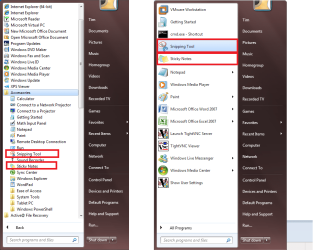
No mate, let me clarify with a picture (that will speak less than 1000 words on this occasion)

- The %userprofile%\AppData\Roaming\Microsoft\Windows\Start Menu\Programs\Accessories path is the default location for these shortcuts on the start menu. i.e. Click the globe, click all programs, click accessories. If they are not there and Greg the bear wants to put them back, he finds them (per Pauly's post) and drops the shortcuts back into the path I noted. This is shown on the left on my picture.
- Alternatively, he can take your advice and pin them to the start menu, per the right side of my picture.

I think there's a guide from Brink (no surprise there ;) ) that says the start menu items reside in the registry here somewhere (as numbers not items), I could be a little off as I cant find the guide right now.
"HKEY_CURRENT_USER\Software\Microsoft\Windows\CurrentVersion\Explorer\StartPage"
 

Attachments

  • clarification for Greg.png
    clarification for Greg.png
    65.2 KB · Views: 110

My Computer My Computer

At a glance

Windows 7 Ultimate 64 bitIntel(R) Core(TM)2 Quad CPU Q8200 @ 2.33GHz8 GB KingstonNvidia GeForce 9600GT
Computer Manufacturer/Model Number
Custom Hack job
OS
Windows 7 Ultimate 64 bit
CPU
Intel(R) Core(TM)2 Quad CPU Q8200 @ 2.33GHz
Motherboard
GigaByte EP45-UD3
Memory
8 GB Kingston
Graphics Card(s)
Nvidia GeForce 9600GT
Sound Card
Soundblaster Audigy
Monitor(s) Displays
AOC x2 22"
Hard Drives
2 x Samsung 500GB (RAID)
2 x Samsung 2TB
1 x WD Green 2TB
1 x Seagate 1TB
1 x Samsung 500GB
PSU
Thermaltake QFan 750W
Case
CM Scout Gaming
Cooling
Coolermaster V10
Keyboard
Microsoft Wireless Keyboard 1000
Mouse
Microsoft Wireless Optical 2000
Internet Speed
320
Other Info
Winfast PVR2000CP
LG DVD-RAM DVD/RW/DL Super Multi
Linksys WMP300Nx2 Wireless Adapter
Thanks for all the help. I now have them where I can not loose them
 

My Computer My Computer

At a glance

Windows 7 64Intel 2.66 Quad6GNVideo
Computer Manufacturer/Model Number
Dell XPS 710
OS
Windows 7 64
CPU
Intel 2.66 Quad
Memory
6G
Graphics Card(s)
NVideo
Sound Card
SB XFI
Monitor(s) Displays
Dell Flat Screen and HP 2010I
Hard Drives
2-500g 7200 SATA
Case
XPS 710
Cooling
Fans
Keyboard
Dell
Mouse
wireless
Internet Speed
Cable
Is this what replaces "Pin to Start menu?"

No mate, let me clarify with a picture (that will speak less than 1000 words on this occasion)

- The %userprofile%\AppData\Roaming\Microsoft\Windows\Start Menu\Programs\Accessories path is the default location for these shortcuts on the start menu. i.e. Click the globe, click all programs, click accessories. If they are not there and Greg the bear wants to put them back, he finds them (per Pauly's post) and drops the shortcuts back into the path I noted. This is shown on the left on my picture.
- Alternatively, he can take your advice and pin them to the start menu, per the right side of my picture.

I think there's a guide from Brink (no surprise there ;) ) that says the start menu items reside in the registry here somewhere (as numbers not items), I could be a little off as I cant find the guide right now.
"HKEY_CURRENT_USER\Software\Microsoft\Windows\CurrentVersion\Explorer\StartPage"

Actually I was asking if that path is where to put items one wants pinned to Start Menu, since that feature disappeared for me as of the RTM.

I just checked and it's back, tho. So all good. Thanks.
 
Greg's
@Rocker - Ah I understand! :D
@The Bear - Fantastic.

Merry Xmas to you both.
 

My Computer My Computer

At a glance

Windows 7 Ultimate 64 bitIntel(R) Core(TM)2 Quad CPU Q8200 @ 2.33GHz8 GB KingstonNvidia GeForce 9600GT
Computer Manufacturer/Model Number
Custom Hack job
OS
Windows 7 Ultimate 64 bit
CPU
Intel(R) Core(TM)2 Quad CPU Q8200 @ 2.33GHz
Motherboard
GigaByte EP45-UD3
Memory
8 GB Kingston
Graphics Card(s)
Nvidia GeForce 9600GT
Sound Card
Soundblaster Audigy
Monitor(s) Displays
AOC x2 22"
Hard Drives
2 x Samsung 500GB (RAID)
2 x Samsung 2TB
1 x WD Green 2TB
1 x Seagate 1TB
1 x Samsung 500GB
PSU
Thermaltake QFan 750W
Case
CM Scout Gaming
Cooling
Coolermaster V10
Keyboard
Microsoft Wireless Keyboard 1000
Mouse
Microsoft Wireless Optical 2000
Internet Speed
320
Other Info
Winfast PVR2000CP
LG DVD-RAM DVD/RW/DL Super Multi
Linksys WMP300Nx2 Wireless Adapter
mine does not work at all

I just tried to unpin then reboot and repin

we'll see
 

My Computer My Computer

At a glance

windows 7 professional & ultimate 64bit laptops2.27 boost to 2.53 & 2.53 boost to 2.804GBIntel® Graphics Media Accelerator HD
Computer Manufacturer/Model Number
Gateway/NV7923u & NV79C52u Laptops
OS
windows 7 professional & ultimate 64bit laptops
CPU
2.27 boost to 2.53 & 2.53 boost to 2.80
Motherboard
Mobile Intel® HM55 Express Chipset ???
Memory
4GB
Graphics Card(s)
Intel® Graphics Media Accelerator HD
Sound Card
realtek High-definition audio support
Monitor(s) Displays
17.3 " HD 1600 x 900
Hard Drives
hatachi Travelstar 5400 500GB & west digital 500GB
Internet Speed
35MB fios
mine does not work at all

I just tried to unpin then reboot and repin

we'll see


Hello mate, you may get better results if you start a new thread.
 

My Computer My Computer

At a glance

W 7 64-bit UltimateIntel Q9550 Yorkfield8GB Dominator 8500C5DATI : XFX 5870
Computer Manufacturer/Model Number
* BFK Customs *
OS
W 7 64-bit Ultimate
CPU
Intel Q9550 Yorkfield
Motherboard
ASUS P5Q Pro
Memory
8GB Dominator 8500C5D
Graphics Card(s)
ATI : XFX 5870
Sound Card
Realtek HD Audio 7-1
Monitor(s) Displays
1x 47" LCD HDMI & 3x 26" LCD HDMI
Screen Resolution
1920x1080P & 1920x1200
Hard Drives
1x 80GB Intel X25-M G2 SSD : 1x 500GB & 1x 640GB WD Caviar Black(s)
PSU
Corsair 620HX
Case
Cooler Master RC-690
Cooling
Tuniq Tower 120, 2x 140mm and 3x 120mm case fans
Keyboard
Microsoft 500
Mouse
Razer Diamondback 3G
Internet Speed
14 Mb/s
Other Info
1x Koutech 3Gb/s SATA HDD Hot Swap Rack

My Computer My Computer

At a glance

windows 7 professional & ultimate 64bit laptops2.27 boost to 2.53 & 2.53 boost to 2.804GBIntel® Graphics Media Accelerator HD
Computer Manufacturer/Model Number
Gateway/NV7923u & NV79C52u Laptops
OS
windows 7 professional & ultimate 64bit laptops
CPU
2.27 boost to 2.53 & 2.53 boost to 2.80
Motherboard
Mobile Intel® HM55 Express Chipset ???
Memory
4GB
Graphics Card(s)
Intel® Graphics Media Accelerator HD
Sound Card
realtek High-definition audio support
Monitor(s) Displays
17.3 " HD 1600 x 900
Hard Drives
hatachi Travelstar 5400 500GB & west digital 500GB
Internet Speed
35MB fios
Back
Top