
Sticky Notes - Backup and Restore

How to Backup and Restore Sticky Notes in Windows 7 and Windows 8

   Information
Sticky Notes allows you to type and leave a Post-it type note on your desktop until deleted.

Sticky Notes is not available in the Windows 7 Starter and Home Basic editions.

This tutorial will show you how to backup and restore your Sticky Notes in Windows 7, Windows 8, and Windows 10 version 1511 and earlier.


EXAMPLE: Sticky Notes
Sticky_Notes.jpg


OPTION ONE

To Back Up Sticky Notes


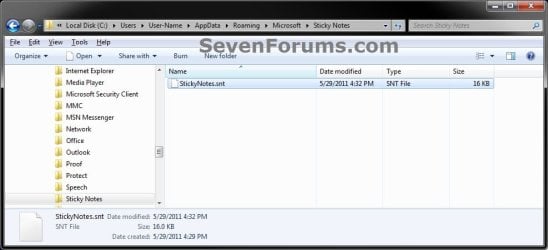
1. Open Windows Explorer (Windows 7) or File Explorer (Windows 8), and copy and paste the location below into the address bar, and press Enter.
%AppData%\Microsoft\Sticky Notes
2. Save a copy of the StickyNotes.snt file to where you like as a backup of it. (see screenshot below)
NOTE: This file is your backup of the current Sticky Notes on your desktop.
Step1.jpg


OPTION TWO

To Restore Sticky Notes


1. Delete all Sticky Notes you currently have on the Desktop if any.
NOTE: If you do not, then the backed up StickyNotes.snt file from Option One will not be able to replace the other one in step 4 below.

2. In Windows Explorer (Windows 7) or File Explorer (Windows 8), navigate to where you saved the backed up StickyNotes.snt file at, right click or press and hold on the StickyNotes.snt file and click/tap on Copy.

3. In Windows Explorer (Windows 7) or File Explorer (Windows 8), and copy and paste the location below into the address bar, and press Enter.
%AppData%\Microsoft\Sticky Notes
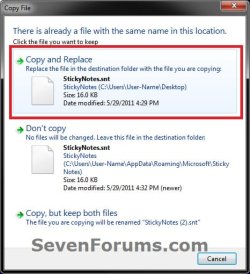
4. Right click or press and hold on an empty area in the "Sticky Notes" folder, and click/tap on Paste. (see screenshot below)
Step1.jpg
5. Click/tap on Copy and Replace. (see screenshot below)
Step2.jpg
6. Press the Windows + R keys to open the Run dialog, type stikynot, and press Enter.

7. Your Sticky Notes included in the backup from OPTION ONE have now been restored.

That's it,
Shawn


Last edited:
So there are many sticky's (I have 3 individual showing on my desktop) they all reside in the .snt file.

So per your clipboard example, I understand that for a individual sticky, delete sticky # 1 and it's gone.
Open a new sticky and it's blank..

Anyhow, maybe a simpler way of asking,
I see portions (hard to navigate thru all the symbols etc) of the individual stickys #1, ....#6 etc in the guts of the .snt file, yet on my desktop only see a few of them lets say # 2 and #4 sticky.

They ALL appear to be in the .snt file, with what appear to he "headers" or something distinguishing between SN #1,2,...6
yet only a few "show" on desktop.
any idea on how to get these to "show"
 

My Computer

Computer type
PC/Desktop
OS
WINDOWS 7
Your example is about right, but I wouldn't rely on being able to always be able to restore the contents from the .snt file. It's best to keep a backup of the .snt before any sticky notes get deleted.

The .snt file was never meant to be used in a readable format, so yeah it can not always be easy to distinguish between the different sticky notes.

If a sticky note has been deleted, it will never show again unless you are able to restore a .snt file before the sticky note was deleted. Of course, you could also manually create the sticky notes again if able to read the content from the current .snt file.
 

My Computer

Computer type
PC/Desktop
Computer Manufacturer/Model Number
Self built custom
OS
64-bit Windows 11 Pro for Workstations
CPU
Intel i7-8700K OC'd to 5 GHz
Motherboard
ASUS ROG Maximus XI Formula Z390
Memory
64 GB (4x16GB) G.SKILL TridentZ RGB DDR4 3600 MHz
Graphics Card(s)
ASUS ROG-STRIX-GTX1080TI-O11G-GAMING
Sound Card
Integrated
Monitor(s) Displays
2 x Samsung Odyssey G7 27"
Screen Resolution
2560x1440
Hard Drives
1TB Samsung 990 PRO M.2,
4TB Samsung 990 PRO PRO M.2,
TerraMaster F8 SSD Plus NAS
PSU
Seasonic Prime Titanium 850W
Case
Thermaltake Core P3
Cooling
Corsair Hydro H115i
Keyboard
Logitech wireless K800
Mouse
Logitech MX Master 4
Internet Speed
2 Gb/s Download and 100 Mb/s Upload
Antivirus
Malwarebyte Anti-Malware Premium
Browser
Google Chrome
Other Info
Logitech Z625 speaker system,
Logitech BRIO 4K Pro webcam,
HP Color LaserJet Pro MFP M477fdn,
APC SMART-UPS RT 1000 XL - SURT1000XLI,
Galaxy S23 Plus phone
Right, I understand about the snt file, and saving them aside in a separate location.

I guess the only mystery to me is, that I can see in the contents of the snt file, contents of SN#1,3,4 (remember I had 6) so the text of SN1,3,4 is in the .snt, yet it doesn't show up, with the others SN's on my desktop.

Two questions;
1) what is preventing that from being shown/activated....
2) how do I get it to do so.
 

My Computer

Computer type
PC/Desktop
OS
WINDOWS 7
If the SN has been deleted (closed), then it can't be restored even if the text is in the current .snt.

You'll have to restore a .snt that contained the SNs before they were deleted (closed) to restore them.
 

My Computer

Computer type
PC/Desktop
Computer Manufacturer/Model Number
Self built custom
OS
64-bit Windows 11 Pro for Workstations
CPU
Intel i7-8700K OC'd to 5 GHz
Motherboard
ASUS ROG Maximus XI Formula Z390
Memory
64 GB (4x16GB) G.SKILL TridentZ RGB DDR4 3600 MHz
Graphics Card(s)
ASUS ROG-STRIX-GTX1080TI-O11G-GAMING
Sound Card
Integrated
Monitor(s) Displays
2 x Samsung Odyssey G7 27"
Screen Resolution
2560x1440
Hard Drives
1TB Samsung 990 PRO M.2,
4TB Samsung 990 PRO PRO M.2,
TerraMaster F8 SSD Plus NAS
PSU
Seasonic Prime Titanium 850W
Case
Thermaltake Core P3
Cooling
Corsair Hydro H115i
Keyboard
Logitech wireless K800
Mouse
Logitech MX Master 4
Internet Speed
2 Gb/s Download and 100 Mb/s Upload
Antivirus
Malwarebyte Anti-Malware Premium
Browser
Google Chrome
Other Info
Logitech Z625 speaker system,
Logitech BRIO 4K Pro webcam,
HP Color LaserJet Pro MFP M477fdn,
APC SMART-UPS RT 1000 XL - SURT1000XLI,
Galaxy S23 Plus phone
Ok

so it sounds like my previous thought was correct in that the snt file has the text but can't show it in a SN

It must be the code or a parameter that makes it null.

Seems crazy to have it there but not be able to access it, why keep it then??

p.s. when right clicking on the snt file is shows a list of previous snt files. Is this something the system archives, I have never done this to my knowledge so it must be the system ?? Is that correct ?
 

My Computer

Computer type
PC/Desktop
OS
WINDOWS 7
Think of the .snt like a cache and database file all in one.

As long as the SNs are not closed or deleted, then they remain referenced in the .snt like a database.

If a SN is deleted, then its reference in the .snt acts like a cache, and will be cleared soon.
 

My Computer

Computer type
PC/Desktop
Computer Manufacturer/Model Number
Self built custom
OS
64-bit Windows 11 Pro for Workstations
CPU
Intel i7-8700K OC'd to 5 GHz
Motherboard
ASUS ROG Maximus XI Formula Z390
Memory
64 GB (4x16GB) G.SKILL TridentZ RGB DDR4 3600 MHz
Graphics Card(s)
ASUS ROG-STRIX-GTX1080TI-O11G-GAMING
Sound Card
Integrated
Monitor(s) Displays
2 x Samsung Odyssey G7 27"
Screen Resolution
2560x1440
Hard Drives
1TB Samsung 990 PRO M.2,
4TB Samsung 990 PRO PRO M.2,
TerraMaster F8 SSD Plus NAS
PSU
Seasonic Prime Titanium 850W
Case
Thermaltake Core P3
Cooling
Corsair Hydro H115i
Keyboard
Logitech wireless K800
Mouse
Logitech MX Master 4
Internet Speed
2 Gb/s Download and 100 Mb/s Upload
Antivirus
Malwarebyte Anti-Malware Premium
Browser
Google Chrome
Other Info
Logitech Z625 speaker system,
Logitech BRIO 4K Pro webcam,
HP Color LaserJet Pro MFP M477fdn,
APC SMART-UPS RT 1000 XL - SURT1000XLI,
Galaxy S23 Plus phone
Understood,
It's reference is gone, even though the text itself is in the .snt database.....

p.s. do you know how the .snt files are archived ?
 

My Computer

Computer type
PC/Desktop
OS
WINDOWS 7
I'm afraid not. :(
 

My Computer

Computer type
PC/Desktop
Computer Manufacturer/Model Number
Self built custom
OS
64-bit Windows 11 Pro for Workstations
CPU
Intel i7-8700K OC'd to 5 GHz
Motherboard
ASUS ROG Maximus XI Formula Z390
Memory
64 GB (4x16GB) G.SKILL TridentZ RGB DDR4 3600 MHz
Graphics Card(s)
ASUS ROG-STRIX-GTX1080TI-O11G-GAMING
Sound Card
Integrated
Monitor(s) Displays
2 x Samsung Odyssey G7 27"
Screen Resolution
2560x1440
Hard Drives
1TB Samsung 990 PRO M.2,
4TB Samsung 990 PRO PRO M.2,
TerraMaster F8 SSD Plus NAS
PSU
Seasonic Prime Titanium 850W
Case
Thermaltake Core P3
Cooling
Corsair Hydro H115i
Keyboard
Logitech wireless K800
Mouse
Logitech MX Master 4
Internet Speed
2 Gb/s Download and 100 Mb/s Upload
Antivirus
Malwarebyte Anti-Malware Premium
Browser
Google Chrome
Other Info
Logitech Z625 speaker system,
Logitech BRIO 4K Pro webcam,
HP Color LaserJet Pro MFP M477fdn,
APC SMART-UPS RT 1000 XL - SURT1000XLI,
Galaxy S23 Plus phone
Back
Top