
Sticky Notes - Backup and Restore

How to Backup and Restore Sticky Notes in Windows 7 and Windows 8

   Information
Sticky Notes allows you to type and leave a Post-it type note on your desktop until deleted.

Sticky Notes is not available in the Windows 7 Starter and Home Basic editions.

This tutorial will show you how to backup and restore your Sticky Notes in Windows 7, Windows 8, and Windows 10 version 1511 and earlier.


EXAMPLE: Sticky Notes
Sticky_Notes.jpg


OPTION ONE

To Back Up Sticky Notes


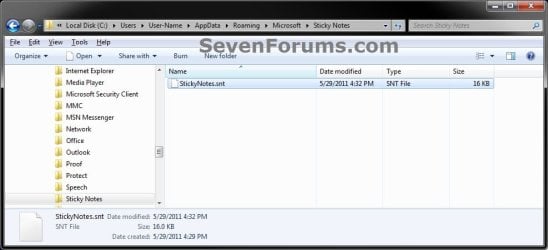
1. Open Windows Explorer (Windows 7) or File Explorer (Windows 8), and copy and paste the location below into the address bar, and press Enter.
%AppData%\Microsoft\Sticky Notes
2. Save a copy of the StickyNotes.snt file to where you like as a backup of it. (see screenshot below)
NOTE: This file is your backup of the current Sticky Notes on your desktop.
Step1.jpg


OPTION TWO

To Restore Sticky Notes


1. Delete all Sticky Notes you currently have on the Desktop if any.
NOTE: If you do not, then the backed up StickyNotes.snt file from Option One will not be able to replace the other one in step 4 below.

2. In Windows Explorer (Windows 7) or File Explorer (Windows 8), navigate to where you saved the backed up StickyNotes.snt file at, right click or press and hold on the StickyNotes.snt file and click/tap on Copy.

3. In Windows Explorer (Windows 7) or File Explorer (Windows 8), and copy and paste the location below into the address bar, and press Enter.
%AppData%\Microsoft\Sticky Notes
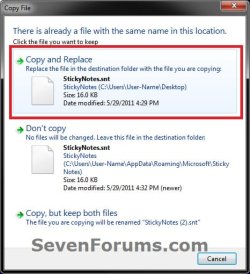
4. Right click or press and hold on an empty area in the "Sticky Notes" folder, and click/tap on Paste. (see screenshot below)
Step1.jpg
5. Click/tap on Copy and Replace. (see screenshot below)
Step2.jpg
6. Press the Windows + R keys to open the Run dialog, type stikynot, and press Enter.

7. Your Sticky Notes included in the backup from OPTION ONE have now been restored.

That's it,
Shawn


Last edited:
I am dealing with a headache of a problem with file history back up...anyways i manually put my StickyNotes.snt file from my back up to appdata>roaming>microsoft>stickynotes (which i believe ive done in the past no problem. But now when i try to open sticky notes after that i get this message "Not able to launch Sticky Notes. Issue with accessing the file.(Quit)" If i open my back up in notepad I can see notes so I know its there. I believe its 3 sticky notes worth of data. Ive already tried sfc /scannow but no luck. Any ideas? Thanks again!
 

My Computer My Computer

Computer type
PC/Desktop
Computer Manufacturer/Model Number
Custom Desktop
OS
Windows 8.1 Professional x64
CPU
AMD Phenom X4 9600
Motherboard
Gigabyte GA-MA78GM-US2H (Socket M2)
Memory
G.Skill 8.00GB Dual-Channel DDR2 @ 401MHz (5-5-5-15)
Monitor(s) Displays
SceptreX22HG-Naga
Screen Resolution
1680 x 1050

My Computer My Computer

Computer type
PC/Desktop
Computer Manufacturer/Model Number
Self built custom
OS
64-bit Windows 11 Pro for Workstations
CPU
Intel i7-8700K OC'd to 5 GHz
Motherboard
ASUS ROG Maximus XI Formula Z390
Memory
64 GB (4x16GB) G.SKILL TridentZ RGB DDR4 3600 MHz
Graphics Card(s)
ASUS ROG-STRIX-GTX1080TI-O11G-GAMING
Sound Card
Integrated
Monitor(s) Displays
2 x Samsung Odyssey G7 27"
Screen Resolution
2560x1440
Hard Drives
1TB Samsung 990 PRO M.2,
4TB Samsung 990 PRO PRO M.2,
TerraMaster F8 SSD Plus NAS
PSU
Seasonic Prime Titanium 850W
Case
Thermaltake Core P3
Cooling
Corsair Hydro H115i
Keyboard
Logitech wireless K800
Mouse
Logitech MX Master 4
Internet Speed
2 Gb/s Download and 100 Mb/s Upload
Antivirus
Malwarebyte Anti-Malware Premium
Browser
Google Chrome
Other Info
Logitech Z625 speaker system,
Logitech BRIO 4K Pro webcam,
HP Color LaserJet Pro MFP M477fdn,
APC SMART-UPS RT 1000 XL - SURT1000XLI,
Galaxy S23 Plus phone
Hey Shawn thanks for responding again to all my nightmares...I have permission even added permission for "everyone" with full control and it does the same thing still
 

My Computer My Computer

Computer type
PC/Desktop
Computer Manufacturer/Model Number
Custom Desktop
OS
Windows 8.1 Professional x64
CPU
AMD Phenom X4 9600
Motherboard
Gigabyte GA-MA78GM-US2H (Socket M2)
Memory
G.Skill 8.00GB Dual-Channel DDR2 @ 401MHz (5-5-5-15)
Monitor(s) Displays
SceptreX22HG-Naga
Screen Resolution
1680 x 1050

My Computer My Computer

Computer type
PC/Desktop
Computer Manufacturer/Model Number
Self built custom
OS
64-bit Windows 11 Pro for Workstations
CPU
Intel i7-8700K OC'd to 5 GHz
Motherboard
ASUS ROG Maximus XI Formula Z390
Memory
64 GB (4x16GB) G.SKILL TridentZ RGB DDR4 3600 MHz
Graphics Card(s)
ASUS ROG-STRIX-GTX1080TI-O11G-GAMING
Sound Card
Integrated
Monitor(s) Displays
2 x Samsung Odyssey G7 27"
Screen Resolution
2560x1440
Hard Drives
1TB Samsung 990 PRO M.2,
4TB Samsung 990 PRO PRO M.2,
TerraMaster F8 SSD Plus NAS
PSU
Seasonic Prime Titanium 850W
Case
Thermaltake Core P3
Cooling
Corsair Hydro H115i
Keyboard
Logitech wireless K800
Mouse
Logitech MX Master 4
Internet Speed
2 Gb/s Download and 100 Mb/s Upload
Antivirus
Malwarebyte Anti-Malware Premium
Browser
Google Chrome
Other Info
Logitech Z625 speaker system,
Logitech BRIO 4K Pro webcam,
HP Color LaserJet Pro MFP M477fdn,
APC SMART-UPS RT 1000 XL - SURT1000XLI,
Galaxy S23 Plus phone
I dont see the option to unblock it in properties. Im just going to call this one a corrupted file even though i can still access the data if i open the file in notepad. sticky notes work fine until i try to replace the file with my back up...ill just recreate them all and copy and paste my data. :cry:
 

My Computer My Computer

Computer type
PC/Desktop
Computer Manufacturer/Model Number
Custom Desktop
OS
Windows 8.1 Professional x64
CPU
AMD Phenom X4 9600
Motherboard
Gigabyte GA-MA78GM-US2H (Socket M2)
Memory
G.Skill 8.00GB Dual-Channel DDR2 @ 401MHz (5-5-5-15)
Monitor(s) Displays
SceptreX22HG-Naga
Screen Resolution
1680 x 1050
It sure seems that way. :(
 

My Computer My Computer

Computer type
PC/Desktop
Computer Manufacturer/Model Number
Self built custom
OS
64-bit Windows 11 Pro for Workstations
CPU
Intel i7-8700K OC'd to 5 GHz
Motherboard
ASUS ROG Maximus XI Formula Z390
Memory
64 GB (4x16GB) G.SKILL TridentZ RGB DDR4 3600 MHz
Graphics Card(s)
ASUS ROG-STRIX-GTX1080TI-O11G-GAMING
Sound Card
Integrated
Monitor(s) Displays
2 x Samsung Odyssey G7 27"
Screen Resolution
2560x1440
Hard Drives
1TB Samsung 990 PRO M.2,
4TB Samsung 990 PRO PRO M.2,
TerraMaster F8 SSD Plus NAS
PSU
Seasonic Prime Titanium 850W
Case
Thermaltake Core P3
Cooling
Corsair Hydro H115i
Keyboard
Logitech wireless K800
Mouse
Logitech MX Master 4
Internet Speed
2 Gb/s Download and 100 Mb/s Upload
Antivirus
Malwarebyte Anti-Malware Premium
Browser
Google Chrome
Other Info
Logitech Z625 speaker system,
Logitech BRIO 4K Pro webcam,
HP Color LaserJet Pro MFP M477fdn,
APC SMART-UPS RT 1000 XL - SURT1000XLI,
Galaxy S23 Plus phone
hi
i have problem in recovering snt.

in the location there was snt file i renamed it to some other name. i copied another snt file and launched sticky notes. but sticky notes will only display the notes in my file which was renamed.

there are notes in the file that i want to recover (i can see its contents if i open it with notepad) but i am unable to open it with stickynotes.

should i delete sticky notes as shown in step 1 ? is it the reason ?
 

My Computer My Computer

Computer type
PC/Desktop
Computer Manufacturer/Model Number
Dell 755
OS
Windows 7 Ultimate x64
CPU
E6550
Motherboard
Stock Q35 Chipset Based
Memory
8GB DDR2
Hard Drives
1TB
Keyboard
Microsoft Comfort 2000
Mouse
Microsoft
Antivirus
None
Browser
FireFox
Hello Plumpf,

Yep, that would be the reason. Just be sure to back them up first if you like. :)
 

My Computer My Computer

Computer type
PC/Desktop
Computer Manufacturer/Model Number
Self built custom
OS
64-bit Windows 11 Pro for Workstations
CPU
Intel i7-8700K OC'd to 5 GHz
Motherboard
ASUS ROG Maximus XI Formula Z390
Memory
64 GB (4x16GB) G.SKILL TridentZ RGB DDR4 3600 MHz
Graphics Card(s)
ASUS ROG-STRIX-GTX1080TI-O11G-GAMING
Sound Card
Integrated
Monitor(s) Displays
2 x Samsung Odyssey G7 27"
Screen Resolution
2560x1440
Hard Drives
1TB Samsung 990 PRO M.2,
4TB Samsung 990 PRO PRO M.2,
TerraMaster F8 SSD Plus NAS
PSU
Seasonic Prime Titanium 850W
Case
Thermaltake Core P3
Cooling
Corsair Hydro H115i
Keyboard
Logitech wireless K800
Mouse
Logitech MX Master 4
Internet Speed
2 Gb/s Download and 100 Mb/s Upload
Antivirus
Malwarebyte Anti-Malware Premium
Browser
Google Chrome
Other Info
Logitech Z625 speaker system,
Logitech BRIO 4K Pro webcam,
HP Color LaserJet Pro MFP M477fdn,
APC SMART-UPS RT 1000 XL - SURT1000XLI,
Galaxy S23 Plus phone
Thank you. AWESOME gude

:D:D
 

My Computer My Computer

Computer type
PC/Desktop
OS
Nahal ashan
Deleted sticky notes return with PC startup

How can I permanently delete my sticky notes? Every time I re-start my Windows 7 Pro PC, all deleted sticky notes reappear...even from several weeks ago!
 

My Computer My Computer

Computer type
PC/Desktop
OS
Windows 7 Professional 64bit
CPU
ACER
Memory
4 GB
Browser
Chrome
Do you have any program installed to prevent system changes? That could restore the stickies during restart.
 

My Computer My Computer

Computer type
Laptop
Computer Manufacturer/Model Number
HP Elitebook 8540p
OS
Windows 7 Pro 32
CPU
Intel(R) Core(TM) i5 CPU M 540 @ 2.53GHz
Motherboard
Hewlett-Packard 1521
Memory
4,00 GB (Usable 2,98)
Graphics Card(s)
NVIDIA NVS 5100M
Sound Card
NVIDIA High Definition Audio
Screen Resolution
1600x900
Hard Drives
INTEL SSDSA2CW120G3
Antivirus
F-Secure Internet Security
Browser
IE, Firefox, Opera
Other Info
Sandboxie,
SRP (Software Restriction Policy),
EMET (Enhanced Mitigation Experience Toolkit),
WFC (Windows Firewall Control by BiniSoft),
Malwarebytes Premium
Not that I am aware of. However, I get requests from sticky notes to synch with evernote or googledrive etc.. however, I do not have any sunchronization set up. I actually do not want to synch outside of my PC. I just use sticky notes on this PC for local (office) reminders.
When I start up my PC, in addition to my current 3-4 sticky notes, I get about 50 old ones!
Thanks for helping.. Elizabeth
 

My Computer My Computer

Computer type
PC/Desktop
OS
Windows 7 Professional 64bit
CPU
ACER
Memory
4 GB
Browser
Chrome
ok, but are you using Evernote or Google Drive?

What security related programs do you have installed?
 

My Computer My Computer

Computer type
Laptop
Computer Manufacturer/Model Number
HP Elitebook 8540p
OS
Windows 7 Pro 32
CPU
Intel(R) Core(TM) i5 CPU M 540 @ 2.53GHz
Motherboard
Hewlett-Packard 1521
Memory
4,00 GB (Usable 2,98)
Graphics Card(s)
NVIDIA NVS 5100M
Sound Card
NVIDIA High Definition Audio
Screen Resolution
1600x900
Hard Drives
INTEL SSDSA2CW120G3
Antivirus
F-Secure Internet Security
Browser
IE, Firefox, Opera
Other Info
Sandboxie,
SRP (Software Restriction Policy),
EMET (Enhanced Mitigation Experience Toolkit),
WFC (Windows Firewall Control by BiniSoft),
Malwarebytes Premium

My Computer My Computer

Computer type
PC/Desktop
Computer Manufacturer/Model Number
Self built custom
OS
64-bit Windows 11 Pro for Workstations
CPU
Intel i7-8700K OC'd to 5 GHz
Motherboard
ASUS ROG Maximus XI Formula Z390
Memory
64 GB (4x16GB) G.SKILL TridentZ RGB DDR4 3600 MHz
Graphics Card(s)
ASUS ROG-STRIX-GTX1080TI-O11G-GAMING
Sound Card
Integrated
Monitor(s) Displays
2 x Samsung Odyssey G7 27"
Screen Resolution
2560x1440
Hard Drives
1TB Samsung 990 PRO M.2,
4TB Samsung 990 PRO PRO M.2,
TerraMaster F8 SSD Plus NAS
PSU
Seasonic Prime Titanium 850W
Case
Thermaltake Core P3
Cooling
Corsair Hydro H115i
Keyboard
Logitech wireless K800
Mouse
Logitech MX Master 4
Internet Speed
2 Gb/s Download and 100 Mb/s Upload
Antivirus
Malwarebyte Anti-Malware Premium
Browser
Google Chrome
Other Info
Logitech Z625 speaker system,
Logitech BRIO 4K Pro webcam,
HP Color LaserJet Pro MFP M477fdn,
APC SMART-UPS RT 1000 XL - SURT1000XLI,
Galaxy S23 Plus phone
Hello, just want to confirm a few things.

I had 6 sticky notes.... came to the PC today and see only 3....
I assume someone else deleted the others.

Read online that by going to the ...... StickyNotes.snt file and right clicking I can restore.

This seems different than the instructions here ?? although they may be dated....
Indeed if I do that I see a restore option, (haven't done that yet) wanted to confirm what way would work best.

Also; I opened the .snt file with word pad, and can see what appears to be "all" of the sticky's, even the ones that don't show ?

So is there something internal to the .snt file that keep those SN's but doesn't SHOW them ?
 

My Computer My Computer

Computer type
PC/Desktop
OS
WINDOWS 7
Hello cowpoke, :)

The .snt file is basically the database file for Sticky Notes.

I find the method to manually backup and restore your .snt file like in the tutorial on the first page here is the safest way.

The "Restore previous versions" item you see in the context menu of the .snt file is to be able to restore a previous version (if available) of the .snt file instead like in the tutorial below.

:ar: Previous Versions - Restore Files and Folders - Windows 7 Help Forums
 

My Computer My Computer

Computer type
PC/Desktop
Computer Manufacturer/Model Number
Self built custom
OS
64-bit Windows 11 Pro for Workstations
CPU
Intel i7-8700K OC'd to 5 GHz
Motherboard
ASUS ROG Maximus XI Formula Z390
Memory
64 GB (4x16GB) G.SKILL TridentZ RGB DDR4 3600 MHz
Graphics Card(s)
ASUS ROG-STRIX-GTX1080TI-O11G-GAMING
Sound Card
Integrated
Monitor(s) Displays
2 x Samsung Odyssey G7 27"
Screen Resolution
2560x1440
Hard Drives
1TB Samsung 990 PRO M.2,
4TB Samsung 990 PRO PRO M.2,
TerraMaster F8 SSD Plus NAS
PSU
Seasonic Prime Titanium 850W
Case
Thermaltake Core P3
Cooling
Corsair Hydro H115i
Keyboard
Logitech wireless K800
Mouse
Logitech MX Master 4
Internet Speed
2 Gb/s Download and 100 Mb/s Upload
Antivirus
Malwarebyte Anti-Malware Premium
Browser
Google Chrome
Other Info
Logitech Z625 speaker system,
Logitech BRIO 4K Pro webcam,
HP Color LaserJet Pro MFP M477fdn,
APC SMART-UPS RT 1000 XL - SURT1000XLI,
Galaxy S23 Plus phone
Thanks
I understand that part.

So how come I can see the missing notes in the .snt file, but they don't show when SN is opened ??
 

My Computer My Computer

Computer type
PC/Desktop
OS
WINDOWS 7
The .snt file will still retain the contents of any deleted Sticky Note until a new one is created.
 

My Computer My Computer

Computer type
PC/Desktop
Computer Manufacturer/Model Number
Self built custom
OS
64-bit Windows 11 Pro for Workstations
CPU
Intel i7-8700K OC'd to 5 GHz
Motherboard
ASUS ROG Maximus XI Formula Z390
Memory
64 GB (4x16GB) G.SKILL TridentZ RGB DDR4 3600 MHz
Graphics Card(s)
ASUS ROG-STRIX-GTX1080TI-O11G-GAMING
Sound Card
Integrated
Monitor(s) Displays
2 x Samsung Odyssey G7 27"
Screen Resolution
2560x1440
Hard Drives
1TB Samsung 990 PRO M.2,
4TB Samsung 990 PRO PRO M.2,
TerraMaster F8 SSD Plus NAS
PSU
Seasonic Prime Titanium 850W
Case
Thermaltake Core P3
Cooling
Corsair Hydro H115i
Keyboard
Logitech wireless K800
Mouse
Logitech MX Master 4
Internet Speed
2 Gb/s Download and 100 Mb/s Upload
Antivirus
Malwarebyte Anti-Malware Premium
Browser
Google Chrome
Other Info
Logitech Z625 speaker system,
Logitech BRIO 4K Pro webcam,
HP Color LaserJet Pro MFP M477fdn,
APC SMART-UPS RT 1000 XL - SURT1000XLI,
Galaxy S23 Plus phone
Thanks brink.

So it being a database, something pulls from it ? so there must be key that say's don't pull these notes (even though they are in the .snt file) is that correct ?

p.s. when you say
"The .snt file will still retain the contents of any deleted Sticky Note until a new one is created. "

the "new one created" refers to, a new sticky or a new .snt file ?

Sorry for the q/a
 

My Computer My Computer

Computer type
PC/Desktop
OS
WINDOWS 7
Sorry, when a new sticky note is created, the contents of a deleted sticky note will be cleared from the .snt file.

Think of it like the clipboard when copying and pasting.
 

My Computer My Computer

Computer type
PC/Desktop
Computer Manufacturer/Model Number
Self built custom
OS
64-bit Windows 11 Pro for Workstations
CPU
Intel i7-8700K OC'd to 5 GHz
Motherboard
ASUS ROG Maximus XI Formula Z390
Memory
64 GB (4x16GB) G.SKILL TridentZ RGB DDR4 3600 MHz
Graphics Card(s)
ASUS ROG-STRIX-GTX1080TI-O11G-GAMING
Sound Card
Integrated
Monitor(s) Displays
2 x Samsung Odyssey G7 27"
Screen Resolution
2560x1440
Hard Drives
1TB Samsung 990 PRO M.2,
4TB Samsung 990 PRO PRO M.2,
TerraMaster F8 SSD Plus NAS
PSU
Seasonic Prime Titanium 850W
Case
Thermaltake Core P3
Cooling
Corsair Hydro H115i
Keyboard
Logitech wireless K800
Mouse
Logitech MX Master 4
Internet Speed
2 Gb/s Download and 100 Mb/s Upload
Antivirus
Malwarebyte Anti-Malware Premium
Browser
Google Chrome
Other Info
Logitech Z625 speaker system,
Logitech BRIO 4K Pro webcam,
HP Color LaserJet Pro MFP M477fdn,
APC SMART-UPS RT 1000 XL - SURT1000XLI,
Galaxy S23 Plus phone
Back
Top