Sticky Notes Taskbar Hider - Send Notes to Tray!

drakeshe

New member
Local time
9:40 PM
Messages
15
Sticky Notes Taskbar Hider allows you to recover that lost taskbar space used by the awesome Windows 7 Sticky Notes feature.

With complete functionality like launching on system startup, hotkeys, along with the super easy usability Sticky Notes Taskbar Hider can make your use of Sticky Notes a hell of a lot easier.

Sticky Notes Taskbar Hider allows you to easily from hotkeys, or via the system tray icon, show or hide the Sticky Notes item from the taskbar. Other hotkeys allow you to launch Sticky Notes and also bring Sticky Notes to focus.


stickymenu.gif

stickysettings.gif

stickypopup.gif


FAQ:

How much does it cost?
Sticky Notes Taskbar Hider is free for download and use and does not cost a single cent. Although, a donation is greatly appreciated and will help continute future development.

My Sticky Notes arent hiding!
If the Sticky Notes taskbar button is not hiding or isn't re-appearing in the taskbar, then you may need to click the button from the menu 'Bring Notes to Focus'. If this still does not work, then you may need to restart Sticky Notes Taskbar Hider by clicking 'Close SNTH'.

I can't find the tray icon for SNTH!
The tray icon for Sticky Notes Taskbar Hider is the squares in front of eachother
notes15icon.gif
. If this is not in the main tray area then you may need to click the arrow
trayArrow.gif
to show hidden icons.
If you still cannot find the icon then SNTH may not be running.

SNTH is crashing!
If this is happening then send us an email with the error and we will do what we can to fix this error. Providing an MSN, WLM or Yahoo messaging email address may help us talk easier in realtime to guide you through the error.
 
Last edited by a moderator:

My Computer

Computer Manufacturer/Model Number
Samsung R620
OS
Windows7 Pro RTM (32-bit)
CPU
2.53GHz Core 2 Duo
Motherboard
Samsung
Memory
4GB
Graphics Card(s)
1GB ATI Radeon Mobile
Monitor(s) Displays
1
Screen Resolution
1366x768
Hard Drives
500GB Samsung Drive
PSU
PerSonal Euthanization
Case
In case of fire break screen.
Cooling
My Breath
Keyboard
Black
Mouse
Logitech Performance Laser Mouse
Internet Speed
5Mb/s
I keep one on my desktop at all times with To-Do list. Love how it expands as I type more items. I have room on the taskbar for now, but will bookmark this for later when my taskbar fills up since I really don't need it there.
 
I've now updated Sticky Notes Taskbar hider with version checking! (Can be disabled of course)
 

My Computer

Computer Manufacturer/Model Number
Samsung R620
OS
Windows7 Pro RTM (32-bit)
CPU
2.53GHz Core 2 Duo
Motherboard
Samsung
Memory
4GB
Graphics Card(s)
1GB ATI Radeon Mobile
Monitor(s) Displays
1
Screen Resolution
1366x768
Hard Drives
500GB Samsung Drive
PSU
PerSonal Euthanization
Case
In case of fire break screen.
Cooling
My Breath
Keyboard
Black
Mouse
Logitech Performance Laser Mouse
Internet Speed
5Mb/s
First of all, thank you for doing what microsoft didnt think of for some reason.

I'm using this with 64bit, and when I start I get the message can't find sticky note application. Any trick to make this message not popup?
 

My Computer

OS
Windows 7 Home Premium 64-bit
CPU
AMD Athlon 64 X2 Dual Core 6000+
Motherboard
ASUS M2N-E ATX AM2 Nforce 570 Ultra
Memory
OCZ Blade PC2-6400 4GB DDR2-800
Graphics Card(s)
GeForce 8800GT OC 512MB GDDR3
Sound Card
Onboard
Monitor(s) Displays
2 x Acer X223w
Screen Resolution
1680x1050
Hard Drives
Internal: 500GB + 1TB + 1.5TB External: 750GB
PSU
Corsair VX450
Case
Logisys CS-51WBK Black ATX Tower Case
Keyboard
Saitek Eclipse
Mouse
Logitech LX3
Internet Speed
Last Test 20.59Mb/s
Other Info
Windows Experience Index: 5.9
This seems to be a common problem for people using x64 systems. :confused: At current I have not been able to test out why this occurs.
 

My Computer

Computer Manufacturer/Model Number
Samsung R620
OS
Windows7 Pro RTM (32-bit)
CPU
2.53GHz Core 2 Duo
Motherboard
Samsung
Memory
4GB
Graphics Card(s)
1GB ATI Radeon Mobile
Monitor(s) Displays
1
Screen Resolution
1366x768
Hard Drives
500GB Samsung Drive
PSU
PerSonal Euthanization
Case
In case of fire break screen.
Cooling
My Breath
Keyboard
Black
Mouse
Logitech Performance Laser Mouse
Internet Speed
5Mb/s
Other then that it works fine... I just need the message to not show up, I don't care if it actually finds it or not. Thanks again by the way.
 

My Computer

OS
Windows 7 Home Premium 64-bit
CPU
AMD Athlon 64 X2 Dual Core 6000+
Motherboard
ASUS M2N-E ATX AM2 Nforce 570 Ultra
Memory
OCZ Blade PC2-6400 4GB DDR2-800
Graphics Card(s)
GeForce 8800GT OC 512MB GDDR3
Sound Card
Onboard
Monitor(s) Displays
2 x Acer X223w
Screen Resolution
1680x1050
Hard Drives
Internal: 500GB + 1TB + 1.5TB External: 750GB
PSU
Corsair VX450
Case
Logisys CS-51WBK Black ATX Tower Case
Keyboard
Saitek Eclipse
Mouse
Logitech LX3
Internet Speed
Last Test 20.59Mb/s
Other Info
Windows Experience Index: 5.9
Thanks for this. All helps to keep things tidy!
 

My Computer

OS
Windows 7 Ultimate
Also, it would be great if you removed the confirmation on exit, because it hangs there every time I restart.
 

My Computer

OS
Windows 7 Home Premium 64-bit
CPU
AMD Athlon 64 X2 Dual Core 6000+
Motherboard
ASUS M2N-E ATX AM2 Nforce 570 Ultra
Memory
OCZ Blade PC2-6400 4GB DDR2-800
Graphics Card(s)
GeForce 8800GT OC 512MB GDDR3
Sound Card
Onboard
Monitor(s) Displays
2 x Acer X223w
Screen Resolution
1680x1050
Hard Drives
Internal: 500GB + 1TB + 1.5TB External: 750GB
PSU
Corsair VX450
Case
Logisys CS-51WBK Black ATX Tower Case
Keyboard
Saitek Eclipse
Mouse
Logitech LX3
Internet Speed
Last Test 20.59Mb/s
Other Info
Windows Experience Index: 5.9
Confirmation on system close has been removed post v1.7
 

My Computer

Computer Manufacturer/Model Number
Samsung R620
OS
Windows7 Pro RTM (32-bit)
CPU
2.53GHz Core 2 Duo
Motherboard
Samsung
Memory
4GB
Graphics Card(s)
1GB ATI Radeon Mobile
Monitor(s) Displays
1
Screen Resolution
1366x768
Hard Drives
500GB Samsung Drive
PSU
PerSonal Euthanization
Case
In case of fire break screen.
Cooling
My Breath
Keyboard
Black
Mouse
Logitech Performance Laser Mouse
Internet Speed
5Mb/s
Cool thanks :)

About the message sticky notes application not found on 64 bit, how about an option in the settings just to disable the error messages, because I get that message every time it starts, but it still works properly aside from that.
 

My Computer

OS
Windows 7 Home Premium 64-bit
CPU
AMD Athlon 64 X2 Dual Core 6000+
Motherboard
ASUS M2N-E ATX AM2 Nforce 570 Ultra
Memory
OCZ Blade PC2-6400 4GB DDR2-800
Graphics Card(s)
GeForce 8800GT OC 512MB GDDR3
Sound Card
Onboard
Monitor(s) Displays
2 x Acer X223w
Screen Resolution
1680x1050
Hard Drives
Internal: 500GB + 1TB + 1.5TB External: 750GB
PSU
Corsair VX450
Case
Logisys CS-51WBK Black ATX Tower Case
Keyboard
Saitek Eclipse
Mouse
Logitech LX3
Internet Speed
Last Test 20.59Mb/s
Other Info
Windows Experience Index: 5.9
Ok, currently working on disabling the messages on 64bit :D
Will be uploaded soon.
SN will notify you when that happens.
 

My Computer

Computer Manufacturer/Model Number
Samsung R620
OS
Windows7 Pro RTM (32-bit)
CPU
2.53GHz Core 2 Duo
Motherboard
Samsung
Memory
4GB
Graphics Card(s)
1GB ATI Radeon Mobile
Monitor(s) Displays
1
Screen Resolution
1366x768
Hard Drives
500GB Samsung Drive
PSU
PerSonal Euthanization
Case
In case of fire break screen.
Cooling
My Breath
Keyboard
Black
Mouse
Logitech Performance Laser Mouse
Internet Speed
5Mb/s
Thanks :)
 

My Computer

OS
Windows 7 Home Premium 64-bit
CPU
AMD Athlon 64 X2 Dual Core 6000+
Motherboard
ASUS M2N-E ATX AM2 Nforce 570 Ultra
Memory
OCZ Blade PC2-6400 4GB DDR2-800
Graphics Card(s)
GeForce 8800GT OC 512MB GDDR3
Sound Card
Onboard
Monitor(s) Displays
2 x Acer X223w
Screen Resolution
1680x1050
Hard Drives
Internal: 500GB + 1TB + 1.5TB External: 750GB
PSU
Corsair VX450
Case
Logisys CS-51WBK Black ATX Tower Case
Keyboard
Saitek Eclipse
Mouse
Logitech LX3
Internet Speed
Last Test 20.59Mb/s
Other Info
Windows Experience Index: 5.9
v1.9 is out, it should now not have problems for people with 64bit.
 

My Computer

Computer Manufacturer/Model Number
Samsung R620
OS
Windows7 Pro RTM (32-bit)
CPU
2.53GHz Core 2 Duo
Motherboard
Samsung
Memory
4GB
Graphics Card(s)
1GB ATI Radeon Mobile
Monitor(s) Displays
1
Screen Resolution
1366x768
Hard Drives
500GB Samsung Drive
PSU
PerSonal Euthanization
Case
In case of fire break screen.
Cooling
My Breath
Keyboard
Black
Mouse
Logitech Performance Laser Mouse
Internet Speed
5Mb/s
Thanks again. It does not give any errors now. One remaining problem though. When I start windows, sticky notes launches, and is visible in the taskbar. Then SNTH launches, and hides it, however I think it is acually closing sticky notes as the notes also disappear, and I cannot alt-tab to them, I have to relaunch it, then manually go to SNTH and select hide sticky notes in tb. This isn't new, however I thought it was related to the cant find sticky notes error and that is why I didn't mention it before now. Hope that helps.
 

My Computer

OS
Windows 7 Home Premium 64-bit
CPU
AMD Athlon 64 X2 Dual Core 6000+
Motherboard
ASUS M2N-E ATX AM2 Nforce 570 Ultra
Memory
OCZ Blade PC2-6400 4GB DDR2-800
Graphics Card(s)
GeForce 8800GT OC 512MB GDDR3
Sound Card
Onboard
Monitor(s) Displays
2 x Acer X223w
Screen Resolution
1680x1050
Hard Drives
Internal: 500GB + 1TB + 1.5TB External: 750GB
PSU
Corsair VX450
Case
Logisys CS-51WBK Black ATX Tower Case
Keyboard
Saitek Eclipse
Mouse
Logitech LX3
Internet Speed
Last Test 20.59Mb/s
Other Info
Windows Experience Index: 5.9
Hey guys I just installed the "Sticky Notes Taskbar Hider" and I really like what it does, but I am having a problem!!!
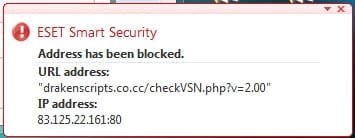
Every time I am pressing on the "Sticky Notes Taskbar Hider" icon in the tray bar, my antivirus software all the time popping up the same message, it is saying that
"Address hes been blocked", I will attache the pop up image to this post. pleas tell me if it is dangerous or my antivirus is overreacting???
Thank you very much
 

Attachments

  • Blocking.jpg
    Blocking.jpg
    8.7 KB · Views: 17

My Computer

Computer Manufacturer/Model Number
SONY VAIO VPCEB1S1E
OS
Windows 7 SP1 Ultimate x64
CPU
Intel Core i5 M430 2.27 GHz 2.27 GHz
Motherboard
Intel Ibex Peak-M HM55, Intel Arrandale
Memory
3952 MB (DDR3-1066 DDR3 SDRAM)
Graphics Card(s)
ATI Mobility Radeon HD 5650 (1024 MB)
Sound Card
Realtek ALC269 @ Intel Ibex Peak PCH - High Definition Audio
Monitor(s) Displays
Generic PnP Monitor [NoDB]
Screen Resolution
1366x768
Hard Drives
Toshiba MK-5055GSX 500 Gb
Hey guys I just installed the "Sticky Notes Taskbar Hider" and I really like what it does, but I am having a problem!!!
Every time I am pressing on the "Sticky Notes Taskbar Hider" icon in the tray bar, my antivirus software all the time popping up the same message, it is saying that
"Address hes been blocked", I will attache the pop up image to this post. pleas tell me if it is dangerous or my antivirus is overreacting???
Thank you very much

Thats the program checking with the server for the latest version number. Just disable the check for updates option or add an exception to your firewall.
 

My Computer

OS
Windows 7 x64
Is it me or is download link down? Mirror please??
 

My Computer

Computer type
PC/Desktop
Computer Manufacturer/Model Number
Custom Build in Progress
OS
Windows 7 Ultimate x64
CPU
Intel Core i5-2320 @ 3GHz
Motherboard
Old Dell OEM (to be replaced)
Memory
8 GB
Graphics Card(s)
Gigabyte Windforce GTX 780 GHz Edition
Sound Card
Onboard HD Sound
Monitor(s) Displays
HP 2311x and HP 2011x
Screen Resolution
1920x1080 and 1600x900
Hard Drives
Samsung 840 Evo 750GB SSD and Seagate 1TB HDD
PSU
Corsair RM 750
Case
Fractal Design Arc Midi R2
Cooling
Stock
Keyboard
Corsair K70 (MX Blues) and Dell AT102 (ALPS Salmon)
Mouse
Razer Deathstalker 2013 Gaming Mouse
Internet Speed
D: 70MB U: 20MB
Antivirus
Malwarebytes Pro, Microsoft Security Essentials
Browser
Chrome
Other Info
Custom Build in Progress (saving up for parts)
It's not just you. It's not work.
 

My Computer

Computer type
Laptop
OS
Windows 8 64bit
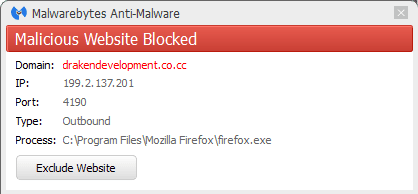
Just viewing the first page in this thread leads to this:
 

Attachments

  • websiteblocked.png
    websiteblocked.png
    4.9 KB · Views: 11

My Computer

Computer type
Laptop
Computer Manufacturer/Model Number
HP Elitebook 8540p
OS
Windows 7 Pro 32
CPU
Intel(R) Core(TM) i5 CPU M 540 @ 2.53GHz
Motherboard
Hewlett-Packard 1521
Memory
4,00 GB (Usable 2,98)
Graphics Card(s)
NVIDIA NVS 5100M
Sound Card
NVIDIA High Definition Audio
Screen Resolution
1600x900
Hard Drives
INTEL SSDSA2CW120G3
Antivirus
F-Secure Internet Security
Browser
IE, Firefox, Opera
Other Info
Sandboxie,
SRP (Software Restriction Policy),
EMET (Enhanced Mitigation Experience Toolkit),
WFC (Windows Firewall Control by BiniSoft),
Malwarebytes Premium
Hello 2022,

If someone have archived this, is it possible to ask for an upload, please?
Or another option to hide Windows 7's Sticky Notes from the Taskbar, and make a System Tray icon instead?

I'm aware of alternatives for Sticky Notes, I've tried them all and none of them are as simple/minimalist as Win7's.

Thanks :)

Edit: From comments I've read online, the tool works fine on x86 systems but not on x64.
So, I guess I've bumped an old thread for fun, I hope you don't mind ;)
 

My Computer

Computer type
PC/Desktop
OS
win 7 pro x64
Back
Top