STILL having problems with screen freezes

eiuguy11

New member
Local time
4:06 PM
Messages
5
My computer is a compaq presario cq62-228dx notebook. I don't know what the problem is with my computer but here goes. For the 2nd time in the last 2 weeks I have had to reformat my computer due to screen freezes I was having shortly after logging on to Windows. I tried using start-up repair and system restore and neither worked. System restore did not even complete succesfully for me to use it. And there have even been times where I did system restore and there were still screen freezes. Does anyone know what could be causing these screen freezes to happen so often? Is it due to programs that begin when I start-up my computer? Or maybe issues with windows updates on load-ups? Any help in solving this matter would be appreciated. Screen freezes have been a constant problem for me with this computer.
 

My Computer

Computer Manufacturer/Model Number
Compaq Presario CQ62-228 DX Notebook
OS
Windows 7
Start with memtest and the hard disk manufacturer diagnostics disk.
 

My Computer

Computer type
PC/Desktop
OS
Microsoft Windows 10 Professional / Windows 7 Professional
CPU
Intel i5-3570
Motherboard
Lenovo Mahobay
Memory
16GB DDR3
Graphics Card(s)
AMD Radeon HD 7850 2GB
Sound Card
(1) Realtek HD Audio (2) AMD HD Audio
Monitor(s) Displays
LG LS192WS
Screen Resolution
1440 x 900 @ 32bit color
Hard Drives
(1) SUV300S37A/120G (2) ST3500413AS SATA Disk Device AHCI mode enabled.
PSU
Corsair HX620
Case
Thermaltake V4 Black Edition
Cooling
Cooler Master Hyper 212 + Artic Silver 5 on CPU/GPU
Keyboard
Dell SK-8115
Mouse
Razer Copperhead with MAPED mat (awesome!)
Internet Speed
100 Mbps up/down
Browser
Chrome
How old`s the hard drive ?
 

My Computer

Computer Manufacturer/Model Number
Myself
OS
Windows 7 Ultimate 64Bit
CPU
C2D E8200
Motherboard
XFX 750i
Memory
8GB PNY PC2-6400
Graphics Card(s)
BFG 9600GT x 2
Sound Card
Stock XFX Optical
Monitor(s) Displays
Gateway 22" HD Display
Hard Drives
C: 1 TB G: 500 GB H: 500 GB
PSU
Ultra LSP 550 Pro Lifetime Series
Case
Xion2
Cooling
ThermalTake
My computer is a compaq presario cq62-228dx notebook. I don't know what the problem is with my computer but here goes. For the 2nd time in the last 2 weeks I have had to reformat my computer due to screen freezes I was having shortly after logging on to Windows. I tried using start-up repair and system restore and neither worked. System restore did not even complete succesfully for me to use it. And there have even been times where I did system restore and there were still screen freezes. Does anyone know what could be causing these screen freezes to happen so often? Is it due to programs that begin when I start-up my computer? Or maybe issues with windows updates on load-ups? Any help in solving this matter would be appreciated. Screen freezes have been a constant problem for me with this computer.

Suggestions only :

Do the followings in safe mode with command prompt......

1. Run a full virus scan with you security program to make sure your computer is NOT infected.

2. Run a system file check to look for corrupt files. It will try to repair them if any found.
http://www.sevenforums.com/tutorials/1538-sfc-scannow-command-system-file-checker.html

3. Run a dish check to look for bad sectors etc. It will try to repair them if any found.
http://www.sevenforums.com/tutorials/433-disk-check.html

4. Make sure your computer is fully updated, including drivers and more importantly installing SP1.
 

My Computer

Computer Manufacturer/Model Number
Acer Aspire 7741Z
OS
Windows 7 Home Premium 64-bit, SP1
CPU
Intel Pentium P6200, Cores 2, 2.13 GHz
Memory
4 GB
Graphics Card(s)
Intel HD
Sound Card
unknown
Monitor(s) Displays
17.3 inches
Screen Resolution
1600 x 900
Hard Drives
640 GB, 5400 PRM
@t-4: I will have to try that the next time my computer freezes.

@Zomby: My parents bought the computer for me brand new at Best Buy last summer.
 

My Computer

Computer Manufacturer/Model Number
Compaq Presario CQ62-228 DX Notebook
OS
Windows 7
@t-4: I will have to try that the next time my computer freezes.

@Zomby: My parents bought the computer for me brand new at Best Buy last summer.

You miss the point.

You do those now so that your computer will NOT freeze again. Not after it freezes.
 

My Computer

Computer Manufacturer/Model Number
Acer Aspire 7741Z
OS
Windows 7 Home Premium 64-bit, SP1
CPU
Intel Pentium P6200, Cores 2, 2.13 GHz
Memory
4 GB
Graphics Card(s)
Intel HD
Sound Card
unknown
Monitor(s) Displays
17.3 inches
Screen Resolution
1600 x 900
Hard Drives
640 GB, 5400 PRM
@t-4: My mistake. I misunderstood you. I will run these now and hopefully it will fix the problem. If it does not then I'm not quite sure what I'll do next. Oh and I'm also a little computer illiterate so i don't know what SP1 means.
 

My Computer

Computer Manufacturer/Model Number
Compaq Presario CQ62-228 DX Notebook
OS
Windows 7
@t-4: My mistake. I misunderstood you. I will run these now and hopefully it will fix the problem. If it does not then I'm not quite sure what I'll do next. Oh and I'm also a little computer illiterate so i don't know what SP1 means.

Good luck.

t-4-2
 

My Computer

Computer Manufacturer/Model Number
Acer Aspire 7741Z
OS
Windows 7 Home Premium 64-bit, SP1
CPU
Intel Pentium P6200, Cores 2, 2.13 GHz
Memory
4 GB
Graphics Card(s)
Intel HD
Sound Card
unknown
Monitor(s) Displays
17.3 inches
Screen Resolution
1600 x 900
Hard Drives
640 GB, 5400 PRM
@t-4: My mistake. I misunderstood you. I will run these now and hopefully it will fix the problem. If it does not then I'm not quite sure what I'll do next. Oh and I'm also a little computer illiterate so i don't know what SP1 means.

sp1= service pack 1
 

My Computer

Computer Manufacturer/Model Number
Toshiba Satellite S875D-S7239 laptop
OS
MS Windows 7 Ultimate SP1 64-bit
CPU
AMD A10-4600M
Motherboard
AMD Pumori (Socket FT1)
Memory
6.00 GB Dual-Channel DDR3 @ 798MHz (11-11-12-28)
Graphics Card(s)
AMD Radeon HD 7660G
Sound Card
High Definition Audio Device
Monitor(s) Displays
Generic PnP Monitor (1600x900@60Hz)
Screen Resolution
1600x900@60Hz
Hard Drives
SSD 119GB Corsair CSSD-V128GB2 ATA Device
Keyboard
Standard PS/2 Keyboard
Mouse
HP Wireless Optical Mobile Mouse Model FHA-3410
Internet Speed
What the local pub, local coffee shop offers.
Other Info
Optical Drive:MATSHITA BD-CMB UJ160B ATA Device


Also have an Asus ha1002xp netbook with Win 7 Ultimate installed.
eiuguy,

You can help us to help you by completing your System Specs and here is how:

UPDATE YOUR SEVENFORUMS SYSTEM SPECS


User CP (3rd item in the top menu bar) |
in left-hand column, under Your Profile, Edit System Spec |


Use Speccy - System Information - Free Download
and/or SIW to gather info for filling in the blanks.

Do me a favor and add the word laptop or desktop to the “system manufacturer” block.

Use the “Other Info” block for Optical Reader, Mouse, touchpad, wifi adapter, speakers, monitor

Scroll down and click on the SAVE CHANGES button.
 

My Computer

Computer Manufacturer/Model Number
Toshiba Satellite S875D-S7239 laptop
OS
MS Windows 7 Ultimate SP1 64-bit
CPU
AMD A10-4600M
Motherboard
AMD Pumori (Socket FT1)
Memory
6.00 GB Dual-Channel DDR3 @ 798MHz (11-11-12-28)
Graphics Card(s)
AMD Radeon HD 7660G
Sound Card
High Definition Audio Device
Monitor(s) Displays
Generic PnP Monitor (1600x900@60Hz)
Screen Resolution
1600x900@60Hz
Hard Drives
SSD 119GB Corsair CSSD-V128GB2 ATA Device
Keyboard
Standard PS/2 Keyboard
Mouse
HP Wireless Optical Mobile Mouse Model FHA-3410
Internet Speed
What the local pub, local coffee shop offers.
Other Info
Optical Drive:MATSHITA BD-CMB UJ160B ATA Device


Also have an Asus ha1002xp netbook with Win 7 Ultimate installed.
@t-4: My mistake. I misunderstood you. I will run these now and hopefully it will fix the problem. If it does not then I'm not quite sure what I'll do next. Oh and I'm also a little computer illiterate so i don't know what SP1 means.

I'm sorry. Somehow I did not see your last sentence ......
" Oh and I'm also a little computer illiterate so i don't know what SP1 means "

SP1 is Service Pack 1 for Windows 7. ( Not the Vista counterpart. Not the MS Office service packs. )
It is to be offered to you via your Windows Update center.
If you were offered SP 1, you would have been notified from Windows Update center.
If you have not received the notification, then please wait. Maybe your machine is not ready for it.
It is best that you install it when it is offered to you, rather than going to MS Download Center looking for it.
P.S. I was never offered the SP1. I had to go to MS Download Center to install it. ;)

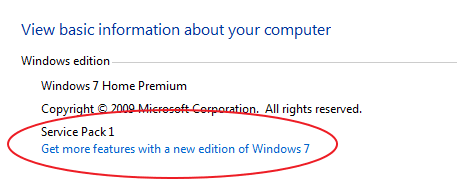
How do you know if you already have Windows 7 SP1 ?
Start button > Computer > toolbar at top, click System Properties > under Windows Edition, it will tell you if you have SP1 or not. See my screenshot...

system properties.png
 

My Computer

Computer Manufacturer/Model Number
Acer Aspire 7741Z
OS
Windows 7 Home Premium 64-bit, SP1
CPU
Intel Pentium P6200, Cores 2, 2.13 GHz
Memory
4 GB
Graphics Card(s)
Intel HD
Sound Card
unknown
Monitor(s) Displays
17.3 inches
Screen Resolution
1600 x 900
Hard Drives
640 GB, 5400 PRM
t-4-2,

Another quick way to find out which version and whether the service pack is installed is:

:orb: | type WINVER | ENTER
 

My Computer

Computer Manufacturer/Model Number
Toshiba Satellite S875D-S7239 laptop
OS
MS Windows 7 Ultimate SP1 64-bit
CPU
AMD A10-4600M
Motherboard
AMD Pumori (Socket FT1)
Memory
6.00 GB Dual-Channel DDR3 @ 798MHz (11-11-12-28)
Graphics Card(s)
AMD Radeon HD 7660G
Sound Card
High Definition Audio Device
Monitor(s) Displays
Generic PnP Monitor (1600x900@60Hz)
Screen Resolution
1600x900@60Hz
Hard Drives
SSD 119GB Corsair CSSD-V128GB2 ATA Device
Keyboard
Standard PS/2 Keyboard
Mouse
HP Wireless Optical Mobile Mouse Model FHA-3410
Internet Speed
What the local pub, local coffee shop offers.
Other Info
Optical Drive:MATSHITA BD-CMB UJ160B ATA Device


Also have an Asus ha1002xp netbook with Win 7 Ultimate installed.
t-4-2,

Another quick way to find out which version and whether the service pack is installed is:

:orb: | type WINVER | ENTER

My way of giving answers/suggestions is " user oriented ".

If I were to suggest something to you, I would just simply say, for example, " your user profile could be corrupted ". I know that you know how to prove or disprove my suggestion.

If I were to give the same suggestion to a novice, I would have to give step by step instructions.

It is better to show the novice the " traditionaln ways " so they have a chance to feel their way through various applications.
To give a novice a " short cut " is to show " how to run " before " how to walk ".
 

My Computer

Computer Manufacturer/Model Number
Acer Aspire 7741Z
OS
Windows 7 Home Premium 64-bit, SP1
CPU
Intel Pentium P6200, Cores 2, 2.13 GHz
Memory
4 GB
Graphics Card(s)
Intel HD
Sound Card
unknown
Monitor(s) Displays
17.3 inches
Screen Resolution
1600 x 900
Hard Drives
640 GB, 5400 PRM
Each to his own said the man as he kissed the cow.

Have a nice day.
 

My Computer

Computer Manufacturer/Model Number
Toshiba Satellite S875D-S7239 laptop
OS
MS Windows 7 Ultimate SP1 64-bit
CPU
AMD A10-4600M
Motherboard
AMD Pumori (Socket FT1)
Memory
6.00 GB Dual-Channel DDR3 @ 798MHz (11-11-12-28)
Graphics Card(s)
AMD Radeon HD 7660G
Sound Card
High Definition Audio Device
Monitor(s) Displays
Generic PnP Monitor (1600x900@60Hz)
Screen Resolution
1600x900@60Hz
Hard Drives
SSD 119GB Corsair CSSD-V128GB2 ATA Device
Keyboard
Standard PS/2 Keyboard
Mouse
HP Wireless Optical Mobile Mouse Model FHA-3410
Internet Speed
What the local pub, local coffee shop offers.
Other Info
Optical Drive:MATSHITA BD-CMB UJ160B ATA Device


Also have an Asus ha1002xp netbook with Win 7 Ultimate installed.
Back
Top