Still No Unified Inbox in Outlook 2010!

imacken

New member
Power User
VIP
Local time
11:21 PM
Messages
288
Unless I'm missing a trick, there is still no unified Inbox in Outlook 2010. In this day and age of most people having multiple email accounts, I find that amazing.
MS have managed to do it excellently in the Mac version of Office 2011 Outlook, so why are we losing out?
 

My Computer My Computer

At a glance

Windows 7 64-bitIntel i7 920 @ 4GHz6GbnVidia GTX 285
OS
Windows 7 64-bit
CPU
Intel i7 920 @ 4GHz
Motherboard
Asus P6T Deluxe V2
Memory
6Gb
Graphics Card(s)
nVidia GTX 285
Sound Card
X-Fi Extreme Audio PCIe
Screen Resolution
1900x1200

My Computer My Computer

At a glance

Windows 10 Pro x64, Windows 8.1 Pro x64, Wind...INTEL i9-7920X LGA 206664 GB (4 X 16 GB) G-Skill V Series DDR4 3200 ...EVGA GTX 1060 SC 3 GB
Computer type
PC/Desktop
Computer Manufacturer/Model Number
Custom Built
OS
Windows 10 Pro x64, Windows 8.1 Pro x64, Windows 7 Ultimate x64 SP1,
CPU
INTEL i9-7920X LGA 2066
Motherboard
Gigabyte X299-WU8 F3
Memory
64 GB (4 X 16 GB) G-Skill V Series DDR4 3200 Quad Channel
Graphics Card(s)
EVGA GTX 1060 SC 3 GB
Sound Card
Realtek Onboard ALC1220
Monitor(s) Displays
2 x Samsung S27E310
Screen Resolution
1920x1080
Hard Drives
Samsung 2 x 970 EVO Plus 500 GB NVMe
1 x 6TB WD 6003FZBX SATA
1 x 6TB WD 60EFRX SATA
12 x 3TB WD 30EFRX SATA
PSU
Seasonic X-1050
Case
Thermaltake Armor+
Cooling
Corsair H80i V2 Liquid AOI Cooler
Keyboard
Logitech G510s
Mouse
Logitech MX Master 2S
Internet Speed
200 Mb/s
Antivirus
ESET NOD32 13.1
Browser
EDGE (Dev, Canary, Beta), Chrome
Other Info
ASUS RT-AC68U router
Malwarebytes 4.0.4
Yes, thanks for that. I've seen that before. I didn't try it because it seems to just move mails to another folder which isn't really the same thing.
You only have to look at Apple's mail client on the iPhone or OS X, or Microsoft's own Outlook 2011 for Mac to see how it should be done.
I just don't understand why MS haven't built it into the Windows version of Office yet.
 

My Computer My Computer

At a glance

Windows 7 64-bitIntel i7 920 @ 4GHz6GbnVidia GTX 285
OS
Windows 7 64-bit
CPU
Intel i7 920 @ 4GHz
Motherboard
Asus P6T Deluxe V2
Memory
6Gb
Graphics Card(s)
nVidia GTX 285
Sound Card
X-Fi Extreme Audio PCIe
Screen Resolution
1900x1200
I don't understand, all of my email goes to my singular inbox from the five email accounts I use.

Always has since Outlook for XP. I suppose I'm missing something, I'm sure, regarding the OP's post. On my iPhone, on the other hand, I have to go into each account to read my emails.
 

My Computer My Computer

At a glance

Windows 7 Ultimate x64 SP1Core2 Duo4 GBGM965 on-board
Computer Manufacturer/Model Number
Toshiba L355D
OS
Windows 7 Ultimate x64 SP1
CPU
Core2 Duo
Motherboard
Intel
Memory
4 GB
Graphics Card(s)
GM965 on-board
Sound Card
RealTek on-board
Monitor(s) Displays
19"+17"(laptop)
Screen Resolution
1440x900 (x 2)
Hard Drives
500GB Ext. 200GB Internal
PSU
N/A
Case
N/A
Cooling
N/A
Tell me how you do it - please!
As far as the iPhone is concerned, then I guess you're not on iOS4, otherwise you would have a unified Inbox.
What I see is this screenshot below
 

Attachments

  • O10.jpg
    O10.jpg
    30.5 KB · Views: 64

My Computer My Computer

At a glance

Windows 7 64-bitIntel i7 920 @ 4GHz6GbnVidia GTX 285
OS
Windows 7 64-bit
CPU
Intel i7 920 @ 4GHz
Motherboard
Asus P6T Deluxe V2
Memory
6Gb
Graphics Card(s)
nVidia GTX 285
Sound Card
X-Fi Extreme Audio PCIe
Screen Resolution
1900x1200
I give up.
I tried the new rule method mentioned above. Couldn't get it to work.
The best I seem to be able to achieve is to show all 4 Inboxes in Favorites. At least then, I don't have to expand each account tree to see the Inboxes.
I would still like to know how Mikedl got it to work, though.
 

My Computer My Computer

At a glance

Windows 7 64-bitIntel i7 920 @ 4GHz6GbnVidia GTX 285
OS
Windows 7 64-bit
CPU
Intel i7 920 @ 4GHz
Motherboard
Asus P6T Deluxe V2
Memory
6Gb
Graphics Card(s)
nVidia GTX 285
Sound Card
X-Fi Extreme Audio PCIe
Screen Resolution
1900x1200
Are all your email accounts POP3?
 

My Computer My Computer

At a glance

Windows 10 Pro x64, Windows 8.1 Pro x64, Wind...INTEL i9-7920X LGA 206664 GB (4 X 16 GB) G-Skill V Series DDR4 3200 ...EVGA GTX 1060 SC 3 GB
Computer type
PC/Desktop
Computer Manufacturer/Model Number
Custom Built
OS
Windows 10 Pro x64, Windows 8.1 Pro x64, Windows 7 Ultimate x64 SP1,
CPU
INTEL i9-7920X LGA 2066
Motherboard
Gigabyte X299-WU8 F3
Memory
64 GB (4 X 16 GB) G-Skill V Series DDR4 3200 Quad Channel
Graphics Card(s)
EVGA GTX 1060 SC 3 GB
Sound Card
Realtek Onboard ALC1220
Monitor(s) Displays
2 x Samsung S27E310
Screen Resolution
1920x1080
Hard Drives
Samsung 2 x 970 EVO Plus 500 GB NVMe
1 x 6TB WD 6003FZBX SATA
1 x 6TB WD 60EFRX SATA
12 x 3TB WD 30EFRX SATA
PSU
Seasonic X-1050
Case
Thermaltake Armor+
Cooling
Corsair H80i V2 Liquid AOI Cooler
Keyboard
Logitech G510s
Mouse
Logitech MX Master 2S
Internet Speed
200 Mb/s
Antivirus
ESET NOD32 13.1
Browser
EDGE (Dev, Canary, Beta), Chrome
Other Info
ASUS RT-AC68U router
Malwarebytes 4.0.4
I didn't do anything special. I've kept my settings for Outlook since Office XP (yeah, I've got email that old I still lug around from version to version). All of my mail goes to my singular inbox except for my Gmail IMAP account which is unchangeable in that aspect. I set up a POP account for Gmail as well so it will show up in my singular inbox and now only use the IMAP account on the computer to delete mail from my iPhone with push.

Have a look at your folder settings as indicated below:
ScreenShot00021.jpg
 

My Computer My Computer

At a glance

Windows 7 Ultimate x64 SP1Core2 Duo4 GBGM965 on-board
Computer Manufacturer/Model Number
Toshiba L355D
OS
Windows 7 Ultimate x64 SP1
CPU
Core2 Duo
Motherboard
Intel
Memory
4 GB
Graphics Card(s)
GM965 on-board
Sound Card
RealTek on-board
Monitor(s) Displays
19"+17"(laptop)
Screen Resolution
1440x900 (x 2)
Hard Drives
500GB Ext. 200GB Internal
PSU
N/A
Case
N/A
Cooling
N/A
Thanks guys.
I have 1 POP and 3 IMAP. Does that make a difference?
 

My Computer My Computer

At a glance

Windows 7 64-bitIntel i7 920 @ 4GHz6GbnVidia GTX 285
OS
Windows 7 64-bit
CPU
Intel i7 920 @ 4GHz
Motherboard
Asus P6T Deluxe V2
Memory
6Gb
Graphics Card(s)
nVidia GTX 285
Sound Card
X-Fi Extreme Audio PCIe
Screen Resolution
1900x1200
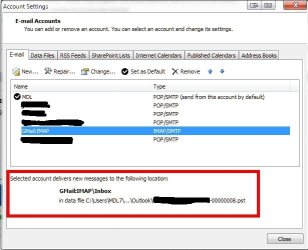
I haven't been able to point my IMAP account to the singular inbox. Note there is no folder option available for the IMAP account as there was for the POP accounts:
ScreenShot00022.jpg

Outlook creates separate folder sets for IMAP thereby giving you the results you showed earlier.

I would imagine rules are the only way to organize your IMAP accounts into one inbox. I haven't tried do so as it's not necessary for me so I cannot say why rules aren't working for you.
 

My Computer My Computer

At a glance

Windows 7 Ultimate x64 SP1Core2 Duo4 GBGM965 on-board
Computer Manufacturer/Model Number
Toshiba L355D
OS
Windows 7 Ultimate x64 SP1
CPU
Core2 Duo
Motherboard
Intel
Memory
4 GB
Graphics Card(s)
GM965 on-board
Sound Card
RealTek on-board
Monitor(s) Displays
19"+17"(laptop)
Screen Resolution
1440x900 (x 2)
Hard Drives
500GB Ext. 200GB Internal
PSU
N/A
Case
N/A
Cooling
N/A
Yes, it looks like Outlook is not geared up for IMAP at all. No folder option (as above), no ability to change the default data file, no forwarding rules working,.....
I'm amazed that this new version of Outlook is way behind the Apple offerings, and more importantly, Microsoft's own outlook 2011 for Mac!
Why can't they update their native Windows version? It is, after all, their bread and butter.
 

My Computer My Computer

At a glance

Windows 7 64-bitIntel i7 920 @ 4GHz6GbnVidia GTX 285
OS
Windows 7 64-bit
CPU
Intel i7 920 @ 4GHz
Motherboard
Asus P6T Deluxe V2
Memory
6Gb
Graphics Card(s)
nVidia GTX 285
Sound Card
X-Fi Extreme Audio PCIe
Screen Resolution
1900x1200
Just thinking about this, can anyone confirm that these issues I'm having are down the the accounts being IMAP?
 

My Computer My Computer

At a glance

Windows 7 64-bitIntel i7 920 @ 4GHz6GbnVidia GTX 285
OS
Windows 7 64-bit
CPU
Intel i7 920 @ 4GHz
Motherboard
Asus P6T Deluxe V2
Memory
6Gb
Graphics Card(s)
nVidia GTX 285
Sound Card
X-Fi Extreme Audio PCIe
Screen Resolution
1900x1200
Anyone have any thoughts on this?
 

My Computer My Computer

At a glance

Windows 7 64-bitIntel i7 920 @ 4GHz6GbnVidia GTX 285
OS
Windows 7 64-bit
CPU
Intel i7 920 @ 4GHz
Motherboard
Asus P6T Deluxe V2
Memory
6Gb
Graphics Card(s)
nVidia GTX 285
Sound Card
X-Fi Extreme Audio PCIe
Screen Resolution
1900x1200
Who knows if anyone is actually going to read this after all this time, but here goes.

The mix of IMAP and POP is the issue. The way Outlook uses IMAP as separate entities does not allow for the concept of a unified inbox. You could set up rules to move new messages from an IMAP account to your local folders, but that's about it.
 

My Computer My Computer

At a glance

Windows 7 (32-bit)
OS
Windows 7 (32-bit)
The OP is correct. I believe the Windows Outlook 2010 development team simply failed to provide the important "All Inboxes" feature. As stated, it's available in other email clients these days including the free or built-in iOS Mail and Windows Live Mail (both of which I end up using more than Outlook 2010 partly for this reason).

Solutions that move email from multiple accounts into a single folder/data store just create a mess IMO. Some may prefer it. But what I and (I think) others want is a View (using the SQL database term which is probably what this feature is based on anyway). A View presents multiple data sources in a single result set without modifying the underlying sources. A View is cached in memory upon each use and otherwise doesn't physically exist.

Anything you do to an email (open, reply, flag, delete...) is passed to the source account for handling, so it doesn't matter whether that account is POP, IMAP, MAPI or whatever as long as you have the credentials stored for each. You can navigate to any source Inbox and see the exact same status for an email because that's where the View is getting it's data anyway.

I don't have the Mac version of Outlook, but it sounds like that team has figured out the All Inboxes feature. If this scenario is correct, I wish they would provide some help to the Windows Outlook team. Help them out with color schemes and user created templates while your at it.

To end on a positive note, I will say the MS Outlook 2010 team hit a home run when it comes to searching and sorting emails!

 

My Computer My Computer

At a glance

Windows 7 Pro x64Intel i7 8608GB - G.SKILL (4 x 2GB) F3-12800CL7D-4GBRHPowerColor AX5750 1GBD5-S3DH HD 5750
Computer Manufacturer/Model Number
Home-Built
OS
Windows 7 Pro x64
CPU
Intel i7 860
Motherboard
Intel DP55KG
Memory
8GB - G.SKILL (4 x 2GB) F3-12800CL7D-4GBRH
Graphics Card(s)
PowerColor AX5750 1GBD5-S3DH HD 5750
Sound Card
currently integrated
Monitor(s) Displays
Samsung T260HD
Hard Drives
Intel X25-M G2 80GB SSD x 2 (RAID-1)
Samsung F3 HD103SJ 1TB x 2 (RAID-1)
PSU
SeaSonic X650 80 PLUS Gold Modular
Case
Lian Li PC-B10
Cooling
Air cooled - Prolimatech Megahalems Rev B
Unified Inbox Workaround

Ok, I'm writing this because I spent a lot of time trying to figure out a way to do a unified inbox for Outlook 2010. I will give out a simple 3 step workaround and then one that is a little more elaborate.

First let's agree that Unified Inbox is no more than a particular "VIEW" of your Inbox mails on different account. So this is the same as querying your inboxes. So we can resolve this by doing a simple global query:

Workaround Solution:
1) Press Ctr+Alt+A
2) Type the following in the search box: folder: (Inbox) received: (this week)
3) Hit enter and you should see your Unified inbox for all mails received this week.

A more elaborate solution to automate this is to do a Macro. Won't go into how to do this, but this is the code you need:

1) This is the code for a UNIFIED INBOX:
Sub UnifiedInbox()
Dim myOlApp As New Outlook.Application
txtSearch = "folder:Inbox received: (this week)"
myOlApp.ActiveExplorer.Search txtSearch, olSearchScopeAllFolders
Set myOlApp = Nothing
End Sub

2) This is the code for a UNIFIED SENT BOX:
Sub UnifiedSentbox()
Dim myOlApp As New Outlook.Application
txtSearch = "folder: (Sent Mail) sent: (this week)"
myOlApp.ActiveExplorer.Search txtSearch, olSearchScopeAllFolders
Set myOlApp = Nothing
End Sub

3) Add Buttons to Your Bar:

Finally add custom buttons to your Ribbon to call the respective Macros so you can quickly toggle the Unified Inbox when needed.

By now you should get the idea, so tweak per your own needs!
 

My Computer My Computer

At a glance

FL
OS
FL
Back
Top