Solved Stop Windows Media Player 11 from keeping display on?

Bobazonski

Banned
Local time
10:38 AM
Messages
14
Location
Las Vegas, Nevada
I want to play music on my computer while working on my homework, while using the least power possible, so I set power options to turn the display off after 1 minute, and applied changes. I noticed if my Windows Media Player music is paused, the display will turn off as it should, but if music is playing, it will stay on. How do I keep WMP from keeping the display on? (I understand that the purpose of this is so your screen won't turn off in the middle of a movie, but I'd like to change the settings temporarily).

Also, and this is a somewhat unrelated question and I don't care as much if I get it answered, but does anyone know how to apply the same setting in VLC Media so it won't keep the display on?

I apologize for not putting this in a more specific category, but it appears to fit in more than one so I wasn't sure which to pick. If it should be moved, let me know.

I have Windows 7 64-bit SP1
and Windows Media Player 12.0.7601.17514
 

My Computer My Computer

At a glance

Windows 7 Home Premium x64AMD Athlon II X2 245 @ 2.9GHz2x4GB DDR2 667MHznVidia GeForce 9600 GSO w/768MB DDR2
OS
Windows 7 Home Premium x64
CPU
AMD Athlon II X2 245 @ 2.9GHz
Motherboard
Gigabyte GA-MA785GM-US2H
Memory
2x4GB DDR2 667MHz
Graphics Card(s)
nVidia GeForce 9600 GSO w/768MB DDR2
Sound Card
Realtek onboard (785 chipset)
Monitor(s) Displays
HANNS•G HH251 25"
Screen Resolution
1920x1080
Hard Drives
Seagate Barracuda 250GB @ 7200RPM
Samsung SpinPint 1TB @ 5400RPM
PSU
400W
Case
Cooler MAster 310 Elite
Cooling
Stock CPU, 2 case fans
Keyboard
GIGABYTE wireless multimedia
Mouse
Wireless IntelliMouse Explorer 2.0
Internet Speed
6-8 Mbps
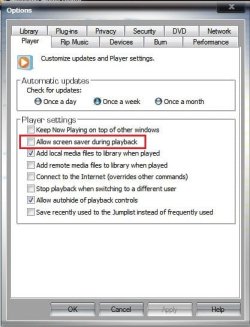
try going to the player options and under player tab check the one that states "allow screensaver during playback" since in theory the screen turning off is kinda like a screen saver...I never done this before as I never had a need but worth a try...
 

My Computer My Computer

At a glance

Windows 10 64bit UltimateIntel Core i7-4770K @3.50GHz8192 Mo, Type: DDR3, @669.7MHzSapphire 7990 6GB DDR3 PCIe 3.0
Computer type
PC/Desktop
Computer Manufacturer/Model Number
Custom Build
OS
Windows 10 64bit Ultimate
CPU
Intel Core i7-4770K @3.50GHz
Motherboard
GA-MA785GT-UD3H
Memory
8192 Mo, Type: DDR3, @669.7MHz
Graphics Card(s)
Sapphire 7990 6GB DDR3 PCIe 3.0
Sound Card
On board
Monitor(s) Displays
Monitor: 22'' Samsung, 2x 15" Touch screen (stored)
Screen Resolution
1600x1900 (Samsung)
Hard Drives
Kingston SSD, 120GB "SSD Now 300"
ADATA SP550
Samsung HM321HI
PSU
1000 Watt
Case
Antec Sonata III
Cooling
200MM side fan, 1 intake front
Keyboard
Naga Chroma Mechanical
Mouse
Razer Naga
Internet Speed
10 megs
Antivirus
Windows Defender
Browser
Chrome
Other Info
Optical drive (main): SONY DVD RW AW-G170S 1.72
Ahh there it is. I had a feeling it was a little checkbox somewhere it the settings but I couldn't find it. Thanks though, that worked like a charm! :)

I added to your rep for this too :)
 

My Computer My Computer

At a glance

Windows 7 Home Premium x64AMD Athlon II X2 245 @ 2.9GHz2x4GB DDR2 667MHznVidia GeForce 9600 GSO w/768MB DDR2
OS
Windows 7 Home Premium x64
CPU
AMD Athlon II X2 245 @ 2.9GHz
Motherboard
Gigabyte GA-MA785GM-US2H
Memory
2x4GB DDR2 667MHz
Graphics Card(s)
nVidia GeForce 9600 GSO w/768MB DDR2
Sound Card
Realtek onboard (785 chipset)
Monitor(s) Displays
HANNS•G HH251 25"
Screen Resolution
1920x1080
Hard Drives
Seagate Barracuda 250GB @ 7200RPM
Samsung SpinPint 1TB @ 5400RPM
PSU
400W
Case
Cooler MAster 310 Elite
Cooling
Stock CPU, 2 case fans
Keyboard
GIGABYTE wireless multimedia
Mouse
Wireless IntelliMouse Explorer 2.0
Internet Speed
6-8 Mbps
Initially it is a little bit contradiction about your media player's version, but I am suggesting you an workaround , which will work as per your need .

Open media player .... then organize > Options > Player > Allow Screen Saver During Playback
Capture.JPG

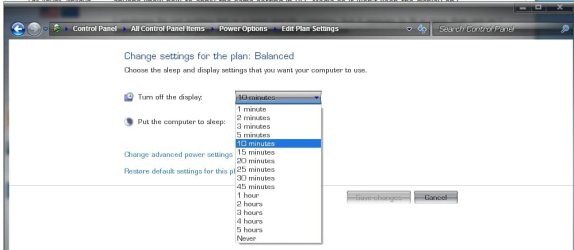
Now adjust Screensaver settings and Power Plan Settings at your will ..... you may turn off the display after one minute .

Right Click on the desktop > Personalize > Screensaver > Change Power Settings > you will be in the power options window, I hope balanced (recommended) is checked . Click on change power settings , click turn off the display, set it to one minute, and save the changes.
Untitled.jpg
 

My Computer My Computer

At a glance

Microsoft Windows 10 Pro Insider Preview 64-bitIntel(R) Core(TM) i3-4130 CPU @ 3.40GHzCorsair Vengence 4GB x2 (8.00GB Dual-Channel ...2047MB GeForce GTS 450 (ZOTAC International)
Computer type
PC/Desktop
Computer Manufacturer/Model Number
Self Assembled
OS
Microsoft Windows 10 Pro Insider Preview 64-bit
CPU
Intel(R) Core(TM) i3-4130 CPU @ 3.40GHz
Motherboard
Gigabyte Technology Co., Ltd. B85M-D3H
Memory
Corsair Vengence 4GB x2 (8.00GB Dual-Channel DDR3 @ 798MHz)
Graphics Card(s)
2047MB GeForce GTS 450 (ZOTAC International)
Sound Card
Onboard (Realtek High Definition Audio)
Monitor(s) Displays
LG Flatron E2040T
Screen Resolution
1600x900
Hard Drives
Western Digital 1 TB
Seagate 500 GB
PSU
Corsair VS550
Case
Cooler Master K380
Cooling
Cooler Master Seidon 120V Plus
Keyboard
Logitech MK260r
Mouse
Logitech MK260r
Internet Speed
PMPL Broadband
Antivirus
Windows Defender + MBAM
Browser
Firefox
Other Info
Dell Studio 15" Laptop
Back
Top