
strange boing noise

peire

New member
Local time
1:52 AM
Messages
37
Location
England,Liverpool
Hi i keep getting this strange boing noise on my laptop, so i have it on mute all the time and i took it off mute and it still doing it i dont even have to touch anything on my laptop for it to do it it does it randomly so i havent a clue as what it can be, any help would be great thanks
 

My Computer

OS
windows 7 x64 Home Premium
CPU
compaq presario CQ56
Memory
2048MB RAM
Monitor(s) Displays
Generic pnp Monitor
Screen Resolution
1366 x 768
Hard Drives
232GB
Keyboard
Laptop
Mouse
touch pad
Internet Speed
http://www.speedtest.net/result/1570184116.png
could be Malware, software you have installed, or an error message that's failing to appear. Fill out your system specs and post a screen shot of your startup items as listed in msconfig.
 

My Computer

Computer type
PC/Desktop
Computer Manufacturer/Model Number
Self Build
OS
Windows 7 Ultimate x64
CPU
Intel Core2 Quad Q8300 2.5Ghz
Motherboard
Asus P5QD Turbo
Memory
Kingston HyperX 4x1GB DDR2 1066Mhz
Graphics Card(s)
Asus/Nvidia 9500GT 1GB
Sound Card
On-Board HD
Monitor(s) Displays
22" Widescreen TFT
Screen Resolution
1920x1080
Hard Drives
2x 320Gb Seagate SATAII RAID 0
2x 80Gb Seagate SATAII RAID 0
1x 1tb hybrid (8gb ssd)
PSU
650w
Case
ATX
Cooling
140mm front, 120mm Rear, 80mm Chipset + stock CPU and GPU
Keyboard
Plastic one
Mouse
Plastic one
Internet Speed
4Mbps
Other Info
Laptop: HP Elitebook 2560p
i5 @2.7Ghz 4GB DDR3
type msinfo32 into the start menu, then expand software environment at the side, then select startup programs. then click file at the top and export to a text file, then when posting here, click the paperclip and upload that text file and insert it in your post.
 

My Computer

Computer type
PC/Desktop
Computer Manufacturer/Model Number
Self Build
OS
Windows 7 Ultimate x64
CPU
Intel Core2 Quad Q8300 2.5Ghz
Motherboard
Asus P5QD Turbo
Memory
Kingston HyperX 4x1GB DDR2 1066Mhz
Graphics Card(s)
Asus/Nvidia 9500GT 1GB
Sound Card
On-Board HD
Monitor(s) Displays
22" Widescreen TFT
Screen Resolution
1920x1080
Hard Drives
2x 320Gb Seagate SATAII RAID 0
2x 80Gb Seagate SATAII RAID 0
1x 1tb hybrid (8gb ssd)
PSU
650w
Case
ATX
Cooling
140mm front, 120mm Rear, 80mm Chipset + stock CPU and GPU
Keyboard
Plastic one
Mouse
Plastic one
Internet Speed
4Mbps
Other Info
Laptop: HP Elitebook 2560p
i5 @2.7Ghz 4GB DDR3
Cant see anything suspicious there, try running Malware Bytes as your only av is MSE (which is good in itself against major threats).
 

My Computer

Computer type
PC/Desktop
Computer Manufacturer/Model Number
Self Build
OS
Windows 7 Ultimate x64
CPU
Intel Core2 Quad Q8300 2.5Ghz
Motherboard
Asus P5QD Turbo
Memory
Kingston HyperX 4x1GB DDR2 1066Mhz
Graphics Card(s)
Asus/Nvidia 9500GT 1GB
Sound Card
On-Board HD
Monitor(s) Displays
22" Widescreen TFT
Screen Resolution
1920x1080
Hard Drives
2x 320Gb Seagate SATAII RAID 0
2x 80Gb Seagate SATAII RAID 0
1x 1tb hybrid (8gb ssd)
PSU
650w
Case
ATX
Cooling
140mm front, 120mm Rear, 80mm Chipset + stock CPU and GPU
Keyboard
Plastic one
Mouse
Plastic one
Internet Speed
4Mbps
Other Info
Laptop: HP Elitebook 2560p
i5 @2.7Ghz 4GB DDR3
ok thanks will get that now...

one other question my laptop gets pretyy hot and makes a lot of noise any idea what it could be ?? im on my laptop a hell of alot a day though so ??

edit:my sig not showing up ??
 

My Computer

OS
windows 7 x64 Home Premium
CPU
compaq presario CQ56
Memory
2048MB RAM
Monitor(s) Displays
Generic pnp Monitor
Screen Resolution
1366 x 768
Hard Drives
232GB
Keyboard
Laptop
Mouse
touch pad
Internet Speed
http://www.speedtest.net/result/1570184116.png
Signatures are limited by size, after you upload an image you need to add the sigpic tag to the free text area of your sig.

Edit: laptops get hot, the noise and heat are likely caused by fans and heatsink getting clogged with dust, this reduces the cooling efficiency and aerodynamics, this results in max fan speed and more heat. I used an AMD laptop that reached 91 degrees C last week and thats only 6months old.

See http://www.hwinfo.com/ for your temps if you are really interested.
 

My Computer

Computer type
PC/Desktop
Computer Manufacturer/Model Number
Self Build
OS
Windows 7 Ultimate x64
CPU
Intel Core2 Quad Q8300 2.5Ghz
Motherboard
Asus P5QD Turbo
Memory
Kingston HyperX 4x1GB DDR2 1066Mhz
Graphics Card(s)
Asus/Nvidia 9500GT 1GB
Sound Card
On-Board HD
Monitor(s) Displays
22" Widescreen TFT
Screen Resolution
1920x1080
Hard Drives
2x 320Gb Seagate SATAII RAID 0
2x 80Gb Seagate SATAII RAID 0
1x 1tb hybrid (8gb ssd)
PSU
650w
Case
ATX
Cooling
140mm front, 120mm Rear, 80mm Chipset + stock CPU and GPU
Keyboard
Plastic one
Mouse
Plastic one
Internet Speed
4Mbps
Other Info
Laptop: HP Elitebook 2560p
i5 @2.7Ghz 4GB DDR3
How frequent is the noise and does it sound the same as any other system sounds or completely different? How long has it been there?

If it's frequent, open the mixer and see if the sound activity is shown, and what application it is shown against.
 

My Computer

Computer type
PC/Desktop
Computer Manufacturer/Model Number
Self Build
OS
Windows 7 Ultimate x64
CPU
Intel Core2 Quad Q8300 2.5Ghz
Motherboard
Asus P5QD Turbo
Memory
Kingston HyperX 4x1GB DDR2 1066Mhz
Graphics Card(s)
Asus/Nvidia 9500GT 1GB
Sound Card
On-Board HD
Monitor(s) Displays
22" Widescreen TFT
Screen Resolution
1920x1080
Hard Drives
2x 320Gb Seagate SATAII RAID 0
2x 80Gb Seagate SATAII RAID 0
1x 1tb hybrid (8gb ssd)
PSU
650w
Case
ATX
Cooling
140mm front, 120mm Rear, 80mm Chipset + stock CPU and GPU
Keyboard
Plastic one
Mouse
Plastic one
Internet Speed
4Mbps
Other Info
Laptop: HP Elitebook 2560p
i5 @2.7Ghz 4GB DDR3
Sounds

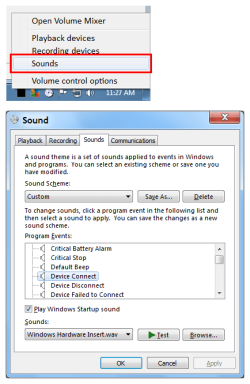
Are you sure it isn't the "Device Connect", "Device Disconnect" or "Device Failed to Connect" sound?

Try this:

  • Right click on the "Speakers" icon in your "Notification Area".
  • Click on "Sounds".
Any item in the "Program Events:" list that has a speaker symbol by it, has a sound set for that event.
You can hear the sound by clicking on the "Test" button.

If you want to change the sound, click on the "Browse" button.
If you want to turn the sound off, click on the "Sounds:" drop down list and choose "(None)".

Sound Settings.png
 

My Computer

Computer type
PC/Desktop
Computer Manufacturer/Model Number
n/a
OS
W7 Ultimate SP1, LM19.2 MATE, W10 Home 1703, W10 Pro 1703 VM, #All 64 bit
CPU
AMD Phenom II x6 1100T, 3.3 GHz
Motherboard
ASUS M4A88T-M/USB3 (AM3)
Memory
12GB DDR3 1333 G-Skill (4GB x 2), G-Skill (2GB x 2)
Graphics Card(s)
NVIDIA GeForce GTX 660
Sound Card
Realtek?
Monitor(s) Displays
Samsung S23B350
Screen Resolution
1920x1080
Hard Drives
WD Green 2TB (SATA), WD Green 3TB (SATA), WD Blue 4TB (SATA), WD Blue 6TB (SATA)
PSU
Cooler Master
Case
Antec GX300 Tower
Cooling
3x Antec TRICOOL 120mm Fans
Mouse
Wired Optical
Internet Speed
DSL
Antivirus
Avast
Browser
Pale Moon (64 bit)
Other Info
2018-12-27 Upgraded HDDs
2015-12-10 Upgraded case, graphics card, storage
2015-08-15 Upgraded motherboard & RAM
2015-07-15 Upgraded LM17.1 to LM17.2
the noise is realy load sometimes when its been on for a wile its been like this for prob a few months but only realy thought about it about a month ago it gets realy hot were the fan is as well i was thinking it could be clogged and i tryed to access the fan but didnt get very far lol so not sure how to get to it


@lehnerus 2000 just did that and the sound isnt one of them ??


edit: and when i just turned my computer on it loaded to black screen and it to a few mins for it to start on my desktop im just thinking of re installing windows for the 6th time lol, i had problems ever since i got windows updates and they crashed my computer alot so i desabled the updates
 

My Computer

OS
windows 7 x64 Home Premium
CPU
compaq presario CQ56
Memory
2048MB RAM
Monitor(s) Displays
Generic pnp Monitor
Screen Resolution
1366 x 768
Hard Drives
232GB
Keyboard
Laptop
Mouse
touch pad
Internet Speed
http://www.speedtest.net/result/1570184116.png
Does the noise happen at random, or does it only happen after your PC has been running for a while?
Perhaps the heat problem, is causing the sound card/chip to misbehave.
 

My Computer

Computer type
PC/Desktop
Computer Manufacturer/Model Number
n/a
OS
W7 Ultimate SP1, LM19.2 MATE, W10 Home 1703, W10 Pro 1703 VM, #All 64 bit
CPU
AMD Phenom II x6 1100T, 3.3 GHz
Motherboard
ASUS M4A88T-M/USB3 (AM3)
Memory
12GB DDR3 1333 G-Skill (4GB x 2), G-Skill (2GB x 2)
Graphics Card(s)
NVIDIA GeForce GTX 660
Sound Card
Realtek?
Monitor(s) Displays
Samsung S23B350
Screen Resolution
1920x1080
Hard Drives
WD Green 2TB (SATA), WD Green 3TB (SATA), WD Blue 4TB (SATA), WD Blue 6TB (SATA)
PSU
Cooler Master
Case
Antec GX300 Tower
Cooling
3x Antec TRICOOL 120mm Fans
Mouse
Wired Optical
Internet Speed
DSL
Antivirus
Avast
Browser
Pale Moon (64 bit)
Other Info
2018-12-27 Upgraded HDDs
2015-12-10 Upgraded case, graphics card, storage
2015-08-15 Upgraded motherboard & RAM
2015-07-15 Upgraded LM17.1 to LM17.2
it just does randomly, iv left the sound off mute now so see if it does it but my laptop has only been on for a bit so its still cool,
 

My Computer

OS
windows 7 x64 Home Premium
CPU
compaq presario CQ56
Memory
2048MB RAM
Monitor(s) Displays
Generic pnp Monitor
Screen Resolution
1366 x 768
Hard Drives
232GB
Keyboard
Laptop
Mouse
touch pad
Internet Speed
http://www.speedtest.net/result/1570184116.png
You could temporarily disable the sound card/chip (using the "Device Manager").

If the strange sound occurs, it shouldn't be Windows fault.
 

My Computer

Computer type
PC/Desktop
Computer Manufacturer/Model Number
n/a
OS
W7 Ultimate SP1, LM19.2 MATE, W10 Home 1703, W10 Pro 1703 VM, #All 64 bit
CPU
AMD Phenom II x6 1100T, 3.3 GHz
Motherboard
ASUS M4A88T-M/USB3 (AM3)
Memory
12GB DDR3 1333 G-Skill (4GB x 2), G-Skill (2GB x 2)
Graphics Card(s)
NVIDIA GeForce GTX 660
Sound Card
Realtek?
Monitor(s) Displays
Samsung S23B350
Screen Resolution
1920x1080
Hard Drives
WD Green 2TB (SATA), WD Green 3TB (SATA), WD Blue 4TB (SATA), WD Blue 6TB (SATA)
PSU
Cooler Master
Case
Antec GX300 Tower
Cooling
3x Antec TRICOOL 120mm Fans
Mouse
Wired Optical
Internet Speed
DSL
Antivirus
Avast
Browser
Pale Moon (64 bit)
Other Info
2018-12-27 Upgraded HDDs
2015-12-10 Upgraded case, graphics card, storage
2015-08-15 Upgraded motherboard & RAM
2015-07-15 Upgraded LM17.1 to LM17.2
If the heat was the problem I would suggest it's a bios alarm warning about the temperature, but then I dont think the mute would stop it because the bios uses the on board system beeper. Not sure if many laptops have these, they dont usually have user changeable bios settings for things like temperature alarm and shutdown (like desktops do), but this doesn't mean there aren't fixed setting for such things.

Another thoughts is: What is the battery condition like?
If the battery isn't charging this could trigger the low battery alarm even when it's plugged in.
 

My Computer

Computer type
PC/Desktop
Computer Manufacturer/Model Number
Self Build
OS
Windows 7 Ultimate x64
CPU
Intel Core2 Quad Q8300 2.5Ghz
Motherboard
Asus P5QD Turbo
Memory
Kingston HyperX 4x1GB DDR2 1066Mhz
Graphics Card(s)
Asus/Nvidia 9500GT 1GB
Sound Card
On-Board HD
Monitor(s) Displays
22" Widescreen TFT
Screen Resolution
1920x1080
Hard Drives
2x 320Gb Seagate SATAII RAID 0
2x 80Gb Seagate SATAII RAID 0
1x 1tb hybrid (8gb ssd)
PSU
650w
Case
ATX
Cooling
140mm front, 120mm Rear, 80mm Chipset + stock CPU and GPU
Keyboard
Plastic one
Mouse
Plastic one
Internet Speed
4Mbps
Other Info
Laptop: HP Elitebook 2560p
i5 @2.7Ghz 4GB DDR3
the battery doesnt stay on long its ment to last for 3 hrs but only lasts about 30 mins to 1hr so got to keep pluging it in
 

My Computer

OS
windows 7 x64 Home Premium
CPU
compaq presario CQ56
Memory
2048MB RAM
Monitor(s) Displays
Generic pnp Monitor
Screen Resolution
1366 x 768
Hard Drives
232GB
Keyboard
Laptop
Mouse
touch pad
Internet Speed
http://www.speedtest.net/result/1570184116.png
Back
Top