
Strange clicking problem

DavidG1991

New member
Local time
7:53 PM
Messages
21
Hello,

I use Google Chrome and it runs perfectly smoothly, however every now and again there is a clicking noise (happens 3-5 times quickly) which sort of makes the browser out of focus (as in I have to click it to be able to scroll again for example).

This isn't a huge problem but is certainly an annoyance, a bigger issue for me is when I play a game and this clicking happens, the games way of losing focus is to completely minimize the window. This is often more than just an annoyance, as in many cases it will cause the game to stop responding.

Any ideas what this might be, and how I can prevent it?
 

My Computer

OS
MS Windows 7 Home Premium 64-bit
CPU
AMD Turion II Ultra M620
Motherboard
Hewlett-Packard 363A (Socket S1G3)
Memory
4.0GB Dual-Channel DDR2 @ 399MHz (6-6-6-18)
Graphics Card(s)
ATI Mobility Radeon HD 4
Sound Card
IDT High Definition Audio CODEC
Monitor(s) Displays
Generic PnP Monitor (1600x900@60Hz)
Screen Resolution
1600 x 900
Hard Drives
488GB Hitachi Hitachi HTS725050A9A364 ATA Device (SATA)
Hi DavidG, welcome to W7F :)

When was the last time you ran any security scans?

Do you have a different mouse to see if it is your mouse?
 

My Computer

Computer type
PC/Desktop
Computer Manufacturer/Model Number
Gateway DX4831-01e (Mid-Tower Desktop)
OS
Originally Win 7 Hm Prem x64 Ver 6.1.7600 Build 7601-SP1 | Upgraded to Windows 10 December 14, 2019
CPU
Intel i3 530 2.93GHz, 2933MHz 2 Cores 4 Logical Processors
Motherboard
Gateway H57M01 133 megahertz
Memory
6GB of 1,333MHz DDR3 SDRAM
Graphics Card(s)
32MB Intel Graphics Media Accelerator HD IGChip
Sound Card
Realtek High Definition Audio
Monitor(s) Displays
Gateway HX2000 20inch TFT active matrix TN
Screen Resolution
1600 x 900 x 59 hertz
Hard Drives
WDC WD10EADS-00M2B0 [HDD] (1000.20 GB) -- drive 0,
HL-DT-ST DVDRAM GH41N [CD-ROM dr]
Four card readers, and Four USB 2.0
PSU
300watts.
Case
Mid-Tower Desktop
Cooling
Stock from Gateway
Keyboard
Natural Ergonomic Keyboard 4000, see Other Info
Mouse
Orig. Gateway wore out now using Insignia USB wired optical
Internet Speed
Vz FIOS 10ms png 57.64Mbps down 65.53Mbps up Speedtest.org
Antivirus
Zamana Anti-logger with Anti-malware, MSE, Windows Firewall,
Browser
IE11.0.9600.19399-Upd ver11.0.135, Firefox 68.0.1 x64
Other Info
System Specs by Belarc.

BIOS: American Megatrends Inc. P01-A0 11/17/2009

Replaced the MS 'Natural' Standard PS/2 Enhanced 101-102 Keyboard with a new Natural Ergonomic Keyboard 4000 on August 1st 2014.

Canon Pixma MG3222 Printer.

Updated to IE11 on 12102015 | Fios Quantum Router g1100

Additional AV: SpywareBlaster, manual Mbam, SAS
maybe your mouse or keyboard need a clean - have you got a stuck button or key?

an old toothbrush is a useful tool here...
 

My Computer

Computer Manufacturer/Model Number
mickey megabyte 1234
OS
ultimate 64 sp1
CPU
i5 2500K [email protected]
Motherboard
MSI P67A-GD53
Memory
8 gigs GSkill Ripjaws 1600
Graphics Card(s)
amd hd6950
Sound Card
creative x-fi gamer
Monitor(s) Displays
samsung 24"
Screen Resolution
1920x1080
Hard Drives
ocz vertex 2e 60 gig, samsung f3 1tb, buffalo 2tb ext
PSU
antec 550
Case
antec three hundred
Cooling
i'm a cooling fan
Keyboard
saitek eclipse ii
Mouse
logitech g3
Internet Speed
about 4 Mbps
Other Info
i love win7
Hi,

Certain sites seem to have multiple refresh when you access them (can't think of 1 off the top of my head) and the clicking noises you're hearing is the browser refreshing.

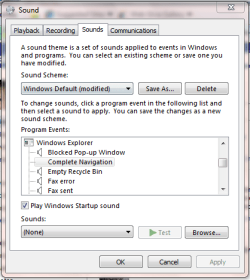
Go to Control Panel -> Hardware and Sound and under Sound click 'Change system sounds'. Scroll down the 'Windows Explorer' and see if anything is set for 'Complete Navigation'

Capture.PNG

Set it to (None) and the annoyance is gone ;)

If you supply the site you're visiting when it happens that will help us determine 100% if that's indeed what it is.


OS
 

My Computer

Computer Manufacturer/Model Number
Compaq Desktop
OS
Windows 7 Ultimate x64
CPU
AMD Sempron Dual Core
Memory
3GB
Graphics Card(s)
NVIDIA GeForce 6150SE nForce 430
Screen Resolution
1024x768
Hard Drives
150GB Sata
Hi DavidG, welcome to W7F :)

When was the last time you ran any security scans?

Do you have a different mouse to see if it is your mouse?

I ran a security scan just now and there was nothing wrong apparently. I'm using a laptop so it's the touchpad that does it normally, although I do use a USB mouse for gaming and the sound still occurs.

maybe your mouse or keyboard need a clean - have you got a stuck button or key?

an old toothbrush is a useful tool here...

I'd honestly doubt this unfortunately, since this laptop is only a month old and has been doing it from pretty much day one.

Hi,

Certain sites seem to have multiple refresh when you access them (can't think of 1 off the top of my head) and the clicking noises you're hearing is the browser refreshing.

Go to Control Panel -> Hardware and Sound and under Sound click 'Change system sounds'. Scroll down the 'Windows Explorer' and see if anything is set for 'Complete Navigation'

View attachment 119411

Set it to (None) and the annoyance is gone ;)

If you supply the site you're visiting when it happens that will help us determine 100% if that's indeed what it is.


OS

Just checked that and it was already set to none. :( And it's no particular web page, it just happens at random times, like I say, sometimes whilst playing a game in full screen.
 

My Computer

OS
MS Windows 7 Home Premium 64-bit
CPU
AMD Turion II Ultra M620
Motherboard
Hewlett-Packard 363A (Socket S1G3)
Memory
4.0GB Dual-Channel DDR2 @ 399MHz (6-6-6-18)
Graphics Card(s)
ATI Mobility Radeon HD 4
Sound Card
IDT High Definition Audio CODEC
Monitor(s) Displays
Generic PnP Monitor (1600x900@60Hz)
Screen Resolution
1600 x 900
Hard Drives
488GB Hitachi Hitachi HTS725050A9A364 ATA Device (SATA)
Where exactly is the clicking emminating from? HDD or Speakers or other?
 

My Computer

Computer Manufacturer/Model Number
Compaq Desktop
OS
Windows 7 Ultimate x64
CPU
AMD Sempron Dual Core
Memory
3GB
Graphics Card(s)
NVIDIA GeForce 6150SE nForce 430
Screen Resolution
1024x768
Hard Drives
150GB Sata
Where exactly is the clicking emminating from? HDD or Speakers or other?

I'm honestly a bit of an idiot and don't really know how I can figure that out, but I'd suggest it's the speakers?
 

My Computer

OS
MS Windows 7 Home Premium 64-bit
CPU
AMD Turion II Ultra M620
Motherboard
Hewlett-Packard 363A (Socket S1G3)
Memory
4.0GB Dual-Channel DDR2 @ 399MHz (6-6-6-18)
Graphics Card(s)
ATI Mobility Radeon HD 4
Sound Card
IDT High Definition Audio CODEC
Monitor(s) Displays
Generic PnP Monitor (1600x900@60Hz)
Screen Resolution
1600 x 900
Hard Drives
488GB Hitachi Hitachi HTS725050A9A364 ATA Device (SATA)
turn the volume of the speakers down, or mute them, and if you can't here it any more, then it's the speakers.

does your problem only happen in games when you also have chrome open in the background?
 

My Computer

Computer Manufacturer/Model Number
mickey megabyte 1234
OS
ultimate 64 sp1
CPU
i5 2500K [email protected]
Motherboard
MSI P67A-GD53
Memory
8 gigs GSkill Ripjaws 1600
Graphics Card(s)
amd hd6950
Sound Card
creative x-fi gamer
Monitor(s) Displays
samsung 24"
Screen Resolution
1920x1080
Hard Drives
ocz vertex 2e 60 gig, samsung f3 1tb, buffalo 2tb ext
PSU
antec 550
Case
antec three hundred
Cooling
i'm a cooling fan
Keyboard
saitek eclipse ii
Mouse
logitech g3
Internet Speed
about 4 Mbps
Other Info
i love win7
1 thing to try is to update all your drivers from the manufacturer website then see if it still happens. This would rule out the sound card, do you have another pair of speakers or is it a laptop you're using?
 

My Computer

Computer Manufacturer/Model Number
Compaq Desktop
OS
Windows 7 Ultimate x64
CPU
AMD Sempron Dual Core
Memory
3GB
Graphics Card(s)
NVIDIA GeForce 6150SE nForce 430
Screen Resolution
1024x768
Hard Drives
150GB Sata
turn the volume of the speakers down, or mute them, and if you can't here it any more, then it's the speakers.

does your problem only happen in games when you also have chrome open in the background?

Interesting, I suppose I have always had Chrome at least minimized when I've had a game open..

And thinking about it I suppose it must be the speakers, since when I have headphones plugged in it plays through them.

1 thing to try is to update all your drivers from the manufacturer website then see if it still happens. This would rule out the sound card, do you have another pair of speakers or is it a laptop you're using?

Yeah it's a laptop.
 

My Computer

OS
MS Windows 7 Home Premium 64-bit
CPU
AMD Turion II Ultra M620
Motherboard
Hewlett-Packard 363A (Socket S1G3)
Memory
4.0GB Dual-Channel DDR2 @ 399MHz (6-6-6-18)
Graphics Card(s)
ATI Mobility Radeon HD 4
Sound Card
IDT High Definition Audio CODEC
Monitor(s) Displays
Generic PnP Monitor (1600x900@60Hz)
Screen Resolution
1600 x 900
Hard Drives
488GB Hitachi Hitachi HTS725050A9A364 ATA Device (SATA)
Do you know the make and model of your laptop?
I recall awhile ago there was problems with a bad touchpad and/or drivers.
 

My Computer

Computer type
PC/Desktop
Computer Manufacturer/Model Number
Gateway DX4831-01e (Mid-Tower Desktop)
OS
Originally Win 7 Hm Prem x64 Ver 6.1.7600 Build 7601-SP1 | Upgraded to Windows 10 December 14, 2019
CPU
Intel i3 530 2.93GHz, 2933MHz 2 Cores 4 Logical Processors
Motherboard
Gateway H57M01 133 megahertz
Memory
6GB of 1,333MHz DDR3 SDRAM
Graphics Card(s)
32MB Intel Graphics Media Accelerator HD IGChip
Sound Card
Realtek High Definition Audio
Monitor(s) Displays
Gateway HX2000 20inch TFT active matrix TN
Screen Resolution
1600 x 900 x 59 hertz
Hard Drives
WDC WD10EADS-00M2B0 [HDD] (1000.20 GB) -- drive 0,
HL-DT-ST DVDRAM GH41N [CD-ROM dr]
Four card readers, and Four USB 2.0
PSU
300watts.
Case
Mid-Tower Desktop
Cooling
Stock from Gateway
Keyboard
Natural Ergonomic Keyboard 4000, see Other Info
Mouse
Orig. Gateway wore out now using Insignia USB wired optical
Internet Speed
Vz FIOS 10ms png 57.64Mbps down 65.53Mbps up Speedtest.org
Antivirus
Zamana Anti-logger with Anti-malware, MSE, Windows Firewall,
Browser
IE11.0.9600.19399-Upd ver11.0.135, Firefox 68.0.1 x64
Other Info
System Specs by Belarc.

BIOS: American Megatrends Inc. P01-A0 11/17/2009

Replaced the MS 'Natural' Standard PS/2 Enhanced 101-102 Keyboard with a new Natural Ergonomic Keyboard 4000 on August 1st 2014.

Canon Pixma MG3222 Printer.

Updated to IE11 on 12102015 | Fios Quantum Router g1100

Additional AV: SpywareBlaster, manual Mbam, SAS
Do you know the make and model of your laptop?
I recall awhile ago there was problems with a bad touchpad and/or drivers.

It is the HP Pavilion dv7-3115ea
 

My Computer

OS
MS Windows 7 Home Premium 64-bit
CPU
AMD Turion II Ultra M620
Motherboard
Hewlett-Packard 363A (Socket S1G3)
Memory
4.0GB Dual-Channel DDR2 @ 399MHz (6-6-6-18)
Graphics Card(s)
ATI Mobility Radeon HD 4
Sound Card
IDT High Definition Audio CODEC
Monitor(s) Displays
Generic PnP Monitor (1600x900@60Hz)
Screen Resolution
1600 x 900
Hard Drives
488GB Hitachi Hitachi HTS725050A9A364 ATA Device (SATA)

My Computer

Computer type
PC/Desktop
Computer Manufacturer/Model Number
A blend of brains, brawn and dumb luck.
OS
Windows 7 Ultimate 64
CPU
i7 3770k OC'd 4.6 @ 1.17v, also FX 8120 & i5 miniITX
Motherboard
MSI P67A-GD80 b3
Memory
32 gb G.Skill Sniper DDR3 10-12-12-31 @ 2133
Graphics Card(s)
XFX Radeon 7870 2GB DDR5
Sound Card
Sound Blaster Z Series Card
Monitor(s) Displays
(2) LG LED 23" 1920 x 1080 2ms Monitors via mini d-port
Screen Resolution
1680 X 1050 p
Hard Drives
Samsung 256 gb 830 SSD sata III
(1) 1 tb WD Black
(2) 1 tb Hitachi deskmates/sata II
(2) 1 tb WD green/sata II
(2) 3 tb Seagate Barracuda
(1) 120 gb OCZ Vertex SS
(1) Drobo 5N w/5 Seagate 3tb
PSU
EVGA modular 1000G2 80% gold rating & APC 1200 RS
Case
CoolerMaster Storm Styker
Cooling
7 case fans 140mm & 120mm, NZXT Kraken X60
Keyboard
(2) Logitech Illuminated Keyboards (1) usb (1) wireless
Mouse
Logitech G700 & T-BC21 - nano nx for the laptop
Internet Speed
Basic 120mbps down
Antivirus
Trend Micro Titanium Max Security & Malwarebytes Premium
Browser
Chrome and IE 10
Other Info
5 Noctua case fans + 3 Noctua in p/p on NZXT cooler
Integrated hot swap drive bays for 2.5" Drives
(2) Lite-on dvd/cd/Blu Ray optical 22X
Integrated fan controller and led on/off
HP Officejet Pro 8630 all-n-one
Hot-swappable 3.5" hard drive bay
Netgear Nighthawk router
Asus USB 3 & sata 6 PCIe card
Vantec IDE to sata adptr./Ultra sata adptr
Lenovo L420 i5 lappy with m sata
Drobo 5N advanced NAS
Thanks I'll give it a shot (It's 64 bit apparently, but I've changed it to that)
 

My Computer

OS
MS Windows 7 Home Premium 64-bit
CPU
AMD Turion II Ultra M620
Motherboard
Hewlett-Packard 363A (Socket S1G3)
Memory
4.0GB Dual-Channel DDR2 @ 399MHz (6-6-6-18)
Graphics Card(s)
ATI Mobility Radeon HD 4
Sound Card
IDT High Definition Audio CODEC
Monitor(s) Displays
Generic PnP Monitor (1600x900@60Hz)
Screen Resolution
1600 x 900
Hard Drives
488GB Hitachi Hitachi HTS725050A9A364 ATA Device (SATA)
Do you know the make and model of your laptop?
I recall awhile ago there was problems with a bad touchpad and/or drivers.

It is the HP Pavilion dv7-3115ea
It was not that one. The only comments about the HP Pavilion dv7-3115ea touchpad were related to its gliding properties.
 

My Computer

Computer type
PC/Desktop
Computer Manufacturer/Model Number
Gateway DX4831-01e (Mid-Tower Desktop)
OS
Originally Win 7 Hm Prem x64 Ver 6.1.7600 Build 7601-SP1 | Upgraded to Windows 10 December 14, 2019
CPU
Intel i3 530 2.93GHz, 2933MHz 2 Cores 4 Logical Processors
Motherboard
Gateway H57M01 133 megahertz
Memory
6GB of 1,333MHz DDR3 SDRAM
Graphics Card(s)
32MB Intel Graphics Media Accelerator HD IGChip
Sound Card
Realtek High Definition Audio
Monitor(s) Displays
Gateway HX2000 20inch TFT active matrix TN
Screen Resolution
1600 x 900 x 59 hertz
Hard Drives
WDC WD10EADS-00M2B0 [HDD] (1000.20 GB) -- drive 0,
HL-DT-ST DVDRAM GH41N [CD-ROM dr]
Four card readers, and Four USB 2.0
PSU
300watts.
Case
Mid-Tower Desktop
Cooling
Stock from Gateway
Keyboard
Natural Ergonomic Keyboard 4000, see Other Info
Mouse
Orig. Gateway wore out now using Insignia USB wired optical
Internet Speed
Vz FIOS 10ms png 57.64Mbps down 65.53Mbps up Speedtest.org
Antivirus
Zamana Anti-logger with Anti-malware, MSE, Windows Firewall,
Browser
IE11.0.9600.19399-Upd ver11.0.135, Firefox 68.0.1 x64
Other Info
System Specs by Belarc.

BIOS: American Megatrends Inc. P01-A0 11/17/2009

Replaced the MS 'Natural' Standard PS/2 Enhanced 101-102 Keyboard with a new Natural Ergonomic Keyboard 4000 on August 1st 2014.

Canon Pixma MG3222 Printer.

Updated to IE11 on 12102015 | Fios Quantum Router g1100

Additional AV: SpywareBlaster, manual Mbam, SAS
does the clicking sound come from the speakers or from the laptop itself?
 

My Computer

Computer Manufacturer/Model Number
Alienware AREA-51 M17x
OS
windows 7 ultimate 64bit
CPU
Intel Core2 Extreme x9000 2.8GHZ
Motherboard
Asus P965 Intel chipset
Memory
4Gig
Graphics Card(s)
2 NVidia GeForce 8800M GTX (SLi)
Sound Card
onboard
Monitor(s) Displays
17in. built-in, 47in JVC LCD
Screen Resolution
1080p
Hard Drives
2 250Gig Hitachi (RAID 0) @ 7200RPM
Case
17in. laptop
Mouse
touchpad, Logitech Anywhere Mouse cordless laser
Internet Speed
cable
Seems to be the speakers, when I have headphones in the sound goes through them.
 

My Computer

OS
MS Windows 7 Home Premium 64-bit
CPU
AMD Turion II Ultra M620
Motherboard
Hewlett-Packard 363A (Socket S1G3)
Memory
4.0GB Dual-Channel DDR2 @ 399MHz (6-6-6-18)
Graphics Card(s)
ATI Mobility Radeon HD 4
Sound Card
IDT High Definition Audio CODEC
Monitor(s) Displays
Generic PnP Monitor (1600x900@60Hz)
Screen Resolution
1600 x 900
Hard Drives
488GB Hitachi Hitachi HTS725050A9A364 ATA Device (SATA)
Other thought's on your problem.

If the LINE-IN channel is not being used, check to see if the LINE-IN channel is enabled. It along with the others, AUX, and MIC, can pick up interference when not being used. Disable or mute.

This can be done in: Control Panel\All Control Panel Items\Sound, playback tab\click on speakers, then on properties\Speaker Properties, level tab, click on speaker icon to disable.

SoundBlaster cards were having this problem, but you should have Altec Lansing speakers with integrated subwoofer and SRS Premium Sound. So that shouldn't be a problem.

You could have a IRQ conflict with the sound card & either the video or the modem. Go to Control Panel\System\Device Manager and look for any yellow triangular exclamation points :warn: by your sound card drivers. Troubleshoot, most likely by upgrading device driver.

Some Cell phones can cause a clicking or buzz through the PC. Do you keep yours close by? I used to have a problem with our ATT service doing that with our machine, and I kept mine in my pocket, It would even do it with the phone in another room.

Does it happen when your plugged into a wall receptacle or only on battery. Both?
If just when your plugged in it could be interference through the wall receptacle. Change location of plug when charging.

It could be caused by CB/Shortwave transmissions from neighbors. You would have to confirm this by using the machine away from your neighborhood or do you see any weird antennas in the neighborhood?.
 

My Computer

Computer type
PC/Desktop
Computer Manufacturer/Model Number
Gateway DX4831-01e (Mid-Tower Desktop)
OS
Originally Win 7 Hm Prem x64 Ver 6.1.7600 Build 7601-SP1 | Upgraded to Windows 10 December 14, 2019
CPU
Intel i3 530 2.93GHz, 2933MHz 2 Cores 4 Logical Processors
Motherboard
Gateway H57M01 133 megahertz
Memory
6GB of 1,333MHz DDR3 SDRAM
Graphics Card(s)
32MB Intel Graphics Media Accelerator HD IGChip
Sound Card
Realtek High Definition Audio
Monitor(s) Displays
Gateway HX2000 20inch TFT active matrix TN
Screen Resolution
1600 x 900 x 59 hertz
Hard Drives
WDC WD10EADS-00M2B0 [HDD] (1000.20 GB) -- drive 0,
HL-DT-ST DVDRAM GH41N [CD-ROM dr]
Four card readers, and Four USB 2.0
PSU
300watts.
Case
Mid-Tower Desktop
Cooling
Stock from Gateway
Keyboard
Natural Ergonomic Keyboard 4000, see Other Info
Mouse
Orig. Gateway wore out now using Insignia USB wired optical
Internet Speed
Vz FIOS 10ms png 57.64Mbps down 65.53Mbps up Speedtest.org
Antivirus
Zamana Anti-logger with Anti-malware, MSE, Windows Firewall,
Browser
IE11.0.9600.19399-Upd ver11.0.135, Firefox 68.0.1 x64
Other Info
System Specs by Belarc.

BIOS: American Megatrends Inc. P01-A0 11/17/2009

Replaced the MS 'Natural' Standard PS/2 Enhanced 101-102 Keyboard with a new Natural Ergonomic Keyboard 4000 on August 1st 2014.

Canon Pixma MG3222 Printer.

Updated to IE11 on 12102015 | Fios Quantum Router g1100

Additional AV: SpywareBlaster, manual Mbam, SAS
Before I try all of that :D I've read on google and found this -

Alas, I think I have found the problem. I too, turned on my scound and heard a click each time it minmized and so i figured it was some type of progam tryign to launch. I went into my Zone Alarm fire wall and went to a place were i can control which programs access the internet and also the level of security the internet access will be. I set it to high and on high any thing and every thing must first ask before it has a right to access the internet, even system application (which was the problem). There is an appliction called Windows NT Logon Application and it is for the system. When i set my fire wall to high, it told me that this kept trying ot access the internet and so I denied it and then gave it not rights to even try to open and so now im happy... I hope this is the same problem for you guys out there.

Does this sound like it could be right? (I haven't tried anything myself because I'm not sure how to actually change these settings at the moment)
 

My Computer

OS
MS Windows 7 Home Premium 64-bit
CPU
AMD Turion II Ultra M620
Motherboard
Hewlett-Packard 363A (Socket S1G3)
Memory
4.0GB Dual-Channel DDR2 @ 399MHz (6-6-6-18)
Graphics Card(s)
ATI Mobility Radeon HD 4
Sound Card
IDT High Definition Audio CODEC
Monitor(s) Displays
Generic PnP Monitor (1600x900@60Hz)
Screen Resolution
1600 x 900
Hard Drives
488GB Hitachi Hitachi HTS725050A9A364 ATA Device (SATA)
Back
Top